
Python Wrapper for SWMM5 API


Project description






Python Wrapper for Stormwater Management Model (SWMM5)
- Website
- Video Tutorial Series:
- Documentation
- Examples
- 🆘Do you need HELP?🆘
We provide support on Stack Overflow or GitHub Discussions to answer support questions related to PySWMM.
- Cite our Paper
McDonnell, Bryant E., Ratliff, Katherine M., Tryby, Michael E., Wu, Jennifer Jia Xin, & Mullapudi, Abhiram. (2020). PySWMM: The Python Interface to Stormwater Management Model (SWMM). Journal of Open Source Software, 5(52), 2292, https://doi.org/10.21105/joss.02292
YouTube Training Vidoes
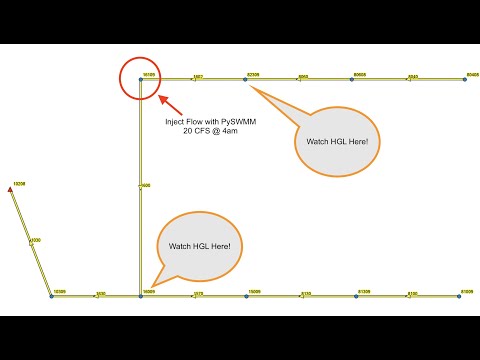
- Setting a manhole inflow during a running simulation!
-
Overview
PySWMM is a Python language software package for the creation, manipulation, and study of the structure, dynamics, and function of complex networks.
With PySWMM you can load and manipulate USEPA Stormwater Management Models. With the development of PySWMM, control algorithms can now be developed exclusively in Python which allows the use of functions and objects as well as storing and tracking hydraulic trends for control actions.
As of version v1.1.0, PySWMM includes new features to process metadata and timeseries stored in SWMM binary output file.
Who uses PySWMM?
PySWMM is used by engineers, modelers, and researchers who want to streamline stormwater modeling optimization, controls, and post-processing results.
Goals
PySWMM is intended to provide
tools for the study of the structure and dynamics within USEPA SWMM5,
a standard programming interface and graph implementation that is suitable for many applications,
a rapid development environment for collaborative, multidisciplinary projects,
an interface to USEPA SWMM5,
development and implementation of control logic outside of native EPA-SWMM Controls,
methods for users to establish their own node inflows,
a coding interface to binary output files,
new modeling possibilities for the SWMM5 Community.
Install
Get the latest version of PySWMM from PyPI See the Quick Guide!
$ pip install pyswmm
Usage
A quick example that steps through a simulation:
Examples:
See the Latte Example
from pyswmm import Simulation, Nodes, Links

with Simulation(r'Example1.inp') as sim:
    Node21 = Nodes(sim)["21"]
    print("Invert Elevation: {}". format(Node21.invert_elevation))

    Link15 = Links(sim)['15']
    print("Outlet Node ID: {}".format(Link15.outlet_node))

    # Launch a simulation!
    for ind, step in enumerate(sim):
        if ind % 100 == 0:
            print(sim.current_time,",",round(sim.percent_complete*100),"%",\
                  Node21.depth, Link15.flow)
Opening a SWMM binary output file and accessing model metadata and timeseries.
from swmm.toolkit.shared_enum import SubcatchAttribute, NodeAttribute, LinkAttribute
from pyswmm import Output

with Output('model.out') as out:
    print(len(out.subcatchments))
    print(len(out.nodes))
    print(len(out.links))
    print(out.version)
    sub_ts = out.subcatch_series('S1', SubcatchAttribute.RUNOFF_RATE)
    node_ts = out.node_series('J1', NodeAttribute.INVERT_DEPTH)
    link_ts = out.link_series('C2', LinkAttribute.FLOW_RATE)
Bugs
Our issue tracker is at https://github.com/OpenWaterAnalytics/pyswmm/issues. Please report any bugs that you find. Or, even better, fork the repository on GitHub and create a pull request. All changes are welcome, big or small, and we will help you make the pull request if you are new to git (just ask on the issue).
Contributing
Please check out our Wiki https://github.com/OpenWaterAnalytics/pyswmm/wiki for more information on contributing, including an Author Contribution Checklist.
License
Distributed with a BSD2 license; see LICENSE.txt:
Copyright (C) 2014-2023 PySWMM Developers
Community-Owned See AUTHORS and CITATION.cff
Acknowledgements
Assela Pathirana
Release history Release notifications | RSS feed


Download files
Download the file for your platform. If you're not sure which to choose, learn more about installing packages.
Source Distribution
Built Distribution
Filter files by name, interpreter, ABI, and platform.
If you're not sure about the file name format, learn more about wheel file names.
Copy a direct link to the current filters
File details
Details for the file pyswmm-1.3.0.tar.gz.
File metadata
- Download URL: pyswmm-1.3.0.tar.gz
- Upload date:
- Size: 76.6 kB
- Tags: Source
- Uploaded using Trusted Publishing? No
- Uploaded via: twine/4.0.2 CPython/3.10.9
File hashes
| Algorithm | Hash digest | |
|---|---|---|
| SHA256 |
380eecf833ffffd3b8f4378b6d4841e095c6e9420af932916c2e520422563fe5
|
|
| MD5 |
1252aaabc86e93c9a475243f201d7858
|
|
| BLAKE2b-256 |
ed57c6bc1bc2a2624a45656244e30fc07356d5ee3c56e4e771e9bf16b401d25c
|
File details
Details for the file pyswmm-1.3.0-py3-none-any.whl.
File metadata
- Download URL: pyswmm-1.3.0-py3-none-any.whl
- Upload date:
- Size: 102.2 kB
- Tags: Python 3
- Uploaded using Trusted Publishing? No
- Uploaded via: twine/4.0.2 CPython/3.10.9
File hashes
| Algorithm | Hash digest | |
|---|---|---|
| SHA256 |
fbf40c7d8145847980893bd64f50d6c407ede757462febf0c0b6141e615e091e
|
|
| MD5 |
96b4b8e075e92af1e4440b32b35d4813
|
|
| BLAKE2b-256 |
6610f3035c2653644aa6a23823f32b82589bfdd6b55165c031c5408eb2f5f875
|






