
PySWX





PySWX is a wrapper for the SolidWorks API 2024, based on the official help site. It provides a typed interface and some useful features.
✏️ This project is in an early stage of development. The API is not complete and the documentation is not yet available. If you want to contribute to this project, please open an issue or a pull request. To see the current state of this project, check out the development branch.
1 installation
1.1 system requirements
- Windows 11
- SolidWorks 2024 or later
- Python 3.12
✏️ These requirements aren't strict, you can try and use PySWX on older or more recent systems, but it isn't tested on these.
1.2 pip
python -m pip install pyswx
or
python -m pip install git+ssh://git@github.com/deloarts/pyswx.git
If you're using poetry add it to you pyproject.toml file using:
poetry add pyswx
2 usage
PySWX works with VS Code Intellisense and provides type hints for the SolidWorks API:
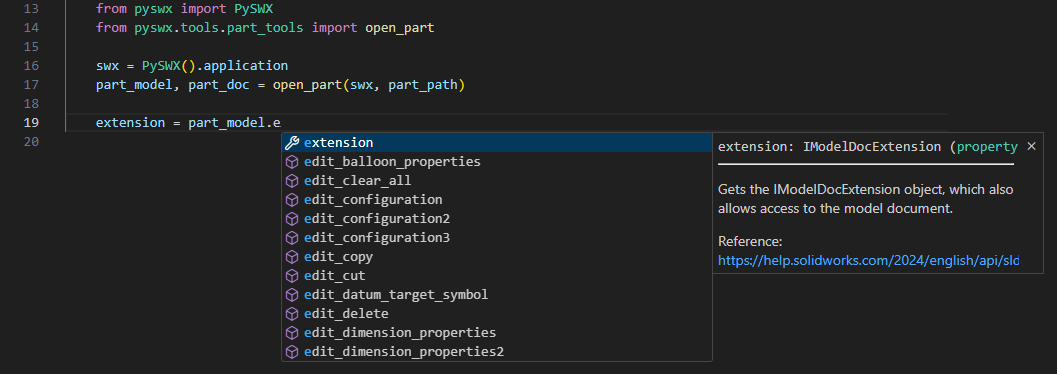
All methods and classes are documented with docstrings, which can be viewed in the Intellisense popup. Like in the example above you can refer to the official documentation of IModelDocExtension.
✏️ PySWX uses PEP8 style for methods, classes and variables.
✏️ PySWX is not completed, methods that aren't implemented yet will raise a
NotImplementedErrorwhen called.
2.1 example: open a part
# Open a part and export it as step

from pathlib import Path

from pyswx import PySWX
from pyswx.api.swconst.enumerations import SWDocumentTypesE
from pyswx.api.swconst.enumerations import SWRebuildOnActivationOptionsE
from pyswx.api.swconst.enumerations import SWSaveAsOptionsE
from pyswx.api.swconst.enumerations import SWSaveAsVersionE

PATH_TO_PART = Path("C:\\path\\to\\your\\part.SLDPRT")

swx = PySWX(version=2024).application

part_open_spec = swx.get_open_doc_spec(file_name=PATH_TO_PART)
part_open_spec.document_type = SWDocumentTypesE.SW_DOC_PART
part_open_spec.use_light_weight_default = True
part_open_spec.light_weight = True
part_open_spec.silent = True

part_model, warning, error = swx.open_doc7(specification=part_open_spec)

assert part_model
assert warning is None
assert error is None

part_model, error = swx.activate_doc_3(
    name=part_model.get_path_name(),
    use_user_preferences=False,
    option=SWRebuildOnActivationOptionsE.SW_REBUILD_ACTIVE_DOC,
)

assert part_model
assert error is None

step_path = part_model.get_path_name().with_suffix(".step")
part_model.extension.save_as_3(
    name=step_path,
    version=SWSaveAsVersionE.SW_SAVE_AS_CURRENT_VERSION,
    options=SWSaveAsOptionsE.SW_SAVE_AS_OPTIONS_SILENT,
    export_data=None,
    advanced_save_as_options=None,
)
For more examples see the examples folder.
2.2 tools
PySWX comes with some tools to help you work with the SolidWorks API, e.g. the above code can be shortcutted with:
from pyswx import PySWX
from pyswx.tools.part_tools import export_step

PATH_TO_PART = Path("C:\\path\\to\\your\\part.SLDPRT")

swx = PySWX().application
export_step(swx, PATH_TO_PART)
For all tools check out the tools folder.
2.3 com object
PySWX provides a way to access the SolidWorks COM object directly. This is useful if you want to use methods that are not yet implemented in PySWX:
...
doc_model, warning, error = swx.open_doc7(specification=part_open_spec)
doc_model_com_object = doc_model.com_object # Here we access the actual com object
configuration_names_com_object = doc_model_com_object.GetConfigurationNames

# Note: Notice how the case of the object after the com_object changes from snake_case to PascalCase.
# The com object is the actual SolidWorks COM object, so you can use it like you would use the SolidWorks API in VBA.
To convert a com object to a PySWX object, you can pass it to the interface:
from pyswx.api.sldworks.interfaces.i_model_doc_2 import IModelDoc2
doc_model = IModelDoc2(doc_model_com_object)
2.4 divergencies
The SolidWorks API exposes methods that work with ByRef [out] arguments, which are not supported in Python.
Such a methods is, for example, the GetConfigurationParams method:
Function GetConfigurationParams( _
   ByVal ConfigName As System.String, _
   ByRef Params As System.Object, _
   ByRef Values As System.Object _
) As System.Boolean
This method sets the Params and the Values via the given arguments, and returns only a bool (in this case True, if the method was successful).
As this isn't possible in Python, the equivalent PySWX method returns a Tuple, the method return value and all ByRef-argument values:
type ParamsRetrieved = bool
type ParamNames = List[str]
type ParamValues = List[str]

def get_configuration_params(self, config_name: str) -> Tuple[ParamsRetrieved, ParamNames, ParamValues]:
    ...
Another divergency is the handling of warnings and errors. Those are also returned as a tuple and can be handled after the function call. You already encountered this behavior before here:
part_model, warning, error = swx.open_doc7(specification=part_open_spec)
The method open_doc7 returns not only the model, but also warnings and errors that might happen during the call. It's up to you how to process these.
2.5 obsolete methods and properties
The SolidWorks API exposes obsolete methods and properties. Those are not included in PySWX.
You are still able to access them via the com_object.
3 developing
For developing you would, additionally to the system requirements, need to install:
3.1 repository
3.1.1 cloning
Clone the repo to your local machine:
cd $HOME
New-Item -Path '.\git\pyswx' -ItemType Directory
cd .\git\pyswx\
git clone git@github.com:deloarts/pyswx.git
Or use GitHub Desktop.
3.1.2 main branch protection
❗️ Never develop new features and fixes in the main branch!
The main branch is protected: it's not allowed to make changes directly to it. Create a new branch in order work on issues. The new branch should follow the naming convention from below.
3.1.3 branch naming convention
- Use grouping tokens at the beginning of your branch names, such as:
- feature: A new feature that will be added to the project
- fix: For bugfixes
- tests: Adding or updating tests
- docs: For updating the docs
- wip: Work in progress, won't be finished soon
- junk: Just for experimenting
- Use slashes
/as delimiter in branch names (feature/docket-export) - Avoid long descriptive names, rather refer to an issue
- Do not use bare numbers as leading parts (
fix/108is bad,fix/issue108is good)
3.1.4 issues
Use the issue templates for creating an issue. Please don't open a new issue if you haven't met the requirements and add as much information as possible. Further:
- Format your code in an issue correctly with three backticks, see the markdown guide.
- Add the full error trace.
- Do not add screenshots for code or traces.
3.2 poetry
3.2.1 setup
If you prefer the environment inside the projects root, use:
poetry config virtualenvs.in-project true
⚠️ Make sure not to commit the virtual environment to GitHub. See .gitignore to find out which folders are ignored.
3.2.2 install
Install all dependencies (assuming you are inside the projects root folder):
poetry install
Update packages with:
poetry update
3.2.3 tests
Tests are done with pytest. For testing with poetry run:
poetry run pytest
⚠️ Test discovery in VS Code only works when SolidWorks is running and all documents are closed!
3.3 status indicators
Each api module has its own status indicator in the module docstring:
| indicator | status | description |
|---|---|---|
| 🟢 | Completed | The module represents the SolidWorks API completely |
| 🟠 | Methods Imported | All SolidWorks API methods are imported, but aren't fully implemented yet |
| 🔴 | Not Completed | The module is not completed and some SolidWorks API methods may be missing |
3.4 new revision checklist
- Update dependencies:
poetry update - Update the version in
- Run all tests:
poetry run pytest - Check pylint output:
poetry run pylint pyswx/ - Update the lockfile:
poetry lock - Update the requirements.txt:
poetry export -f requirements.txt -o requirements.txt - Build the package:
poetry build
4 license
5 changelog
v0.6.0: Update IModelDoc2 api, add part tools. Update error and warning handling.
v0.5.0: Update IModelDoc2 api.
v0.4.0: Add const api, improve return values.
v0.3.1: Fix type mismatch in custom_property_manager.
v0.3.0: Complete ICustomPropertyManager interface.
v0.2.0: Complete IFrame interface and add swconst enum interfaces.
v0.1.1: Enhance IModelDoc2 and ISldWorks interfaces with new methods and clean up imports.
v0.1.0: Add new interfaces and properties for IComponent2, IConfiguration, IModelDoc2, ISldWorks and ISwAddin.
v0.0.1: First stable version.
6 to do
Using VS Code Comment Anchors to keep track of to-dos.
1 maintainer

Download files
Download the file for your platform. If you're not sure which to choose, learn more about installing packages.
Source Distribution
Built Distribution
Filter files by name, interpreter, ABI, and platform.
If you're not sure about the file name format, learn more about wheel file names.
Copy a direct link to the current filters
File details
Details for the file pyswx-0.6.0.tar.gz.
File metadata
- Download URL: pyswx-0.6.0.tar.gz
- Upload date:
- Size: 61.7 kB
- Tags: Source
- Uploaded using Trusted Publishing? Yes
- Uploaded via:
twine/6.1.0 CPython/3.13.7
File hashes
| Algorithm | Hash digest | |
|---|---|---|
| SHA256 |
8225bfbe889d2c57c0766fa17ca354f5c087ef6b4cab2889634e626a3149de07
|
|
| MD5 |
8cd6f87a398737540e0d31dd025b75c4
|
|
| BLAKE2b-256 |
e79c0524f568dd1ff8021d3c06c48ec2d330109b484a4fd40042b54ecfd42116
|
Provenance
The following attestation bundles were made for pyswx-0.6.0.tar.gz:
Publisher:
publish-pypi.yml on deloarts/pyswx
-
Statement:
-
Statement type:
https://in-toto.io/Statement/v1 -
Predicate type:
https://docs.pypi.org/attestations/publish/v1 -
Subject name:
pyswx-0.6.0.tar.gz -
Subject digest:
8225bfbe889d2c57c0766fa17ca354f5c087ef6b4cab2889634e626a3149de07 - Sigstore transparency entry: 761392776
- Sigstore integration time:
-
Permalink:
deloarts/pyswx@f2375edba3b5ca3ea7ab43b91c3872e3cc043f11 -
Branch / Tag:
refs/tags/v0.6.0 - Owner: https://github.com/deloarts
-
Access:
public
-
Token Issuer:
https://token.actions.githubusercontent.com -
Runner Environment:
github-hosted -
Publication workflow:
publish-pypi.yml@f2375edba3b5ca3ea7ab43b91c3872e3cc043f11 -
Trigger Event:
push
-
Statement type:
File details
Details for the file pyswx-0.6.0-py3-none-any.whl.
File metadata
- Download URL: pyswx-0.6.0-py3-none-any.whl
- Upload date:
- Size: 105.8 kB
- Tags: Python 3
- Uploaded using Trusted Publishing? Yes
- Uploaded via:
twine/6.1.0 CPython/3.13.7
File hashes
| Algorithm | Hash digest | |
|---|---|---|
| SHA256 |
a42dde16704af30c8018854872cbd883bd159beac46d3f33f440de11f3b07197
|
|
| MD5 |
caf519438fca5903a6e2e9892e2ec583
|
|
| BLAKE2b-256 |
5712a1ee689002a5788cf1c326667feee17b795de61fe7e4631fa5d8742ef143
|
Provenance
The following attestation bundles were made for pyswx-0.6.0-py3-none-any.whl:
Publisher:
publish-pypi.yml on deloarts/pyswx
-
Statement:
-
Statement type:
https://in-toto.io/Statement/v1 -
Predicate type:
https://docs.pypi.org/attestations/publish/v1 -
Subject name:
pyswx-0.6.0-py3-none-any.whl -
Subject digest:
a42dde16704af30c8018854872cbd883bd159beac46d3f33f440de11f3b07197 - Sigstore transparency entry: 761392803
- Sigstore integration time:
-
Permalink:
deloarts/pyswx@f2375edba3b5ca3ea7ab43b91c3872e3cc043f11 -
Branch / Tag:
refs/tags/v0.6.0 - Owner: https://github.com/deloarts
-
Access:
public
-
Token Issuer:
https://token.actions.githubusercontent.com -
Runner Environment:
github-hosted -
Publication workflow:
publish-pypi.yml@f2375edba3b5ca3ea7ab43b91c3872e3cc043f11 -
Trigger Event:
push
-
Statement type:














