
Standalone Tailwind CSS CLI, installable via pip
Use Tailwind CSS without Node.js — install it via pip.
Why
Tailwind CSS is notoriously dependent on Node.js. If you're a Python developer, this dependency may not be welcome in your team, your Docker container, or your inner circle.
The Tailwind CSS team ships a standalone CLI build that gives you the full power of Tailwind CLI in a
self-contained executable — no Node.js or npm required.
However, installing the standalone CLI isn't as easy as running npm install.
That's why I created this package to make it as simple as running the pip install command. Now you can install the standalone Tailwind CLI via pip by running:
pip install pytailwindcss
Now you can run tailwindcss in your terminal:
tailwindcss -i input.css -o output.css --minify
Voilà!
Get started
-
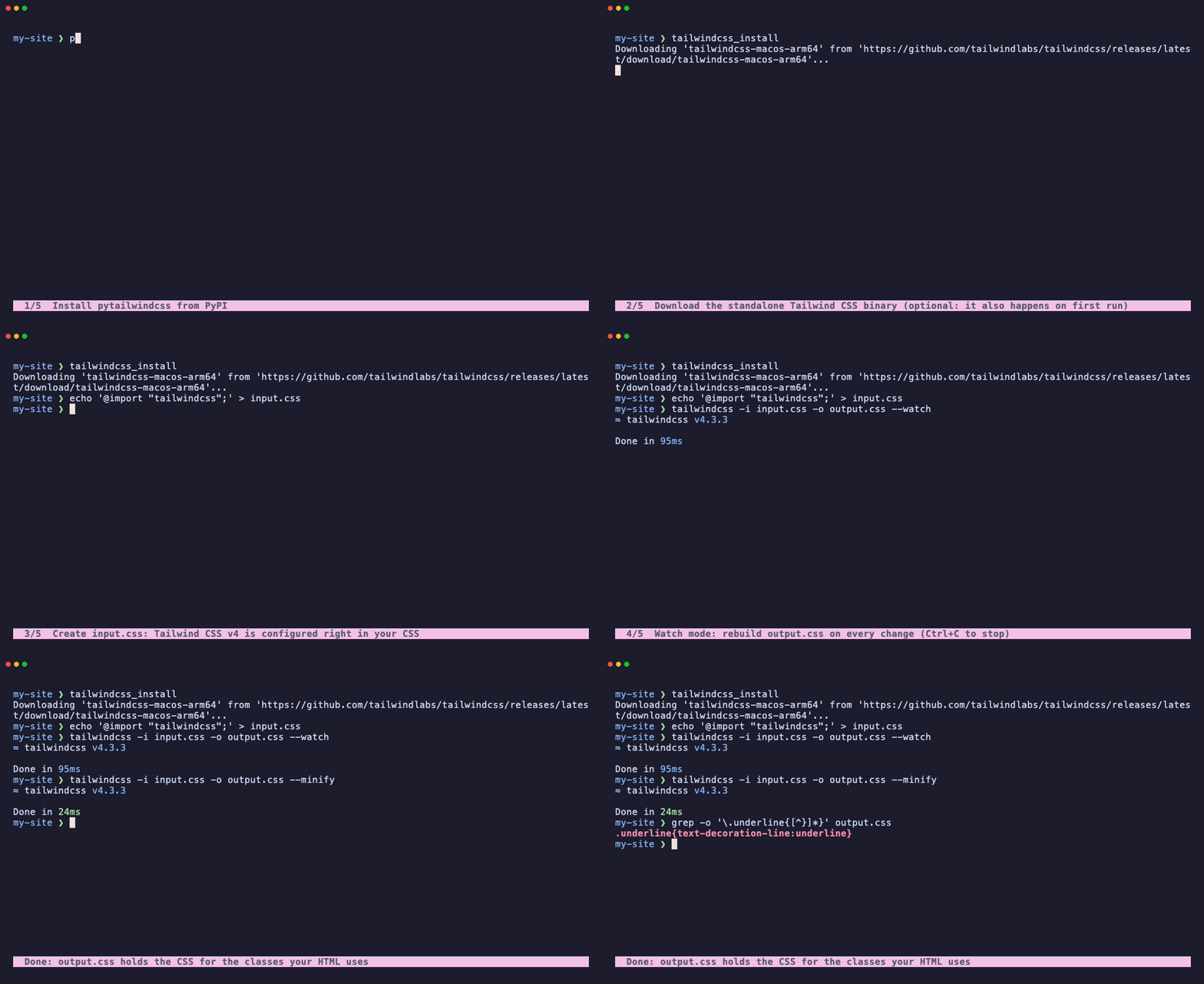
Install
pytailwindcssviapip(oruv add pytailwindcss):pip install pytailwindcss
-
[Recommended] Preinstall the
tailwindcssbinary:tailwindcss_install
If you skip this step, the binary will be downloaded automatically on the first run of the
tailwindcsscommand. -
Create an
input.cssfile that imports Tailwind CSS:@import "tailwindcss";
Tailwind CSS v4 is configured right in your CSS — there's no
tailwind.config.jsand notailwindcss initanymore. See the official documentation for theming and customization. -
Start a watcher to compile CSS automatically during development:
tailwindcss -i input.css -o output.css --watch
-
Compile and minify your CSS for production:
tailwindcss -i input.css -o output.css --minify
That's it! Run tailwindcss --help to see all the CLI options.
Pinning a Tailwind CSS version
By default, the latest binary version is downloaded. To pin to a specific Tailwind CSS version, set the TAILWINDCSS_VERSION environment variable. It's used by both tailwindcss_install and tailwindcss:
# On Linux/macOS
export TAILWINDCSS_VERSION=v4.3.3
tailwindcss_install

# On Windows (cmd)
set TAILWINDCSS_VERSION=v4.3.3
tailwindcss_install

# On Windows (PowerShell)
$env:TAILWINDCSS_VERSION="v4.3.3"
tailwindcss_install
To see a list of available Tailwind CSS releases, visit: https://github.com/tailwindlabs/tailwindcss/releases
Every download is checked against the SHA-256 checksums published with the release, and a binary that doesn't match is never installed. Releases before v4 don't publish checksums; for those, pytailwindcss logs a warning and installs the binary unverified.
Where the binary lives
Binaries are stored per version inside the installed package, so every virtualenv gets its own copy and projects don't affect each other.
If that directory isn't writable (for example, a virtualenv owned by another user), point TAILWINDCSS_BIN_DIR at a directory you can write to (relative paths and ~ are resolved):
export TAILWINDCSS_BIN_DIR=~/.cache/pytailwindcss
Binaries then go to $TAILWINDCSS_BIN_DIR/<version>/tailwindcss.
Docker
Install the binary while building the image, so containers start without downloading anything:
ENV TAILWINDCSS_VERSION=v4.3.3
RUN pip install pytailwindcss && tailwindcss_install
The binary is readable and executable by every user, so it's fine to install it as root and run your app as an unprivileged user.
On Alpine (musl) images, pytailwindcss downloads the matching -musl build of Tailwind CSS v4. That build needs the C++ runtime libraries, which Alpine doesn't include by default:
RUN apk add --no-cache libstdc++ libgcc
Using it from Python
import pytailwindcss

# Download the binary (optional, see auto_install below).
pytailwindcss.install(version="v4.3.3")

# Run the CLI and get its output as a string.
pytailwindcss.run("-i input.css -o output.css --minify", version="v4.3.3")

# Arguments can be a list too; auto_install downloads the binary if it's missing.
pytailwindcss.run(["-i", "input.css", "-o", "output.css"], auto_install=True)
run() raises subprocess.CalledProcessError when Tailwind CSS exits with an error. Pass live_output=True to stream Tailwind's output to the terminal instead; you then get the subprocess.CompletedProcess back. Download and installation problems raise subclasses of pytailwindcss.exceptions.PyTailwindCssException.
Caveats
Without Node.js, you can't install third-party plugins from npm. The standalone build bundles the official plugins, though — @tailwindcss/forms, @tailwindcss/typography, and @tailwindcss/aspect-ratio — so you can enable them in your CSS:
@import "tailwindcss";
@plugin "@tailwindcss/typography";
This covers the vast majority of typical Tailwind CSS setups.
Here's what the Tailwind CSS team says about the standalone build:
If you're working on a project where you don't otherwise need Node.js or
npm, the standalone build can be a great choice. If Tailwind was the only reason you had a package.json file, this is probably going to feel like a nicer solution.
Development
uv sync                       # create the virtualenv with dev dependencies
uv run pytest                 # run all tests (some download real binaries)
uv run pytest -m "not network"  # skip the tests that need network access
uvx pre-commit install        # run linters, formatters, and mypy on every commit
Bugs and Suggestions
Found a bug or have a suggestion? Please use the issue tracker on GitHub:
https://github.com/timonweb/pytailwindcss/issues
2021 - 2026 (c) Tim Kamanin — A Full-Stack Django and Wagtail Developer
1 maintainer

Metadata
1 maintainer
Release files for pytailwindcss 0.4.1
For a detailed explanation of source distributions (sdists) and built distributions (wheels), please see the package formats documentation.
Source distribution (sdist)
| File | Size | Uploaded | |
|---|---|---|---|
| pytailwindcss-0.4.1.tar.gz | 68.1 kB | Details |
Built distribution (wheel)
| File | Interpreter | ABI | Platform | Reset |
|---|---|---|---|---|
| pytailwindcss-0.4.1-py3-none-any.whl | Python 3 | none | any | Details |
Total release size: 78.8 kB
Release files / pytailwindcss-0.4.1.tar.gz
| Download URL | pytailwindcss-0.4.1.tar.gz |
|---|---|
| Size | 68.1 kB |
| Tags | Source |
|
SHA-256 checksum How to use checksums |
c560bcf23670c4789786403f7a27cfa4ef27e5f949f39f48dafedafbe9a7cd1f
|
|
BLAKE2b-256 checksum How to use checksums |
2373a3b4baefb87e7db8ed952f8c1717c62f95833f42cb47dd280d85b41c14a3
|
| Upload date | |
|
Uploaded using Trusted Publishing? What is trusted publishing? |
Yes |
| Uploaded via |
twine/7.0.0 CPython/3.13.14
|
Provenance
Provenance describes where a file came from. On PyPI, provenance is shared via attestations, which provide a verifiable record of the build or publishing details. View details, limitations and caveats.


PyPI Publish Attestation
PyPI verified that this artifact, at this checksum, originated from the publisher listed below.
Signed by GitHub Actions, verified by PyPI on Oct 13, 2026.
Transparency logRelease files / pytailwindcss-0.4.1-py3-none-any.whl
| Download URL | pytailwindcss-0.4.1-py3-none-any.whl |
|---|---|
| Size | 10.8 kB |
| Tags | Python 3 |
|
SHA-256 checksum How to use checksums |
36c43199c2dfec7fe49b847b00a6ff0ac63864112713781d5fef759a7d293dec
|
|
BLAKE2b-256 checksum How to use checksums |
584ef27db6ab2f3acb669888579219ba7324316a00748a2c3cdce72736b0af57
|
| Upload date | |
|
Uploaded using Trusted Publishing? What is trusted publishing? |
Yes |
| Uploaded via |
twine/7.0.0 CPython/3.13.14
|
Provenance
Provenance describes where a file came from. On PyPI, provenance is shared via attestations, which provide a verifiable record of the build or publishing details. View details, limitations and caveats.
PyPI Publish Attestation
PyPI verified that this artifact, at this checksum, originated from the publisher listed below.
Signed by GitHub Actions, verified by PyPI on Oct 13, 2026.
Transparency log













