
This release is a pre-release and may not be stable for production use.

Talo
A resident Python session you drive from the terminal.
Load your data once. Keep it in memory. Snapshot, roll back, branch.
Status: alpha · Design · Protocol · Roadmap · Contributing · Apache-2.0
Talo is a long-lived Python process that keeps your variables in memory while you — or your coding agent — send it code from the terminal, one command at a time. Think of it as a Jupyter kernel without the notebook UI, built for work where the expensive part is getting the data into memory (illustrative session):
$ talo run 'import pandas as pd; df = pd.read_parquet("trades.parquet")'   # once: 40 s, 30 GB
[job 1 ok [1] 41.20s, memory 30.4 GB (+30.3 GB)]

$ talo run 'df.groupby("symbol").price.std().nlargest(5)'                  # every idea after that: instant
symbol
BTCUSDT    812.4
...
[job 2 ok [2] 0.84s, memory 30.4 GB (+12.0 MB)]
Every command returns quickly: if the code is still running after the timeout, you get a job id and the computation keeps going in the background. Output is captured at the file-descriptor level (prints from C extensions show up too), cut to a sensible size for people and agents alike, and kept in full on disk.
Why Talo?
Data analysis by trial and error — which is exactly how coding agents work — keeps paying three costs:
- Reloading. Every new idea becomes a new script that loads the same gigabytes again.
- No way back. Once a step changes a table in place, the only way to recover is to reload and redo.
- No parallelism. Trying ten ideas at once means ten copies of the data, or ten reloads.
Talo keeps one prepared state in memory and makes it cheap to snapshot it, roll back to it, and fork it — for one more idea, for a whole fan of parallel experiments, or for a change you want to review before adopting:
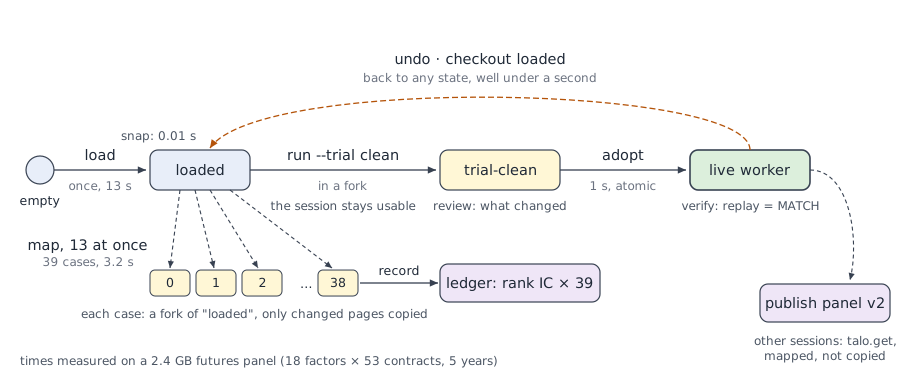
Snapshots and forks use copy-on-write fork(): taking one costs milliseconds even with tens of gigabytes in memory,
and it only consumes extra memory for the pages that change afterwards
(measurements).
| Jupyter kernel | Talo | |
|---|---|---|
| Variables stay in memory between executions | ✓ | ✓ |
Rich outputs (HTML, images), .ipynb |
✓ | ✓ |
| Open from JupyterLab / VS Code | ✓ | ✓ |
Driven from the terminal by agents: non-blocking commands, background jobs, --json |
– | ✓ |
| Snapshots, rollback, branches and forks of the in-memory state | – | ✓ |
| Parallel experiments from one state, sessions as services, an experiment ledger | – | ✓ |
| Review a change in a fork before adopting it; check that replaying the code gives the same state | – | ✓ |
| Several agents and people on one session, with revisions, leases and sharing | – | ✓ |
| Memory accounting, hard limits, durable checkpoints, shared datasets | – | ✓ |
Status
Alpha: interfaces may still change. Linux only. Every milestone of the roadmap works:
- resident sessions and background jobs; snapshots, rollback, branches,
tree,diff; - an interactive prompt, images as files, export to
.py/.ipynb; - for agents at scale:
brief, notes, atomic runs, safe retries, revisions, progress, memory limits,reload; - across sessions:
map, services, the experiment ledger, events, handoffs, sharing; - shared datasets: immutable versions in memory, mapped by every session without copying;
- Jupyter front ends (a kernel bridge, notebook magics, autosnap and undo) and an MCP server;
- trust and safety:
verify, trial / review / adopt, hard limits, deadlines,diagnose,--retain-error, leases; - durability: content-addressed checkpoints,
recoverafter a restart,autosave; - bounded snapshots: snapshots move to disk under a memory budget and come back on checkout.
Install
Talo needs Python ≥ 3.10 on Linux and has no runtime dependencies (pip install "pytalo[jupyter]" adds what the
Jupyter kernel bridge needs). The package is pytalo on PyPI; the command and the module are talo.
$ pip install pytalo
$ talo --version
The session's code runs in whichever interpreter you choose (--python), so your project's virtualenv does not need
Talo installed in it.
Quick start
$ talo run 'x = 41'                       # creates the "default" session on first use
$ talo run 'x + 1'
42
[job 2 ok [2] 0.00s, memory 17.6 MB (+64.0 KB)]

$ talo run -f load.py -t 5                # long job: returns after 5 s, keeps running
[job 3 running 5.00s] `talo wait 3` for the result, `talo tail 3` for output, `talo interrupt 3` to stop it
$ talo wait 3

$ talo vars                               # what's in memory
df                   pandas.DataFrame (12000000, 8)  1.1 GB
x                    int  28 B = 41

$ talo snap loaded                        # snapshot: milliseconds, even with tens of GB in memory
$ talo run 'df = df[df.price > 0]'        # experiment ...
$ talo checkout loaded --discard          # ... and roll back
$ talo map --from loaded --range 8 -f evaluate.py -j 8   # eight ideas at once, one copy of the data

$ talo new research --python ~/proj/.venv/bin/python --cwd ~/proj
$ talo run -s research 'import mylib'     # sessions are independent processes
For coding agents
Add --json to any command for stable, machine-readable output; talo mcp offers the same tools to MCP clients.
$ talo run --json 'df.shape'
{"job": {"id": "7", "status": "ok", "execution_count": 4, "result": {"data": {"text/plain": "(12000000, 8)"}, ...},
 "output": {"text": "", "lines_cut": 0, ...}}
Exit codes: 0 ok, 1 the code failed (error, interrupted, lost), 2 Talo itself failed, 3 still running
(talo wait ID). After losing its context, an agent gets back to work with talo brief.
Commands
talo COMMAND --help documents every option.
Running code
| Command | What it does |
|---|---|
talo run CODE / -f FILE / - |
run code in a session (-s NAME, -t SECONDS, --deadline, --atomic, --key) |
talo wait ID / tail ID [-f] / interrupt ID |
a job's result, its output, stop it |
talo jobs / history / diagnose ID |
jobs; finished jobs with memory deltas; stacks of a running job |
talo vars / show EXPR / memory |
what is in memory, a summary of one value, where the memory went |
talo attach |
an interactive prompt on the session (completion, history, % commands) |
talo new NAME / ls / kill NAME / stop |
manage sessions (--python, --cwd, --limit memory=100G) |
States
| Command | What it does |
|---|---|
talo snap [NAME] / checkout NAME / undo |
snapshot; roll back; go back one execution (autosnap on) |
talo new NAME --from SNAPSHOT |
branch: a new session forked from a snapshot |
talo snaps / tree / diff A [B] / drop NAME |
snapshots and their memory, the tree of all states, what changed |
talo snapshot demote NAME / new --snapshot-policy demote |
move snapshots to disk to bound memory; checkout restores their values |
talo run --trial NAME / review / adopt |
run in a fork, review it, switch the session to it |
talo verify [--cold] |
replay the code behind the current state and check it gives the same variables |
talo export [-o FILE] / notebook |
that code as .py / .ipynb; a notebook attached to the session |
Across sessions and agents
| Command | What it does |
|---|---|
talo map --from SNAP --cases FILE -f code.py -j 8 |
run code once per case, each in a fork of one snapshot |
talo.expose(fn) / talo call SESSION.FN '{...}' |
a session as a service: calls run in forks of a pinned version |
talo publish NAME / talo.get("NAME") |
share a table between sessions: versions in memory, mapped without copying |
talo.record(...) / talo ledger |
an experiment ledger tied to the job, case and snapshot behind each record |
talo brief / note TEXT / handoff -m MSG |
resume after losing context; hand work over |
talo events --after CURSOR --wait 30 |
wait for jobs, maps, calls, snapshots without polling |
talo queue pause / lease / share --user NAME |
a person takes over; share with another user |
Durability
| Command | What it does |
|---|---|
talo save / restore / checkpoints |
durable checkpoints of variables, stored by content |
talo recover / autosave on |
bring sessions back after a restart; checkpoint periodically |
How it works
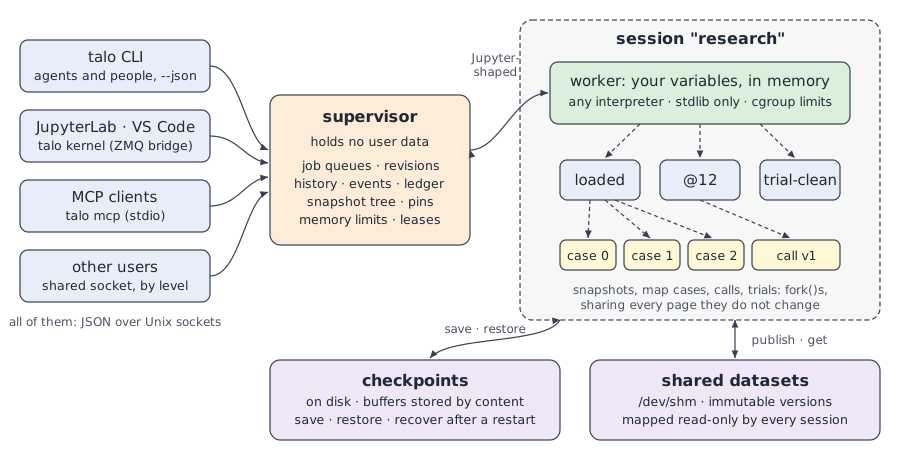
- The supervisor starts automatically on first use and routes requests; it never holds your data, so it outlives a worker crash and tells you what happened (for example an out-of-memory kill).
- Each session's worker is a single-threaded process running in your chosen interpreter: one standard-library-only file executed by path.
- Snapshots are suspended
fork()s of the worker taken between executions; ephemeral forks of them run map cases, service calls and trials in parallel; all of them share the pages they do not change. - Messages follow the Jupyter messaging protocol (
execute_request,execute_result,error,status, ...), with Talo's own extensions prefixedtalo_(protocol).
Details, trade-offs and known limitations are in docs/design.md.
Development
$ uv venv && uv pip install -e ".[dev]"
$ .venv/bin/pytest
See CONTRIBUTING.md. Changes are listed in CHANGELOG.md.
License
Apache License 2.0. The Talo name and logo are not covered by the license.
1 maintainer

Metadata
1 maintainer
Release files for pytalo 0.1.0a1
For a detailed explanation of source distributions (sdists) and built distributions (wheels), please see the package formats documentation.
Source distribution (sdist)
| File | Size | Uploaded | Provenance | |
|---|---|---|---|---|
| pytalo-0.1.0a1.tar.gz | 165.4 kB | Without provenance | Details |
Built distribution (wheel)
| File | Interpreter | ABI | Platform | Reset |
|---|---|---|---|---|
| pytalo-0.1.0a1-py3-none-any.whl | Python 3 | none | any | Details |
Total release size: 308.1 kB
Release files / pytalo-0.1.0a1.tar.gz
| Download URL | pytalo-0.1.0a1.tar.gz |
|---|---|
| Size | 165.4 kB |
| Tags | Source |
|
SHA-256 checksum How to use checksums |
dd79754147b4c72386d5558df11b82cd853b7b5657667294c06316b8bd86e716
|
|
BLAKE2b-256 checksum How to use checksums |
2654276f581e2d0cb74d7bd62bee9b51ea08ff5bdaa97bf4d3c306f9ff961429
|
| Upload date | |
|
Uploaded using Trusted Publishing? What is trusted publishing? |
No |
| Uploaded via |
twine/7.0.0 CPython/3.12.15
|
Release files / pytalo-0.1.0a1-py3-none-any.whl
| Download URL | pytalo-0.1.0a1-py3-none-any.whl |
|---|---|
| Size | 142.7 kB |
| Tags | Python 3 |
|
SHA-256 checksum How to use checksums |
4a1c26c43df0f38864451a664769c90161343bb62f495d9546b7e79f55e39816
|
|
BLAKE2b-256 checksum How to use checksums |
d5712cb972e2f1ae75f2b5f2ca7e55dde29d36357fca1a6eaab1a9fdc6a1e86a
|
| Upload date | |
|
Uploaded using Trusted Publishing? What is trusted publishing? |
No |
| Uploaded via |
twine/7.0.0 CPython/3.12.15
|
Security for pytalo 0.1.0a1
Provenance
Provenance describes where a file came from. On PyPI, provenance is shared via attestations, which provide a verifiable record of the build or publishing details. View details, limitations and caveats.
No provenance found
None of the files in this release were uploaded with provenance metadata.
A note on package security
PyPI is a repository for distributing packages, not a service for auditing them. While third-party security researchers and our staff do their best to detect and remove malicious packages, PyPI cannot guarantee the quality, security or suitability of any given package.
To learn more about protecting yourself from malicious actors, visit our package security documentation.













