
Use Telegram bots to track your project logs in real-time.

Project description
pytelelogger
pytelelogger allows you to use Telegram bots to track your project logs in real-time.
Installation
Dependencies
- python-telegram-bot>=13.1
- PyYAML>=5.3.1
User installation
The easiest way to install pytelelogger is pip:
pip install pytelelogger
How to use
1. Create Telegram bot
Check official Telegram documentation at https://core.telegram.org/bots and follow a few simple steps to create a bot. You will get an access token which is used to control your bot.
2. Create cfg.yaml file
Example config file looks like this:
# define bot access token, your Telegram username and your project name
token: YOUR_TOKEN
username: YOUR_USERNAME
project: "YOUR PROJECT NAME"

# set logging level
# DEBUG = 0
# INFO = 1
# WARNING = 3
# ERROR = 4
# CRITICAL = 5
level: 0

# set paths for duplicate files
# you can use one file to store everything (single), but using separate files (multi) is more convenient
mode: multi

# in case of single mode, debug key must store path to file
paths:
  debug: debug.txt
  info: info.txt
  warning: warning.txt
  error: error.txt
  critical: critical.txt

# customize key phrase
greeting: I'm ready!

# datetime format string that will be used in logging
dtf: "%d/%b/%Y %H:%M:%S"

# emojis to use in messages (debug, info, warning, error, critical)
emojis:
  debug: "⚙"
  info: "ℹ"
  warning: "⚠"
  error: "❌"
  critical: "🔴"
Later, chat_id field will be added to config file. Please, don't remove it.
3. Add some code
from pytelelogger import TeleLogger

if __name__ == '__main__':
    tl = TeleLogger('cfg.yaml')
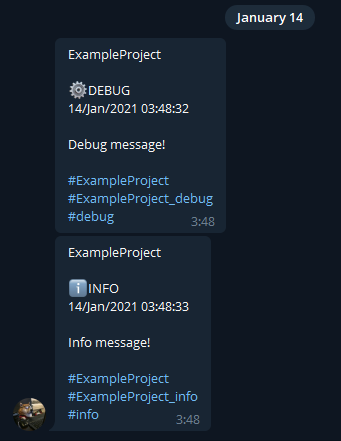
    tl.debug('Debug message!')
    tl.info('Info message!')

    tl.stop(force=True)
You will get messages like this:
And all logs are duplicated into files:
[DEBUG:14/Jan/2021 03:48:32] Debug message!
[INFO:14/Jan/2021 03:48:33] Info message!
Development
Source code
The latest source code is available at:
https://github.com/SN4KEBYTE/pytelelogger
Contributing
Feel free to open issues, send pull requests and review other users.
Release history Release notifications | RSS feed


Download files
Download the file for your platform. If you're not sure which to choose, learn more about installing packages.
Source Distribution
Built Distribution
Filter files by name, interpreter, ABI, and platform.
If you're not sure about the file name format, learn more about wheel file names.
Copy a direct link to the current filters
File details
Details for the file pytelelogger-0.1.1.tar.gz.
File metadata
- Download URL: pytelelogger-0.1.1.tar.gz
- Upload date:
- Size: 6.4 kB
- Tags: Source
- Uploaded using Trusted Publishing? No
- Uploaded via: twine/3.3.0 pkginfo/1.6.1 requests/2.25.1 setuptools/49.2.1 requests-toolbelt/0.9.1 tqdm/4.56.0 CPython/3.9.1
File hashes
| Algorithm | Hash digest | |
|---|---|---|
| SHA256 |
546f46e25a2f162637c4a52c8a84aa3fa77d9d7f85abf230d2b89d746d0c88d4
|
|
| MD5 |
3d9fbef962088a207e7a23e43da6c39d
|
|
| BLAKE2b-256 |
b47c4346bdae26e368c4231e900aa53284de5b0619f5cf0f28e0dc513fde44ec
|
File details
Details for the file pytelelogger-0.1.1-py3-none-any.whl.
File metadata
- Download URL: pytelelogger-0.1.1-py3-none-any.whl
- Upload date:
- Size: 19.1 kB
- Tags: Python 3
- Uploaded using Trusted Publishing? No
- Uploaded via: twine/3.3.0 pkginfo/1.6.1 requests/2.25.1 setuptools/49.2.1 requests-toolbelt/0.9.1 tqdm/4.56.0 CPython/3.9.1
File hashes
| Algorithm | Hash digest | |
|---|---|---|
| SHA256 |
41ea6296ff85f88a293d13cc3a009bf7d8a4d353fe875b1f4a70a2938acf9fc7
|
|
| MD5 |
faa783da83fbca19851f8525efa86e95
|
|
| BLAKE2b-256 |
fa628cda79ea83e96691960c21dbc49efb78d8b69519cd7dfcacf0001633168f
|






