
PyTessera
A modular library for turning whole-slide images into training-ready tile datasets for multi-scale models.
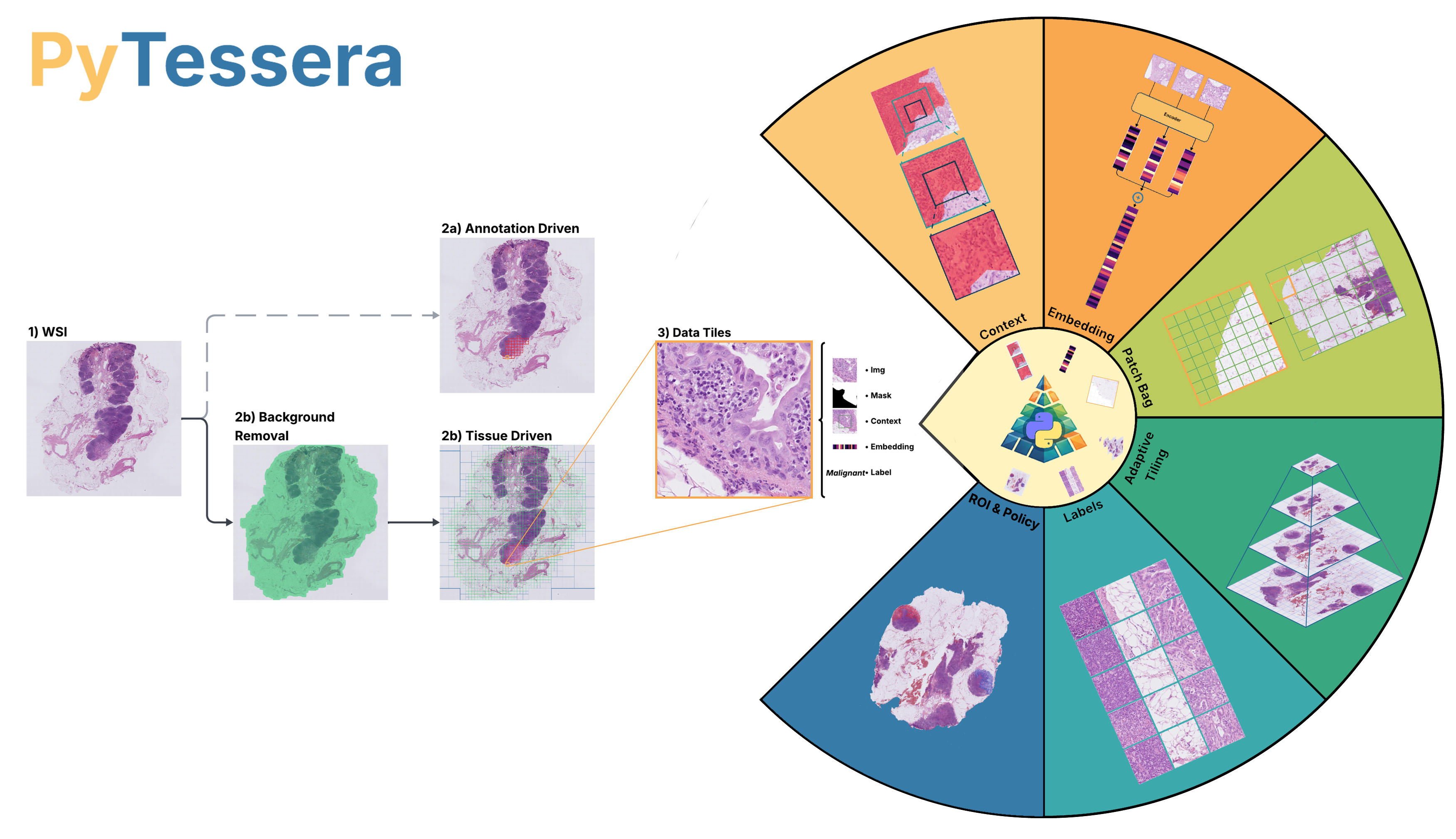
Diagnostic interpretation of whole-slide images (WSIs) relies on integrating cellular
morphology and tissue architecture across multiple magnifications, so AI training datasets
must preserve those spatial relationships. PyTessera builds training-ready tile datasets
from WSIs through modular functions rather than one fixed pipeline. A quadtree tiles only
tissue, or only annotated regions of interest, into DataTiles, the shared unit that each
later stage enriches: a tile can carry a multi-resolution context chain for multi-scale
models, or join its neighbours in a patch bag for hierarchical patch-then-region models.
Encoders and classifiers attach feature embeddings and tissue-type labels through simple
hooks, so users bring their own models, while a class-balanced sampler draws a balanced
subset from the same catalog for a standardized data representation.
Features
- Adaptive quadtree tiling: background is pruned as the tree descends, so tiles follow the tissue, and the whole layout is built as a pixel-free skeleton before anything is read.
- Aligned multi-zoom context: every tile can carry a multi-resolution context chain, and neighbouring tiles regroup into patch bags, both off the same tiling.
- Bring your own models: encoders and classifiers attach through hooks; PyTessera bundles and validates none of them.
- Class-balanced datasets: draw a materialised balanced subset or an exact per-class epoch, over either the annotation-derived category or a hooked tissue-type label.
- Pure Python (≥3.11), with a native DICOM reader in the core. PyTorch (
pytessera[ml]) and the SVS/NDPI/OME-TIFF readers (pytessera[tiff]) are optional extras, soimport pytesseranever pulls PyTorch. - Format-agnostic: a native Sectra DICOM backend, plus Aperio SVS, Hamamatsu
NDPI and OME-TIFF through
tifffile+zarr.
Install
The core is a light, pure-Python install; the slide readers and the PyTorch loading stack are optional extras you add only when your workflow needs them.
pip install pytessera                 # core: tissue segmentation, quadtree tiling, DICOM
pip install "pytessera[tiff]"         # + Aperio SVS / Hamamatsu NDPI / OME-TIFF readers
pip install "pytessera[ml]"           # + PyTorch loading stack (TileDataset, samplers)
pip install "pytessera[tiff,ml]"      # both extras at once (what the tutorials use)
From the command line
The same builders run as a pytessera command, so a cohort can be tiled from a shell script
or a cluster job and the catalog handed to Python later with load_datatile_dict:
pytessera build --slides cohort/*.svs --magnification 20 --save cohort.npz   # tissue-driven
pytessera build-annotations --slides cohort/*.tif --labels Tumor --save tumour.npz
pytessera build -h                                                           # every flag
Slides can be files of any supported format, or DICOM case folders (--data-root DIR --cases ID...).
The command stops at the catalog; embeddings, labels and balancing are Python calls.
Tutorials
Start here: Train a tumour segmentation model on a cohort takes ten annotated CAMELYON16 slides to a trained model, scores it on held-out slides, and paints a prediction map over an unseen CAMELYON17 slide. PyTessera calls do the data side, the scoring and the map; only the model and the training loop are plain PyTorch.
The other notebooks in docs/tutorials/ take one idea each:
- Slide-level MIL on patch bags — group tiles into patch bags, encode them with a foundation model, and feed the bags to an attention-MIL model.
- Tissue mask hook — swap in your own tissue segmentation via the
mask_fnhook. - Embeddings — leaf, chain, and merged tile embeddings, plus a classifier hook.
- Patch bags — group tiles into HIPT-style region grids and encode each into a vector.
- ROI-balanced tiling — label tiles from real ASAP annotations and balance classes before materialising pixels.
- Label-balanced skeleton — enrich with pixels, then drop them and keep only the labelled, embedded skeleton.
- End-to-end training — the cohort training tutorial above.
Acknowledgements
We thank all paper authors for their contributions: Tomás Bordoy García-Carpintero, Lucas A. D. T. Dyssel, Isabell Seyfried
If PyTessera is useful in your work, please cite it; see CITATION.cff.
Contact
Tomás Bordoy García-Carpintero and Lucas A. D. T. Dyssel (equal contribution), University of Southern Denmark & Odense University Hospital. Corresponding author: tobor@imada.sdu.dk. Issues and questions are welcome on the GitLab repository.
1 maintainer

Metadata
1 maintainer
Release files for pytessera 0.1.0
For a detailed explanation of source distributions (sdists) and built distributions (wheels), please see the package formats documentation.
Source distribution (sdist)
| File | Size | Uploaded | |
|---|---|---|---|
| pytessera-0.1.0.tar.gz | 152.9 kB | Details |
Built distribution (wheel)
| File | Interpreter | ABI | Platform | Reset |
|---|---|---|---|---|
| pytessera-0.1.0-py3-none-any.whl | Python 3 | none | any | Details |
Total release size: 332.8 kB
Release files / pytessera-0.1.0.tar.gz
| Download URL | pytessera-0.1.0.tar.gz |
|---|---|
| Size | 152.9 kB |
| Tags | Source |
|
SHA-256 checksum How to use checksums |
e2abf8612f4bdad4ca78f2bbe832449819b8378f7fec7360c20dd3f57ba2a411
|
|
BLAKE2b-256 checksum How to use checksums |
36b338728c751179f8f02aa44edf44f1c1c2bea49b83cbda6026e16213d6a6a7
|
| Upload date | |
|
Uploaded using Trusted Publishing? What is trusted publishing? |
No |
| Uploaded via |
twine/7.0.0 CPython/3.12.10
|
Release files / pytessera-0.1.0-py3-none-any.whl
| Download URL | pytessera-0.1.0-py3-none-any.whl |
|---|---|
| Size | 179.8 kB |
| Tags | Python 3 |
|
SHA-256 checksum How to use checksums |
28a30dba8f35bdd6c08d1d03943081d2cec8358b6611dab028c13fd45b0ca128
|
|
BLAKE2b-256 checksum How to use checksums |
460ff9fa4f1fc264c77b91cae17469b0051d8c5c06e75efa03cf25032f5296ac
|
| Upload date | |
|
Uploaded using Trusted Publishing? What is trusted publishing? |
No |
| Uploaded via |
twine/7.0.0 CPython/3.12.10
|













