
pytest-calendar-chaos




Your tests pass today. Will they pass on Feb 29?
Test your Python code on leap day (Feb 29), the last day of the month, New Year's Eve, midnight and daylight saving time changes, without waiting for those dates to arrive.
A pytest plugin that runs each explicitly marked test once per tricky calendar moment (leap day, month end, year end, midnight, ISO week 53, the 2038 limit, DST transitions) with the clock frozen by time-machine. When a run fails, the report tells you which scenario failed, the exact mocked time, and one command that reruns only that scenario.
import pytest


@pytest.mark.calendar_chaos(
    cases=["leap_day", "month_end", "dst"], zones=["UTC", "America/New_York"]
)
def test_subscription_renewal(): ...
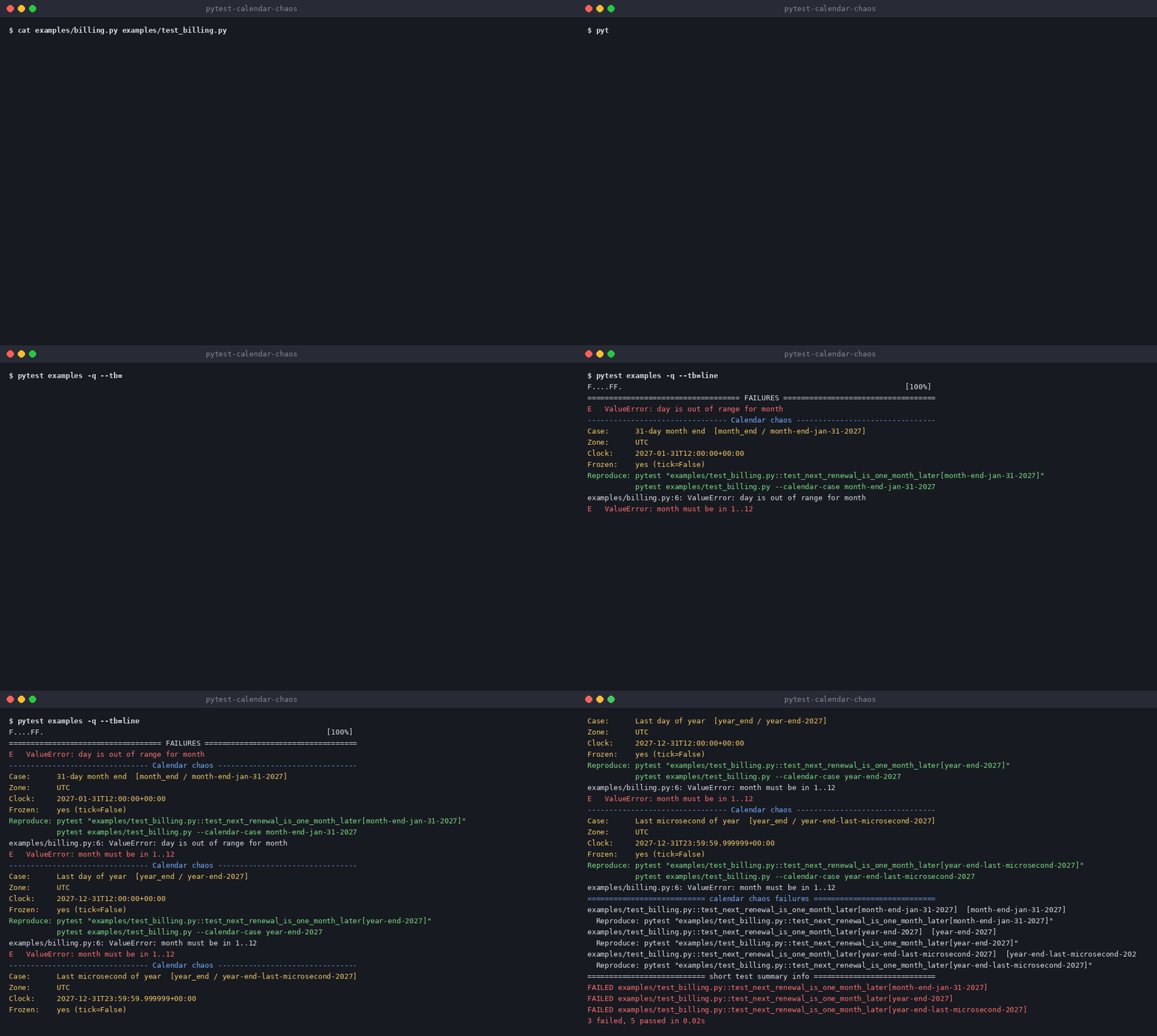
A failing run looks like this (from examples/, a renewal function that breaks at month end):
-------------------------------- Calendar chaos --------------------------------
Case:      31-day month end  [month_end / month-end-jan-31-2027]
Zone:      UTC
Clock:     2027-01-31T12:00:00+00:00
Frozen:    yes (tick=False)
Reproduce: pytest "test_billing.py::test_next_renewal_is_one_month_later[month-end-jan-31-2027]"
           pytest test_billing.py --calendar-case month-end-jan-31-2027
Install
pip install pytest-calendar-chaos
Requires Python 3.10+ and pytest 8+. Clock mocking is done entirely by time-machine.
Marker
@pytest.mark.calendar_chaos(cases=[...], zones=["UTC"], tick=False) on a function, class, or
module (pytestmark). The closest marker wins.
cases: required, non-empty list of presets:leap_day,month_end,year_end,midnight,iso_week,y2038,dst(-and_are interchangeable). Unknown names are a collection error listing the valid presets.zones: optional IANA zone names, default["UTC"]. Each fixed case is a local wall-clock time placed in each zone. An unknown zone is a collection error naming it.tick: passed totime_machine.travel. DefaultFalse(frozen).- Combining with time-machine's own
time_machinemarker is a collection error.
Test IDs look like test_x[leap-day-2028] (UTC) or test_x[leap-day-2028@america-new-york].
IDs never depend on today's date, the machine, or test order, so saved reproduce commands keep
working.
CLI
--calendar-case ID (repeatable) keeps only matching scenarios, by full ID
(leap-day-2028@america-new-york) or base ID (leap-day-2028, every zone). Unmarked tests are
unaffected. A marked test with no matching scenario is skipped. An ID that matches nothing in the
whole session prints a warning at the end of the run (not shown under pytest-xdist).
--calendar-chaos-list prints the case catalog (IDs, local times, labels) and exits without
running any tests. Use it to find the ID to pass to --calendar-case.
Configuration
calendar_chaos_default_zones (ini option, space separated) sets the zones used by markers that
don't pass zones. Explicit zones=[...] on a marker always wins. Default: UTC.
[pytest]
calendar_chaos_default_zones = UTC America/New_York
Fixture
calendar_case returns the current Scenario (.case, .zone, .moment, .note, .id), or
None for unmarked tests.
Catalog
Fixed presets use fixed years (2027 normal, 2028 leap); nothing is computed from "now".
| Preset | Case IDs |
|---|---|
| leap_day | leap-eve-2028, leap-day-2028, leap-day-last-microsecond-2028, leap-day-after-2028 |
| month_end | month-end-jan-31-2027, month-end-feb-28-2027, month-start-mar-01-2027, month-end-apr-30-2027, month-end-feb-29-2028 |
| year_end | year-end-2027, year-end-last-microsecond-2027, new-year-2028 |
| midnight | midnight-before-2027-06-15, midnight-after-2027-06-16 |
| iso_week | iso-week-53-2026-12-31, iso-week-53-new-year-2027, iso-week-1-2027-01-04 |
| y2038 | y2038-before-limit, y2038-last-valid-second, y2038-after-limit |
| dst | computed per zone from zoneinfo for 2027 (below) |
iso_week covers 2026, a year with 53 ISO weeks: Dec 31 2026 and Jan 1 2027 both fall in ISO week 53
of ISO year 2026, so code that mixes the calendar year (%Y) with the ISO week (%V) or uses
%G incorrectly breaks here.
y2038 sits on the signed 32-bit time_t limit, 2038-01-19 03:14:07 UTC (2**31 - 1 seconds). These
three cases are absolute UTC instants, so they are the same moment in every zone (only the local
wall-clock reading changes). Python itself handles these dates; the cases help find code that
stores times in 32-bit fields, such as databases, serialization formats and C extensions.
DST
For each zone with a transition in 2027, spring-forward gets dst-spring-before-2027 and
dst-spring-after-2027 (one minute either side). Fall-back gets dst-fall-before-2027,
dst-fall-first-repeat-2027 (fold=0), dst-fall-second-repeat-2027 (fold=1) and
dst-fall-after-2027. IDs carry the zone suffix, e.g. dst-fall-second-repeat-2027@europe-london.
Zones without DST in 2027 (UTC, Asia/Tokyo) contribute nothing; if no listed zone has DST,
collection fails with a clear message. If a zone has several transitions of one kind in the year,
IDs are numbered (dst-spring-2-before-2027). Failure reports add a Transition: line, for
example 2027-03-14 02:00 local clocks jump to 03:00 (America/New_York).
Case IDs are a public API: adding cases is a minor release, changing or removing one is breaking.
Limitations
- Only the clock inside the Python process is mocked. Databases, subprocesses and C extensions that read the system clock are not.
- Fixtures with class, module or session scope are set up before the freeze and see real time. Function-scoped fixtures and the test body see the mocked time.
- Comparing aware datetimes in a repeated hour. Per PEP 495, a
folddatetime in a repeated DST hour never compares equal to a datetime in another time zone, even at the same instant. Comparecalendar_case.moment.astimezone(timezone.utc)or use.timestamp(). - Freezing exact moments in non-UTC zones, including every DST case, is tested in CI on Linux,
macOS and Windows. Naive
datetime.now()returning the zone's local wall time relies on time-machine setting the process time zone (TZ/time.tzset); that is tested on Linux and macOS only, because Windows has notzset. On Windows, compare aware datetimes rather than relying on naive local time. - Under pytest-xdist the failure sections and the end-of-run summary work, but the "unmatched
--calendar-case" warning is not printed. - Async tests get no special handling.
How it works
Built on time-machine (MIT, by Adam Johnson), which does all clock mocking. This plugin adds the curated catalog, automatic parametrization, and reproducible failure reports.
Comparison
- time-machine / freezegun alone: mock the clock, but you choose the dates and write the parametrization. This plugin supplies a vetted catalog and reproducible reports on top of time-machine.
- Hypothesis
datetimes(): generates datetimes (including tricky ones) as test inputs. It does not freeze "now" for code that callsdatetime.now(). The two are complementary. - pytest-tzshift: runs tests across a matrix of time zones and locales. This plugin varies the moment in time (and zone), not just the environment.
Contributing
See CONTRIBUTING.md. New calendar cases are very welcome.
License
MIT
1 maintainer

Metadata
1 maintainer
Release files for pytest-calendar-chaos 0.4.0
For a detailed explanation of source distributions (sdists) and built distributions (wheels), please see the package formats documentation.
Source distribution (sdist)
| File | Size | Uploaded | Provenance | |
|---|---|---|---|---|
| pytest_calendar_chaos-0.4.0.tar.gz | 131.7 kB | With provenance | Details |
Built distribution (wheel)
| File | Interpreter | ABI | Platform | Reset |
|---|---|---|---|---|
| pytest_calendar_chaos-0.4.0-py3-none-any.whl | Python 3 | none | any | Details |
Total release size: 145.9 kB
Release files / pytest_calendar_chaos-0.4.0.tar.gz
| Download URL | pytest_calendar_chaos-0.4.0.tar.gz |
|---|---|
| Size | 131.7 kB |
| Tags | Source |
|
SHA-256 checksum How to use checksums |
60d8c5748eb39bfee9d7472f1774140b08ac0f28fa08e0893b7e31340930ca94
|
|
BLAKE2b-256 checksum How to use checksums |
5a9eb9d3dd1bc3090383156239d6f9345891fe6cd019fca80d812f7f9d210af7
|
| Upload date | |
|
Uploaded using Trusted Publishing? What is trusted publishing? |
Yes |
| Uploaded via |
twine/7.0.0 CPython/3.13.16
|
Provenance
Provenance describes where a file came from. On PyPI, provenance is shared via attestations, which provide a verifiable record of the build or publishing details. View details, limitations and caveats.


PyPI Publish Attestation
PyPI verified that this artifact, at this checksum, originated from the publisher listed below.
Signed by GitHub Actions, verified by PyPI on Oct 23, 2026.
Transparency logRelease files / pytest_calendar_chaos-0.4.0-py3-none-any.whl
| Download URL | pytest_calendar_chaos-0.4.0-py3-none-any.whl |
|---|---|
| Size | 14.2 kB |
| Tags | Python 3 |
|
SHA-256 checksum How to use checksums |
29da1f318f198f44d2334da440f348f0ee92d57a02b60d4e943137836e5bfe40
|
|
BLAKE2b-256 checksum How to use checksums |
0d22c51a562eaa7a2b676749de99c9d2f165043941d077c093d69b0764e72b28
|
| Upload date | |
|
Uploaded using Trusted Publishing? What is trusted publishing? |
Yes |
| Uploaded via |
twine/7.0.0 CPython/3.13.16
|
Provenance
Provenance describes where a file came from. On PyPI, provenance is shared via attestations, which provide a verifiable record of the build or publishing details. View details, limitations and caveats.
PyPI Publish Attestation
PyPI verified that this artifact, at this checksum, originated from the publisher listed below.
Signed by GitHub Actions, verified by PyPI on Oct 23, 2026.
Transparency logSecurity for pytest-calendar-chaos 0.4.0
Provenance
Provenance describes where a file came from. On PyPI, provenance is shared via attestations, which provide a verifiable record of the build or publishing details. View details, limitations and caveats.
Full provenance
All 2 files in this release have been uploaded with provenance metadata.
Attestation for pytest_calendar_chaos-0.4.0.tar.gz
PyPI Publish Attestation
PyPI verified that this artifact, at this checksum, originated from the publisher listed below.
Signed by GitHub Actions, verified by PyPI on Oct 23, 2026.
Transparency logA note on package security
PyPI is a repository for distributing packages, not a service for auditing them. While third-party security researchers and our staff do their best to detect and remove malicious packages, PyPI cannot guarantee the quality, security or suitability of any given package.
To learn more about protecting yourself from malicious actors, visit our package security documentation.














