
pytest-casebook
English | 日本語
A pytest plugin that runs test cases written in YAML and writes the results as a test specification sheet (an HTML table with categories, subcategories and items). It keeps your test specification sheet and your automated tests from drifting apart, because they are the same file.
Features
- Run a CLI and check the exit code, stdout and stderr
- Call a Python function and check the return value or exception (async functions too)
- Send a request to an HTTP API and check the status, JSON and headers (sent with your framework's test client, e.g. FastAPI or Flask; how)
- Set up preconditions: put files in place, insert rows into a DB, switch to a state such as "during an outage" (how)
- Check the DB or files after the action (how)
- Write expected results directly in YAML, or generate golden files from the actual output and compare with a diff (how)
- Put manual checks that cannot be automated (looking at a screen, printed forms) in the same sheet, with the results written by hand (how)
- Organize cases into categories, subcategories and items (any depth) and write an HTML test specification sheet (in English or Japanese; how)
Run pytest --casebook-html=report.html and the cases in your YAML come out as this test specification sheet. The group hierarchy is merged vertically, and preconditions, expected results and results sit on one row.
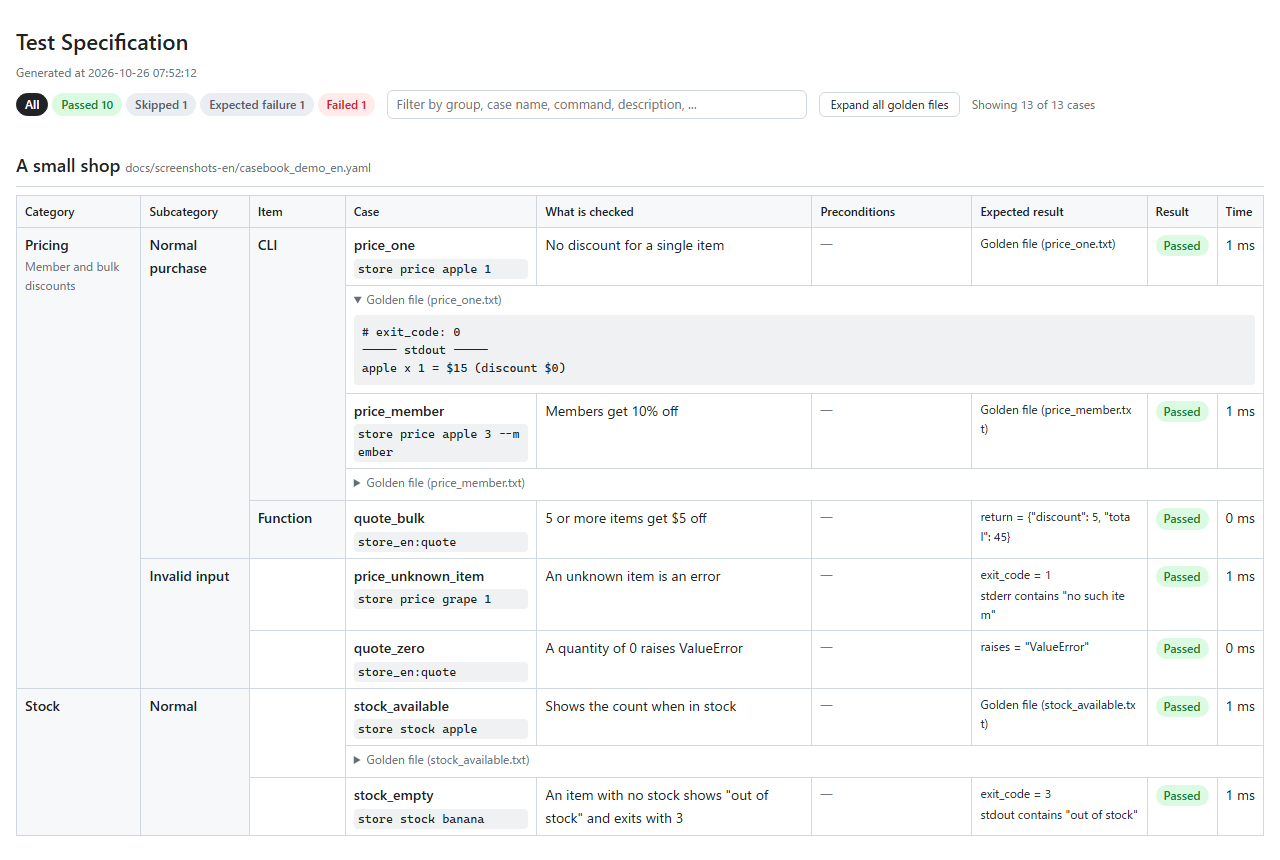
This is (part of) the YAML behind the table above; the whole file is docs/screenshots-en/casebook_demo_en.yaml. Nested group:s become the category / subcategory / item columns, description becomes "What is checked", and expect: becomes "Expected result". Cases without expect: are compared with golden files.
title: A small shop
levels: [Category, Subcategory, Item]
command_prefix: store

cases:
  - group: Pricing
    description: Member and bulk discounts
    cases:
      - group: Normal purchase
        cases:
          - group: CLI
            cases:
              - name: price_one
                description: No discount for a single item
                command: price apple 1
          - group: Function
            cases:
              - name: quote_bulk
                description: 5 or more items get $5 off
                call: store_en:quote
                args: [banana, 5]
                expect:
                  return: {discount: 5, total: 45}
Note: the HTML report and the messages (failed comparisons, mistakes in the YAML, errors while running a case) are in English by default; set
casebook_lang = "ja"for Japanese. The YAML keys, options and the Python API are in English.
When to use it
If you write tests in Python you get type completion and a debugger. For unit tests, @pytest.mark.parametrize plus snapshot testing (syrupy etc.) is enough. pytest-casebook fits cases like these:
- You want to show the list of tests to non-engineers (QA, customers, product) or submit it as a test specification sheet
- Many people, including QA, add cases in YAML, while an engineer writes the plumbing (DB setup etc. as conftest.py hooks) once
- You want "insert rows into a DB → run an API or CLI → check the response and the DB changes" as a single case
- You want to use the same YAML outside pytest, e.g. in a demo script (
pytest_casebook.load())
Supported: Python 3.11–3.15 and pytest 8 / 9 (checked by the GitHub Actions CI and scripts/check.sh).
Installation
pip install pytest-casebook
# with uv
uv add --dev pytest-casebook
Works with Python 3.11+ and pytest 8+. Installing it is enough: pytest loads it automatically, no configuration needed.
On Python 3.15, PyYAML is built from source until it ships 3.15 wheels. If that fails on Windows without a C compiler, install with the environment variable PYYAML_FORCE_LIBYAML=0 (PyYAML without the C extension).
The only dependencies are pytest, PyYAML and pluggy (which pytest needs anyway). Testing HTTP APIs does not add an HTTP library either (requests are sent with your framework's test client, e.g. FastAPI's or Flask's).
Getting started: you only write one YAML file
To test a CLI, all you write is one YAML file — no conftest.py, no Python test code. Here we test hello, a command (your own CLI) that greets the name it is given.
myproject/
└── tests/
    ├── casebook_hello.yaml        ← 1. write this
    └── golden/casebook_hello/     ← 2. generated by pytest --casebook-update
        └── greet.txt
1. Write tests/casebook_hello.yaml
The file name starts with casebook_ (*.casebook.yaml also works).
# yaml-language-server: $schema=https://raw.githubusercontent.com/gyuro-dev/pytest-casebook/main/src/pytest_casebook/casebook.schema.json
title: hello command
command_prefix: [hello]              # prepended to every case (the command under test)

cases:
  - name: greet                         # case name (letters, digits, _ - .)
    description: greets the given name
    command: --name Alice

  - name: greet_error
    description: fails without a name
    command: --name
    expect:                             # you can also write the expected result in YAML
      exit_code: 2
      stderr: {contains: --name}
Each case runs command_prefix followed by command, e.g. hello --name Alice. It runs in the directory of the YAML file (tests/ here), so the command must be runnable from there (an installed command, or a script referenced by path such as [python, "{casebook_dir}/../hello.py"]).
2. Generate the golden file
uv run pytest --casebook-update
(Without uv: pytest --casebook-update. The same applies to the commands below.)
For cases without expect: (here greet), tests/golden/casebook_hello/<case name>.txt is generated from the actual output. Cases with expect: are only compared with the YAML, and no file is created.
# case: greet
# command: hello --name Alice
# exit_code: 0
----- stdout -----
Hello, Alice
Only the results are compared (# exit_code: and everything below the ----- headings). Lines like # case: and # command: are explanations for readers, so you can omit them when writing a golden file by hand. If there is only one output, the body alone is enough (see Golden files).
Hello, Alice
3. Review it and commit
Check that the golden file is correct and commit it together with the YAML. From then on, every uv run pytest compares the actual output with this file. When you change the behavior, regenerate with --casebook-update and review the changes in the git diff.
View the results as a table
uv run pytest --casebook-html=reports/casebook.html
The report and the failure messages are in English by default. For Japanese, set casebook_lang once in pyproject.toml:
[tool.pytest.ini_options]
casebook_lang = "ja"
Terms
| Term | Meaning |
|---|---|
| case | One thing to check. Written one by one under cases: in YAML (one row of the specification sheet) |
| case file | A YAML file with cases (casebook_*.yaml) |
| group | A category of cases (group:). Nesting groups gives categories, subcategories and items |
| golden file | The "correct result" file generated from the actual output (expected output file). Created with --casebook-update |
expect: |
Writing the expected result directly in YAML. When present, no golden file is used |
| hook | A pytest hook (pytest_casebook_…) in conftest.py. Handles what YAML alone cannot, such as preparing a DB |
casebook_env |
The "environment" (DB connection, mocks, etc.) you prepare in conftest.py. Passed to each hook as env |
How do I...?
Most things can be done in YAML alone. Add pytest hooks to conftest.py only when you use a DB or want to pass a test environment.
Every row has a ready-to-run sample in examples-en. You can start by copying a sample directory and renaming things.
| What you want to do | Where | What to write | Sample |
|---|---|---|---|
| Run a CLI and check its output | YAML | command_prefix and command |
01_cli |
| Call a Python function and check the return value | YAML | call: module:function and args / kwargs |
02_function |
| Check that an exception is raised | YAML | expect: {raises: ValueError} |
03_exception |
| Write the expected result directly in YAML | YAML | expect: (how) |
04_expect |
| Classify cases into categories and subcategories | YAML | nested group: (how) |
05_groups |
| Put input files in place / check the files produced | YAML | setup: {files: ...} and observe: [files] |
06_files |
| Check the same action "normally" and "during an outage" | YAML + conftest.py | states: + pytest_casebook_setup |
07_states |
| Insert rows into a DB, run, and check the DB afterwards | YAML + conftest.py | casebook_env, pytest_casebook_setup, pytest_casebook_observe, pytest_casebook_prepare_call |
08_db |
| Run a CLI in-process and pass it a mock | YAML + conftest.py | pytest_casebook_run_command + run_in_process |
09_in_process |
| Normalize IDs and timestamps that change on every run | YAML | normalize: (also possible with hooks) |
10_normalize |
| Attach your own information to cases and use the same YAML outside pytest | YAML + Python | meta: and pytest_casebook.load() |
11_meta_load |
| Write golden files by hand | golden file | the body only (headers can be omitted) | 12_handwritten_golden |
| Skip a case with a reason / record a known bug | YAML | skip: reason / xfail: reason |
13_skip_xfail |
| Call an HTTP API and check the status and response | YAML + conftest.py | request: + pytest_casebook_request |
14_http_hook |
| Test a FastAPI API together with its DB | YAML + conftest.py | request:, setup:, expect: + TestClient |
15_fastapi |
| Test a Flask API together with its DB | YAML + conftest.py | request:, setup:, expect: + test_client |
16_flask |
| Run the same cases against different environments (local and staging, mock and real, …) | conftest.py + command line | switch in casebook_env, -o casebook_golden_dir=… and -m (how) |
17_targets |
| Check AWS (put files in S3 and rows in DynamoDB, then check DynamoDB, SQS and S3) | YAML + conftest.py | setup:, expect: + boto3 in pytest_casebook_setup / pytest_casebook_observe (moto's mock; how) |
19_aws |
| Put manual checks (visual checks, printed forms) in the same sheet | YAML | manual: and result: (how) |
18_manual |
| Write the sheet of what will be checked, before testing | command line | pytest --collect-only --casebook-html=plan.html (results are "Not run"; how) |
— |
| Measure coverage while writing the HTML report | pyproject.toml + command line | pytest-cov and coverage.py's patch = ["subprocess"] (how) |
— |
A sample combining everything is in examples-en/shop.
Timestamps (e.g. 2026-10-19T12:34:56Z) and UUIDs are replaced with <datetime> / <uuid> before comparison, without any setup.
Notes on writing YAML:
- A
:(colon + space) or#(space + hash) in the middle of a value is read as a YAML separator or comment. Quote the whole value, e.g.description: "setup: explanation" - Write file paths in
command:with/(C:/data/in.csv). A string command is split like a shell command, so\disappears. To keep\, write a list:command: ['C:\data\in.csv'] - Editor completion and validation are available (see Editor completion and validation)
- Modules called with
call:can be imported if they are in the same directory as the YAML. However, modules with the same name in different directories (e.g. twoutils.py) clash: whichever is imported first is used. Keep module names unique within the project
Full example: testing a function that uses a DB
When using a DB, you write two files: the YAML and conftest.py.
myproject/
├── orders.py                      ← the function under test (place_order)
└── tests/
    ├── conftest.py                ← prepare the DB, insert rows, read rows back
    └── casebook_orders.yaml       ← the cases
tests/casebook_orders.yaml
title: Orders
levels: [Feature, Situation]

cases:
  - group: Place an order
    cases:
      - group: In stock
        cases:
          - name: order_ok
            description: stock decreases and one order row is added
            setup:
              db:                                      # passed to pytest_casebook_setup
                stock: [{item: apple, count: 10}]
            call: orders:place_order
            args: [apple, 3]
            expect:
              return: {item: apple, quantity: 3}       # only the keys you write are compared
              db.stock: [{item: apple, count: 7}]      # read with pytest_casebook_observe
              db.orders: [{item: apple, quantity: 3}]
      - group: Out of stock
        cases:
          - name: order_out_of_stock
            description: raises, and the DB does not change
            setup:
              db:
                stock: [{item: melon, count: 2}]
            call: orders:place_order
            args: [melon, 5]
            expect:
              raises: OutOfStock
              db.stock: [{item: melon, count: 2}]
              db.orders: []
tests/conftest.py
import contextlib
import sqlite3

import pytest


@pytest.fixture(scope="session")
def casebook_env():
    """Prepare the DB used by the tests. This value is passed to each hook as env."""
    conn = sqlite3.connect(":memory:")
    conn.execute("create table stock (item text primary key, count integer)")
    conn.execute("create table orders (id integer primary key, item text, quantity integer)")
    yield conn
    conn.close()


@contextlib.contextmanager
def _insert(conn, tables):
    for table, rows in tables.items():
        for row in rows:
            marks = ", ".join("?" for _ in row)
            conn.execute(
                f"insert into {table} ({', '.join(row)}) values ({marks})", list(row.values())
            )
    try:
        yield
    finally:  # clean up after each case so the next case is not affected
        conn.execute("delete from stock")
        conn.execute("delete from orders")


def pytest_casebook_setup(env, data):
    """Receive the setup: content (except files) and prepare it."""
    return _insert(env, data.get("db", {}))


def pytest_casebook_prepare_call(env, args):
    """Pass the DB connection as the first argument of the function."""
    args.insert(0, env)


def pytest_casebook_observe(target, env):
    """Read db.<table> for observe: / expect:. Always order the rows so the result is deterministic."""
    if target.startswith("db."):
        cur = env.execute(f"select * from {target[3:]} order by 1")
        columns = [d[0] for d in cur.description]
        return [dict(zip(columns, row)) for row in cur]
    return None
When the result differs, each difference is listed, followed by the actual value with one item per line (messages follow casebook_lang).
[order_ok] (line 9) Place an order > In stock stock decreases and one order row is added
Differs from the expected result:
  - db.stock[0].count: expected 7 / actual 10
----- actual db.stock -----
{"item": "apple", "count": 10}
examples-en/shop uses everything described so far (CLI, functions, three levels, states, files, a sqlite DB).
uv run pytest examples-en/shop --casebook-html=reports/shop.html
Reference
The whole YAML file
title: Title                   # report heading (defaults to the file name)
description: Description
levels: [Category, Subcategory, Item]  # names of the levels, any number (default: ini casebook_levels)
command_prefix: [python, -m, mytool]  # {casebook_dir} becomes the YAML's directory
states:                        # state name -> content (a named setup:; see "States")
  default: {}
  outage: {db: down}
golden_dir: golden             # where golden files live (relative to this file)
check_orphans: true            # fail if golden files without a case are left over
normalize:                     # replacements applied to the output
  - {pattern: 'req-[0-9a-f]+', replace: '<request-id>'}
meta: {owner: qa}              # free-form information (see "meta")
env: {LANG: C}                 # environment variables for command cases (see "Environment variables")
cases: [...]                   # list of cases or groups
Groups
- group: Pricing             # name (the nesting depth becomes the hierarchy)
  description: Description
  state: outage              # default state for the cases inside
  marks: [slow]              # pytest marks for the cases inside
  meta: {area: price}        # meta for the cases inside
  env: {TZ: UTC}             # environment variables for the command cases inside
  skip: paused until the spec is decided  # skip all cases inside with this reason (xfail: too)
  cases: [...]
You can select by group name, e.g. -k Pricing. The HTML report only shows as many level columns as the groups actually use (with three levels but one level of groups, there is one column).
Cases
| Key | Meaning |
|---|---|
name |
Case name. It becomes the golden file name, so use letters, digits, _, -, . |
description |
What is checked |
command |
Arguments to run as a CLI (split like a shell command), appended to command_prefix. May be empty ("") if command_prefix is set. A list ([a, 'b c']) is passed as is without splitting |
stdin |
Standard input for the command |
timeout |
Seconds before the case fails as too slow (command, call and request; details) |
env |
Environment variables for the command, put over the current ones (how) |
call |
Function to call (module:function, module:Class.method). async def functions are awaited |
args / kwargs |
Arguments for the function |
request |
HTTP request to send ("POST /users", or method, path, query, headers, json, body; how) |
manual |
Steps of a manual case, which is not run (how) |
result |
Result of a manual case checked by hand: passed, failed or skipped |
state |
State name (from states:) |
setup |
Preconditions. files (files placed in the working directory) and content passed to pytest_casebook_setup |
observe |
What to read after the action. files (built in) or a name read by pytest_casebook_observe |
expect |
Expected result. When present, no golden file is used (for a manual case, text: a string or a list of strings) |
marks |
List of pytest mark names |
skip / xfail |
Reason to skip / reason it is known to fail. Shown in the terminal (pytest -rsx) and in the HTML result column |
meta |
Free-form information (see meta) |
golden |
Expected-output file name (default <name>.txt) |
Write exactly one of command, call, request and manual. Keys not in this table are errors, to catch typos. Put your own information under meta:.
Environment variables (env)
env: sets environment variables for command: cases. Write it at the top of the file, on groups, or on cases.
env: {LANG: C, TZ: UTC}          # every command case in the file
cases:
  - group: Debug output
    env: {MYTOOL_DEBUG: 1}       # numbers become strings ("1")
    cases:
      - name: debug_report
        command: report
      - name: default_locale
        command: report
        env: {LANG: null}        # null removes a value set further out
- When the command runs in a subprocess, these values are put over the environment of the pytest process (
os.environ). APATHset here is also used to find the program - Inner levels override outer ones key by key (file → group → case). Values are strings or numbers;
true/falseare errors (write"true").nullonly removes a value from an outerenv:; it does not unset variables inherited from your shell - Only command cases use it:
env:written on a call / request case is an error, andenv:inherited from the file or a group is ignored for them - Hooks read the merged result as
case.env. Whenpytest_casebook_run_commandruns the command itself, apply it there;run_in_processdoes not changeos.environ, so wrap it, e.g. inunittest.mock.patch.dict(os.environ, case.env) - The HTML report shows the variables that differ from the file-level
env:in the preconditions column. Golden files do not record them
meta
pytest-casebook does not look inside meta:. It is a place for your project's own information (a flag for cases shown in demos, an owner, restrictions on where to run, …).
- group: IPv6
  meta: {moto_only: true}       # on a group, it applies to all cases inside
  cases:
    - name: find_ipv6
      command: find 2001:db8::31
      meta: {demo: true}        # a case's meta is merged over the group's meta
- In hooks, read it as
case.meta({"moto_only": True, "demo": True}for find_ipv6 above) - The file-level
meta:isdoc.meta - To select with pytest's
-m, usemarks:instead ofmeta:
Reading outside pytest (load)
You can use the same YAML outside pytest, e.g. in a demo script.
import pytest_casebook

doc = pytest_casebook.load("tests/casebook_demo.yaml")
for case in doc.cases:
    if case.meta.get("demo"):
        print(" > ".join(case.path), case.name, case.command)
load() performs the same validation as pytest collection and returns a CasebookDoc (title, levels, states, meta, env, cases, …). Mistakes raise pytest_casebook.CasebookError.
Preconditions (setup)
- With
setup.files, a temporary working directory is created per case, the files are placed there, and both commands and calls run in that directory. The directory's path in the output is replaced with<tmp> - The working directory is not the YAML's directory. Refer to scripts next to the YAML with
{casebook_dir}(e.g.command_prefix: [python, "{casebook_dir}/tool.py"]). The YAML directory's path in the output is replaced with{casebook_dir} - Everything except
filesis passed topytest_casebook_setup. If the hook returns a context manager, it is exited after observe (use it for cleanup) - Preparation is applied for every case. Nothing carries over from the previous case
States (states)
A state is a "named setup:". Give frequently used preconditions a name and select them with state: on a case or group.
states:
  default:
    flags: {maintenance: false}
  maintenance:
    flags: {maintenance: true}
    files: {notice.txt: under maintenance}

cases:
  - name: during_maintenance
    state: maintenance
    setup:
      db: {users: [...]}     # the case's setup: is merged over the state's content
    call: app:handle
- The selected state's content, with the case's
setup:merged over it, is passed topytest_casebook_setupasdata(filesare merged per file name) - Cases without
state:use thedefaultstate - States are written like
setup:and validated the same way
Golden files
--casebook-update writes golden files like this:
# case: price_member
# command: shop price apple 3 --member
# state: sold_out
# exit_code: 0
----- stdout -----
apple x 3 = 324 yen
----- stderr -----
(only when there is stderr)
Only the results are compared: # exit_code: (# status: for requests) and the body below the ----- heading ----- lines.
- The
# case:,# command:,# call:,# args:,# kwargs:and# state:lines are explanations and are not compared. You can omit them when writing by hand - Without
# exit_code:/# status:, the exit code / status is not compared - A body without a heading is treated as stdout for commands, return for calls and json for requests. If there is only one output, the body alone is enough
- A heading you did not write is expected to be empty (without a stderr heading, stderr must be empty)
--casebook-updateonly rewrites a file when the results changed. Hand-written golden files keep their form as long as the results are the same- If a golden file is left over after its case was removed, the
golden_orphanscheck fails (subdirectories are checked too). It looks at.txtfiles and at files with any extension used ingolden:(e.g..json), so other files you keep there, such as notes, are not reported. Golden files used by other case files in the same directory count as used, so sharinggolden_dir:between several YAML files does not cause false alarms. To turn the check off, writecheck_orphans: falsein the YAML
HTTP APIs (request)
A request: case sends an HTTP request and checks the response. pytest-casebook itself does not send HTTP; the pytest_casebook_request hook in conftest.py does, using your framework's test client.
request_defaults:                     # headers added to every request (cases can override)
  headers: {Authorization: Bearer test-token}

cases:
  - name: list
    request: GET /todos                # "METHOD PATH" string (GET if the method is omitted)
  - name: create
    request:                           # or a mapping
      method: POST
      path: /todos
      query: {notify: true}            # /todos?notify=true
      headers: {X-Request-Id: abc}
      json: {title: buy milk}          # for non-JSON bodies use body: with a string
    expect:
      status: 201
      json: {title: buy milk}          # only the keys you write are compared
      headers: {Location: {regex: '^/todos/\d+$'}}
      db.todos: [{title: buy milk}]    # the DB changes can be checked too
In conftest.py, write the hook that sends the request. pytest_casebook.http has adapters for common clients (they only call the client's methods and do not import any framework).
from pytest_casebook.http import send_with_httpx_client, send_with_werkzeug_client


# FastAPI / Starlette TestClient (a client with the httpx API)
def pytest_casebook_request(request, env):
    return send_with_httpx_client(env.client, request)


# Flask test_client (a Werkzeug client)
def pytest_casebook_request(request, env):
    return send_with_werkzeug_client(env.client, request)
Any other client works too: read request (HttpRequest: method, path, url, query, headers, json, body) and return HttpResponse(status, body, headers) (14_http_hook is an example without a framework).
The golden file contains # status: and, if the body is JSON, a formatted ----- json -----, otherwise ----- body -----. Response headers are not written to the golden file (they change on every run, e.g. dates). To check headers, use headers in expect:.
Values after the action (observe)
- For cases using a golden file, the observed values are added as
----- observe: <target> ----- - Lists (DB rows etc.) are written one item per line as JSON, so when a value changes, the diff shows only that line
fileswrites the files in the working directory and their contents as=== file name ===
Expected results (expect)
expect:
  exit_code: 1                          # command
  stdout: ""                            # strings: exact match (trailing newline ignored)
  stderr: {contains: error}             # {contains: ...} contains / {regex: ...} regex
  return: {item: apple}                 # call. dicts: only the keys you write
  raises: ValueError                    # call. type name (subclasses match too)
  db.stock: [{item: apple, count: 7}]   # anything else is an observe target
| Item | Cases | How it is compared |
|---|---|---|
exit_code |
command | exact integer match |
status |
request | exact integer match |
json |
request | the response body read as JSON, compared like return |
body |
request | the body text, compared like stdout |
headers |
request | header name -> expected value. Only the headers you write, names case-insensitive. Values compared like stdout |
stdout / stderr |
command, call | a string is an exact match, {contains: ...} contains, {regex: ...} regex |
return |
call | dicts: only the keys you write; lists: count and each item; others: exact match |
raises |
call | see the table below |
anything else (db.users, files, …) |
all | read as an observe target and compared like return |
raises written as |
Matching exceptions |
|---|---|
ValueError |
ValueError and its subclasses |
mypkg.errors.AppError |
the type with the same module name, and its subclasses |
Outer.Inner |
an exception class defined inside a class |
"ValueError: quantity must be at least 1" |
the type as above, and an exact message |
{contains: ...} / {regex: ...} |
contains / matches the actual type name: message string |
If a call raises but raises is not written, the case fails.
Inside return, json and observe targets (db.* etc.) you can use matchers starting with $. The $ distinguishes them from data that really has keys like contains.
expect:
  json:
    message: {$contains: out of stock}       # contains this substring
    code: {$regex: '^E\d{3}$'}               # matches the regex
  db.users:
    $unordered:                              # any order (same count)
      - {name: Bob}
      - {name: Alice}
  db.history:
    $includes:                               # these items exist (others may too)
      - {action: withdraw}
Unknown matchers (typos such as $unorderd) are errors when the YAML is read.
When to use which:
- Long output (tables, trees) or a whole table after the action → golden file (generated with
--casebook-update) - Only specific values →
expect:(the YAML reads like a specification;--casebook-updatenever rewrites it)
Exceptions
- call: an exception is a result, like a return value. In the golden file it is written under
----- raises -----asTypeName: message. observe still runs after an exception, so you can check that the DB did not change - command (subprocess): an exception inside the CLI is compared as the exit code (1 for Python) and the traceback on stderr
- command (
run_in_process):sys.exit()becomes the exit code, other exceptions become exit code 1 andTypeName: messageon stderr. Withrun_in_process(main, argv, traceback=True)the full traceback goes to stderr (it contains line numbers and paths, so golden files change more easily) - Exceptions in the
setuporobservehooks are not compared; they are test errors
Timeouts (timeout)
timeout: is the number of seconds a case may take to run. It is written per case (there is no default for a whole file or group).
- command (subprocess): the process is stopped and the case fails
- call / request: the function (for request, the
pytest_casebook_requesthook) runs in a separate thread, and the case fails if it has not finished in time. Python cannot stop a thread, so the function is not stopped: it keeps running in the background until it returns. Its output after the timeout is not captured, and it does not keep pytest from exiting. To stop a hanging test for real, use pytest-timeout - command (
run_in_process): up to thepytest_casebook_run_commandhook (it can readcase.timeout)
Without timeout:, the function and the hook run in the test's own thread, as before. With it, they run in another thread, so objects that can only be used from the thread that created them (e.g. an sqlite3 connection made in pytest_casebook_setup) cannot be used. Context variables (contextvars) set before the call are visible to the function (it receives a copy).
The current directory is shared by the whole process. A case with setup.files runs in its own working directory, and that directory is left when the case ends. A function that keeps running after a timeout therefore sees another current directory: the original one, or the working directory of a later case. If it reads or writes files with relative paths, it can touch the wrong files (and break the files comparison of a later case). In a function that may time out, use absolute paths.
Manual cases (manual)
Checks that cannot be automated (looking at a screen, checking a printed form, …) can go in the same test specification sheet. Write the steps in manual: instead of command / call / request. A manual case is never run.
cases:
  - group: Printing
    cases:
      - name: print_layout
        description: The table is not broken when printed
        manual: |
          Open the print preview
          Check that the ruled lines do not break across pages
        expect:                      # expected results in words (a string or a list)
          - The header row is repeated at the top of page 2
          - No ruled line is broken
        result: passed               # the result checked by hand (omit until checked)
- In the HTML report, the steps are shown under the case name and
expect:in the expected-result column - Without
result:, the case is skipped by pytest and the report shows Manual. Use it to see what is left to check by hand result: passed/failed/skippedmake the case pass / fail / be skipped, in pytest and in the report. With the results written in, onepytest --casebook-html=…run gives a complete sheet of the automated and the manual resultssetup:andstate:can be written; they are only shown as preconditions (thepytest_casebook_setuphook is not called).args,kwargs,stdin,timeout,env,observeandgoldencannot be written
Hooks and fixtures
Write them in conftest.py. Each hook only needs the arguments it uses (e.g. def pytest_casebook_observe(target, env): ...). A hook only applies to cases in YAML files under the directory of its conftest.py.
| Name | Called | Returns |
|---|---|---|
casebook_env fixture |
once at the start (session) | the value passed to each hook as env (default None) |
pytest_casebook_setup(case, data, env, workdir) |
before every case (data is empty without setup: / states:) |
a context manager for cleanup, or None |
pytest_casebook_request(case, request, env, workdir) |
to run a request | HttpResponse. Required when using request: |
pytest_casebook_run_command(case, argv, env, cwd) |
to run a command | CommandResult (what run_in_process returns). None runs it in a subprocess |
pytest_casebook_prepare_call(case, env, args, kwargs, workdir) |
before a call | nothing (modify args / kwargs in place) |
pytest_casebook_observe(target, case, env, workdir) |
after the action | the observed value (None fails) |
pytest_casebook_placeholders(env) |
before comparing | list of (actual value, replacement) |
pytest_casebook_patterns(env) |
before comparing | list of (regex, replacement) |
Every hook also receives config (pytest's Config). A case's state name and content are case.state and case.state_data, and its environment variables from env: are case.env. When running in a subprocess and the child is Python, its output encoding is set to casebook_encoding (via PYTHONIOENCODING).
Running against multiple environments
You can run the same cases against different environments (local and staging, a mock and real AWS, …). There is no dedicated feature; you combine what pytest and pytest-casebook already have.
| Goal | How |
|---|---|
| Switch what you connect to | add an option such as --target in conftest.py and switch inside casebook_env |
| Separate golden files per environment | change the ini location on the command line, e.g. -o casebook_golden_dir=golden_staging |
| Exclude cases that only run in one environment | add marks: [local_only] to cases or groups and exclude them with -m "not local_only" |
# conftest.py (put it at the top of the project; pytest_addoption is only called for
# conftest.py files loaded at startup)
def pytest_addoption(parser):
    parser.addoption("--target", default="local", choices=["local", "staging"])


@pytest.fixture(scope="session")
def casebook_env(request):
    if request.config.getoption("--target") == "staging":
        return connect_staging()
    return connect_local()
uv run pytest                                    # local (golden files in golden/)
uv run pytest --target staging -o casebook_golden_dir=golden_staging -m "not local_only"
golden_dir:in the YAML takes precedence over-o. When switching locations per environment, do not write it in the YAML- Check environment-dependent answers with golden files and environment-independent ones with
expect:, to avoid duplicated expectations - See examples-en/17_targets
AWS (moto and real AWS)
pytest-casebook does not talk to AWS itself. Put inputs in with pytest_casebook_setup and read the results with pytest_casebook_observe, both with boto3 (see 19_aws):
setup: {s3: {bucket/key: contents}, dynamodb: {table: [rows]}}puts input files in S3 and rows in DynamoDBdynamodb.<table>,sqs.<queue>ands3.<bucket>inexpect:/observe:read the contents after the action
Things to know with moto (a mock of AWS):
- moto's
mock_aws()only works inside the pytest process.call:andrequest:(andcommand:withrun_in_process) are mocked; a CLI run as a subprocess bycommand:is not. For that, start moto's server or LocalStack and passAWS_ENDPOINT_URLwithenv: - DynamoDB returns numbers as
Decimal. Turn them intoint/floatin the observe hook, orprice: 300does not match - DynamoDB scans and SQS receives have no fixed order. Sort in the hook, or use
$unorderedinexpect: - SQS returns at most 10 messages per call. Receive until the queue is empty, and delete what you received (otherwise the messages come back in a later case after the visibility timeout)
The same YAML can run against real AWS by switching casebook_env (Running against multiple environments). Things to know with real AWS:
- Never empty real data. The sample's cleanup deletes every row, message and object. Use a dedicated test account, or create resources with a name unique to the run (e.g.
casebook-1a2b3c4d-orders) and delete them all at the end of the session. Let the code under test take the table, queue and bucket names from settings or environment variables, so that the test can pass its own command:works as is. A subprocess reaches the same AWS; passAWS_PROFILEor the resource names withenv:- Wait for asynchronous work. When an S3 upload triggers a Lambda that writes to DynamoDB, the result is not there right after the action. Read again every few seconds in the observe hook until it appears (with an upper limit). Receive SQS messages with
WaitTimeSeconds, and scan DynamoDB withConsistentRead=True - Normalize what changes. Message IDs, ETags, timestamps and account IDs in ARNs differ per run: replace them with
normalize:orpytest_casebook_placeholders. Keep the golden files of real AWS apart with-o casebook_golden_dir=golden_realwhen they differ from the mock - Slow and parallel runs. A case can take seconds; add
timeout:. With pytest-xdist (-n), workers share the same resources: run real-AWS tests without-n, or give each worker its own names - Credentials. Locally, use SSO or a profile. On GitHub Actions, assume a role in the test account with OIDC (no access keys in secrets), and allow only the test resources. Run the real-AWS tests by hand or nightly rather than on every pull request
A common split: run with moto on every pull request (fast, any number of times), and run the same YAML against real AWS before a release or nightly, to check what a mock cannot (IAM permissions, real Lambda triggers, details of the real APIs).
Measuring coverage
pytest-casebook works with pytest-cov, so you can measure coverage while writing the HTML report.
uv add --dev pytest-cov
uv run pytest --cov --casebook-html=reports/casebook.html
call:cases andrequest:cases (sent with a test client) run in the pytest process, so they are measured as iscommand:cases run in a subprocess, so set coverage.py'spatch = ["subprocess"](coverage.py 7.10 or later). Coverage from Python subprocesses is then collected and combined
[tool.coverage.run]
source = ["myapp"]
patch = ["subprocess"]
- The subprocess has to run the Python of the environment where coverage is installed. A program name without a path, such as
pythonincommand_prefix: [python, ...], is looked up on PATH, so withuv run pytestor an activated virtual environment it runs that environment's Python - If
pytest_casebook_run_commandreturnsrun_in_processto run the CLI in-process, coverage is measured without this setting (09_in_process)
Editor completion and validation
A JSON Schema for the YAML is published on GitHub and bundled with the package (pytest_casebook.SCHEMA_PATH). Editors that use yaml-language-server, such as VS Code with the YAML extension (Red Hat), then give you key completion, descriptions on hover and validation as you type.
The easiest way is to put this comment on the first line of a case file (the samples in examples-en/ have it):
# yaml-language-server: $schema=https://raw.githubusercontent.com/gyuro-dev/pytest-casebook/main/src/pytest_casebook/casebook.schema.json
main follows the latest development version. To match the version you installed, use its tag instead (e.g. https://raw.githubusercontent.com/gyuro-dev/pytest-casebook/v0.2.0/src/pytest_casebook/casebook.schema.json).
To apply the schema to every case file without the comment, map it in your VS Code settings (settings.json):
{
  "yaml.schemas": {
    "https://raw.githubusercontent.com/gyuro-dev/pytest-casebook/main/src/pytest_casebook/casebook.schema.json": ["casebook_*.yaml", "*.casebook.yaml"]
  }
}
Without network access, use the schema bundled with the package instead (put the printed file:///... path in place of the URL):
uv run python -c "import pytest_casebook; print(pytest_casebook.SCHEMA_PATH.as_uri())"
A failed case shows the line in the YAML where it is written ([wrong] (line 8)). pytest receives it as the test location, so JUnit XML (xunit1) and IDEs can jump to that line.
Command-line options
| Option | Meaning |
|---|---|
--casebook-update |
rewrite golden files from the current output (only those whose results changed; expect: cases are only compared) |
--casebook-html=PATH |
write the results as HTML |
All options start with --casebook-. Generic names such as --update-golden may already be defined by a project's conftest.py, and a duplicate name stops pytest from starting.
HTML report
For each case file the report contains:
- counts and results per top-level group
- a list of cases that need attention (links to their rows)
- a table whose level columns (
levels) are merged vertically, with case name, action, description, preconditions, expected result, result and time. Failed rows can be expanded to show the diff - preconditions show non-default state names and the case's own
setup:. Skip and known-bug reasons are shown under the result - the time only counts running the case (not session fixtures that build the environment)
At the top of the page you can narrow the table down. Click a result (e.g. Failed) to show only those cases (click more results to add them, "All" to reset), and type in the box to keep only the cases whose group, case name, command, description, preconditions or expected results contain the text (case-insensitive; several words must all match). The merged group cells are rebuilt for the rows that remain, and files with no matching case are hidden. The per-file counts always describe the whole run. The report stays a single HTML file; without JavaScript the full table is shown.
To submit "what will be checked" before testing, use it with --collect-only. The cases are not run, and every result is "Not run" (the precondition and expected result columns come from the YAML).
uv run pytest --collect-only --casebook-html=reports/plan.html
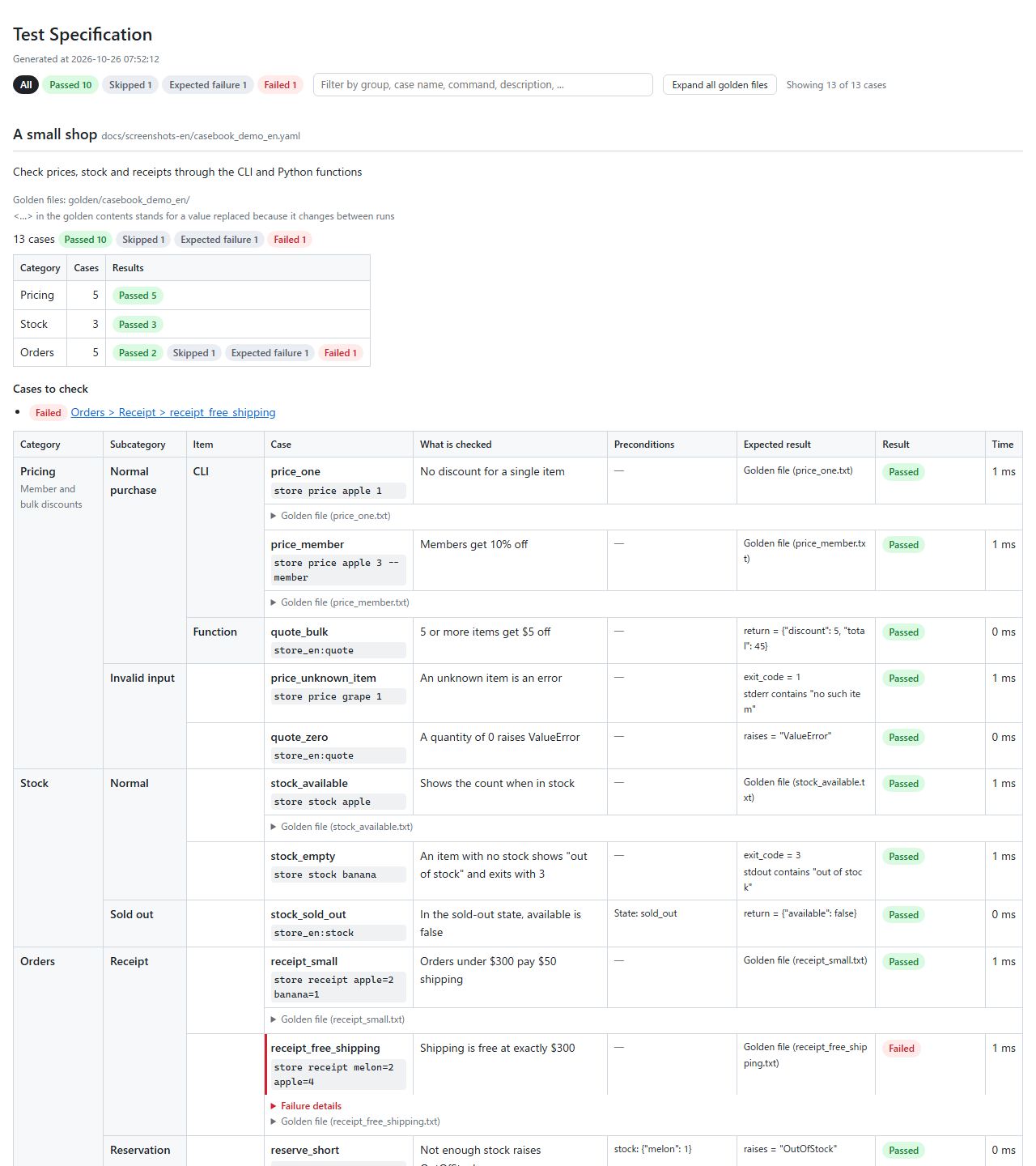
The whole report looks like this (made from the cases in docs/screenshots-en).
A failed case can be expanded below its row to show the diff.
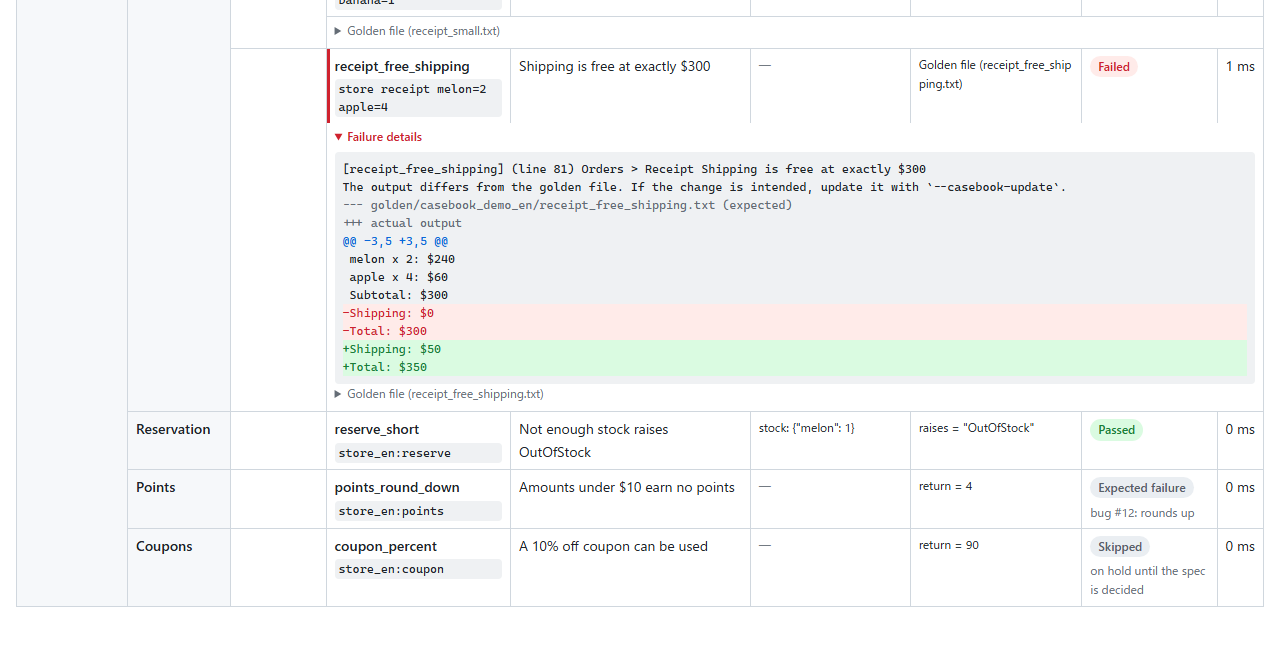
Results are one of: passed, updated (rewritten by --casebook-update), skipped, expected failure, unexpected pass, failed, error, not run (labels follow casebook_lang). "Not run" is a case that was collected but not run (e.g. after -x stopped the session). pytest-html is not required (they can be used together).
ini options
| Name | Default | Meaning |
|---|---|---|
casebook_files |
casebook_*.yaml casebook_*.yml *.casebook.yaml *.casebook.yml |
file name patterns to collect |
casebook_golden_dir |
golden |
where golden files live. A directory per case file name is created under it |
casebook_levels |
depends on casebook_lang (en: Category Subcategory Item, ja: 大項目 中項目 小項目) |
names of the levels |
casebook_command_prefix |
(none) | arguments prepended to commands |
casebook_encoding |
utf-8 |
encoding of command output |
casebook_builtin_patterns |
true |
replace timestamps and UUIDs with <datetime> / <uuid> |
casebook_html_title |
depends on casebook_lang (en: Test Specification, ja: 試験項目表) |
title of the HTML report |
casebook_lang |
en |
language of the HTML report and the messages (failed comparisons, mistakes in the YAML, errors while running a case): en or ja |
Development (for people working on this repository)
A script checks every combination of Python 3.11–3.15 and pytest 8 / 9 with the same steps. Dependencies are installed exactly as in uv.lock, with a separate virtual environment per combination (.venvs/). Results go to reports/check/summary.txt together with the OS and tool versions.
scripts/check.sh                 # 3.11–3.15 × pytest 8 / 9
scripts/check.sh 3.12            # choose the Python version
PYTESTS=9 scripts/check.sh 3.13  # also choose the pytest version
There is also an end-to-end test that starts a real PostgreSQL instance and API server with Docker (integration/). For WSL there is a script that installs Docker Engine and uv.
scripts/integration.sh # start → test → clean up (results in reports/integration/)
Everyday checks:
uv sync
uv run pytest
uv run ruff check . && uv run ruff format --check .
uv run mypy
1 maintainer

Metadata
1 maintainer
Release files for pytest-casebook 0.5.0
For a detailed explanation of source distributions (sdists) and built distributions (wheels), please see the package formats documentation.
Source distribution (sdist)
| File | Size | Uploaded | Provenance | |
|---|---|---|---|---|
| pytest_casebook-0.5.0.tar.gz | 143.2 kB | With provenance | Details |
Built distribution (wheel)
| File | Interpreter | ABI | Platform | Reset |
|---|---|---|---|---|
| pytest_casebook-0.5.0-py3-none-any.whl | Python 3 | none | any | Details |
Total release size: 229.5 kB
Release files / pytest_casebook-0.5.0.tar.gz
| Download URL | pytest_casebook-0.5.0.tar.gz |
|---|---|
| Size | 143.2 kB |
| Tags | Source |
|
SHA-256 checksum How to use checksums |
cb597a41e693da95dc49734a10fd4295e7774a95e1cf22d5c5e7b6cbf86f1f28
|
|
BLAKE2b-256 checksum How to use checksums |
2e704a7417e928f5dddacf82ee9b555647316192c4f690fcc3e80b4685829e67
|
| Upload date | |
|
Uploaded using Trusted Publishing? What is trusted publishing? |
Yes |
| Uploaded via |
twine/7.0.0 CPython/3.13.16
|
Provenance
Provenance describes where a file came from. On PyPI, provenance is shared via attestations, which provide a verifiable record of the build or publishing details. View details, limitations and caveats.


PyPI Publish Attestation
PyPI verified that this artifact, at this checksum, originated from the publisher listed below.
Signed by GitHub Actions, verified by PyPI on Oct 23, 2026.
Transparency logRelease files / pytest_casebook-0.5.0-py3-none-any.whl
| Download URL | pytest_casebook-0.5.0-py3-none-any.whl |
|---|---|
| Size | 86.3 kB |
| Tags | Python 3 |
|
SHA-256 checksum How to use checksums |
93779ea0dc1ed92b146e6a93264d59f13243e1e20fa65029f61697a884c820d5
|
|
BLAKE2b-256 checksum How to use checksums |
eb86810ecf45a0c5244721dc268ead1d20d1f2ac18effc9618861454d515acc6
|
| Upload date | |
|
Uploaded using Trusted Publishing? What is trusted publishing? |
Yes |
| Uploaded via |
twine/7.0.0 CPython/3.13.16
|
Provenance
Provenance describes where a file came from. On PyPI, provenance is shared via attestations, which provide a verifiable record of the build or publishing details. View details, limitations and caveats.
PyPI Publish Attestation
PyPI verified that this artifact, at this checksum, originated from the publisher listed below.
Signed by GitHub Actions, verified by PyPI on Oct 23, 2026.
Transparency logSecurity for pytest-casebook 0.5.0
Provenance
Provenance describes where a file came from. On PyPI, provenance is shared via attestations, which provide a verifiable record of the build or publishing details. View details, limitations and caveats.
Full provenance
All 2 files in this release have been uploaded with provenance metadata.
Attestation for pytest_casebook-0.5.0.tar.gz
PyPI Publish Attestation
PyPI verified that this artifact, at this checksum, originated from the publisher listed below.
Signed by GitHub Actions, verified by PyPI on Oct 23, 2026.
Transparency logA note on package security
PyPI is a repository for distributing packages, not a service for auditing them. While third-party security researchers and our staff do their best to detect and remove malicious packages, PyPI cannot guarantee the quality, security or suitability of any given package.
To learn more about protecting yourself from malicious actors, visit our package security documentation.














