



pytest-custom-report
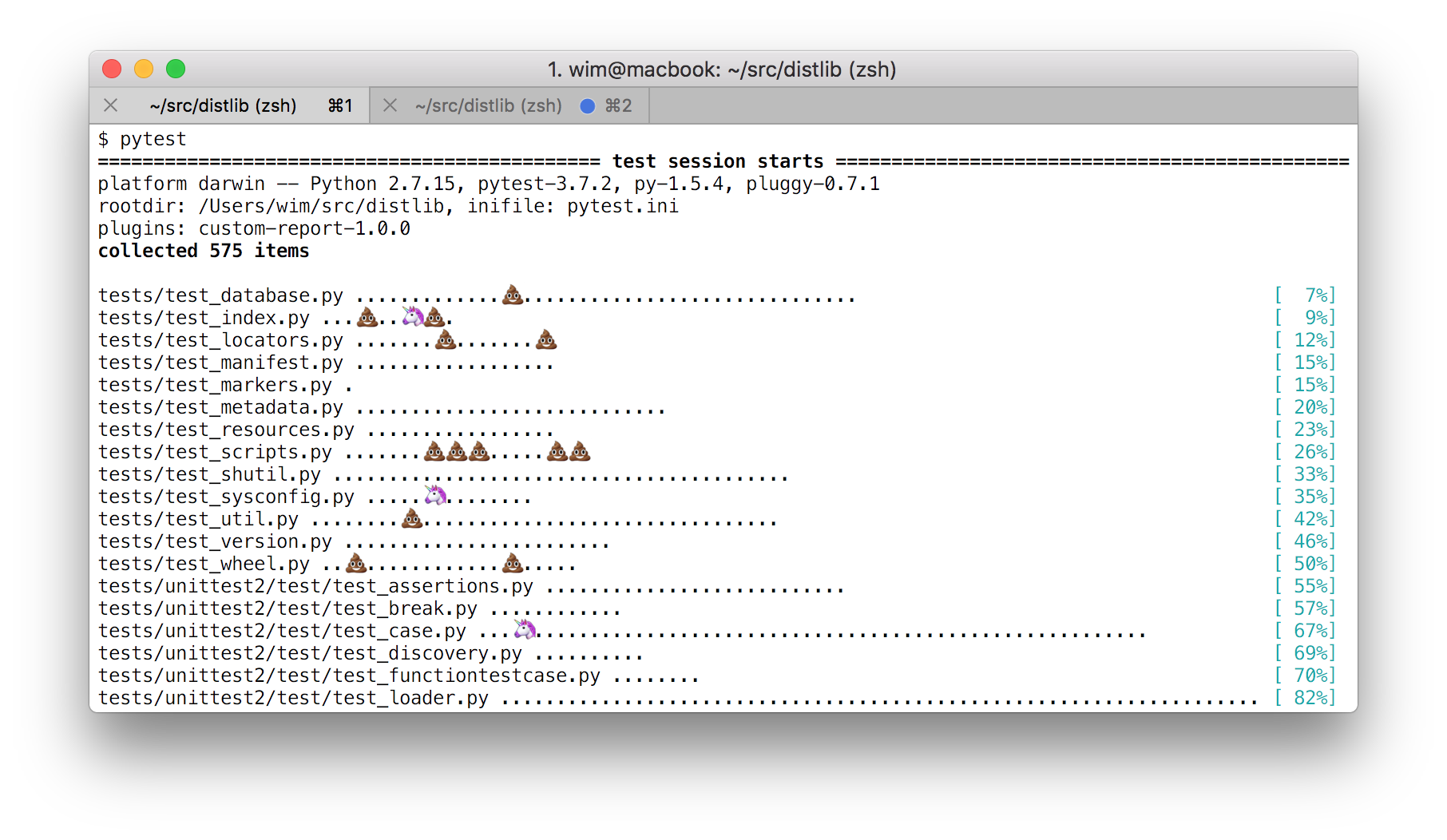
A plugin for defining your own characters to be used when displaying test outcomes in pytest (passed, failed, skipped etc).
For example, if you wanted to see a PILE OF POO (U+1F4A9) glyph displayed in the terminal report for each failing test:
pytest --report-failed=💩To persist your custom characters, add a section like this in the configuration file (i.e. in pytest.ini, tox.ini, setup.cfg or whatever):
[pytest]
report_failed = 💩
report_failed_verbose = OH CRAP
Installation and Usage
pip install pytest-custom-reportThis will add new command-line arguments and configuration file options to pytest (detailed in the following section). Command line arguments take precedence over configuration file settings. The plugin is always enabled, but unless you’ve configured your own symbols the pytest defaults are used.
To execute tests with the plugin disabled temporarily, use this:
pytest -p no:pytest-custom-reportIf you’re trying to use emojis but you can’t see the glyphs properly in your terminal, you may be missing unicode fonts with the upper plane - you could install for example GNU Unifont.
Configuration
The table below shows the available options as well as pytest’s default style for each outcome.
test outcome |
command-line argument name |
.ini file config key |
default report symbol |
|---|---|---|---|
passed |
--report-passed |
report_passed |
. |
xpassed |
--report-xpassed |
report_xpassed |
X |
failed |
--report-failed |
report_failed |
F |
xfailed |
--report-xfailed |
report_xfailed |
x |
skipped |
--report-skipped |
report_skipped |
s |
error |
--report-error |
report_error |
E |
When tests are executed with -v or --verbose flag enabled, you’ll see longer strings displayed and one-line per test outcome. These can be specified too.
test outcome |
command-line argument name |
.ini file config key |
default report string |
|---|---|---|---|
passed |
--report-passed-verbose |
report_passed_verbose |
PASSED |
xpassed |
--report-xpassed-verbose |
report_xpassed_verbose |
XPASS |
failed |
--report-failed-verbose |
report_failed_verbose |
FAILED |
xfailed |
--report-xfailed-verbose |
report_xfailed_verbose |
XFAIL |
skipped |
--report-skipped-verbose |
report_skipped_verbose |
SKIPPED |
error |
--report-error-verbose |
report_error_verbose |
ERROR |
Example config file
Here is some example pytest.ini content that you can copy-paste and modify to your liking:
[pytest]

report_passed = ✔
report_xpassed = 🦄
report_failed = ✗
report_xfailed = 👎
report_skipped = ?
report_error = 🔥

report_passed_verbose = OH YEAH
report_xpassed_verbose = WHAT IN TARNATION?
report_failed_verbose = OH CRAP
report_xfailed_verbose = YEAH WHATEVER
report_skipped_verbose = DON'T CARE
report_error_verbose = YOU MEDDLING KIDS!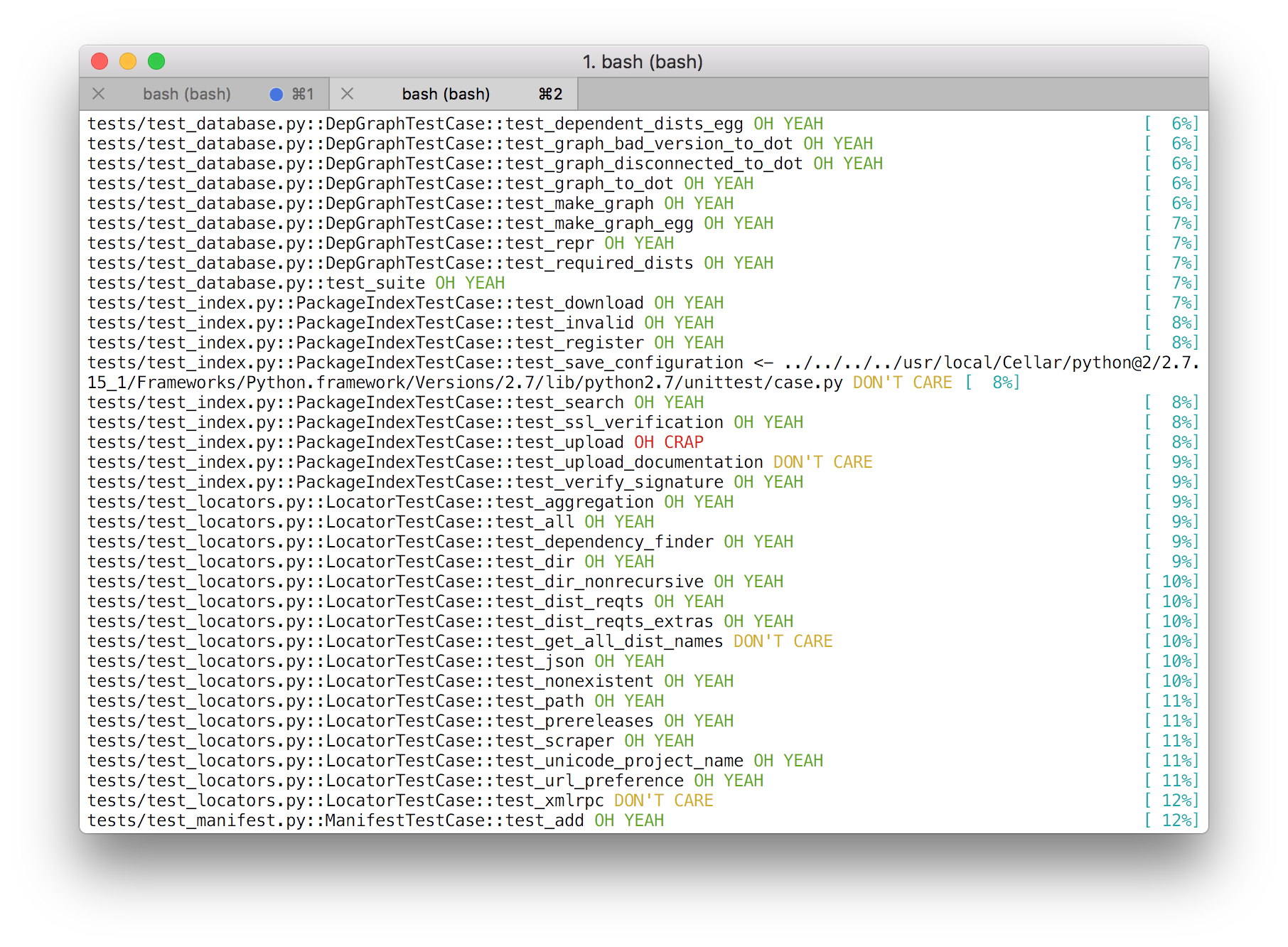
1 maintainer

Metadata
1 maintainer
Release files for pytest-custom-report 1.0.1
For a detailed explanation of source distributions (sdists) and built distributions (wheels), please see the package formats documentation.
Built distribution (wheel)
| File | Interpreter | ABI | Platform | Actions Reset |
|---|---|---|---|---|
| pytest_custom_report-1.0.1-py2.py3-none-any.whl | Python 3, Python 2 | none | any | Details for pytest_custom_report-1.0.1-py2.py3-none-any.whl |
Release files / pytest_custom_report-1.0.1-py2.py3-none-any.whl
| Download URL | pytest_custom_report-1.0.1-py2.py3-none-any.whl |
|---|---|
| Size | 5.1 kB |
| Tags | Python 2 Python 3 |
|
SHA-256 checksum How to use checksums |
f048c5a06faf1621099a27571f4d749a666e8bfc038e158e10f17775add27364
|
|
BLAKE2b-256 checksum How to use checksums |
649aa2d1e9173c8ed7df06de8a50b1c526b0b3a912c5925c153e46e3da69d7d8
|
| Upload date | |
|
Uploaded using Trusted Publishing? What is trusted publishing? |
No |
| Uploaded via |
twine/1.12.1 pkginfo/1.5.0.1 requests/2.21.0 setuptools/40.7.1 requests-toolbelt/0.9.1 tqdm/4.30.0 CPython/3.7.0
|
Security for pytest-custom-report 1.0.1
Provenance
Provenance describes where a file came from. On PyPI, provenance is shared via attestations, which provide a verifiable record of the build or publishing details. View details, limitations and caveats.
No provenance found
None of the files in this release were uploaded with provenance metadata.
A note on package security
PyPI is a repository for distributing packages, not a service for auditing them. While third-party security researchers and our staff do their best to detect and remove malicious packages, PyPI cannot guarantee the quality, security or suitability of any given package.
To learn more about protecting yourself from malicious actors, visit our package security documentation.














