
Summary






A pytest plugin to notify test results to a Discord channel.
Installation
pip install pytest-discord
Quick start
Making a Discord webhook
Usage
Set a webhook URL when executing pytest via --discord-webhook option:
$ pytest --discord-webhook=<https://discordapp.com/api/webhooks/...>
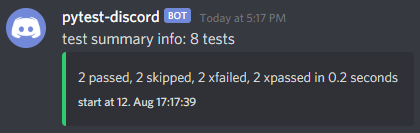
Notification message example
Or, set a webhook URL to an environment variable PYTEST_DISCORD_WEBHOOK:
$ export PYTEST_DISCORD_WEBHOOK=<https://discordapp.com/api/webhooks/...>
$ pytest
Or, you can specify a webhook URL of a discord channel via ini-options (described later).
Increase the verbosity level
$ pytest --discord-verbose=1
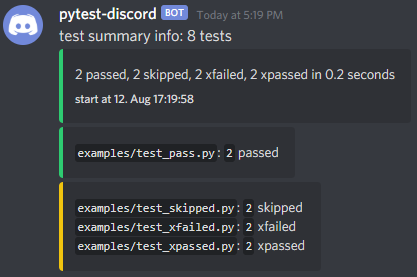
Notification message example
Notification messages may omit information caused by Discord limitations (especially when errors occur). You can get full messages as an attached markdown file with --discord-attach-file option.
Options
Command options
notify test results to a discord channel:
  --discord-webhook=WEBHOOK_URL
                        discord webhook url of a discord channel to notify pytest results. you can also specify the value with PYTEST_DISCORD_WEBHOOK environment variable.
  --discord-verbose=VERBOSITY_LEVEL
                        Verbosity level for pytest-discord.
                        If not set, use the verbosity level of pytest.
                        Defaults to 0.
                        you can also specify the value with PYTEST_DISCORD_VERBOSE environment variable.
  --discord-username=DISCORD_USERNAME
                        name for a message. defaults to pytest. you can also specify the value with PYTEST_DISCORD_USERNAME environment variable.
  --discord-success-icon=ICON_URL
                        url to an icon of a successful run. you can also specify the value with PYTEST_DISCORD_SUCCESS_ICON environment variable.
  --discord-skip-icon=ICON_URL
                        url to an icon of a skipped run. you can also specify the value with PYTEST_DISCORD_SKIP_ICON environment variable.
  --discord-fail-icon=ICON_URL
                        url to an icon of a failed run. you can also specify the value with PYTEST_DISCORD_FAIL_ICON environment variable.
  --discord-attach-file
                        post pytest results as a markdown file to a discord channel. you can also specify the value with PYTEST_DISCORD_ATTACH_FILE environment variable.
ini-options
[pytest] ini-options in the first pytest.ini/tox.ini/setup.cfg/pyproject.toml (pytest 6.0.0 or later) file found:
discord_webhook (string):
                      discord webhook url of a discord channel to notify pytest results.
discord_verbose (string):
                      Verbosity level for pytest-discord. If not set, use the verbosity level of pytest. Defaults to 0.
discord_username (string):
                      name for a message. defaults to pytest.
discord_success_icon (string):
                      url to an icon of a successful run.
discord_skip_icon (string):
                      url to an icon of a skipped run.
discord_fail_icon (string):
                      url to an icon of a failed run.
discord_attach_file (bool):
                      post pytest results as a markdown file to a discord channel.
- Example of pyproject.toml:
[tool.pytest.ini_options] discord_webhook = "https://discordapp.com/api/webhooks/..." md_report_verbose = 1- Example of setup.cfg:
[tool:pytest]
discord_webhook = https://discordapp.com/api/webhooks/...
md_report_verbose = 1
Dependencies
1 maintainer

Metadata
1 maintainer
Release files for pytest-discord 0.2.0
For a detailed explanation of source distributions (sdists) and built distributions (wheels), please see the package formats documentation.
Source distribution (sdist)
| File | Size | Uploaded | |
|---|---|---|---|
| pytest_discord-0.2.0.tar.gz | 59.1 kB | Details |
Built distribution (wheel)
| File | Interpreter | ABI | Platform | Reset |
|---|---|---|---|---|
| pytest_discord-0.2.0-py3-none-any.whl | Python 3 | none | any | Details |
Total release size: 69.4 kB
Release files / pytest_discord-0.2.0.tar.gz
| Download URL | pytest_discord-0.2.0.tar.gz |
|---|---|
| Size | 59.1 kB |
| Tags | Source |
|
SHA-256 checksum How to use checksums |
bda52946adb3e5085bf3603d2df374ae25245f82dbd17b967f867a8bcd3ca77b
|
|
BLAKE2b-256 checksum How to use checksums |
ab47af777f9c6369c28222dfe8bd409ef85c3a9f9314ddd23ba113af03a94d13
|
| Upload date | |
|
Uploaded using Trusted Publishing? What is trusted publishing? |
Yes |
| Uploaded via |
twine/5.0.0 CPython/3.12.3
|
Release files / pytest_discord-0.2.0-py3-none-any.whl
| Download URL | pytest_discord-0.2.0-py3-none-any.whl |
|---|---|
| Size | 10.4 kB |
| Tags | Python 3 |
|
SHA-256 checksum How to use checksums |
d94ff53b7b7f95f9a427ba81494494bc9df04c236e9824bb56da91669ff35217
|
|
BLAKE2b-256 checksum How to use checksums |
672ff496610119e88acc50515dfda1e8adff4e231dadaf8b61074aff511b1f75
|
| Upload date | |
|
Uploaded using Trusted Publishing? What is trusted publishing? |
Yes |
| Uploaded via |
twine/5.0.0 CPython/3.12.3
|














