
Extends allure-pytest functionality

Project description
pytest-glamor-allure
pytest plugin extending allure behaviour









- Why has it been created?
- What is it?
- Why is it named "glamor"?
- How to install?
- What does it can?
- Pleasant bonus 🎁
- How can I help?
Why has it been created?
Just because allure-python plugin accepts PRs very slowly. Sad but true.
I want to inject more functionality into it. That's why I've decided to create this plugin.
What is it?
As been said it is pytest plugin (tnx captain 😄). Consider this plugin just as some extension for allure-pytest.
Hopefully, they'll see this code and add some of this functionality later.
Why is it named "glamor"?
Because "glamor" is a synonym for "allure". Glamor does the same thing as allure-pytest does but a little more.
The main idea is to just replace imports in you project: instead of import allure you type import glamor as allure and everything works as before.
How to install?
pip install pytest-glamor-allure
That's it.
What does it can?
It's the most interesting part of the ReadMe.
Fancy names for setups and teardowns
allure-python provides possibility to set title for fixture with @allure.title decorator.
But there is no chance to set different titles for setup and teardown. Glamor does can this!
import pytest
import glamor as allure

@pytest.fixture
@allure.title.setup('Fancy setup name')
@allure.title.teardown('Fancy teardown name')
def fixture():
    yield

@allure.title('Test Title')
def test_test(fixture):
    with allure.step('test step'):
        pass
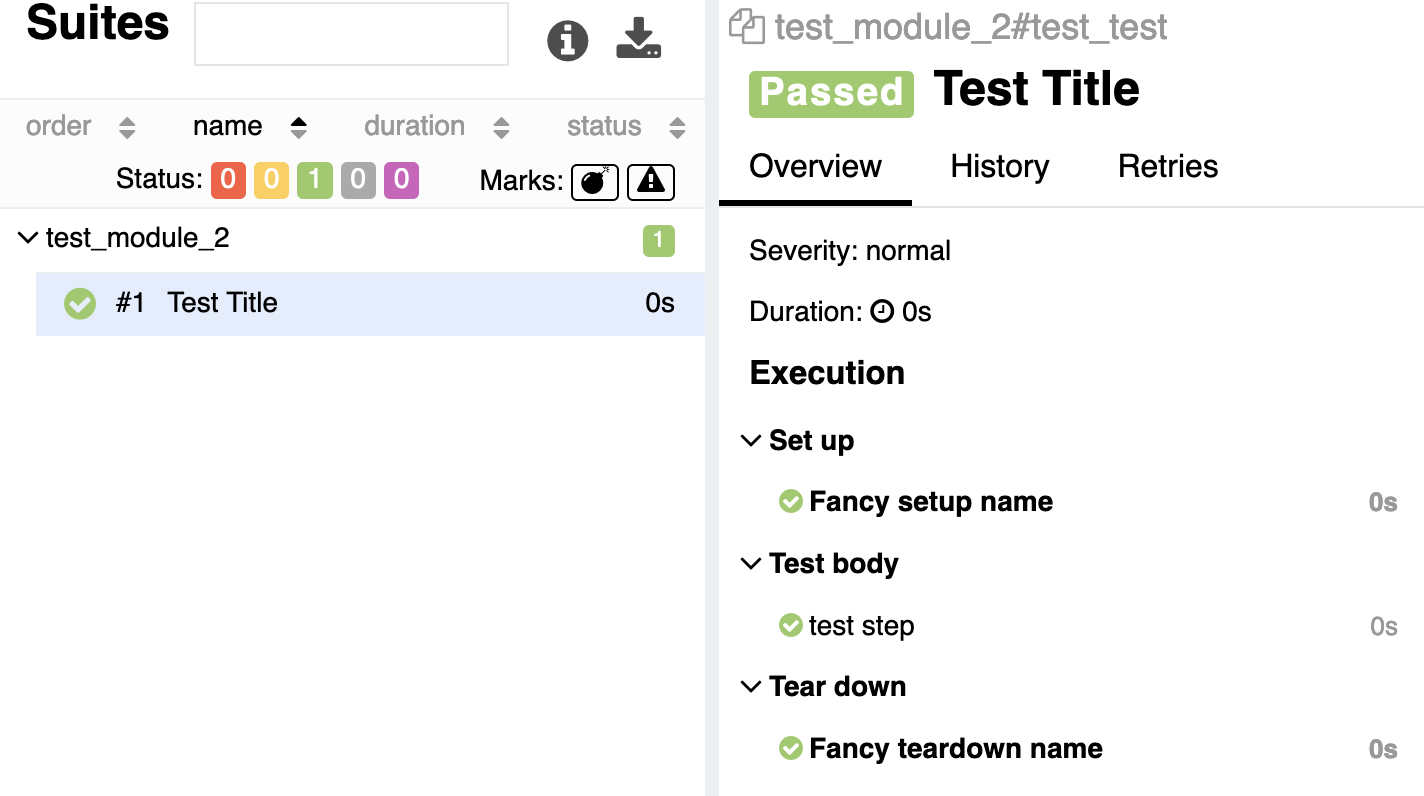
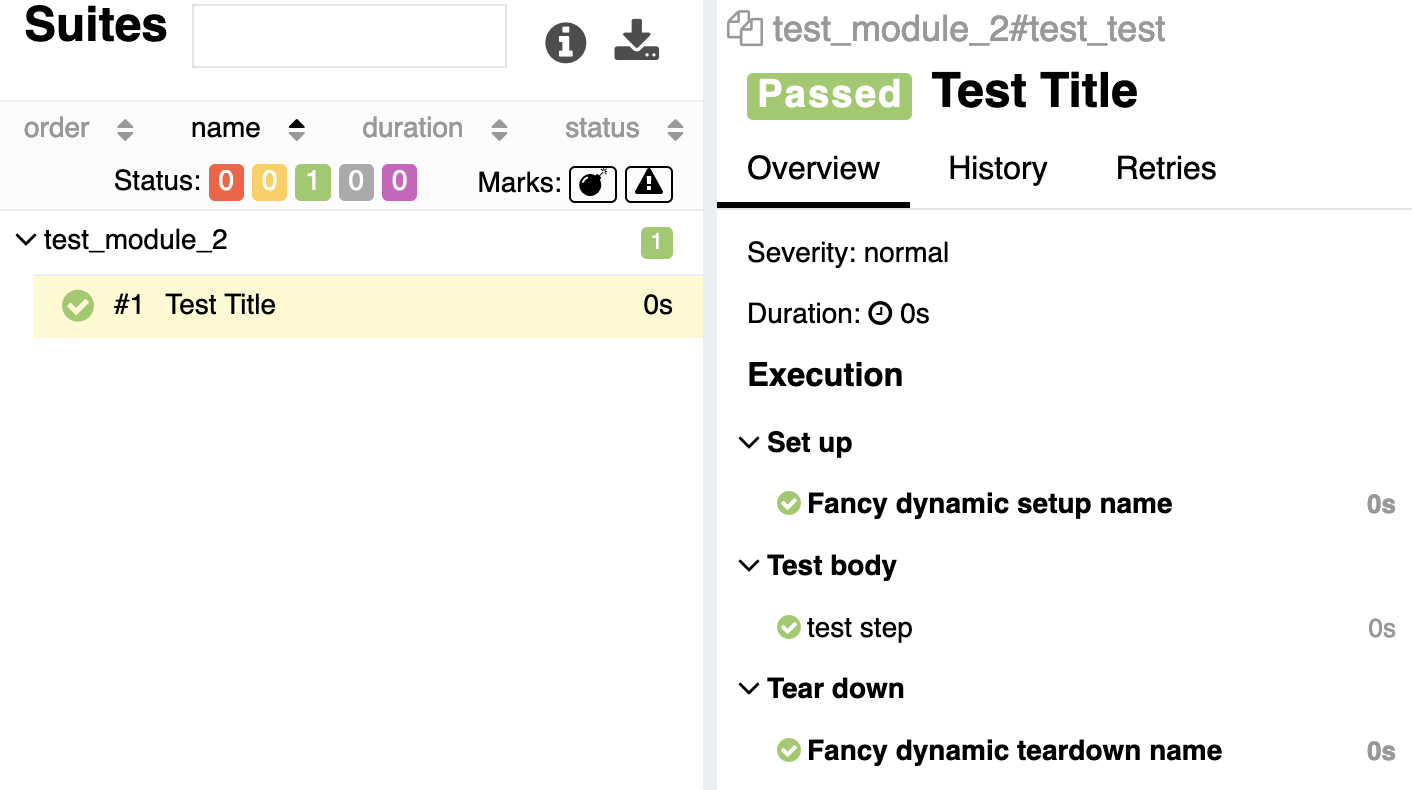
And moreover. You can dynamically change setup and teardown titles for fixtures.
Only one restriction: dynamic hook must be used inside the fixture's body.
import pytest
import glamor as allure


@pytest.fixture
def fixture():
    yield
    allure.dynamic.title.setup('Fancy dynamic setup name')
    allure.dynamic.title.teardown('Fancy dynamic teardown name')


@allure.title('Test Title')
def test_test(fixture):
    with allure.step('test step'):
        pass
Hide setup and teardown
Have you ever wanted to conceal setup and/or teardown from 'allure' report?
Well, now you can.
import pytest
import glamor as allure


@pytest.fixture
@allure.title.setup(hidden=True)
@allure.title.teardown('Teardown ONE')
def fixture():
    yield


@pytest.fixture
@allure.title.setup('Setup TWO')
def fixture2():
    yield

    if True:
        allure.dynamic.title.teardown(hidden=True)


@allure.title('Test Title')
def test_test(fixture, fixture2):
    with allure.step('test step'):
        pass
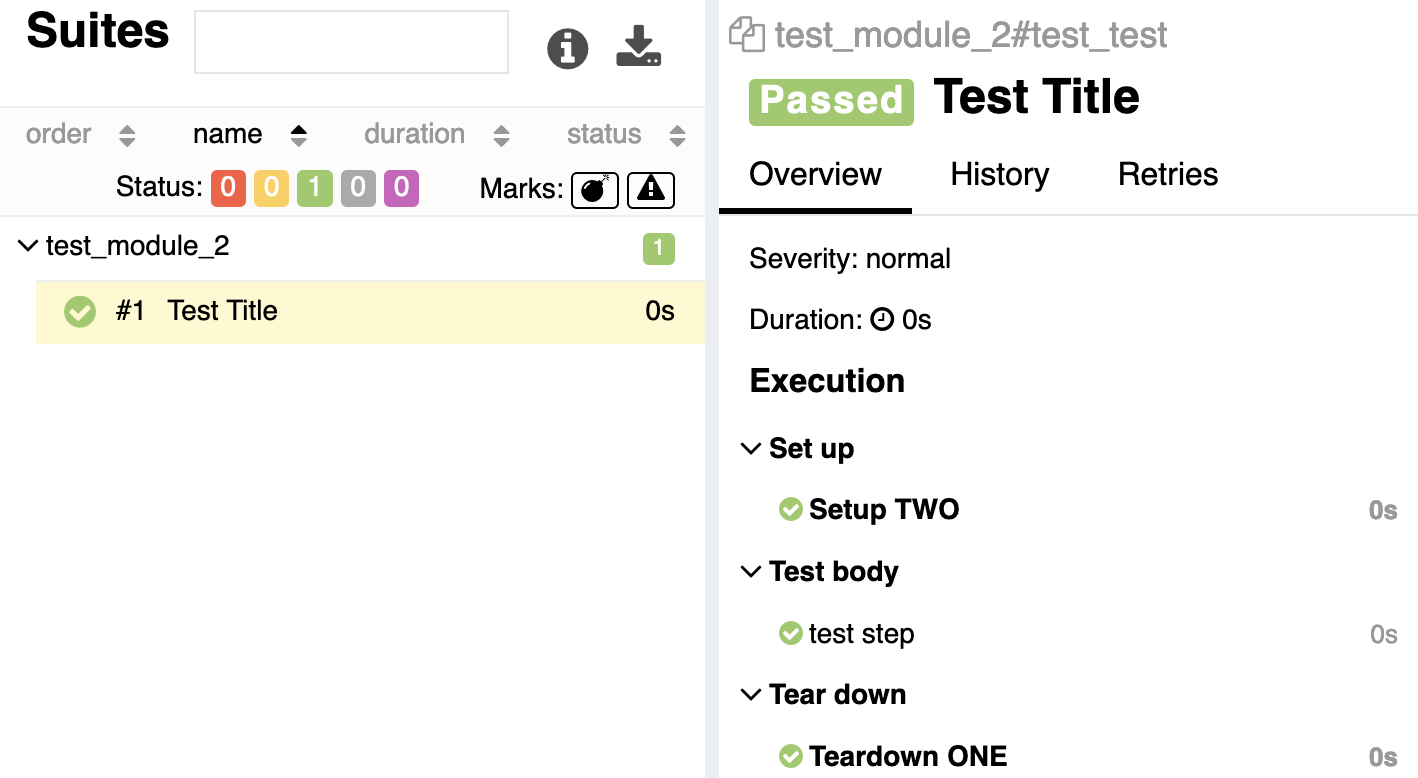
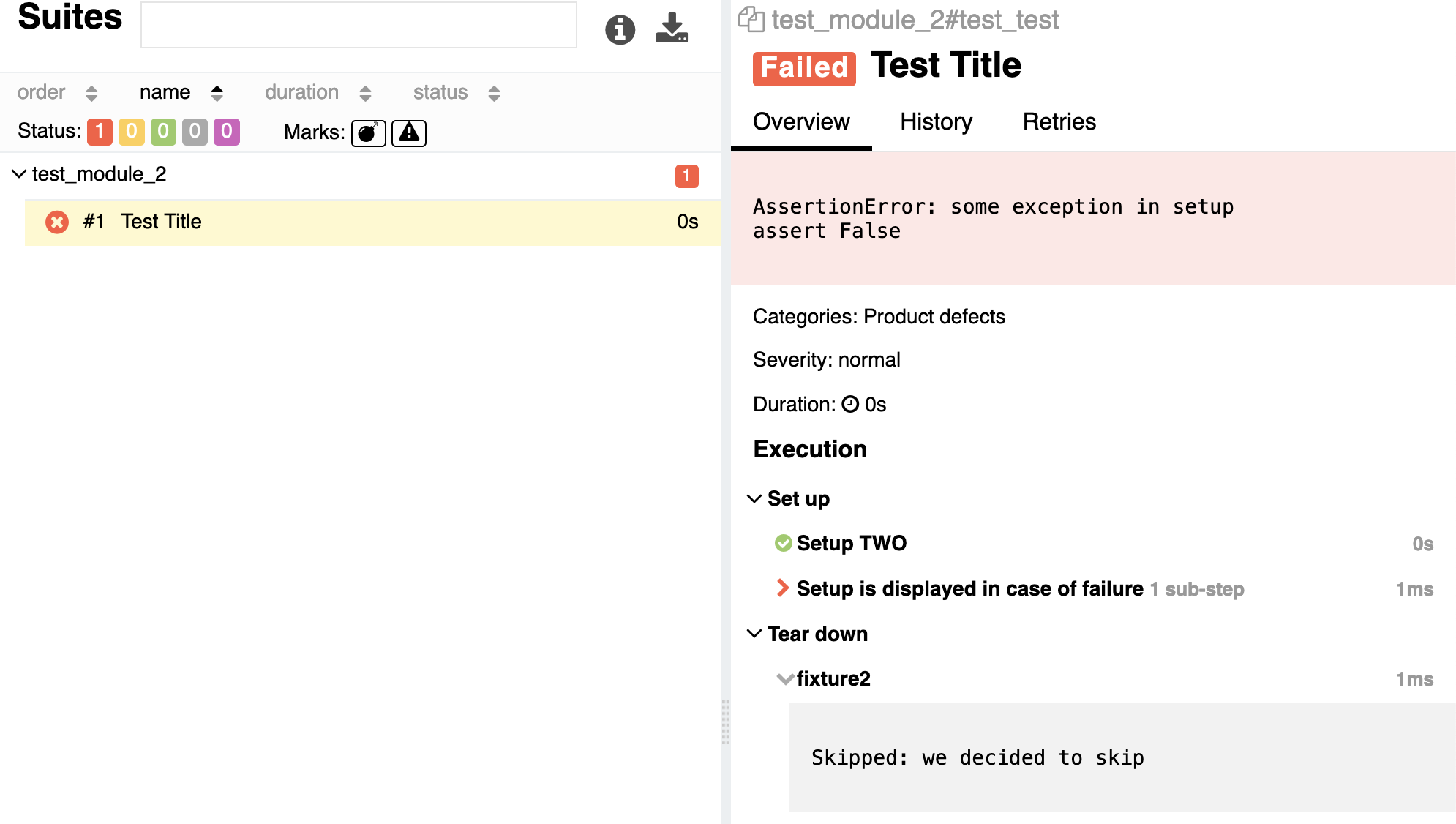
But! If any exception (including Skipped) is raised, then hidden setups and teardowns are shown forcefully.
import pytest
import glamor as allure


@pytest.fixture
@allure.title.setup('Setup is displayed in case of failure', hidden=True)
@allure.title.teardown('Teardown ONE')
def fixture():
    with allure.step('fail step'):
        assert False, 'some exception in setup'
    yield


@pytest.fixture
@allure.title.setup('Setup TWO')
def fixture2():
    yield

    if True:
        allure.dynamic.title.teardown(hidden=True)
    pytest.skip('we decided to skip')


@allure.title('Test Title')
def test_test(fixture2, fixture):
    with allure.step('test step'):
        pass
Display 'scope' and 'autouse' fixture parameters in fixture title
Sometimes it is useful to know which scope this fixture is, and was it called manually or autoused.
Just call the function once per runtime include_scope_in_title before pytest starts execution of any hook (during modules initialization).
import pytest
import glamor as allure

allure.include_scope_in_title('before', autouse=True)


@pytest.fixture(scope='session', autouse=True)
@allure.title.setup('Fancy setup name')
def fixture():
    yield


@pytest.fixture
@allure.title.setup('Setup TWO')
def fixture2():
    yield


@allure.title('Test Title')
def test_test(fixture2):
    with allure.step('test step'):
        pass
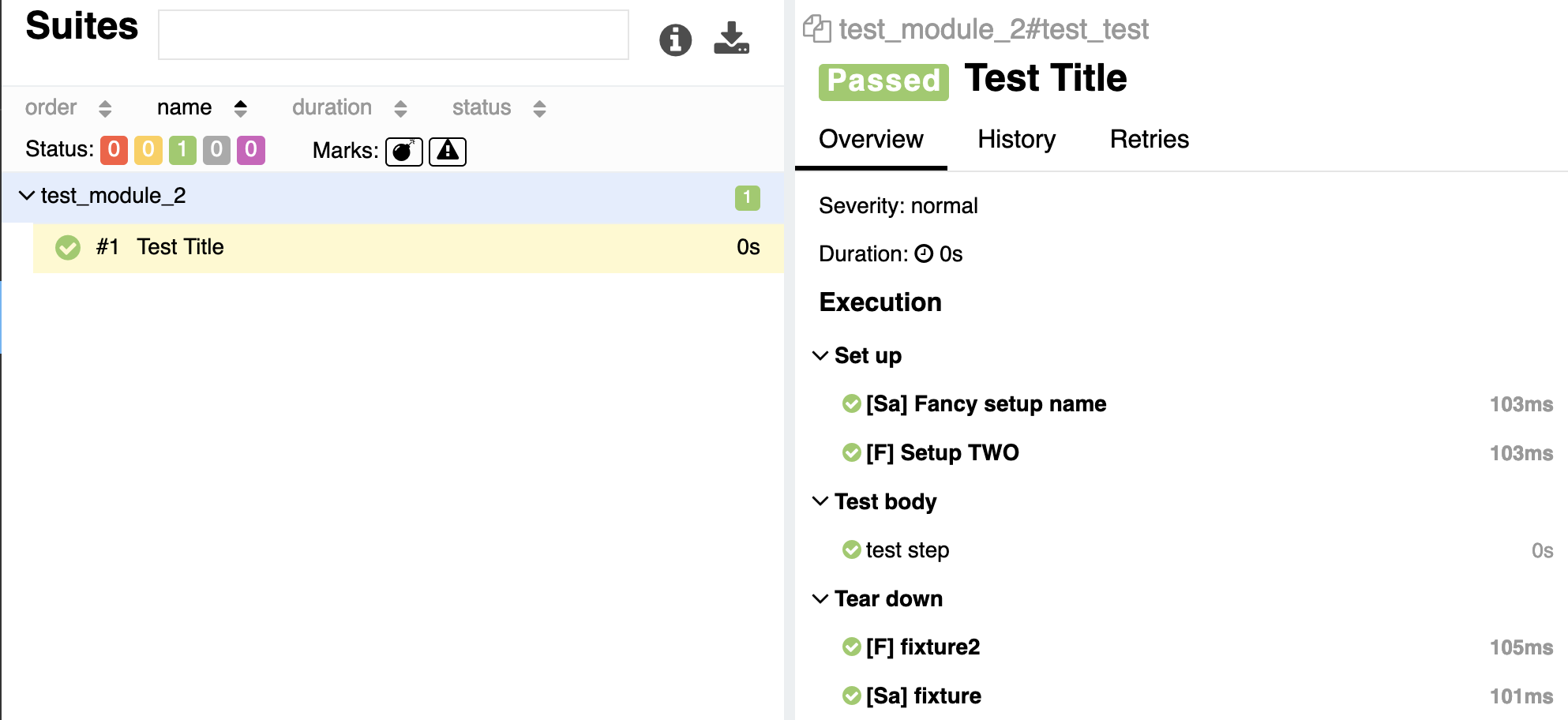
The big letter is the first letter of the scope name (one of 'function', 'class', 'module', 'package', 'session'). The lower letter 'a' says that fixture was autoused.
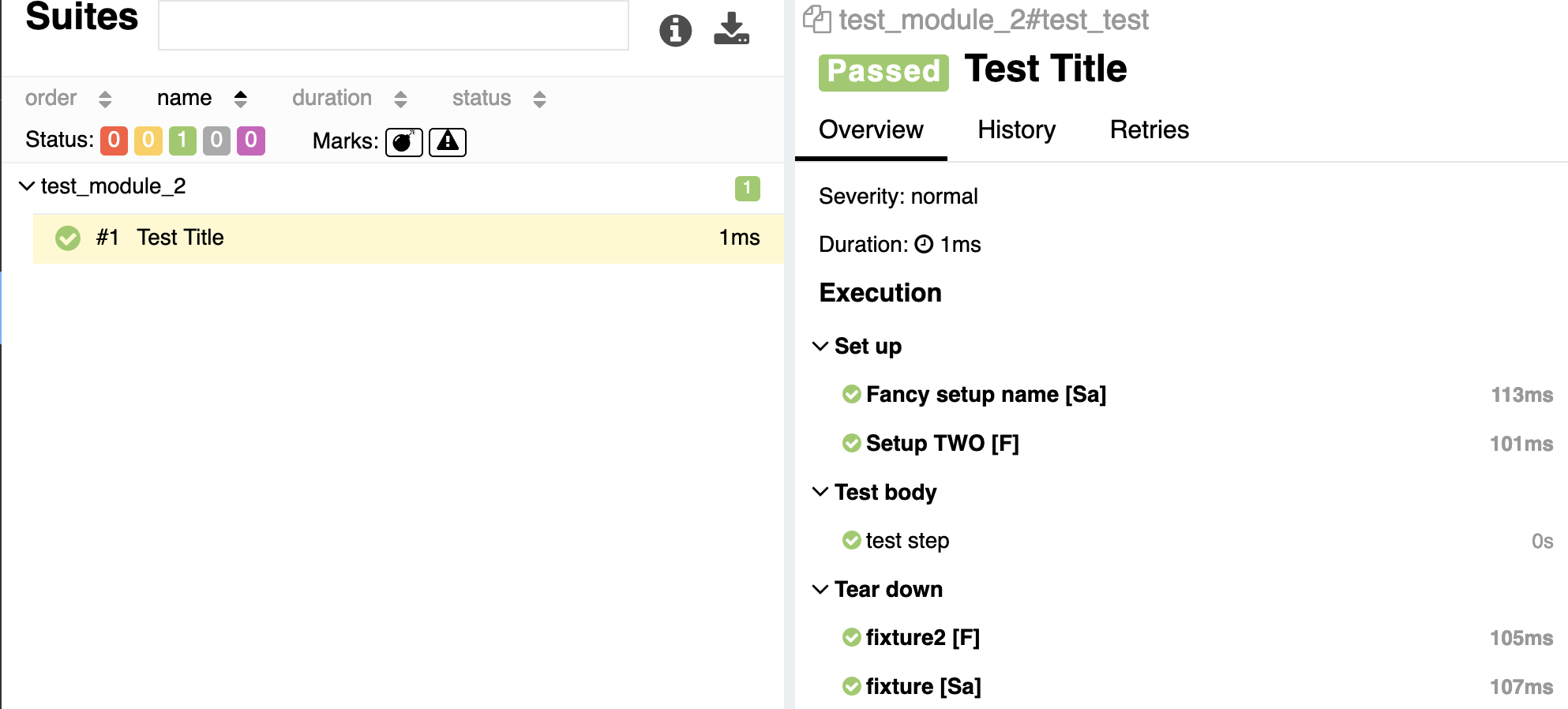
If you want to put this information to the end of the title, then just call the function as allure.include_scope_in_title('after', autouse=True) and you get:
No more '::0' in teardown title
Have you noticed '::0' in raw teardown titles? No? That's because glamor strips such ending if fixture has not more than one finalizer.
Add allure.step titles into logging
Have you ever tried to understand when the particular allure step started looking at tests' logs? Of course, you have!
With "glamor" you can register you own logger, which is considered to print steps' titles into output.
import logging
import sys
import glamor as allure


# Create logger
logger = logging.getLogger('MyLogger')
logger.setLevel(logging.INFO)

fmt = logging.Formatter('[%(levelname)s] %(message)s')

handler = logging.StreamHandler(stream=sys.stdout)
handler.setLevel(logging.INFO)
handler.setFormatter(fmt)

logger.addHandler(handler)

# Register logger in allure
allure.logging_allure_steps(logger)


# Execute tests' code
logger.info("start message")

with allure.step("step message"):
    pass

logger.error("end message")
[INFO] start message
[STEP] step message
[ERROR] end message
logging_allure_steps should be called only once - during modules initialization. But who am I to restrict you?
If you need you can turn off this behaviour by calling the function with None instead of logging.Logger instance.
What else?
import glamor as allure

allure.listener  # access to AllureListener plugin instance
allure.reporter  # alias for allure.listener.allure_logger
allure.pytest_config  # access to pytest.Config instance. alias for allure.listener.config
Also via 'glamor' module you get direct access to many objects from:
- allure_commons
- allure_commons._allure
- allure_commons.model2
- allure_commons.types
- allure_commons.utils
- allure_pytest.utils
Pleasant bonus 🎁
Type import pitest as pytest instead of import pytest and get direct access to a bunch of objects from pytest and _pytest modules.
How can I help?
Your contribution is highly appreciated. Please read CONTRIBUTING.md before you start.
Release history Release notifications | RSS feed


Download files
Download the file for your platform. If you're not sure which to choose, learn more about installing packages.
Source Distribution
Built Distribution
Filter files by name, interpreter, ABI, and platform.
If you're not sure about the file name format, learn more about wheel file names.
Copy a direct link to the current filters
File details
Details for the file pytest_glamor_allure-0.0.15.tar.gz.
File metadata
- Download URL: pytest_glamor_allure-0.0.15.tar.gz
- Upload date:
- Size: 22.1 kB
- Tags: Source
- Uploaded using Trusted Publishing? No
- Uploaded via: twine/6.2.0 CPython/3.9.25
File hashes
| Algorithm | Hash digest | |
|---|---|---|
| SHA256 |
d474b28d176b85c41d64f3414ee76e91cf1d51689b577e8911f4c57c07644c7b
|
|
| MD5 |
4c1f01c677c2180facf7a07b6a84c447
|
|
| BLAKE2b-256 |
eb06cc2fb01075ebbff872c11555746004232c8a59b67131ff3a741a6bee426e
|
File details
Details for the file pytest_glamor_allure-0.0.15-py3-none-any.whl.
File metadata
- Download URL: pytest_glamor_allure-0.0.15-py3-none-any.whl
- Upload date:
- Size: 12.5 kB
- Tags: Python 3
- Uploaded using Trusted Publishing? No
- Uploaded via: twine/6.2.0 CPython/3.9.25
File hashes
| Algorithm | Hash digest | |
|---|---|---|
| SHA256 |
0883a5c3daa53c238ab21c50d0bf271959b15ca77efd73880eb7ccec22e24021
|
|
| MD5 |
72e804362282d5005bc05ecf1be305df
|
|
| BLAKE2b-256 |
f438bde3816b70a27c9e015706569f36edf4514c4ab218305fb27eb445b64f91
|






