
A pytest plugin that generates self-contained HTML automation reports with visual charts.
Verified details
These details have been verified by PyPIProject links
GitHub Statistics
Maintainers

Project description
pytest-automation-report
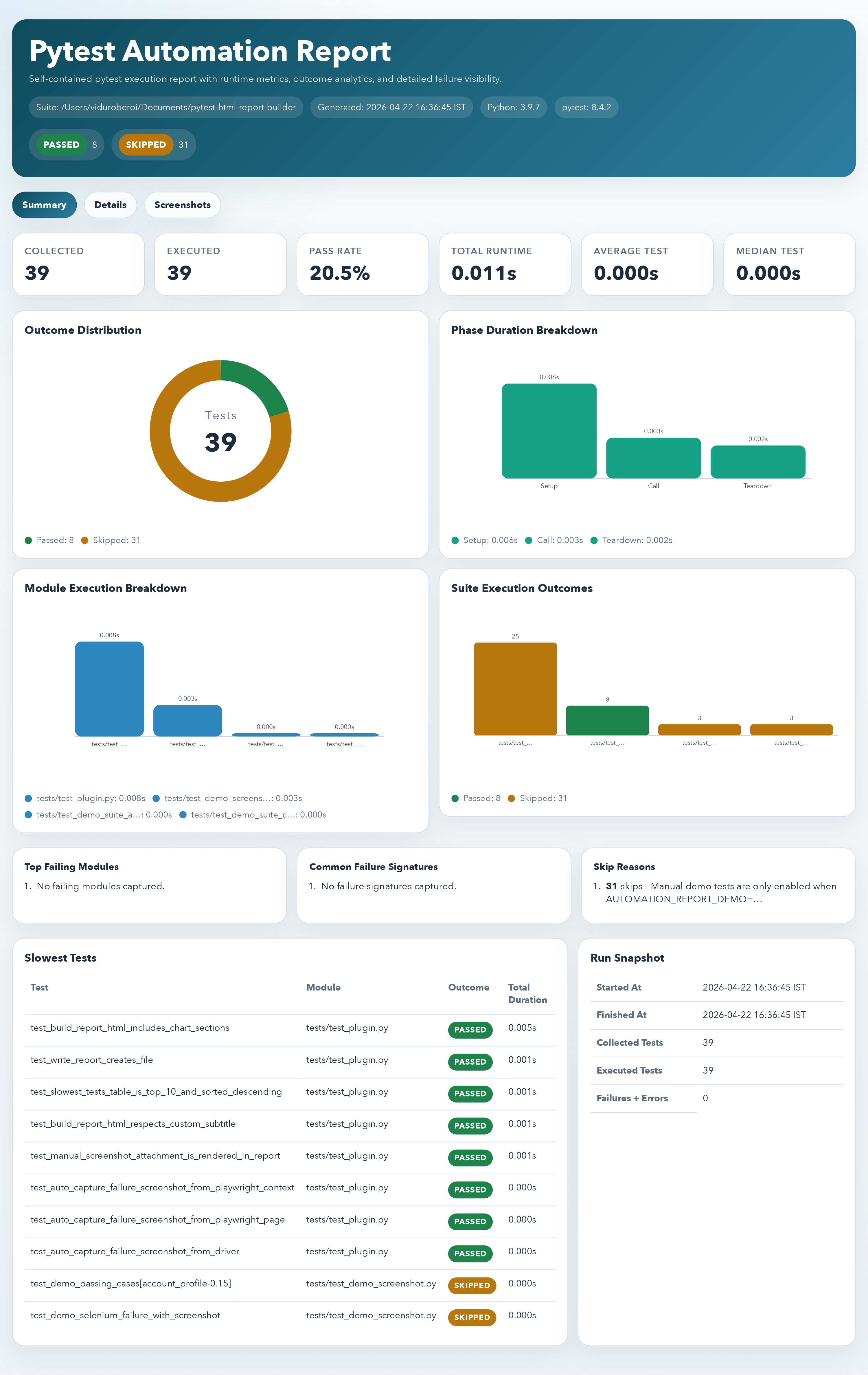
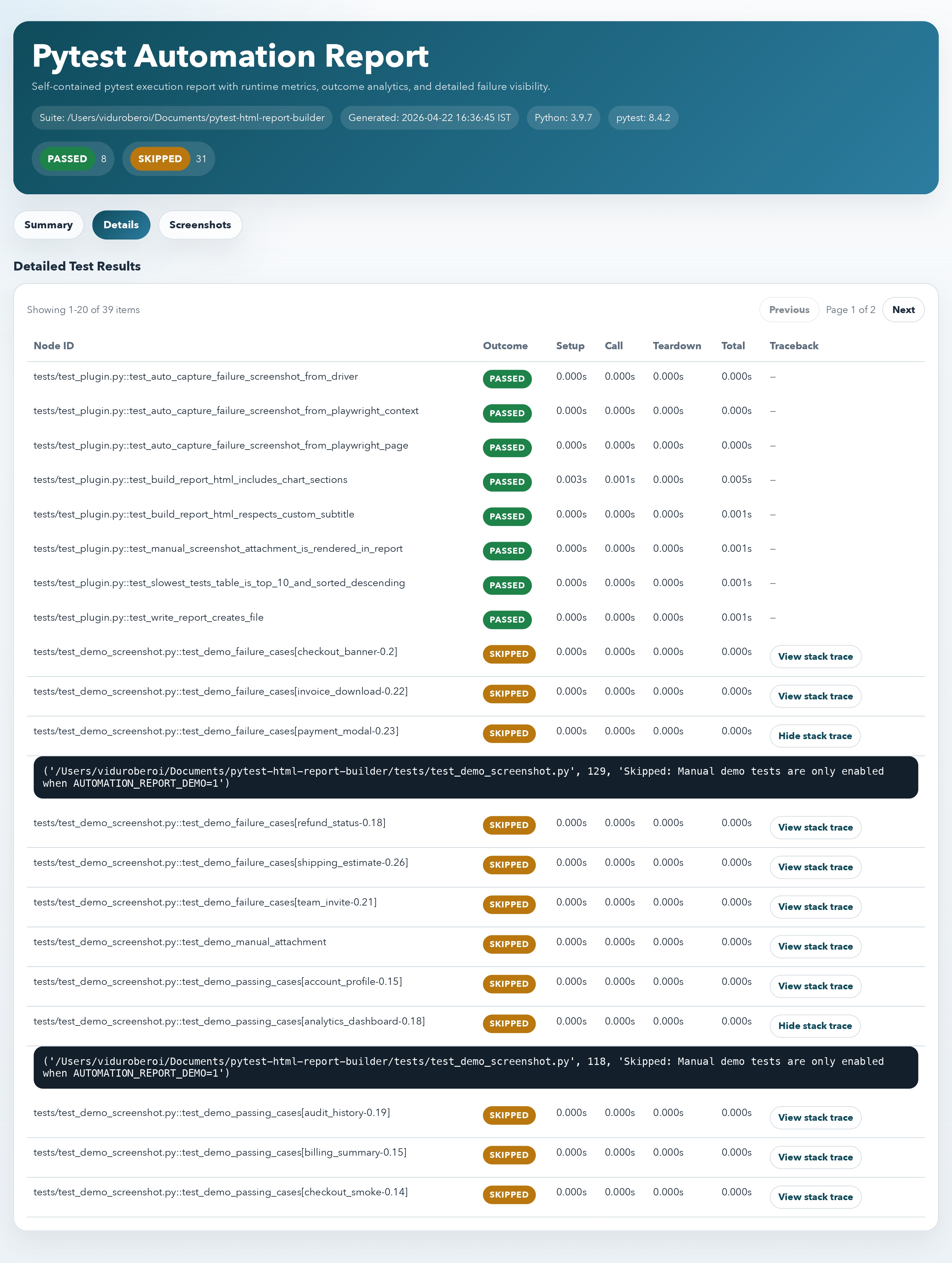
pytest-automation-report is a lightweight pytest plugin that creates a self-contained HTML execution report after a test run. It works with plain pytest suites as well as UI suites built on Selenium or Playwright. The report includes:
- summary cards for key test metrics
- outcome distribution charts
- execution phase timing charts
- slowest test visualizations
- module-level execution breakdown
- embedded failure screenshots
- failure details and a complete test result table
Preview
Dashboard summary
Generated from the demo report produced by tests/test_demo_screenshot.py.
Failure details with screenshots
Installation
pip install -e .
Usage
Generate a report on demand:
pytest --automation-report=reports/automation-report.html
Customize the report title:
pytest \
  --automation-report=reports/automation-report.html \
  --automation-report-title="Nightly Regression Dashboard"
You can also configure a default output path in pytest.ini:
[pytest]
automation_report = reports/automation-report.html
automation_report_title = CI Automation Report
What the Report Includes
- KPI summary cards for total tests, pass rate, total runtime, and average runtime
- a donut chart showing overall test outcomes
- a bar chart for total phase durations across setup, call, and teardown
- a bar chart for the slowest tests in the run
- a bar chart highlighting the busiest test modules
- embedded screenshots for failed UI tests
- failure cards with stack traces
- a detailed test results table
Example Integration
Once installed, the plugin is discovered automatically by pytest through the pytest11 entry point. That means your existing test suite can use it without changing test code.
If you prefer local plugin loading during development, you can also enable it explicitly:
# conftest.py
pytest_plugins = ["pytest_automation_report.plugin"]
UI Screenshot Support
The plugin supports screenshots in two ways:
- automatic capture on test failure from supported Selenium and Playwright fixtures
- manual screenshot attachment from the test itself through the
automation_reportfixture
Automatic failure screenshots
Selenium WebDriver fixtures named driver, browser, selenium, or webdriver are detected automatically when they expose get_screenshot_as_base64() or get_screenshot_as_png().
If your test already uses a Selenium fixture called driver, no extra code is required beyond generating the report:
def test_checkout(driver):
    driver.get("https://example.com/checkout")
    assert "Success" in driver.page_source
When that test fails during the call phase, the plugin will try to capture a screenshot and embed it directly in the HTML report.
Playwright sync fixtures named page, playwright_page, context, or browser_context are also supported. For context fixtures, the plugin captures the most recently opened page.
def test_checkout(page):
    page.goto("https://example.com/checkout")
    assert page.get_by_text("Success").is_visible()
When that test fails during the call phase, the plugin will call page.screenshot(type="png") and embed the image into the report.
Manual screenshot attachment
Use the built-in automation_report fixture when you want explicit control over what gets attached:
def test_checkout(driver, automation_report):
    driver.get("https://example.com/checkout")

    if "Success" not in driver.page_source:
        automation_report(
            image_base64=driver.get_screenshot_as_base64(),
            name="Checkout failure state",
        )

    assert "Success" in driver.page_source
You can also attach raw bytes:
automation_report(image_bytes=driver.get_screenshot_as_png(), name="Current page")
The same manual helper works with Playwright:
def test_checkout(page, automation_report):
    page.goto("https://example.com/checkout")
    automation_report(image_bytes=page.screenshot(type="png"), name="Checkout state")
    assert page.get_by_text("Success").is_visible()
Helper import option
If you prefer not to use the fixture, you can also call the helper directly:
from pytest_automation_report.plugin import attach_screenshot


def test_checkout(driver, request):
    attach_screenshot(
        request,
        image_base64=driver.get_screenshot_as_base64(),
        name="Checkout failure state",
    )
Project details
Verified details
These details have been verified by PyPIProject links
GitHub Statistics
Maintainers
Release history Release notifications | RSS feed


Download files
Download the file for your platform. If you're not sure which to choose, learn more about installing packages.
Source Distribution
Built Distribution
Filter files by name, interpreter, ABI, and platform.
If you're not sure about the file name format, learn more about wheel file names.
Copy a direct link to the current filters
File details
Details for the file pytest_html_report_builder-0.1.6.tar.gz.
File metadata
- Download URL: pytest_html_report_builder-0.1.6.tar.gz
- Upload date:
- Size: 18.4 kB
- Tags: Source
- Uploaded using Trusted Publishing? Yes
- Uploaded via: twine/6.1.0 CPython/3.13.12
File hashes
| Algorithm | Hash digest | |
|---|---|---|
| SHA256 |
6426248edd56f1dff981607e4fe493c8b1d1e9b930a3e971346027c6eb942e4c
|
|
| MD5 |
2f15195b75e51f674152bc5abf9c4de6
|
|
| BLAKE2b-256 |
94875c53da567c5fbf2fccc1761079da2010579bd6ba7bcc39bb8b25a06fb4cf
|
Provenance
The following attestation bundles were made for pytest_html_report_builder-0.1.6.tar.gz:
Publisher:
publish.yml on viduroberoi/pytest-html-report-builder
-
Statement:
-
Statement type:
https://in-toto.io/Statement/v1 -
Predicate type:
https://docs.pypi.org/attestations/publish/v1 -
Subject name:
pytest_html_report_builder-0.1.6.tar.gz -
Subject digest:
6426248edd56f1dff981607e4fe493c8b1d1e9b930a3e971346027c6eb942e4c - Sigstore transparency entry: 1351755139
- Sigstore integration time:
-
Permalink:
viduroberoi/pytest-html-report-builder@a913a19aa2c8e7ea8153327ef82a5b10f1a098e4 -
Branch / Tag:
refs/tags/v0.1.6 - Owner: https://github.com/viduroberoi
-
Access:
public
-
Token Issuer:
https://token.actions.githubusercontent.com -
Runner Environment:
github-hosted -
Publication workflow:
publish.yml@a913a19aa2c8e7ea8153327ef82a5b10f1a098e4 -
Trigger Event:
release
-
Statement type:
File details
Details for the file pytest_html_report_builder-0.1.6-py3-none-any.whl.
File metadata
- Download URL: pytest_html_report_builder-0.1.6-py3-none-any.whl
- Upload date:
- Size: 13.7 kB
- Tags: Python 3
- Uploaded using Trusted Publishing? Yes
- Uploaded via: twine/6.1.0 CPython/3.13.12
File hashes
| Algorithm | Hash digest | |
|---|---|---|
| SHA256 |
2b4c2cced2a67a4bf09988706ea0aa193d9bb5af900e9262af3f4a8b41b621d4
|
|
| MD5 |
e8f20247acb579df4c2f943a8f40cf14
|
|
| BLAKE2b-256 |
7aa94f66be128a1ce1217c21abfc98d3aa5eadc1a47384b75a729d42d8d4bfb5
|
Provenance
The following attestation bundles were made for pytest_html_report_builder-0.1.6-py3-none-any.whl:
Publisher:
publish.yml on viduroberoi/pytest-html-report-builder
-
Statement:
-
Statement type:
https://in-toto.io/Statement/v1 -
Predicate type:
https://docs.pypi.org/attestations/publish/v1 -
Subject name:
pytest_html_report_builder-0.1.6-py3-none-any.whl -
Subject digest:
2b4c2cced2a67a4bf09988706ea0aa193d9bb5af900e9262af3f4a8b41b621d4 - Sigstore transparency entry: 1351755236
- Sigstore integration time:
-
Permalink:
viduroberoi/pytest-html-report-builder@a913a19aa2c8e7ea8153327ef82a5b10f1a098e4 -
Branch / Tag:
refs/tags/v0.1.6 - Owner: https://github.com/viduroberoi
-
Access:
public
-
Token Issuer:
https://token.actions.githubusercontent.com -
Runner Environment:
github-hosted -
Publication workflow:
publish.yml@a913a19aa2c8e7ea8153327ef82a5b10f1a098e4 -
Trigger Event:
release
-
Statement type:






