
Custom HTML report plugin for Pytest with charts and tables

Project description
PYTEST-HTMLX





pytest-htmlx is a plugin for pytest that generate beautiful and customizable HTML reports for your pytest test suite with ease.
This package automatically creates a detailed HTML report after running your tests, helping you better visualize test results, errors, and logs.
📦 Installation
Install it via pip:
pip install pytest-htmlx
🚀 Usage
Simply run your tests with the --htmlx flag:
pytest --htmlx
This generates a report named report.html in the current directory.
To specify a custom report file path:
pytest --htmlx=results/my-report.html
✨ Features
- Interactive, modern HTML report
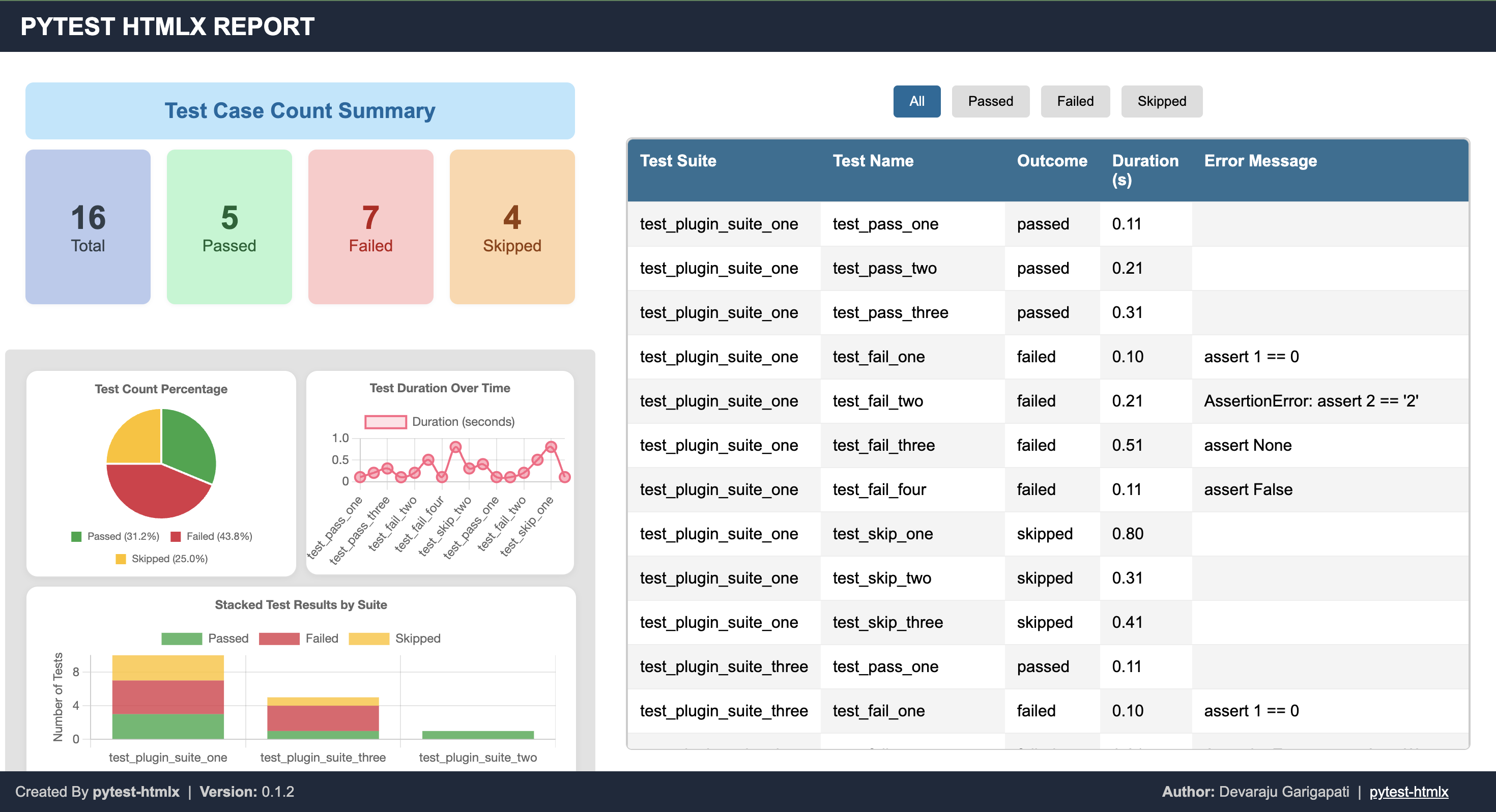
- Summary of passed/failed/skipped tests
- Stack traces and log capture
📅 Future Releases
We’re working on exciting new capabilities for pytest-htmlx to make test reporting even more powerful:
- 📷 Screenshot Support for UI Tests — automatically capture and embed screenshots for Selenium, Playwright, or other UI automation test failures.
- 📝 Test Log Embedding — include detailed per-test logs inside the HTML report for easier debugging without switching between the terminal and report.
- 📊 Rich Visualizations — add trend charts and test run metrics over time.
💡 Feature suggestions are always welcome — submit ideas via our GitHub Issues.
📸 HTML Report Screenshot
Below is an example of what the HTML report looks like:
📝 License
This project is licensed under the MIT License.
🙌 Contributing
Pull requests are welcome! For major changes, please open an issue first to discuss what you would like to change.
🔗 Links
- PyPI: https://pypi.org/project/pytest-htmlx/
- Source Code: https://github.com/devarajug/pytest-htmlx
- Issues: GitHub Issue Tracker


Download files
Download the file for your platform. If you're not sure which to choose, learn more about installing packages.
Source Distribution
Built Distribution
Filter files by name, interpreter, ABI, and platform.
If you're not sure about the file name format, learn more about wheel file names.
Copy a direct link to the current filters
File details
Details for the file pytest_htmlx-0.3.4.tar.gz.
File metadata
- Download URL: pytest_htmlx-0.3.4.tar.gz
- Upload date:
- Size: 11.1 kB
- Tags: Source
- Uploaded using Trusted Publishing? No
- Uploaded via: twine/6.2.0 CPython/3.11.13
File hashes
| Algorithm | Hash digest | |
|---|---|---|
| SHA256 |
96fbcda7c55e497d181556dbb1f8f62cb0c1b1486dc045bb52a537dad8e28d44
|
|
| MD5 |
a52c79fa986b1c5ac7ba663858f27def
|
|
| BLAKE2b-256 |
87f2a77ee7b7c3d0d9f462f3bdd40369dc850a62dbc3cbdd53c7e30ffdad0b7d
|
File details
Details for the file pytest_htmlx-0.3.4-py3-none-any.whl.
File metadata
- Download URL: pytest_htmlx-0.3.4-py3-none-any.whl
- Upload date:
- Size: 10.0 kB
- Tags: Python 3
- Uploaded using Trusted Publishing? No
- Uploaded via: twine/6.2.0 CPython/3.11.13
File hashes
| Algorithm | Hash digest | |
|---|---|---|
| SHA256 |
ee03d077acf850cd90d33fb695689f96c998c515c61e571c3103b00ce880ade1
|
|
| MD5 |
8f4b32987e8007e627619402eebe29e4
|
|
| BLAKE2b-256 |
3b68fc44e2a471593e6893a1370a9d415a6aa75091be102bcf146c0391c14b12
|






