

pytest-mongo




What is this?
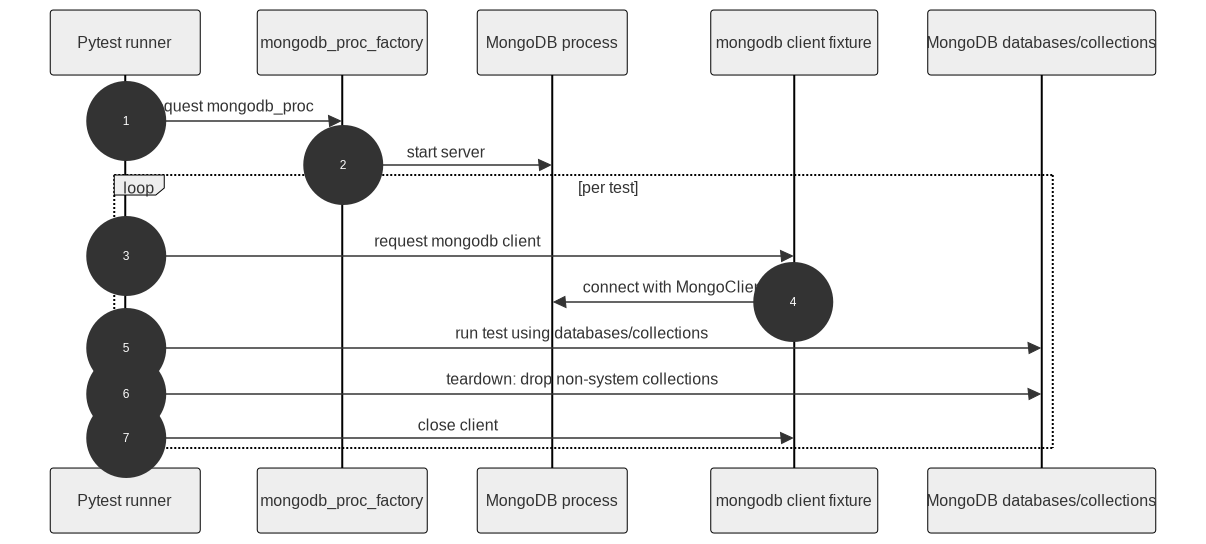
This is a pytest plugin that helps you test code that relies on a running MongoDB database. It provides fixtures for a MongoDB process and client.
How to use
Runtime requirements are defined in pyproject.toml.
The plugin contains three fixtures:
mongodb - a function-scoped client fixture that cleans MongoDB at the end of each test.
mongo_proc - a session-scoped fixture that starts a MongoDB instance on first use and stops it at the end of the test session.
mongo_noproc - a no-process fixture that connects to an already running MongoDB instance. For example, on dockerized test environments or CI providing MongoDB services.
Simply include one of these fixtures in your test or fixture list.
Both mongo_proc and mongo_noproc support authentication via the username, password, and auth_source arguments. When username is passed to mongo_proc, mongod is started with --auth and the user is created via the MongoDB localhost exception, so subsequent connections authenticate with that account. The mongo_noproc fixture additionally accepts tls and a full uri for connecting to existing servers.
You can also create additional MongoDB client and process fixtures if you need to:
from pytest_mongo import factories

mongo_my_proc = factories.mongo_proc(port=None)
mongo_my = factories.mongodb('mongo_my_proc')Connecting to an existing MongoDB database
Some projects use already running MongoDB servers (e.g., on docker instances). To connect to them, use the mongo_noproc fixture.
mongo_external = factories.mongodb('mongo_noproc')By default, the mongo_noproc fixture connects to a MongoDB instance on port 27017. Standard configuration options apply to it.
The mongo_noproc fixture also supports authenticated and TLS connections, as well as connecting via a full connection URI:
mongo_auth_proc = factories.mongo_noproc(
    host="mongo.example.com",
    port=27017,
    username="user",
    password="secret",
    auth_source="admin",
    tls=True,
)
mongo_auth = factories.mongodb("mongo_auth_proc")
When uri is provided, it takes precedence over the host/port/credential arguments:
mongo_uri_proc = factories.mongo_noproc(
    uri="mongodb://<user>:<password>@mongo.example.com:27017/?authSource=admin"
)
Testing against a replica set
Transactions and change streams need a replica set or a sharded cluster, and a standalone MongoDB server rejects them. A single-member replica set running in Docker is enough for tests. Start the container with a replica set name, then initiate the set once:
docker run -d --name mongo-rs -p 127.0.0.1:27017:27017 mongo:8.0 --replSet rs0 --bind_ip_all
docker exec mongo-rs mongosh --quiet --eval \
    'rs.initiate({_id: "rs0", members: [{_id: 0, host: "localhost:27017"}]})'
rs.initiate fails while mongod is still starting, so retry it a limited number of times and fail the setup if it never succeeds. In Docker Compose or CI, run it as its own step once the container has started, and keep the health check for readiness only.
Connect to the set through mongo_noproc with a URI naming the replica set:
mongo_rs = factories.mongodb("mongo_noproc")[pytest]
mongo_uri = mongodb://127.0.0.1:27017/?replicaSet=rs0&directConnection=truedirectConnection=true keeps the client on the address in the URI. Without it, the client switches to the member address stored in the replica set configuration, which is the container’s own view of itself and is not reachable when the container port is mapped to a different port on the host.
Managed databases
The mongodb fixture manages one database - test by default - and empties it at the end of each test by dropping its non-system.* collections. Nothing else on the instance is touched, so preseeded data survives and tests running in parallel against a shared MongoDB instance do not clear each other’s databases.
Point the fixture at a different database with dbname:
from pytest_mongo import factories

mongo_my = factories.mongodb("mongo_proc", dbname="orders")
A single MongoClient can reach every database on the server, so one test may legitimately use several. Name the further ones in dbs and they are managed alongside dbname:
mongo_my = factories.mongodb("mongo_proc", dbname="orders", dbs=["customers"])dbs is optional, and dbname on its own is enough for most suites. Collections are what gets dropped, so the fixture needs no privileges beyond the ones it has always needed. admin, config and local are MongoDB’s own databases and cannot be managed.
When several xdist workers share one MongoDB instance, give each worker its own database name so they never clear each other’s data:
import os

from pytest_mongo import factories

worker = os.environ.get("PYTEST_XDIST_WORKER", "master")
mongo_my = factories.mongodb("mongo_noproc", dbname=f"orders-{worker}")
Configuration
You can define settings in three ways: fixture factory argument, command line option, and pytest.ini configuration option. You can pick which you prefer, but remember that these settings are handled in the following order:
Fixture factory argument
Command line option
Configuration option in your pytest.ini file
MongoDB server option |
Fixture factory argument |
Command line option |
pytest.ini option |
Applies to mongo_noproc |
Default |
|---|---|---|---|---|---|
Path to mongodb exec |
executable |
–mongo-exec |
mongo_exec |
no |
/usr/bin/mongod |
MongoDB host |
host |
–mongo-host |
mongo_host |
127.0.0.1 |
127.0.0.1 |
MongoDB port |
port |
–mongo-port |
port |
27017 |
random |
Port search count |
–mongo-port-search-count |
mongo_port_search_count |
5 |
||
Additional parameters |
params |
–mongo-params |
mongo_params |
no |
|
MongoDB client’s time zone awareness (override with –mongo-tz-aware/–no-mongo-tz-aware) |
tz_aware |
–mongo-tz-aware, –no-mongo-tz-aware |
mongo_tz_aware |
no |
False |
Username for authentication |
username |
–mongo-username |
mongo_username |
yes |
|
Password for authentication |
password |
–mongo-password |
mongo_password |
yes |
|
Authentication database (authSource) |
auth_source |
–mongo-auth-source |
mongo_auth_source |
yes |
admin |
Full MongoDB connection URI (takes precedence over host/port/credentials) |
uri (mongo_noproc only) |
–mongo-uri |
mongo_uri |
yes |
|
Enable TLS/SSL (override with –mongo-tls/–no-mongo-tls) |
tls (mongo_noproc only) |
–mongo-tls, –no-mongo-tls |
mongo_tls |
yes |
False |
Database the mongodb client fixture manages and empties after each test |
dbname (mongodb only) |
–mongo-dbname |
mongo_dbname |
yes |
test |
Further databases managed alongside dbname (optional) |
dbs (mongodb only) |
–mongo-dbs (repeatable) |
mongo_dbs |
yes |
Example usage:
pass it as an argument in your own fixture
mongo_proc = factories.mongo_proc(port=8888)pass additional mongod parameters via a single string
mongo_proc = factories.mongo_proc(
    params="--quiet --setParameter diagnosticDataCollectionEnabled=false"
)
use --mongo-port command line option when you run your tests
pytest tests --mongo-port=8888specify your port as mongo_port in your pytest.ini file.
To do so, put a line like the following under the [pytest] section of your pytest.ini:
[pytest]
mongo_port = 8888
Compatibility (tested)
CI covers MongoDB 7.0 and 8.0; other versions may work but aren’t tested.
Package resources
Bug tracker: https://github.com/dbfixtures/pytest-mongo/issues
1 maintainer

Metadata
1 maintainer
Release files for pytest-mongo 6.0.1
For a detailed explanation of source distributions (sdists) and built distributions (wheels), please see the package formats documentation.
Source distribution (sdist)
| File | Size | Uploaded | Provenance | Actions |
|---|---|---|---|---|
| pytest_mongo-6.0.1.tar.gz | 20.8 kB | With provenance | Details for pytest_mongo-6.0.1.tar.gz |
Built distribution (wheel)
| File | Interpreter | ABI | Platform | Actions Reset |
|---|---|---|---|---|
| pytest_mongo-6.0.1-py3-none-any.whl | Python 3 | none | any | Details for pytest_mongo-6.0.1-py3-none-any.whl |
Total release size: 39.8 kB
Release files / pytest_mongo-6.0.1.tar.gz
| Download URL | pytest_mongo-6.0.1.tar.gz |
|---|---|
| Size | 20.8 kB |
| Tags | Source |
|
SHA-256 checksum How to use checksums |
26585d6e2d0fafef78942211eb46f32be05bd9731ed5a597c59f4240dd2cc923
|
|
BLAKE2b-256 checksum How to use checksums |
ca0d985bd1693a6bbfb681dc37fd9c295e170f23ba2fa3818b3d85fcc3515108
|
| Upload date | |
|
Uploaded using Trusted Publishing? What is trusted publishing? |
Yes |
| Uploaded via |
twine/7.0.0 CPython/3.13.16
|
Provenance
Provenance describes where a file came from. On PyPI, provenance is shared via attestations, which provide a verifiable record of the build or publishing details. View details, limitations and caveats.


PyPI Publish Attestation
PyPI verified that this artifact, at this checksum, originated from the publisher listed below.
Signed by GitHub Actions, verified by PyPI on Nov 9, 2026.
Transparency logRelease files / pytest_mongo-6.0.1-py3-none-any.whl
| Download URL | pytest_mongo-6.0.1-py3-none-any.whl |
|---|---|
| Size | 19.1 kB |
| Tags | Python 3 |
|
SHA-256 checksum How to use checksums |
af1d47dff4becc9b0e18f82162881a897137d8ec56fa980d78a9041f23b0b394
|
|
BLAKE2b-256 checksum How to use checksums |
bd7736d86c4f695705fc70bb37228a36c7e011534a8876e7dcdfd0da88a8fdde
|
| Upload date | |
|
Uploaded using Trusted Publishing? What is trusted publishing? |
Yes |
| Uploaded via |
twine/7.0.0 CPython/3.13.16
|
Provenance
Provenance describes where a file came from. On PyPI, provenance is shared via attestations, which provide a verifiable record of the build or publishing details. View details, limitations and caveats.
PyPI Publish Attestation
PyPI verified that this artifact, at this checksum, originated from the publisher listed below.
Signed by GitHub Actions, verified by PyPI on Nov 9, 2026.
Transparency logSecurity for pytest-mongo 6.0.1
Provenance
Provenance describes where a file came from. On PyPI, provenance is shared via attestations, which provide a verifiable record of the build or publishing details. View details, limitations and caveats.
Full provenance
Both files in this release have been uploaded with provenance metadata.
Attestation for pytest_mongo-6.0.1.tar.gz
PyPI Publish Attestation
PyPI verified that this artifact, at this checksum, originated from the publisher listed below.
Signed by GitHub Actions, verified by PyPI on Nov 9, 2026.
Transparency logA note on package security
PyPI is a repository for distributing packages, not a service for auditing them. While third-party security researchers and our staff do their best to detect and remove malicious packages, PyPI cannot guarantee the quality, security or suitability of any given package.
To learn more about protecting yourself from malicious actors, visit our package security documentation.














