
MySQL process and client fixtures for pytest

Project description

pytest-mysql




What is this?
A pytest plugin for tests that rely on a running MySQL or MariaDB database. It provides process and client fixtures.
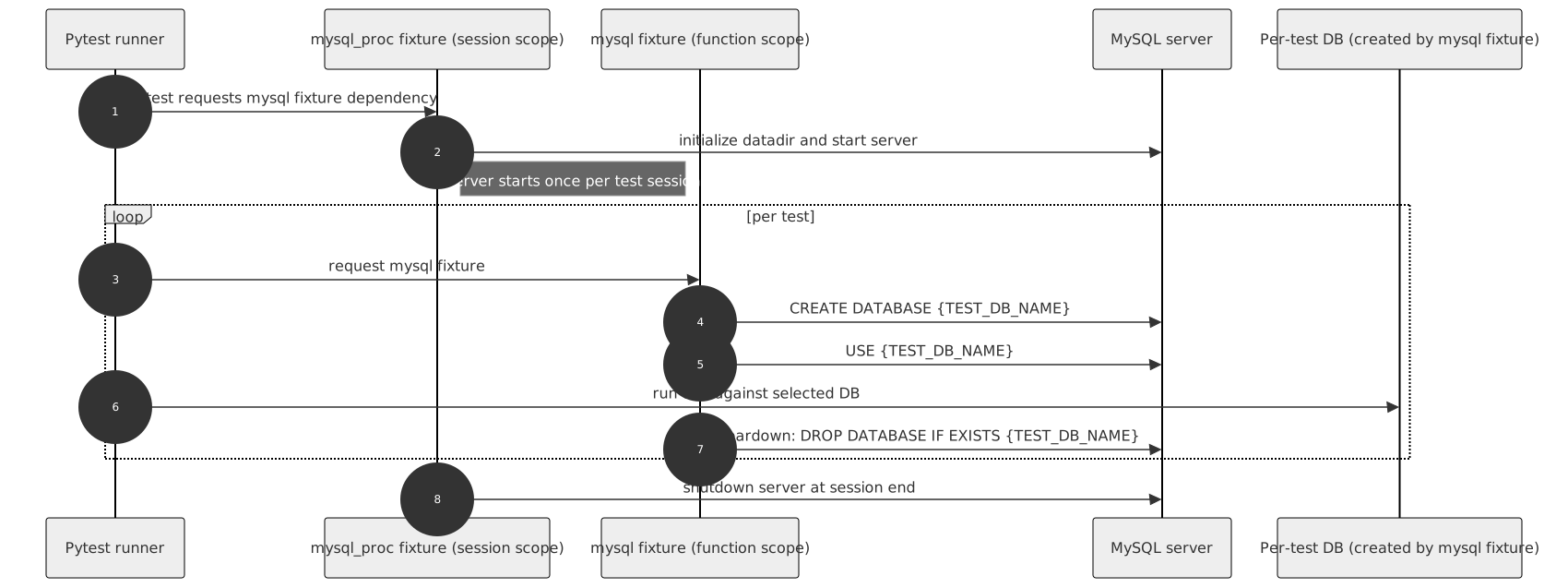
How to use
The plugin contains three fixtures:
mysql - a function-scoped client fixture that drops the test database after each test to ensure repeatability.
mysql_proc - a session-scoped process fixture that starts a local MySQL instance on first use and stops it at the end of the test session.
mysql_noproc - a session-scoped fixture that connects to an already running MySQL instance.
Simply include one of these fixtures in your test fixture list.
You can also create additional MySQL client and process fixtures if you need to:
from pytest_mysql import factories
from getpass import getuser

mysql_my_proc = factories.mysql_proc(
    port=None, user=getuser())
mysql_my = factories.mysql('mysql_my_proc')Prerequisites
Install MySQL or MariaDB on the machine where tests are executed. This plugin relies on binaries provided by those installations (for example mysqld and mysqladmin).
Use mysql_proc to start a local MySQL process from installed binaries. Use mysql_noproc to connect to an already running MySQL/MariaDB server.
Quickstart: first test
Install the plugin:
pip install pytest-mysqlCreate a minimal test that uses the built-in fixture:
def test_mysql_fixture_available(mysql):
    assert mysql is not None
Run your tests:
pytest -qConfiguration
You can define settings in three ways: fixture factory arguments, command-line options, and pytest.ini configuration options. These settings are applied in the following order:
Fixture factory argument
Command-line option
Configuration option in your pytest.ini file
MySQL/MariaDB option |
Fixture factory argument |
Command line option |
pytest.ini option |
Noproc process fixture |
Default |
|---|---|---|---|---|---|
Path to executable |
mysqld_exec |
–mysql-mysqld |
mysql_mysqld |
mysqld |
|
Path to safe executable |
mysqld_safe |
–mysql-mysqld-safe |
mysql_mysqld_safe |
mysqld_safe |
|
Path to mysql_install_db for legacy installations |
install_db |
–mysql-install-db |
mysql_install_db |
mysql_install_db |
|
Path to Admin executable |
admin_executable |
–mysql-admin |
mysql_admin |
mysqladmin |
|
Database hostname |
host |
–mysql-host |
mysql_host |
yes |
localhost |
Database port |
port |
–mysql-port |
mysql_port |
yes (3306) |
random |
Free port search count |
port_search_count |
–mysql-port-search-count |
mysql_port_search_count |
5 |
|
MySQL user to work with |
user |
–mysql-user |
mysql_user |
root |
|
User’s password |
passwd |
–mysql-passwd |
mysql_passwd |
||
Test database name |
dbname |
–mysql-dbname |
mysql_dbname |
test |
|
Starting parameters |
params |
–mysql-params |
mysql_params |
Example usage:
pass it as an argument in your own fixture
mysql_proc = factories.mysql_proc(
    port=8888)
use --mysql-port command line option when you run your tests
pytest tests --mysql-port=8888specify your port as mysql_port in your pytest.ini file
To do so, put a line like the following under the [pytest] section of your pytest.ini:
[pytest]
mysql_port = 8888
Examples
The examples below show advanced integration patterns after your first smoke test is passing.
Populating database for tests
With SQLAlchemy
This example shows how to populate the database and create an SQLAlchemy ORM connection:
The sample below is a simplified session fixture from pyramid_fullauth tests:
from sqlalchemy import create_engine
from sqlalchemy.orm import scoped_session, sessionmaker
from sqlalchemy.pool import NullPool
from zope.sqlalchemy import register


@pytest.fixture
def db_session(mysql):
    """Session for SQLAlchemy."""
    from pyramid_fullauth.models import Base  # pylint:disable=import-outside-toplevel

    # assumes setting, these can be obtained from pytest-mysql config or mysql_proc
    connection = f'mysql+mysqldb://root:@127.0.0.1:3307/tests?charset=utf8'

    engine = create_engine(connection, echo=False, poolclass=NullPool)
    pyramid_basemodel.Session = scoped_session(sessionmaker(extension=ZopeTransactionExtension()))
    pyramid_basemodel.bind_engine(
        engine, pyramid_basemodel.Session, should_create=True, should_drop=True)

    yield pyramid_basemodel.Session

    transaction.commit()
    Base.metadata.drop_all(engine)


@pytest.fixture
def user(db_session):
    """Test user fixture."""
    from pyramid_fullauth.models import User
    from tests.tools import DEFAULT_USER

    new_user = User(**DEFAULT_USER)
    db_session.add(new_user)
    transaction.commit()
    return new_user


def test_remove_last_admin(db_session, user):
    """
    Sample test checks internal login, but shows usage in tests with SQLAlchemy
    """
    user = db_session.merge(user)
    user.is_admin = True
    transaction.commit()
    user = db_session.merge(user)

    with pytest.raises(AttributeError):
user.is_admin = FalseConnecting to MySQL/MariaDB (in a docker)
To connect to MySQL or MariaDB running in Docker, use noproc fixtures.
docker run --name some-db -e MYSQL_ALLOW_EMPTY_PASSWORD=yes -d mysql --expose 3306docker run --name some-db -e MARIADB_ALLOW_EMPTY_PASSWORD=yes -d mariadb --expose 3306This starts MySQL/MariaDB in a Docker container, but using a locally installed MySQL or MariaDB instance is similar.
In tests, make sure your tests use the mysql_noproc fixture like this:
mysql_in_docker = factories.mysql_noproc()
mysql = factories.mysql("mysql_in_docker")


def test_mysql_docker(mysql):
    """Run test."""
    cur = mysql.cursor()
    cur.query("CREATE TABLE pet (name VARCHAR(20), owner VARCHAR(20), species VARCHAR(20), sex CHAR(1), birth DATE, death DATE);")
    mysql.commit()
    cur.close()
And run tests:
pytest --mysql-host=127.0.0.1Running on Docker/as root
MySQL and MariaDB refuse to run as root by default, but we can force them by setting user=root in the configuration file.
However, the most common and secure approach is to change the user that runs tests in Docker:
USER nobodyThis line should switch your Docker process to run as user nobody. See this comment for example.
Package resources
Bug tracker: https://github.com/dbfixtures/pytest-mysql/issues
Release
Install pipenv and --dev dependencies first, then run:
pipenv run tbump [NEW_VERSION]Release history Release notifications | RSS feed


Download files
Download the file for your platform. If you're not sure which to choose, learn more about installing packages.
Source Distribution
Built Distribution
Filter files by name, interpreter, ABI, and platform.
If you're not sure about the file name format, learn more about wheel file names.
Copy a direct link to the current filters
File details
Details for the file pytest_mysql-4.0.0.tar.gz.
File metadata
- Download URL: pytest_mysql-4.0.0.tar.gz
- Upload date:
- Size: 39.2 kB
- Tags: Source
- Uploaded using Trusted Publishing? No
- Uploaded via: twine/6.1.0 CPython/3.13.7
File hashes
| Algorithm | Hash digest | |
|---|---|---|
| SHA256 |
00cd9c352ee69b7f943934bc670e75e95c71de38415dacbc056dda0dac34a743
|
|
| MD5 |
add278a4d9679057003f872735bceb7d
|
|
| BLAKE2b-256 |
a94a2506fd098f89d994b3443925a524c629badabe129bafeac32d1eb56d45af
|
File details
Details for the file pytest_mysql-4.0.0-py3-none-any.whl.
File metadata
- Download URL: pytest_mysql-4.0.0-py3-none-any.whl
- Upload date:
- Size: 34.9 kB
- Tags: Python 3
- Uploaded using Trusted Publishing? No
- Uploaded via: twine/6.1.0 CPython/3.13.7
File hashes
| Algorithm | Hash digest | |
|---|---|---|
| SHA256 |
a58ddf5b19dd233808840d28dd856dfec7f4e50a1982afc384ed181f32de7e6e
|
|
| MD5 |
ec9ec6123f6be7e9ec47ed8a770de0e8
|
|
| BLAKE2b-256 |
5efee8e02488bf10a1f20d90346def5d9d4dcd988d4bbaeae91df8c8594fa203
|






