
Pytest Playwright Axe



pytest-playwright-axe is a package for Playwright Python that allows for the execution of axe-core®, a JavaScript
library used for scanning for accessibility issues and providing guidance on how to resolve these issues.
Table of Contents
- Pytest Playwright Axe
Prerequisites
This package has the following requirements for use:
- Python 3.12 or greater
pytest-playwright>=0.7.1
Installation
This package is available via PyPi, so can be installed by running the following command:
pip install pytest-playwright-axe
Instantiating the Axe class
You can initialise the Axe class by using the following code in your test file:
from pytest_playwright_axe import Axe
You can run the Axe instance either as a standalone instance or instantiate it as follows:
# Standalone execution
Axe().run(page)

# Instantiated execution
axe = Axe()
axe.run(page)
Optional arguments
The Axe() class has the following optional arguments that can be passed in:
| Argument | Format | Supported Values | Default Value | Description |
|---|---|---|---|---|
output_directory |
pathlib.Path or str |
A valid directory path to save results to (e.g. C:/axe_reports) |
If provided, sets the directory to save HTML and JSON results into. If not provided (default), the default path is os.getcwd()/axe-reports. |
|
css_override |
str |
A string with valid CSS. | If provided, this will override the default CSS used in the HTML report with the CSS styling provided. | |
use_minified_file |
bool |
True, False |
False |
If True, use the minified version of axe-core® (axe.min.js). If not provided (default), use the full version of axe-core® (axe.js). |
snapshot_directory |
pathlib.Path or str |
A valid directory path where snapshots are stored (e.g. C:/snapshots) |
If provided, sets the directory to check for JSON outputs from previous runs to compare against. |
.run(): Single page scan
To conduct a scan, you can just use the following once the page you want to check is at the right location:
Axe().run(page)
This will inject the axe-core® code into the page (and any frames within it) and then run axe-core®, generating an accessibility report for the page being tested.
By default, the Axe().run(page) command will do the following:
- Scan the page passed in, including any iframes within it, with the default axe-core® configuration (see Frames and iframes)
- Generate a HTML and JSON report with the findings in the
axe-reportsdirectory, regardless of if any violations are found - Any steps after the
Axe().run()command will continue to execute, and it will not cause the test in progress to fail (it runs a passive scan of the page) - Will return the full response from axe-core® as a dict object if the call is set to a variable, e.g.
axe_results = Axe().run(page)will populateaxe_resultsto interact with as required
This follows the run method outlined in the axe-core® documentation, but uses axe.runPartial and axe.finishRun (the approach axe-core® recommends for browser automation tools) so that frames can be scanned.
Required arguments
The following are required for Axe().run():
| Argument | Format | Description |
|---|---|---|
| page | playwright.sync_api.Page | A Playwright Page on the page to be checked. |
Optional arguments
The Axe().run(page) has the following optional arguments that can be passed in:
| Argument | Format | Supported Values | Default Value | Description |
|---|---|---|---|---|
filename |
str |
A string valid for a filename (e.g. test_report) |
If provided, HTML and JSON reports will save with the filename provided. If not provided (default), the URL of the page under test will be used as the filename. | |
context |
dict, list, Locator, Frame or str |
A dict (e.g. {"exclude": [".ad-banner"]}), a Playwright Locator or Frame, or JavaScript as a str. See Context and options. |
If provided, adds the context that axe-core® should use. | |
options |
dict or str |
A dict (e.g. {"runOnly": {"type": "tag", "values": ["wcag2a", "wcag2aa"]}}), or JavaScript as a str. See Context and options. |
If provided, adds the options that axe-core® should use. | |
report_on_violation_only |
bool |
True, False |
False |
If True, HTML and JSON reports will only be generated if at least one violation is found. |
strict_mode |
bool |
True, False |
False |
If True, when a violation is found an AxeAccessibilityException is raised, causing a test failure. |
html_report_generated |
bool |
True, False |
True |
If True, a HTML report will be generated summarising the axe-core® findings. |
json_report_generated |
bool |
True, False |
True |
If True, a JSON report will be generated with the full axe-core® findings. |
Returns
This function can be used independently, but when set to a variable returns a dict with the axe-core® results (or whatever the reporter used returns).
Example usage
A default execution with no arguments:
from pytest_playwright_axe import Axe
from playwright.sync_api import Page

def test_axe_example(page: Page) -> None:
    page.goto("https://github.com/davethepunkyone/pytest-playwright-axe")
    Axe().run(page)
A WCAG 2.2 (AA) execution, with a custom filename, strict mode enabled and only HTML output provided:
from pytest_playwright_axe import Axe
from playwright.sync_api import Page

def test_axe_example(page: Page) -> None:
    page.goto("https://github.com/davethepunkyone/pytest-playwright-axe")
    Axe().run(page,
              filename="test_report",
              options={"runOnly": {"type": "tag", "values": ["wcag2a", "wcag21a", "wcag2aa", "wcag21aa", "wcag22a", "wcag22aa", "best-practice"]}},
              strict_mode=True,
              json_report_generated=False)
Context and options
The context (what is scanned) and options (how it is scanned) use the same format as the
context and
options parameters in the axe-core® documentation,
and can be provided in the following ways:
| Provided as | Used for | Description |
|---|---|---|
dict or list |
context, options |
Sent to axe-core® as JSON, e.g. {"include": ["main"], "exclude": [".ad-banner"]}. An AxeAccessibilityException is raised if it cannot be converted to JSON. |
playwright.sync_api.Locator |
context |
Only the elements the locator matches are scanned. Locators can also be used within include and exclude (or as the items of a list), and are replaced with the elements they match. |
playwright.sync_api.Frame |
context |
Only that frame (and any frames within it) is scanned. |
str |
context, options |
JavaScript, which is evaluated within the page (e.g. document.getElementById('content')). Use this where something cannot be provided as a dict, such as a reference to an element in the page. |
For example:
from pytest_playwright_axe import Axe
from playwright.sync_api import Page

def test_axe_example(page: Page) -> None:
    page.goto("https://github.com/davethepunkyone/pytest-playwright-axe")
    axe = Axe()

    # Dicts for the context and options
    axe.run(page,
            context={"include": ["main"], "exclude": [".ad-banner"]},
            options={"runOnly": {"type": "tag", "values": ["wcag2a", "wcag2aa"]}})

    # Only scan the elements a Locator matches
    axe.run(page, context=page.locator("main"))

    # Locators to include and exclude
    axe.run(page, context={"include": [page.locator("main")], "exclude": [page.locator("#cookie-banner")]})

    # Only scan a frame
    axe.run(page, context=page.frame(name="payment"))

    # JavaScript, as a str
    axe.run(page, context="document.getElementById('content')")
Some points to be aware of when using Locators and Frames:
- A Locator in
include(or provided as thecontext) must match at least one element, otherwise anAxeAccessibilityExceptionis raised, so a scan cannot pass simply because what it should have scanned could not be found. A Locator inexcludethat matches nothing is ignored. - The frame containing the Locators to include (or the Frame provided) is the one that is scanned, so the results are for that frame: the
urlis the frame's URL and thetargetselectors are relative to the frame. All Locators to include must be in the same frame, and any to exclude must be in that frame too. To exclude something within an iframe from a scan of the whole page, use selectors instead (e.g.{"exclude": [["iframe#ads", ".banner"]]}). - A Frame is not suitable for
run_list(), as it is no longer valid once the page navigates, whereas a Locator is found again for each page. - The
OPTIONS_WCAG_22AAruleset (see Rulesets) is a JavaScriptstr, so can still be used as theoptions.
Some points to be aware of when using a JavaScript str:
- If only one
stris provided (either as thecontextor theoptions), axe-core® works out which it has been given, as it always has. - A
strfor theoptionsis evaluated once in the page, and the result is then sent to every frame (and to where the results are combined) as JSON. Any functions within it (such as a customreporter) are not carried across, so use.configure()for these instead.
Frames and iframes
Any iframes within the page are scanned as part of the same run, including iframes served from a different origin,
and their findings are included in the same reports and results. The target for an element within an iframe
lists the selector for each iframe followed by the selector for the element, e.g. ['iframe#payment', 'form'].
Some points to be aware of:
- Earlier releases only scanned the top-level page, so you may see new findings if your pages contain iframes.
- To skip iframes, use the axe-core®
iframesoption:Axe().run(page, options={"iframes": False}). - To only scan part of an iframe, use the axe-core®
fromFramescontext:Axe().run(page, context={"fromFrames": ["iframe#payment", "form"]}). - The
contextandoptionsprovided are applied to every frame. - Frames should have finished loading before
Axe().run()is called. If a frame cannot be scanned (for example because it is removed or navigates away during the scan), a warning is logged and the rest of the page is still scanned. A frame that is still waiting for its navigation to complete (e.g. a stalled third-party iframe) can never be scanned, so after waiting 5 seconds for it, it is skipped in the same way. Ifstrict_modeis used, anAxeAccessibilityExceptionis raised if any frame could not be scanned (once the reports have been generated), as a violation could be within it. - axe-core® is run in each frame separately and the results are combined afterwards, which is done in a blank page. To avoid anything being added to your own browser context (e.g. extra pages in traces or videos), a temporary browser context is opened for this and closed again once the scan completes. If the browser does not allow this, a blank page in your own context is used instead, and as a last resort the page being scanned.
Reporters
axe-core® can return its results in different formats, which can be chosen using the reporter option (e.g. Axe().run(page, options={"reporter": "no-passes"}),
or for every scan using .configure()). By default the v1 reporter is used, and the following is supported for each reporter:
| Reporter | Returns | Summary | HTML report | JSON report | strict_mode |
|---|---|---|---|---|---|
v1 (default) |
The standard results | Yes | Yes | Yes | Yes |
v2 or na |
The standard results | Yes | Yes | Yes | Yes |
no-passes |
Only the violations (and the details of the scan), so is useful for reducing the size of the results | Yes | Yes, with the passes, incomplete and inapplicable checks stated as not included | Yes | Yes |
raw or rawEnv |
The raw results for each rule (a list for raw, and a dict with raw and env for rawEnv) |
No | No, as it needs the standard results (a warning is logged) | Yes | Yes |
Custom (using .configure()) |
Whatever the reporter returns | If standard | If standard | Yes (if it can be converted to JSON) | Only if the violations can be found, otherwise an AxeAccessibilityException is raised |
Some points to be aware of:
- What
run()returns is whatever the reporter returns, so it is alistwhen usingraw. - If
strict_modeis used but there is no way to tell if the results contain any violations (e.g. the results from a custom reporter), anAxeAccessibilityExceptionis raised rather than the scan passing, as it may have been hiding a violation. - If
report_on_violation_onlyis used but there is no way to tell if the results contain any violations, the reports are generated. - The reporter for the raw results with environment details is named
rawEnv(the axe-core® documentation refers toraw-env). axe-core® uses the default reporter if the name provided is not recognised, so a reporter that is incorrectly named does not cause an error. - A snapshot (see Working With Snapshots) can be compared against for any results that contain violations, so a snapshot from the
v1reporter can be used with theno-passesreporter, but a snapshot of raw results cannot be used (a warning is logged). - A reporter that is a function (rather than the name of one) has to be provided using
.configure(), as functions in theoptionsare not carried across to each frame.
.run_list(): Multiple page scan
To scan multiple URLs within your application, you can use the following method:
Axe().run_list(page, page_list)
This runs the Axe().run(page) function noted above against each URL provided in the page_list argument, and will generate reports as required. This navigates by using the Playwright Page's .goto() method, so this only works for pages that can be directly accessed.
Required arguments
The following are required for Axe().run_list():
| Argument | Format | Description |
|---|---|---|
| page | playwright.sync_api.Page |
A Playwright Page object to drive navigation to each page to test. |
| page_list | list[ str or dict ] |
A list of URLs to execute against (e.g. ["home", "profile", "product/test"]). If a dict is provided, basic actions and assertions can be conducted as part of the list prior to the scan being conducted. |
NOTE: It is heavily recommended that when using the
run_listcommand, that you set a--base-urleither via the pytest.ini file or by passing in the value when using thepytestcommand in the command line. By doing this, the list you pass in will not need to contain the base URL value and therefore make any scanning transferrable between environments.
page_list dict Structure
The page_list supports providing a list made up of str format urls (that will just navigate to the page and scan) and providing
a dict, whereby a basic action can be provided along with a basic assertion (to prove the action completed successfully) before the
scan is undertaken.
If a dict is provided as part of the page_list, the following key / value pairs can be provided:
| Key | Required | Format | Allowed Values | Description |
|---|---|---|---|---|
url |
Yes | str |
The url to initially navigate to. | |
action |
Yes | str |
click, dblclick, hover, fill, type, select_option |
The action to undertake to get to the desired page state. |
locator |
Yes | playwright.sync_api.Locator |
The locator to perform the action against. | |
value |
No (Yes if action is one of: fill, type, select_option) |
str |
The value to use for the action, when a value is required. | |
assert_type |
No (Yes if assertion required) | str |
to_be_visible, to_be_hidden, to_be_enabled, to_contain_text, to_not_contain_text |
If conducting an assertion, the type of assertion to complete. |
assert_locator |
No (Yes if assertion required) | playwright.sync_api.Locator |
The locator to perform the assertion against. | |
assert_value |
No (Yes if assert_type is one of: to_contain_text, to_not_contain_text) |
str |
The value to use for the assertion, when a value is required. | |
wait_time |
No | int |
If provided, the amount of time to wait after completing the defined action and assertion in milliseconds before running Axe. |
NOTE: This format has been provided to allow for basic actions to be completed whilst using the
run_list()method if checking multiple pages in succession, but is not designed to replace comprehensive testing. If you need to do anything more complex than a single basic action, it is recommended that you write a test that does the actions first and then use therun()method instead.
Optional arguments
The Axe().run_list(page, page_list) function has the following optional arguments that can be passed in:
| Argument | Format | Supported Values | Default Value | Description |
|---|---|---|---|---|
use_list_for_filename |
bool |
True, False |
True |
If True, the filename will be derived from the value provided in the list. If False, the full URL will be used. |
context |
dict, list, Locator or str |
A dict (e.g. {"exclude": [".ad-banner"]}), a Playwright Locator, or JavaScript as a str. A Frame is not suitable, as it is no longer valid once the page navigates. See Context and options. |
If provided, adds the context that axe-core® should use. | |
options |
dict or str |
A dict (e.g. {"runOnly": {"type": "tag", "values": ["wcag2a", "wcag2aa"]}}), or JavaScript as a str. See Context and options. |
If provided, adds the options that axe-core® should use. | |
report_on_violation_only |
bool |
True, False |
False |
If True, HTML and JSON reports will only be generated if at least one violation is found. |
strict_mode |
bool |
True, False |
False |
If True, when a violation is found an AxeAccessibilityException is raised, causing a test failure. |
html_report_generated |
bool |
True, False |
True |
If True, a HTML report will be generated summarising the axe-core® findings. |
json_report_generated |
bool |
True, False |
True |
If True, a JSON report will be generated with the full axe-core® findings. |
Returns
This function can be used independently, but when set to a variable returns a dict with the axe-core® results for all pages scanned (using the URL value in the list provided as the key).
Example usage
When using the following command: pytest --base-url https://www.github.com:
from pytest_playwright_axe import Axe
from playwright.sync_api import Page

def test_accessibility(page: Page) -> None:
    # A list of URLs to loop through
    urls_to_check = [
        "davethepunkyone/pytest-playwright-axe",
        "davethepunkyone/pytest-playwright-axe/issues",
        {
            "url": "https://github.com/davethepunkyone/pytest-playwright-axe",
            "action": "click",
            "locator": page.get_by_test_id("anchor-button"),
            "assert_type": "to_contain_text",
            "assert_locator": page.get_by_test_id("overlay-content"),
            "assert_value": "rework-axe-to-include-init",
            "wait_time": 1000
        }
      ]

    Axe().run_list(page, urls_to_check)
.configure(): Configure axe-core®
You can configure axe-core® (e.g. to add custom rules and checks, change the rules and checks that are applied, provide a locale or change the branding of the help URLs) by using this method:
Axe().configure(config)
This uses the configure method outlined in the axe-core® documentation.
axe-core® is injected into the page (and each of its frames) every time a scan is run, so anything configured directly in the page would be
discarded. Instead, configure() stores the configuration on the Axe instance, and it is then applied each time run(), run_list() or
get_rules() is used by that instance: in the page, in every frame, and where the results are combined.
- Each call adds to the configuration already provided, and the calls are applied in the order they were made.
Axe().reset()removes all the configuration provided, so the default axe-core® configuration is used.- Both methods return the
Axeinstance, so calls can be chained (e.g.Axe().configure(config).run(page)).
Required argument
The following is required for Axe().configure():
| Argument | Format | Description |
|---|---|---|
| config | dict or str |
The configuration to apply. A dict is sent to axe-core® as JSON. A str is treated as JavaScript, which is needed if the configuration has to contain a function (e.g. to define a custom check). |
Example configurations
Using a dict to disable a rule for every scan:
from pytest_playwright_axe import Axe
from playwright.sync_api import Page

def test_axe_example(page: Page) -> None:
    page.goto("https://github.com/davethepunkyone/pytest-playwright-axe")

    axe = Axe()
    axe.configure({"rules": [{"id": "image-alt", "enabled": False}]})
    axe.run(page)

    # Remove the configuration, so the default rules are used again
    axe.reset()
    axe.run(page)
Using a dict to apply a locale, loaded from one of the axe-core® locale files:
import json
from pathlib import Path
from pytest_playwright_axe import Axe
from playwright.sync_api import Page

def test_axe_example(page: Page) -> None:
    locale = json.loads(Path("fr.json").read_text(encoding="utf-8"))

    page.goto("https://github.com/davethepunkyone/pytest-playwright-axe")
    Axe().configure({"locale": locale}).run(page)
Using a str to add a custom rule, as the check has to contain a function:
from pytest_playwright_axe import Axe
from playwright.sync_api import Page

CUSTOM_RULE = """{
    checks: [{
        id: 'has-data-test',
        evaluate: function (node) { return node.hasAttribute('data-test'); },
        metadata: {impact: 'minor', messages: {pass: 'Has data-test', fail: 'Missing data-test'}}
    }],
    rules: [{
        id: 'h1-data-test', selector: 'h1', any: ['has-data-test'],
        metadata: {description: 'h1 needs data-test', help: 'h1 needs data-test'}
    }]
}"""

def test_axe_example(page: Page) -> None:
    page.goto("https://github.com/davethepunkyone/pytest-playwright-axe")
    Axe().configure(CUSTOM_RULE).run(page)
.get_rules(): Return rules
You can get the rules used for specific tags by using this method, or all rules if no ruleset is provided. Any
configuration provided using .configure() is applied first, so the rules returned reflect it.
This uses the getRules method outlined in the axe-core® documentation.
Required Arguments
The following are required for Axe().get_rules():
| Argument | Format | Description |
|---|---|---|
| page | playwright.sync_api.Page |
A Playwright Page object.. This page can be empty/blank. |
Optional Arguments
The Axe().get_rules(page, page_list) function has the following optional arguments that can be passed in:
| Argument | Format | Supported Values | Default Value | Description |
|---|---|---|---|---|
rules |
list[str] |
A Python list with strings representing valid tags. | None |
If provided, the list of rules to provide information on. If not provided, return details for all rules. |
Returns
A Python list[dict] object with all matching rules and their descriptors.
Example usage
import logging
from pytest_playwright_axe import Axe
from playwright.sync_api import Page

def test_get_rules(page: Page) -> None:

    rules = Axe().get_rules(page, ['wcag21aa'])
    for rule in rules:
        logging.info(rule)
Rulesets
The following rulesets can also be imported via the pytest_playwright_axe module:
| Ruleset | Import | Rules Applied |
|---|---|---|
| WCAG 2.2 AA | OPTIONS_WCAG_22AA |
['wcag2a', 'wcag21a', 'wcag2aa', 'wcag21aa', 'wcag22a', 'wcag22aa', 'best-practice'] |
Example:
from pytest_playwright_axe import Axe, OPTIONS_WCAG_22AA
from playwright.sync_api import Page

def test_axe_example(page: Page) -> None:
    page.goto("https://github.com/davethepunkyone/pytest-playwright-axe")
    Axe().run(page, options=OPTIONS_WCAG_22AA)
Working With Snapshots
From release 4.11.0.post1, this package provides the ability to compare to a previous scan of the page and highlight changes between then and now. Scans are conducted against the JSON output of a previous run, so to use this functionality you will need to ensure you save JSON files as part of your outputs.
If any changes are detected and snapshot scanning is enabled, a new section will be populated at the start of the HTML report that outlines the detected changes, as shown in the screenshot below.
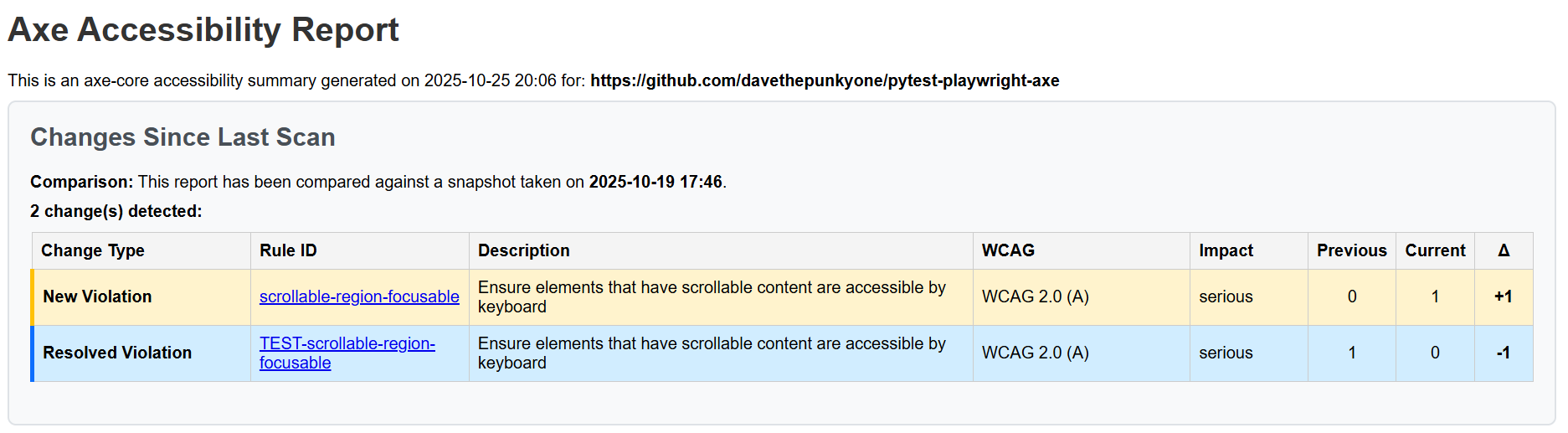
When working with snapshots, the following needs to be considered:
- Snapshots are detected from the designated snapshot directory based on the expected filename, so to use this logic the URLs under test will need to be consistent.
- The comparison output is only presented on the HTML version of the report.
Example Snapshot Usage
1 - Get Initial Snapshot
An initial scan of the page is conducted, with JSON output enabled.
For the purposes of this example, the following test is located in the
tests/accessibility directory in tests_accessibility.py:
from playwright.sync_api import Page
from pytest_playwright_axe import Axe

def test_axe_example(page: Page) -> None:
    page.goto("https://github.com/davethepunkyone/pytest-playwright-axe")
    Axe().run(page)
This generates the following output in the axe-reports directory:
    axe-reports/
      |- github_com_davethepunkyone_pytest-playwright-axe.html
      |- github_com_davethepunkyone_pytest-playwright-axe.json
The .json file should then be copied into an appropriate directory to be
referenced later (e.g. tests/accessibility/snapshots).
This should then result in a file structure like so:
    axe-reports/
      |- github_com_davethepunkyone_pytest-playwright-axe.html
      |- github_com_davethepunkyone_pytest-playwright-axe.json
    tests/
      |- accessibility/
      |  |- snapshots/
      |  |  |- github_com_davethepunkyone_pytest-playwright-axe.json
      |  |- tests_accessibility.py
2 - Compare Snapshots
To allow for the snapshot comparison, the test needs to be amended to check
for available snapshots, by adding the snapshot_directory=<path> to the
initialised Axe instance.
Using our example above, we would modify the existing test as follows:
from playwright.sync_api import Page
from pytest_playwright_axe import Axe
from pathlib import Path

# Reference the snapshot directory
SNAPSHOT_DIRECTORY = Path(__file__).parent.joinpath("snapshots")

def test_axe_example(page: Page) -> None:
    page.goto("https://github.com/davethepunkyone/pytest-playwright-axe")
    # Initialise Axe referencing the snapshot directory
    Axe(snapshot_directory=SNAPSHOT_DIRECTORY).run(page)
With this change in place, the test will now check the snapshots directory
and as this will generate a JSON file matching the one we have added, it will
load the JSON file from snapshots/github_com_davethepunkyone_pytest-playwright-axe.json
and check for changes between the two files, outputting the results in a new
section on the HTML report.
Example Reports
The following are examples of the reports generated using this package:
| Format | Example |
|---|---|
| HTML (Use download file to see report) | Example File |
| JSON | Example File |
Versioning
The versioning for this project is designed to be directly linked to the releases from the axe-core® project, to accurately reflect the version of axe-core® that is being executed.
Breaking Changes
The following section outlines important breaking changes between version, due to the versioning of this project being aligned with axe-core®.
4.14.0 -> Onwards
The following policy has been introduced for all releases beyond 4.14.0:
- To encourage updates to
pytest-playwright, we will be pinning the minimum supported version ofpytest-playwrightto the version that was available 12 months prior to our release.
4.10.3 -> Onwards
The following significant changes have been applied for releases after 4.10.3, which would require amending existing logic:
- The
Axe()module logic is no longer static, so usingAxe.run()will no longer work. output_directoryhas now been moved into the__init__method forAxe, and is no longer defined in the.run()andrun_list()functions.
Licence
Unless stated otherwise, the codebase is released under the MIT Licence (note the UK spelling for the filename). This covers both the codebase and any sample code in the documentation.
Acknowledgements
This package was created based on work initially designed for the NHS England Playwright Python Blueprint.
axe-core® is a trademark of Deque Systems, Inc. in the US and other countries.
1 maintainer

Metadata
1 maintainer
Release files for pytest-playwright-axe 4.14.0
For a detailed explanation of source distributions (sdists) and built distributions (wheels), please see the package formats documentation.
Source distribution (sdist)
| File | Size | Uploaded | |
|---|---|---|---|
| pytest_playwright_axe-4.14.0.tar.gz | 902.4 kB | Details |
Built distribution (wheel)
| File | Interpreter | ABI | Platform | Reset |
|---|---|---|---|---|
| pytest_playwright_axe-4.14.0-py3-none-any.whl | Python 3 | none | any | Details |
Total release size: 1.4 MB
Release files / pytest_playwright_axe-4.14.0.tar.gz
| Download URL | pytest_playwright_axe-4.14.0.tar.gz |
|---|---|
| Size | 902.4 kB |
| Tags | Source |
|
SHA-256 checksum How to use checksums |
1e2744fe8b7a21e3ed77be6bd08036322167a9202c82139f3332c385f63e1b4d
|
|
BLAKE2b-256 checksum How to use checksums |
8cac19d66cc0cd60a6668cd097c12dd89fe9663d62e8cb4e7977a6f01dd47303
|
| Upload date | |
|
Uploaded using Trusted Publishing? What is trusted publishing? |
Yes |
| Uploaded via |
twine/7.0.0 CPython/3.13.14
|
Provenance
Provenance describes where a file came from. On PyPI, provenance is shared via attestations, which provide a verifiable record of the build or publishing details. View details, limitations and caveats.


PyPI Publish Attestation
PyPI verified that this artifact, at this checksum, originated from the publisher listed below.
Signed by GitHub Actions, verified by PyPI on Oct 13, 2026.
Transparency logRelease files / pytest_playwright_axe-4.14.0-py3-none-any.whl
| Download URL | pytest_playwright_axe-4.14.0-py3-none-any.whl |
|---|---|
| Size | 490.6 kB |
| Tags | Python 3 |
|
SHA-256 checksum How to use checksums |
b8eed34ac17e1c1094983eaef97687e65b3e0c5a0de0257b8b34cc05430a07ca
|
|
BLAKE2b-256 checksum How to use checksums |
b883ab690c2a06ea90d24e3f6978c9f7ee06391ffa6462f28b5119acd1ab2d62
|
| Upload date | |
|
Uploaded using Trusted Publishing? What is trusted publishing? |
Yes |
| Uploaded via |
twine/7.0.0 CPython/3.13.14
|
Provenance
Provenance describes where a file came from. On PyPI, provenance is shared via attestations, which provide a verifiable record of the build or publishing details. View details, limitations and caveats.
PyPI Publish Attestation
PyPI verified that this artifact, at this checksum, originated from the publisher listed below.
Signed by GitHub Actions, verified by PyPI on Oct 13, 2026.
Transparency log













