
Postgresql fixtures and fixture factories for Pytest.

Project description

pytest-postgresql




What is this?
This is a pytest plugin that enables you to test code relying on a running PostgreSQL database. It provides fixtures for managing both the PostgreSQL process and the client connections.
Quick Start
Install the plugin:
pip install pytest-postgresqlYou will also need to install psycopg (version 3). See its installation instructions.
Run a test:
Simply include the postgresql fixture in your test. It provides a connected psycopg.Connection object.
def test_example(postgresql):
    """Check main postgresql fixture."""
    with postgresql.cursor() as cur:
        cur.execute("CREATE TABLE test (id serial PRIMARY KEY, num integer, data varchar);")
        postgresql.commit()
How to use
How does it work
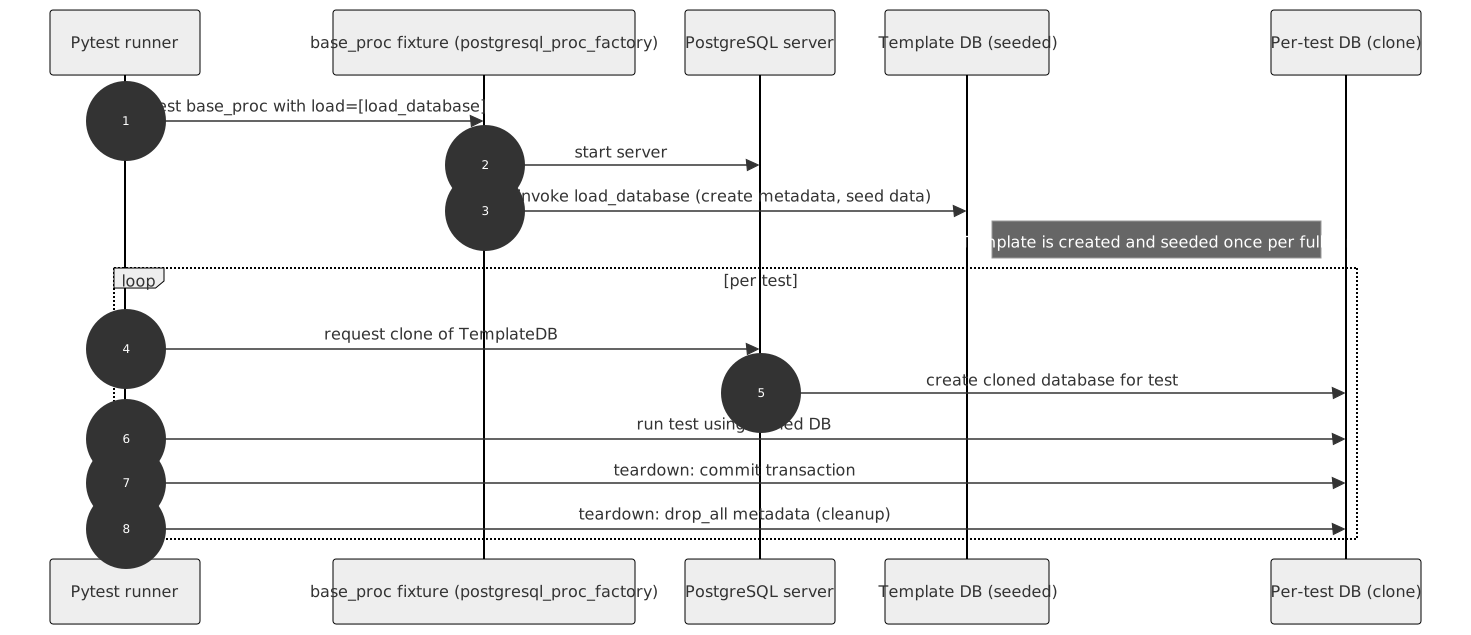
The plugin provides two main types of fixtures:
- 1. Client Fixtures
These provide a connection to a database for your tests.
postgresql - A function-scoped fixture. It returns a connected psycopg.Connection. After each test, it terminates leftover connections and drops the test database to ensure isolation.
- 2. Process Fixtures
These manage the PostgreSQL server lifecycle.
postgresql_proc - A session-scoped fixture that starts a PostgreSQL instance on its first use and stops it when all tests are finished.
postgresql_noproc - A fixture for connecting to an already running PostgreSQL instance (e.g., in Docker or CI).
Customizing Fixtures
You can create additional fixtures using factories:
from pytest_postgresql import factories

# Create a custom process fixture
postgresql_my_proc = factories.postgresql_proc(
    port=None, unixsocketdir='/var/run')

# Create a client fixture that uses the custom process
postgresql_my = factories.postgresql('postgresql_my_proc')Pre-populating the database for tests
If you want the database to be automatically pre-populated with your schema and data, there are two levels you can achieve it:
Per test: In a client fixture, by using an intermediary fixture.
Per session: In a process fixture.
The process fixture accepts a load parameter, which supports:
SQL file paths: Loads and executes the SQL files.
Loading functions: A callable or an import string (e.g., "path.to.module:function"). These functions receive host, port, user, dbname, and password and must perform the connection themselves (or use an ORM).
The process fixture pre-populates the database once per session into a template database. The client fixture then clones this template for each test, which significantly speeds up your tests.
from pathlib import Path
postgresql_my_proc = factories.postgresql_proc(
    load=[
        Path("schemafile.sql"),
        "import.path.to.function",
        load_this_callable
    ]
)
Defining pre-population on the command line:
pytest --postgresql-populate-template=path/to/file.sql --postgresql-populate-template=path.to.functionConnecting to an existing PostgreSQL database
To connect to an external server (e.g., running in Docker), use the postgresql_noproc fixture.
postgresql_external = factories.postgresql('postgresql_noproc')By default, it connects to 127.0.0.1:5432.
Chaining fixtures
You can chain multiple postgresql_noproc fixtures to layer your data pre-population. Each fixture in the chain will create its own template database based on the previous one.
from pytest_postgresql import factories

# 1. Start with a process or a no-process base
base_proc = factories.postgresql_proc(load=[load_schema])

# 2. Add a layer with some data
seeded_noproc = factories.postgresql_noproc(depends_on="base_proc", load=[load_data])

# 3. Add another layer with more data
more_seeded_noproc = factories.postgresql_noproc(depends_on="seeded_noproc", load=[load_more_data])

# 4. Use the final layer in your test
client = factories.postgresql("more_seeded_noproc")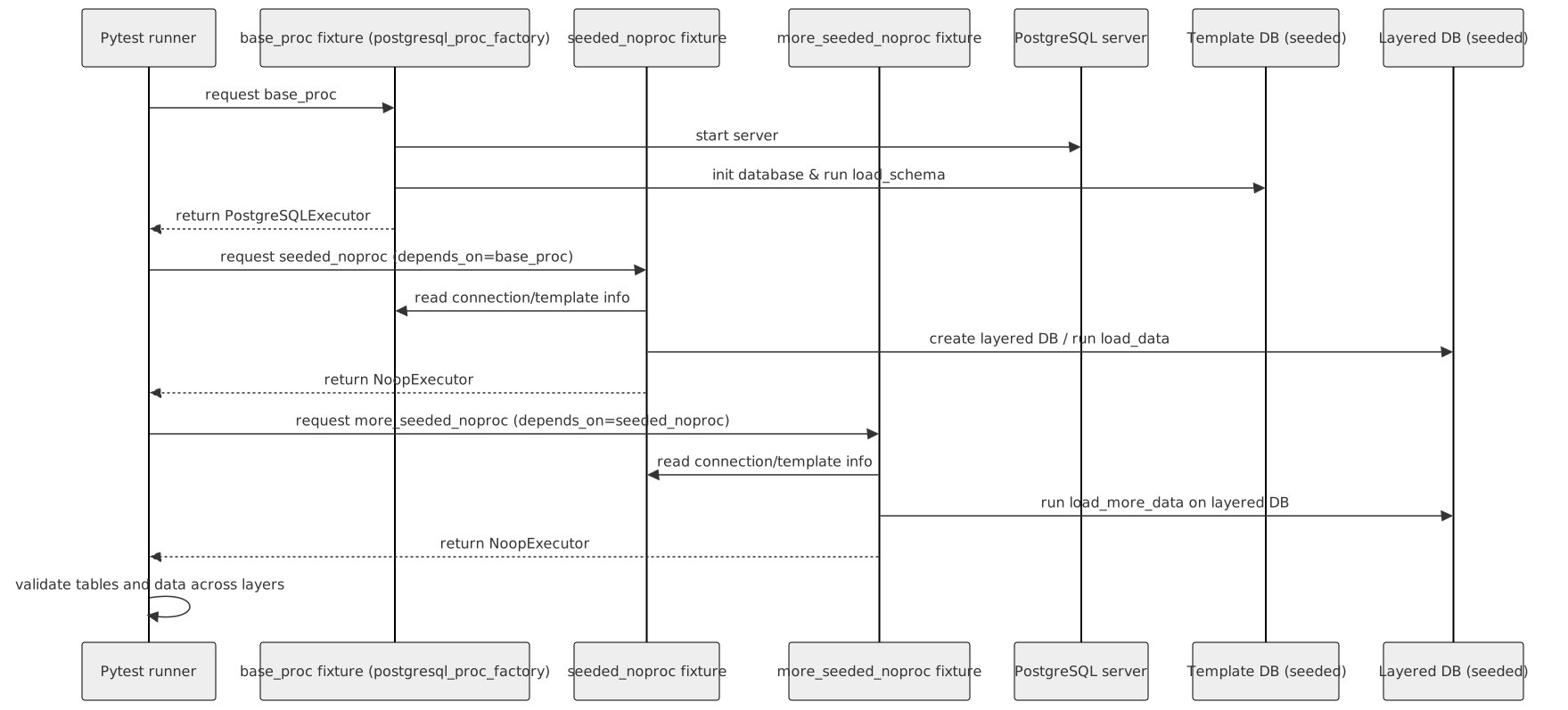
Configuration
You can define settings via fixture factory arguments, command line options, or pytest.ini. They are resolved in this order:
Fixture factory argument
Command line option
pytest.ini configuration option
PostgreSQL option |
Fixture factory argument |
Command line option |
pytest.ini option |
Noop process fixture |
Default |
|---|---|---|---|---|---|
Path to executable |
executable |
–postgresql-exec |
postgresql_exec |
pg_config --bindir + pg_ctl |
|
host |
host |
–postgresql-host |
postgresql_host |
yes |
127.0.0.1 |
port |
port |
–postgresql-port |
postgresql_port |
yes (5432) |
random |
Port search count |
–postgresql-port-search-count |
postgresql_port_search_count |
5 |
||
postgresql user |
user |
–postgresql-user |
postgresql_user |
yes |
postgres |
password |
password |
–postgresql-password |
postgresql_password |
yes |
|
Starting parameters (extra pg_ctl arguments) |
startparams |
–postgresql-startparams |
postgresql_startparams |
-w |
|
Postgres exe extra arguments (passed via pg_ctl’s -o argument) |
postgres_options |
–postgresql-postgres-options |
postgresql_postgres_options |
||
Location for unixsockets |
unixsocket |
–postgresql-unixsocketdir |
postgresql_unixsocketdir |
$TMPDIR |
|
Database name |
dbname |
–postgresql-dbname |
postgresql_dbname |
yes (handles xdist) |
test |
Default Schema (load list) |
load |
–postgresql-load |
postgresql_load |
yes |
|
PostgreSQL connection options |
options |
–postgresql-options |
postgresql_options |
yes |
|
Drop test database on start |
–postgresql-drop-test-database |
false |
Examples
Using SQLAlchemy
This example shows how to create an SQLAlchemy session fixture:
from typing import Iterator
import pytest
from psycopg import Connection
from sqlalchemy import create_engine
from sqlalchemy.orm import Session, sessionmaker, scoped_session
from sqlalchemy.pool import NullPool

@pytest.fixture
def db_session(postgresql: Connection) -> Iterator[Session]:
    """Session for SQLAlchemy."""
    user = postgresql.info.user
    host = postgresql.info.host
    port = postgresql.info.port
    dbname = postgresql.info.dbname

    connection_str = f'postgresql+psycopg://{user}:@{host}:{port}/{dbname}'
    engine = create_engine(connection_str, echo=False, poolclass=NullPool)

    # Assuming you use a Base model
    from my_app.models import Base
    Base.metadata.create_all(engine)

    SessionLocal = scoped_session(sessionmaker(bind=engine))
    yield SessionLocal()

    SessionLocal.close()
    Base.metadata.drop_all(engine)
Advanced Usage: DatabaseJanitor
DatabaseJanitor is an advanced API for managing database state outside of standard fixtures. It is used by projects like Warehouse (pypi.org).
import psycopg
from pytest_postgresql.janitor import DatabaseJanitor

def test_manual_janitor(postgresql_proc):
    with DatabaseJanitor(
        user=postgresql_proc.user,
        host=postgresql_proc.host,
        port=postgresql_proc.port,
        dbname="my_custom_db",
        version=postgresql_proc.version,
        password="secret_password",
    ):
        with psycopg.connect(
            dbname="my_custom_db",
            user=postgresql_proc.user,
            host=postgresql_proc.host,
            port=postgresql_proc.port,
            password="secret_password",
        ) as conn:
            # use connection
            pass
Connecting to PostgreSQL in Docker
To connect to a Docker-run PostgreSQL, use the noproc fixture.
docker run --name some-postgres -e POSTGRES_PASSWORD=mysecret -d postgresIn your tests:
from pytest_postgresql import factories

postgresql_in_docker = factories.postgresql_noproc()
postgresql = factories.postgresql("postgresql_in_docker", dbname="test")

def test_docker(postgresql):
    with postgresql.cursor() as cur:
        cur.execute("SELECT 1")
Run with:
pytest --postgresql-host=172.17.0.2 --postgresql-password=mysecretBasic database state for all tests
You can define a load function and pass it to your process fixture factory:
import psycopg
from pytest_postgresql import factories

def load_database(**kwargs):
    with psycopg.connect(**kwargs) as conn:
        with conn.cursor() as cur:
            cur.execute("CREATE TABLE stories (id serial PRIMARY KEY, name varchar);")
            cur.execute("INSERT INTO stories (name) VALUES ('Silmarillion'), ('The Expanse');")

postgresql_proc = factories.postgresql_proc(load=[load_database])
postgresql = factories.postgresql("postgresql_proc")

def test_stories(postgresql):
    with postgresql.cursor() as cur:
        cur.execute("SELECT count(*) FROM stories")
        assert cur.fetchone()[0] == 2
The process fixture populates the template database once, and the client fixture clones it for every test. This is fast, clean, and ensures no dangling transactions. This approach works with both postgresql_proc and postgresql_noproc.
Release
Install pipenv and dev dependencies, then run:
pipenv run tbump [NEW_VERSION]Release history Release notifications | RSS feed


Download files
Download the file for your platform. If you're not sure which to choose, learn more about installing packages.
Source Distribution
Built Distribution
Filter files by name, interpreter, ABI, and platform.
If you're not sure about the file name format, learn more about wheel file names.
Copy a direct link to the current filters
File details
Details for the file pytest_postgresql-8.0.0.tar.gz.
File metadata
- Download URL: pytest_postgresql-8.0.0.tar.gz
- Upload date:
- Size: 49.7 kB
- Tags: Source
- Uploaded using Trusted Publishing? No
- Uploaded via: twine/6.1.0 CPython/3.13.7
File hashes
| Algorithm | Hash digest | |
|---|---|---|
| SHA256 |
26cbd44a0adef76cf4a82a3a2263f0e029bc54b5863556a9bd86ca3edfa91cce
|
|
| MD5 |
96173b70e80c054f23d0005afbce7d91
|
|
| BLAKE2b-256 |
bfc8b9607675904b3e4004c76109741aac6479daecfe6fb38ad89f330c6c5adc
|
File details
Details for the file pytest_postgresql-8.0.0-py3-none-any.whl.
File metadata
- Download URL: pytest_postgresql-8.0.0-py3-none-any.whl
- Upload date:
- Size: 40.2 kB
- Tags: Python 3
- Uploaded using Trusted Publishing? No
- Uploaded via: twine/6.1.0 CPython/3.13.7
File hashes
| Algorithm | Hash digest | |
|---|---|---|
| SHA256 |
125b63b16d630c2dea19807062ed4c96e6123f06058ce65b82b4b14174d6c4b8
|
|
| MD5 |
dba5f8dcac02e0edb120dc65d3662818
|
|
| BLAKE2b-256 |
7bcf2c962ce63904e2b051b644a0036bdeeae8ae05d91e11e829b220c3db9935
|






