

pytest-rabbitmq




What is this?
A pytest plugin for tests that require a running RabbitMQ broker. It provides process and client fixtures.
How to use
The plugin contains two fixtures:
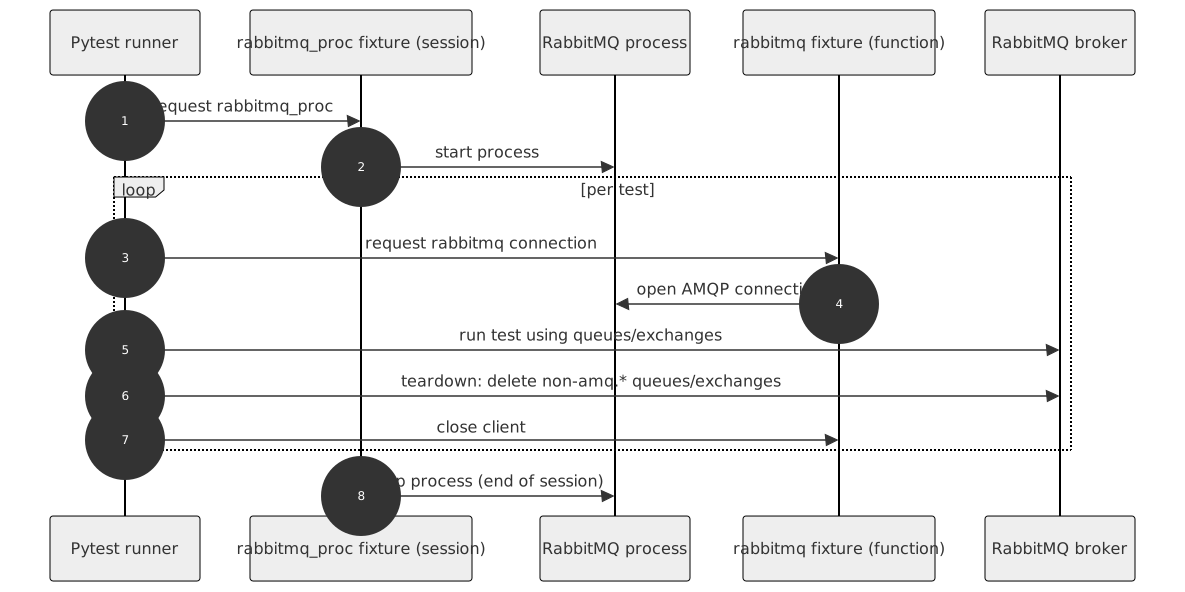
rabbitmq - it is a client fixture with function scope. After each test, it removes queues and exchanges created during the test to keep tests isolated and reliable.
rabbitmq_proc - a session-scoped fixture that starts a RabbitMQ instance at its first use and stops it at the end of the test session.
Simply include one of these fixtures in your test fixture list.
You can also create additional RabbitMQ client and process fixtures if you need to:
from pytest_rabbitmq import factories

rabbitmq_my_proc = factories.rabbitmq_proc(
    port=None)
rabbitmq_my = factories.rabbitmq('rabbitmq_my_proc')Prerequisites
Install RabbitMQ on the machine where tests are executed. The plugin starts a local RabbitMQ process and uses rabbitmq-server and rabbitmqctl binaries.
By default, binary paths are set to typical Linux locations:
/usr/lib/rabbitmq/bin/rabbitmq-server
/usr/lib/rabbitmq/bin/rabbitmqctl
If your environment uses different paths, override them with fixture arguments, command-line options, or pytest.ini settings described below.
Quickstart: first test
Install the plugin:
pip install pytest-rabbitmqCreate a test that uses the built-in fixture:
def test_rabbitmq_fixture_available(rabbitmq):
    assert rabbitmq is not None
Run your tests:
pytest -qConfiguration
You can define settings in three ways: fixture factory argument, command-line option, and pytest.ini configuration option. You can pick which you prefer, but remember that these settings are handled in the following order:
Fixture factory argument
Command-line option
Configuration option in your pytest.ini file
RabbitMQ option |
Fixture factory argument |
Command-line option |
pytest.ini option |
Default |
|---|---|---|---|---|
host |
host |
–rabbitmq-host |
rabbitmq_host |
127.0.0.1 |
RABBITMQ_NODE_PORT |
port |
–rabbitmq-port |
rabbitmq_port |
random |
Port search count |
–rabbitmq-port-search-count |
rabbitmq_port_search_count |
5 |
|
RABBITMQ_DIST_PORT |
distribution_port |
–rabbitmq-distribution-port |
rabbitmq_distribution_port |
random |
rabbitmqctl path |
ctl |
–rabbitmq-ctl |
rabbitmq_ctl |
/usr/lib/rabbitmq/bin/rabbitmqctl |
rabbitmq server path |
server |
–rabbitmq-server |
rabbitmq_server |
/usr/lib/rabbitmq/bin/rabbitmq-server |
Plugin directory location |
plugin_path |
–rabbitmq-plugindir |
rabbitmq_plugindir |
$TMPDIR |
Node name |
node |
–rabbitmq-node |
rabbitmq_node |
rabbitmq-test-{port} |
Example usage:
Pass it as an argument in your own fixture.
rabbitmq_proc = factories.rabbitmq_proc(port=8888)Use the --rabbitmq-port command-line option when you run your tests.
pytest tests --rabbitmq-port=8888Specify your port as rabbitmq_port in your pytest.ini file.
To do so, put a line like the following under the [pytest] section of your pytest.ini:
[pytest]
rabbitmq_port = 8888
Package resources
Bug tracker: https://github.com/dbfixtures/pytest-rabbitmq/issues
1 maintainer

Metadata
1 maintainer
Release files for pytest-rabbitmq 5.0.0
For a detailed explanation of source distributions (sdists) and built distributions (wheels), please see the package formats documentation.
Source distribution (sdist)
| File | Size | Uploaded | |
|---|---|---|---|
| pytest_rabbitmq-5.0.0.tar.gz | 15.9 kB | Details |
Built distribution (wheel)
| File | Interpreter | ABI | Platform | Reset |
|---|---|---|---|---|
| pytest_rabbitmq-5.0.0-py3-none-any.whl | Python 3 | none | any | Details |
Total release size: 31.4 kB
Release files / pytest_rabbitmq-5.0.0.tar.gz
| Download URL | pytest_rabbitmq-5.0.0.tar.gz |
|---|---|
| Size | 15.9 kB |
| Tags | Source |
|
SHA-256 checksum How to use checksums |
8e74e42870602fb990b769745a58f8baf0e11263072d8f367375e3449b8e68b3
|
|
BLAKE2b-256 checksum How to use checksums |
7541f480875f03db9393aaca90b05eb39907639a1baad094c60420bc33d37682
|
| Upload date | |
|
Uploaded using Trusted Publishing? What is trusted publishing? |
Yes |
| Uploaded via |
twine/7.0.0 CPython/3.13.14
|
Provenance
Provenance describes where a file came from. On PyPI, provenance is shared via attestations, which provide a verifiable record of the build or publishing details. View details, limitations and caveats.


PyPI Publish Attestation
PyPI verified that this artifact, at this checksum, originated from the publisher listed below.
Signed by GitHub Actions, verified by PyPI on Oct 11, 2026.
Transparency logRelease files / pytest_rabbitmq-5.0.0-py3-none-any.whl
| Download URL | pytest_rabbitmq-5.0.0-py3-none-any.whl |
|---|---|
| Size | 15.5 kB |
| Tags | Python 3 |
|
SHA-256 checksum How to use checksums |
be1a64ca853db4fc6f1f831ff6246fa20e5df38eb73c7c2c9c8f4fc69ff969e8
|
|
BLAKE2b-256 checksum How to use checksums |
c4d1c350cadb574f7fd1fc35e894836c977035c624dc88226717bba05d365eb2
|
| Upload date | |
|
Uploaded using Trusted Publishing? What is trusted publishing? |
Yes |
| Uploaded via |
twine/7.0.0 CPython/3.13.14
|
Provenance
Provenance describes where a file came from. On PyPI, provenance is shared via attestations, which provide a verifiable record of the build or publishing details. View details, limitations and caveats.
PyPI Publish Attestation
PyPI verified that this artifact, at this checksum, originated from the publisher listed below.
Signed by GitHub Actions, verified by PyPI on Oct 11, 2026.
Transparency log













