
Randomise the order in which pytest tests are run with some control over the randomness


Project description

pytest-random-order is a pytest plugin that randomises the order of tests. This can be useful to detect a test that passes just because it happens to run after an unrelated test that leaves the system in a favourable state.
The plugin allows user to control the level of randomness they want to introduce and to disable reordering on subsets of tests. Tests can be rerun in a specific order by passing a seed value reported in a previous test run.
Quick Start
Installation:
$ pip install pytest-random-order
From v1.0.0 onwards, this plugin no longer randomises tests by default. To enable randomisation, you have to run pytest in one of the following ways:
pytest --random-order
pytest --random-order-bucket=<bucket_type>
pytest --random-order-seed=<seed>
If you want to always randomise the order of tests, configure pytest. There are many ways to do it, my favourite one is to add addopts = --random-order in your project-specific configuration file under the pytest options (usually [pytest] or [tool:pytest] section).
Alternatively, you can set environment variable PYTEST_ADDOPTS:
export PYTEST_ADDOPTS="--random-order"
To randomise the order of tests within modules and shuffle the order of test modules (which is the default behaviour of the plugin), run pytest as follows:
$ pytest --random-order
To change the scope of re-ordering, run pytest with --random-order-bucket=<bucket-type> option where <bucket-type> can be class, module, package, global:
$ pytest -v --random-order-bucket=package
To disable reordering of tests in a module or class, use pytest marker notation:
pytestmark = pytest.mark.random_order(disabled=True)
To rerun tests in a particular order:
$ pytest -v --random-order-seed=<seed>
All runs in which the randomisation is enabled report seed so if you encounter a specific ordering of tests that causes problems you can look up the value in the test report and repeat the run with the above command.
platform darwin -- Python 3.5.6, pytest-3.9.1, py-1.7.0, pluggy-0.8.0
Using --random-order-bucket=module
Using --random-order-seed=383013
Design
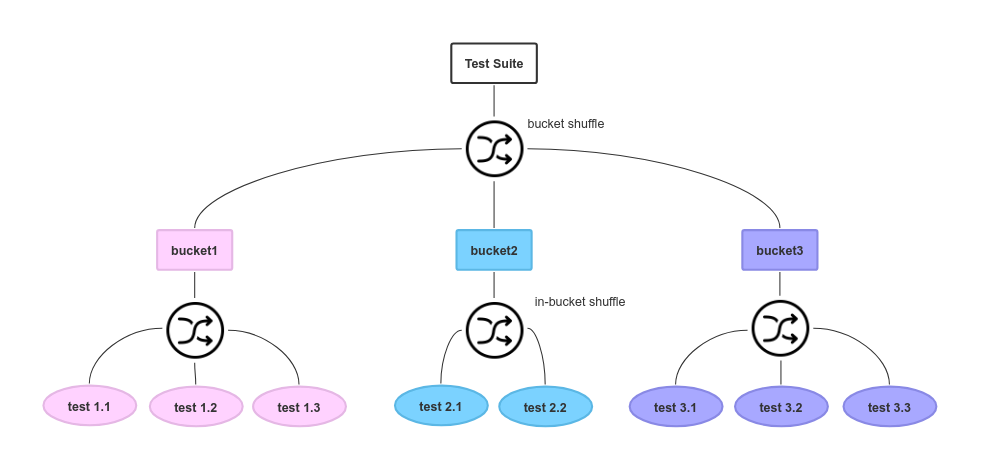
The plugin groups tests in buckets, shuffles them within buckets and then shuffles the buckets.
Given the test suite above, here are two of a few possible generated orders of tests:


You can choose from a few types of buckets:
- class
Tests will be shuffled within a class and classes will be shuffled, but tests from one class will never have tests from other classes or modules run in-between them.
- module
Same as above at module level. This is the setting applied if you run pytest with just --random-order flag or --random-order-seed=<seed>.
- package
Same as above at package level. Note that modules (and hence tests inside those modules) that belong to package x.y.z do not belong to package x.y, so they will fall in different buckets when randomising with package bucket type.
- parent
If you are using custom test items which don’t belong to any module, you can use this to limit reordering of test items to within the parent to which they belong. For normal test functions the parent is the module in which they are declared.
- grandparent
Similar to parent above, but use the parent of the parent of the test item as the bucket key instead.
- global
All tests fall in the same bucket, full randomness, tests probably take longer to run.
- none (deprecated)
Disable shuffling. Deprecated since 1.0.4 because this plugin no longer shuffles tests by default so there is nothing to disable.
If you have three buckets of tests A, B, and C with three tests 1 and 2, and 3 in each of them, then one of many potential orderings that non-global randomisation can produce could be:
c2, c1, c3, a3, a1, a2, b3, b2, b1
As you can see, all C tests are executed “next” to each other and so are tests in buckets A and B. Tests from any bucket X are guaranteed to not be interspersed with tests from another bucket Y. For example, if you choose bucket type module then bucket X contains all tests that are in this module.
By default, when randomisation is enabled, your tests will be randomised at module level which means that tests within a single module X will be executed in no particular order, but tests from other modules will not be mixed in between tests of module X.
The randomised reordering can be disabled per module or per class irrespective of the chosen bucket type.
Usage and Tips
Bucket Type Choice
It is best to start with smallest bucket type (class or module depending on whether you have class-based tests), and switch to a larger bucket type when you are sure your tests handle that.
If your tests rely on fixtures that are module or session-scoped, more randomised order of tests will mean slower tests. You probably don’t want to randomise at global or package level while you are coding and need a quick confirmation that nothing big is broken.
Disable Shuffling in Module or Class
You can disable shuffling of tests within a single module or class by marking the module or class with random_order marker and passing disabled=True to it:
pytestmark = pytest.mark.random_order(disabled=True)

def test_number_one():
    assert True

def test_number_two():
    assert True
class MyTest(TestCase):
    pytestmark = pytest.mark.random_order(disabled=True)

    def test_number_one(self):
        self.assertTrue(True)
No matter what will be the bucket type for the test run, test_number_one will always run before test_number_two.
Rerun Tests in the Same Order (Same Seed)
If you discover a failing test because you reordered tests, you will probably want to be able to rerun the tests in the same failing order. To allow reproducing test order, the plugin reports the seed value it used with pseudo random number generator:
============================= test session starts ==============================
..
Using --random-order-bucket=module
Using --random-order-seed=24775
...
You can now use the --random-order-seed=... bit as an argument to the next run to produce the same order:
$ pytest -v --random-order-seed=24775
Run Last Failed Tests First
Since v0.8.0 pytest cache plugin’s --failed-first flag is supported – tests that failed in the last run will be run before tests that passed irrespective of shuffling bucket type.
Disable the Plugin
If the plugin misbehaves or you just want to assure yourself that it is not the plugin making your tests fail or pass undeservedly, you can disable it:
$ pytest -p no:random_order
Note that randomisation is disabled by default. By passing -p no:random_order you are stopping the plugin from being registered so its hooks won’t be registered and its command line options won’t appear in --help.
Changelog
v1.1.0 (2022-12-03)
Fixes xdist support (thanks @matejsp)
v1.0.4 (2018-11-30)
Fixes issues with doctests reported in #36 - class, package and module didn’t work because DoctestItem doesn’t have cls or module attributes. Thanks @tobywf.
Deprecate none bucket type.
With tox, run tests of pytest-random-order with both pytest 3 and 4.
v1.0.3 (2018-11-16)
Fixes compatibility issues with pytest 4.0.0, works with pytest 3.0+ as before.
Tests included in the source distribution.
v1.0.0 (2018-10-20)
Plugin no longer alters the test order by default. You will have to either 1) pass --random-order, or --random-order-bucket=<bucket>, or --random-order-seed=<seed>, or 2) edit your pytest configuration file and add one of these options there under addopts, or 3) specify these flags in environment variable PYTEST_ADDOPTS.
Python 3.5+ is required. If you want to use this plugin with Python 2.7, use v0.8.0 which is stable and fine if you are happy with it randomising the test order by default.
The name under which the plugin registers itself is changed from random-order (hyphen) to random_order (underscore). This addresses the issue of consistency when disabling or enabling this plugin via the standard -p flag. Previously, the plugin could be disabled by passing -p no:random-order yet re-enabled only by passing -p pytest_random_order.plugin. Now they are -p no:random_order to disable and -p random_order.plugin to enable (The .plugin bit, I think, is required because pytest probably thinks it’s an unrelated thing to random_order and import it, yet without it it’s the same thing so doesn’t import it).
v0.8.0
pytest cache plugin’s --failed-first works now.
Credits
The shuffle icon in the diagram is by artist Daniele De Santis and it was found on iconarchive.
The diagram is drawn with sketchboard.io
Release history Release notifications | RSS feed


Download files
Download the file for your platform. If you're not sure which to choose, learn more about installing packages.
Source Distribution
Built Distribution
Filter files by name, interpreter, ABI, and platform.
If you're not sure about the file name format, learn more about wheel file names.
Copy a direct link to the current filters
File details
Details for the file pytest-random-order-1.1.0.tar.gz.
File metadata
- Download URL: pytest-random-order-1.1.0.tar.gz
- Upload date:
- Size: 14.6 kB
- Tags: Source
- Uploaded using Trusted Publishing? No
- Uploaded via: twine/4.0.1 CPython/3.11.0
File hashes
| Algorithm | Hash digest | |
|---|---|---|
| SHA256 |
dbe6debb9353a7af984cc9eddbeb3577dd4dbbcc1529a79e3d21f68ed9b45605
|
|
| MD5 |
1701109bacfe9901e5fc3c614a3ca83f
|
|
| BLAKE2b-256 |
3def93dc9fa0b3b7eb99566813bccaf50216ef1c7d8d07923348fabbd6f7eefc
|
File details
Details for the file pytest_random_order-1.1.0-py3-none-any.whl.
File metadata
- Download URL: pytest_random_order-1.1.0-py3-none-any.whl
- Upload date:
- Size: 11.5 kB
- Tags: Python 3
- Uploaded using Trusted Publishing? No
- Uploaded via: twine/4.0.1 CPython/3.11.0
File hashes
| Algorithm | Hash digest | |
|---|---|---|
| SHA256 |
6cb1e59ab0f798bb0c3488c11ae0c70d7d3340306a466d28b28ccd8ef8c20b7e
|
|
| MD5 |
d48ed01046a5315db1d48904392194ce
|
|
| BLAKE2b-256 |
7ed0468a06e0942a6cd628dbfe2e5944fbd21a12cbf452f5faff089da8cd7152
|






