
Library pytest-spec is a pytest plugin to display test execution output like a SPECIFICATION.
Verified details
These details have been verified by PyPIProject links
GitHub Statistics
Maintainers

Project description
pytest-spec


Library pytest-spec is a pytest plugin to display test execution output like a SPECIFICATION.
[Documentation]
Available features
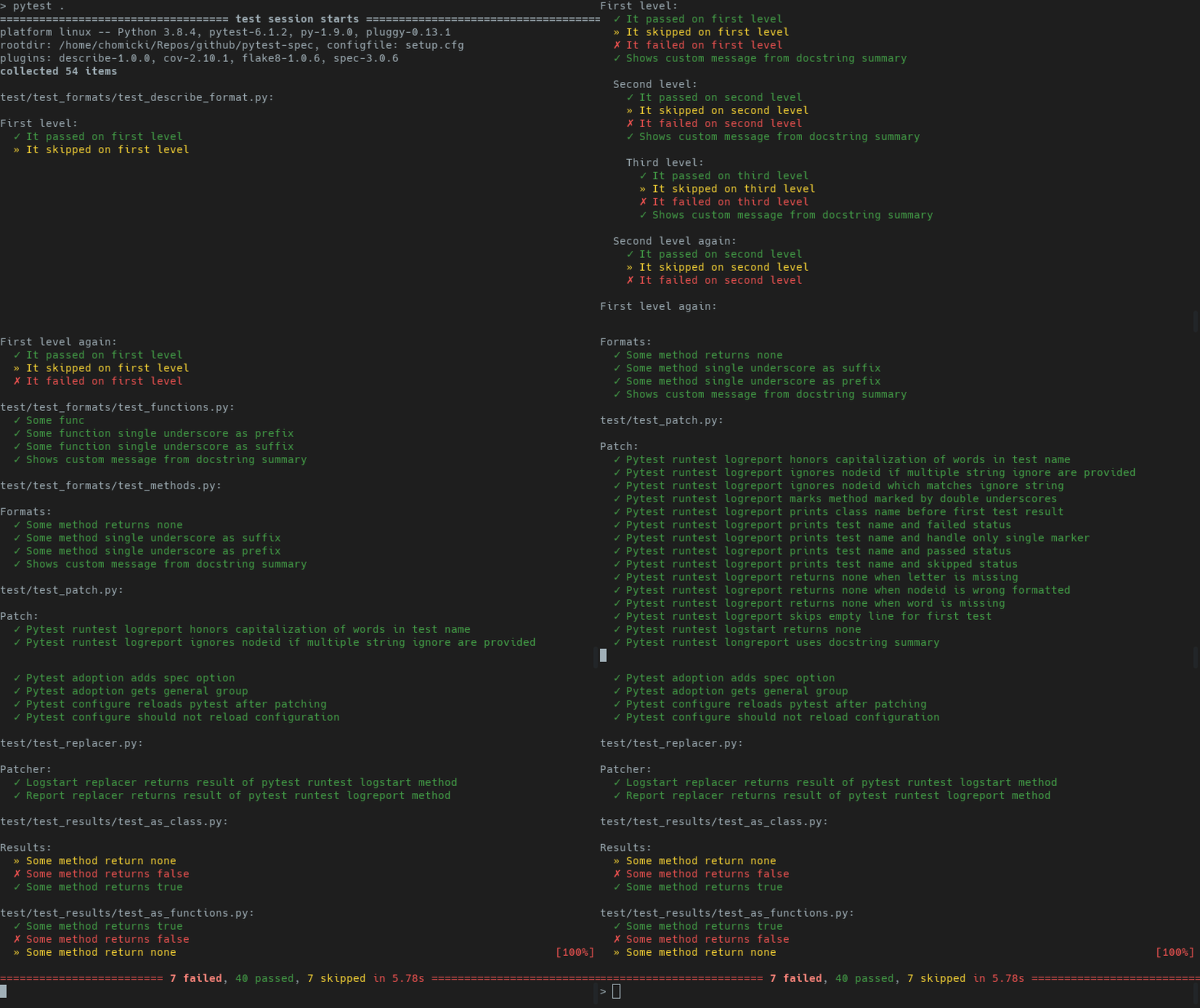
- Format output to look like specification.
- Group tests by classes and files
- Failed, passed and skipped are marked and colored.
- Remove test_ and underscores for every test.
- It is possible to use docstring summary instead of test name.
- Supports function based, class based test.
- Supports describe like tests.
Output example
Configuration
spec_header_format
spec_header_format
You can configure the format of the test headers by specifying a format string in your ini-file:
    ; since pytest 4.6.x
    [pytest]
    spec_header_format = {module_path}:

    ; legacy pytest
    [tool:pytest]
    spec_header_format = {module_path}:
or in your pyproject.toml file:
    [tool.pytest.ini_options]
    spec_header_format = "{module_path}:"
In addition to the {path} and {class_name} replacement fields, there is also {test_case} that holds a more human readable name.
spec_container_format
spec_container_format
You can configure the format of test container names (e.g., describe_* or Test* classes/methods) by specifying a format string in your ini-file:
Available variables:
{sentence}- Capitalize first letter, replace underscores with spaces, removedescribe_prefix{unit_name}- Raw name withdescribe_prefix removed, underscores preserved
    ; since pytest 4.6.x
    [pytest]
    spec_container_format = {sentence}:

    ; legacy pytest
    [tool:pytest]
    spec_container_format = {sentence}:
Similar configuration could be done in your pyproject.toml file:
    [tool.pytest.ini_options]
    spec_container_format = "{sentence}:"
Here is an example of what the formatted output might look like:
| Format | Test Container | Formatted Output |
|---|---|---|
| sentence | class TestFibonacciSequence |
Fibonacci Sequence |
| sentence | def describe_fibonacci_sequence() |
Fibonacci sequence |
| unit_name | class TestFibonacciSequence |
FibonacciSequence |
| unit_name | def describe_fibonacci_sequence() |
fibonacci_sequence |
spec_test_format
spec_test_format
You can configure the format of the test results by specifying a format string in your ini-file:
3 variables are available:
- result - place for indicator
- name - name of test
- docstring_summary - first line from test docstring if available
    ; since pytest 4.6.x
    [pytest]
    spec_test_format = {result} {name}

    ; legacy pytest
    [tool:pytest]
    spec_test_format = {result} {name}
or
    ; since pytest 4.6.x
    [pytest]
    spec_test_format = {result} {docstring_summary}

    ; legacy pytest
    [tool:pytest]
    spec_test_format = {result} {docstring_summary}
In second example where docstring is not available the name will be added to spec output.
Similar configuration could be done in your pyproject.toml file:
    [tool.pytest.ini_options]
    spec_test_format = "{result} {name}"
or
    [tool.pytest.ini_options]
    spec_test_format = "{result} {docstring_summary}"
spec_success_indicator
spec_success_indicator
You can configure the indicator displayed when test passed.
ini-file
    ; since pytest 4.6.x
    [pytest]
    spec_success_indicator = ✓

    ; legacy pytest
    [tool:pytest]
    spec_success_indicator = ✓
or pyproject.toml
    [tool.pytest.ini_options]
    spec_success_indicator = "✓"
spec_failure_indicator
spec_failure_indicator
You can configure the indicator displated when test failed.
ini-file
    ; since pytest 4.6.x
    [pytest]
    spec_failure_indicator = ✗

    ; legacy pytest
    [tool:pytest]
    spec_failure_indicator = ✗
or pyproject.toml
    [tool.pytest.ini_options]
    spec_failure_indicator = "✗"
spec_skipped_indicator
spec_skipped_indicator
You can configure the indicator displated when test is skipped.
ini-file
    ; since pytest 4.6.x
    [pytest]
    spec_skipped_indicator = »

    ; legacy pytest
    [tool:pytest]
    spec_skipped_indicator = »
or pyproject.toml
    [tool.pytest.ini_options]
    spec_skipped_indicator = "»"
spec_ignore
spec_ignore
Comma-separated settings to ignore/hide some tests or output from from plugins like FLAKE8 or ISORT. Any test which contain provided string will be ignored in output spec.
ini-file
    ; since pytest 4.6.x
    [pytest]
    spec_ignore = FLAKE8

    ; legacy pytest
    [tool:pytest]
    spec_ignore = FLAKE8
or pyproject.toml
    [tool.pytest.ini_options]
    spec_ignore = "FLAKE8"
spec_indent
spec_indent
ini-file
    ; since pytest 4.6.x
    [pytest]
    spec_indent = "   "

    ; legacy pytest
    [tool:pytest]
    spec_indent = "   "
or pyproject.toml
    [tool.pytest.ini_options]
    spec_indent = "   "
Continuous Integration

Download
All versions of library are available on official pypi server.
Install
From pypi.org
pip install pytest-spec
From source
    cd pytest-spec
    uv sync
From source for testing
    cd pytest-spec
    uv sync --all-extras --dev
From source for build or deployment
    cd pytest-spec
    uv sync
    uv build
    uv publish
Contribution
Please feel free to present your idea by code example (pull request) or reported issues.
Contributors
- @0x64746b
- @lucasmarshall
- @amcgregor
- @jhermann
- @frenzymadness
- @chrischambers
- @maxalbert
- @jayvdb
- @hugovk
- @b0g3r
- @paxcodes
- @s-t-e-v-e-n-k
- @yk-kd
- @benfairless
- @damienflament
- @joshuaprior
License
pytest-spec - pytest plugin to display test execution output like a SPECIFICATION.
Copyright (C) 2014-2026 Pawel Chomicki
This program is free software; you can redistribute it and/or modify it under the terms of the GNU General Public License as published by the Free Software Foundation; either version 2 of the License, or (at your option) any later version.
This program is distributed in the hope that it will be useful, but WITHOUT ANY WARRANTY; without even the implied warranty of MERCHANTABILITY or FITNESS FOR A PARTICULAR PURPOSE. See the GNU General Public License for more details.
Project details
Verified details
These details have been verified by PyPIProject links
GitHub Statistics
Maintainers
Release history Release notifications | RSS feed


Download files
Download the file for your platform. If you're not sure which to choose, learn more about installing packages.
Source Distribution
Built Distribution
Filter files by name, interpreter, ABI, and platform.
If you're not sure about the file name format, learn more about wheel file names.
Copy a direct link to the current filters
File details
Details for the file pytest_spec-6.1.0.tar.gz.
File metadata
- Download URL: pytest_spec-6.1.0.tar.gz
- Upload date:
- Size: 1.2 MB
- Tags: Source
- Uploaded using Trusted Publishing? Yes
- Uploaded via: twine/6.1.0 CPython/3.13.12
File hashes
| Algorithm | Hash digest | |
|---|---|---|
| SHA256 |
0168ebebd8ef2050d94876698204066d491d1b46c2408b588a898421d533d573
|
|
| MD5 |
d53becd6a46878a79aabb8feba5c3ace
|
|
| BLAKE2b-256 |
b51bb6375805e7201f1b865e59ce978d16ce067a36a7862e6f266f6f9ac65216
|
Provenance
The following attestation bundles were made for pytest_spec-6.1.0.tar.gz:
Publisher:
release.yml on pchomik/pytest-spec
-
Statement:
-
Statement type:
https://in-toto.io/Statement/v1 -
Predicate type:
https://docs.pypi.org/attestations/publish/v1 -
Subject name:
pytest_spec-6.1.0.tar.gz -
Subject digest:
0168ebebd8ef2050d94876698204066d491d1b46c2408b588a898421d533d573 - Sigstore transparency entry: 1563918905
- Sigstore integration time:
-
Permalink:
pchomik/pytest-spec@8fd9297f90d7c2f2216b3bcba8a7b33d91e40dff -
Branch / Tag:
refs/tags/6.1.0 - Owner: https://github.com/pchomik
-
Access:
public
-
Token Issuer:
https://token.actions.githubusercontent.com -
Runner Environment:
github-hosted -
Publication workflow:
release.yml@8fd9297f90d7c2f2216b3bcba8a7b33d91e40dff -
Trigger Event:
release
-
Statement type:
File details
Details for the file pytest_spec-6.1.0-py3-none-any.whl.
File metadata
- Download URL: pytest_spec-6.1.0-py3-none-any.whl
- Upload date:
- Size: 15.9 kB
- Tags: Python 3
- Uploaded using Trusted Publishing? Yes
- Uploaded via: twine/6.1.0 CPython/3.13.12
File hashes
| Algorithm | Hash digest | |
|---|---|---|
| SHA256 |
1b29dde53b5a17b311329ff9bb7bb5c7591a4688e52c518f1ea0197bba544c37
|
|
| MD5 |
c3cbe5018c88c8f878a22fe3afb9f8f8
|
|
| BLAKE2b-256 |
9179978f3a60e35d9ef9393912c18ef3d881b62685b6576c5451e816285fb236
|
Provenance
The following attestation bundles were made for pytest_spec-6.1.0-py3-none-any.whl:
Publisher:
release.yml on pchomik/pytest-spec
-
Statement:
-
Statement type:
https://in-toto.io/Statement/v1 -
Predicate type:
https://docs.pypi.org/attestations/publish/v1 -
Subject name:
pytest_spec-6.1.0-py3-none-any.whl -
Subject digest:
1b29dde53b5a17b311329ff9bb7bb5c7591a4688e52c518f1ea0197bba544c37 - Sigstore transparency entry: 1563918909
- Sigstore integration time:
-
Permalink:
pchomik/pytest-spec@8fd9297f90d7c2f2216b3bcba8a7b33d91e40dff -
Branch / Tag:
refs/tags/6.1.0 - Owner: https://github.com/pchomik
-
Access:
public
-
Token Issuer:
https://token.actions.githubusercontent.com -
Runner Environment:
github-hosted -
Publication workflow:
release.yml@8fd9297f90d7c2f2216b3bcba8a7b33d91e40dff -
Trigger Event:
release
-
Statement type:






