
TUI runner for `pytest` tests
Verified details
These details have been verified by PyPIProject links
GitLab Statistics
Maintainers

Project description
pytest-tui-run


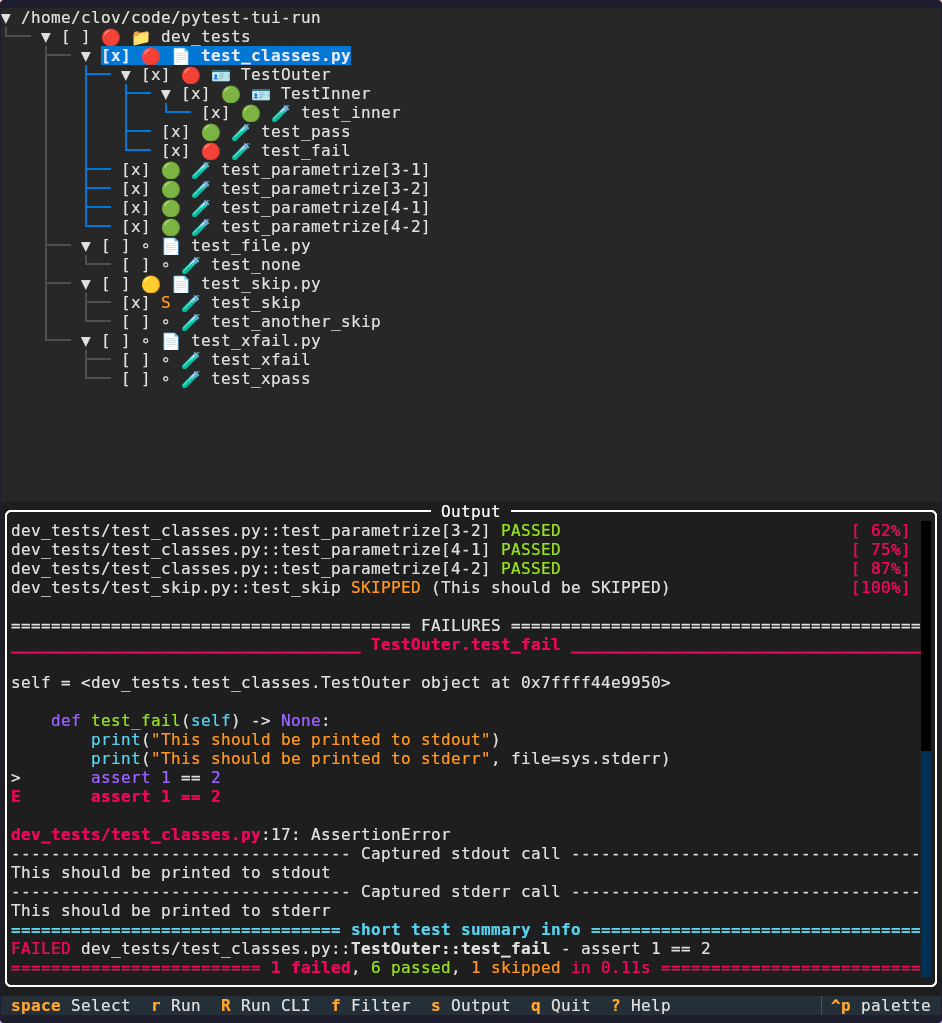
TUI test runner for pytest.
Motivation
Do you like running pytest from the terminal, but find it difficult to run a subset
of tests? Do you like VS Code's test tree view, but hate using the mouse? Then
pytest-tui-run is for you: it combines the best of both worlds by showing you the
collected test tree, but allows you to use your keyboard to select and run tests.
Even better, it comes with vim-like keybindings by default, which are fully
configurable.
Alternatives
There are similar projects, but none with the same scope.
- pytest-explorer.
TUI for exploring
pytesttests. No tree view. - pytest-tui.
TUI for exploring
pytestresults. No test running. - VS Code Testing View. GUI for running tests in a tree view. Plugins for multiple languages and test frameworks. Mouse centric and works only in VS Code.
- Neotest plugin for Neovim. TUI for running tests in a tree view. Plugins for multiple languages and test frameworks. Works only in Neovim.
Philosophy
Don't reinvent the wheel: everything that can be delegated to pytest, is delegated to
pytest. This is to keep the plugin as lightweight as possible to minimize the burden
of maintaining. In practice this means that the plugin mostly just modifies the
user-given pytest arguments, and then runs pytest with those arguments.
Installation
The package is distributed through PyPI, so simply use your favorite package manager.
For example using pip:
pip install pytest-tui-run
Usage
This is a pytest plugin, so you can start it from the terminal by
pytest --tui-run
Just give it the arguments you would normally give to plain pytest. Another option
is to start the app directly:
pytest-tui-run
There are two ways to run the (selected) tests:
Run tests in TUI
Press r to run the (selected) tests directly in the TUI. This shows you the output
and marks the test results in the tree.
Run tests in CLI
Press R to run the (selected) tests in CLI. This exits the TUI and prints you the
proper pytest command to run.
Configuration
The default configuration includes all the available configuration options. A schema is included for validation. Both of these are included with the package to ensure compatible versions. To get started, run
pytest --tui-run --init-config
This will copy the default config to your config directory
(usually ~/.config/pytest-tui-run/) and create a symlink to the schema.
You may use your favorite validation tool, but a schema directive for Taplo (in VS Code the Even Better TOML plugin) is included in the config file by default. In other words, if you have a Taplo-compatible editor, you should get schema validation out of the box, assuming you have properly symlinked the schema file.
Contributing
Contributions are welcome. See CONTRIBUTING.md for details.
Project details
Verified details
These details have been verified by PyPIProject links
GitLab Statistics
Maintainers
Release history Release notifications | RSS feed


Download files
Download the file for your platform. If you're not sure which to choose, learn more about installing packages.
Source Distribution
Built Distribution
Filter files by name, interpreter, ABI, and platform.
If you're not sure about the file name format, learn more about wheel file names.
Copy a direct link to the current filters
File details
Details for the file pytest_tui_run-0.1.0.tar.gz.
File metadata
- Download URL: pytest_tui_run-0.1.0.tar.gz
- Upload date:
- Size: 26.7 kB
- Tags: Source
- Uploaded using Trusted Publishing? Yes
- Uploaded via: uv/0.11.19 {"installer":{"name":"uv","version":"0.11.19","subcommand":["publish"]},"python":null,"implementation":{"name":null,"version":null},"distro":{"name":"Debian GNU/Linux","version":"13","id":"trixie","libc":null},"system":{"name":null,"release":null},"cpu":null,"openssl_version":null,"setuptools_version":null,"rustc_version":null,"ci":true}
File hashes
| Algorithm | Hash digest | |
|---|---|---|
| SHA256 |
54ef6c10cd7432d24d7b08d6daba6357e2f18affb17af03d0a0cfe7349eacad1
|
|
| MD5 |
5d0b25fce4036dbc411a6c4a85f593d5
|
|
| BLAKE2b-256 |
914dab792f0882905d65d267f929b3afdb6ac1617574455777eda32bef791a9e
|
File details
Details for the file pytest_tui_run-0.1.0-py3-none-any.whl.
File metadata
- Download URL: pytest_tui_run-0.1.0-py3-none-any.whl
- Upload date:
- Size: 32.9 kB
- Tags: Python 3
- Uploaded using Trusted Publishing? Yes
- Uploaded via: uv/0.11.19 {"installer":{"name":"uv","version":"0.11.19","subcommand":["publish"]},"python":null,"implementation":{"name":null,"version":null},"distro":{"name":"Debian GNU/Linux","version":"13","id":"trixie","libc":null},"system":{"name":null,"release":null},"cpu":null,"openssl_version":null,"setuptools_version":null,"rustc_version":null,"ci":true}
File hashes
| Algorithm | Hash digest | |
|---|---|---|
| SHA256 |
8fbeeba4d822d813073eaba837c6855cc37411a5db72fe76443a92c001703d27
|
|
| MD5 |
23c09e16a03e0999de12d9002934e0b7
|
|
| BLAKE2b-256 |
1163e42429f80c4cb42503c22596103600e50a5c4b9e3e83b5826faa1d434a5c
|






