
Textual-based terminal UI for running pytest tests

Project description
pytest-tui-runner
Interactive Textual User Interface (TUI) for running pytest tests easily from your terminal.
Introdution
When I was running tests with pytest, I often struggled to easily select and execute only the tests I needed.
Typing long and complex command-line arguments was error-prone and not very convenient.
That inspired me to create pytest-tui-runner, a plugin that makes working with tests much simpler and more interactive — right inside your terminal.
Features
pytest-tui-runner allows you to create your own text-based interface that lists and organizes your tests exactly the way you want.
You can select tests, provide parameters, and run them. All from a user-friendly terminal interface.
Main features:
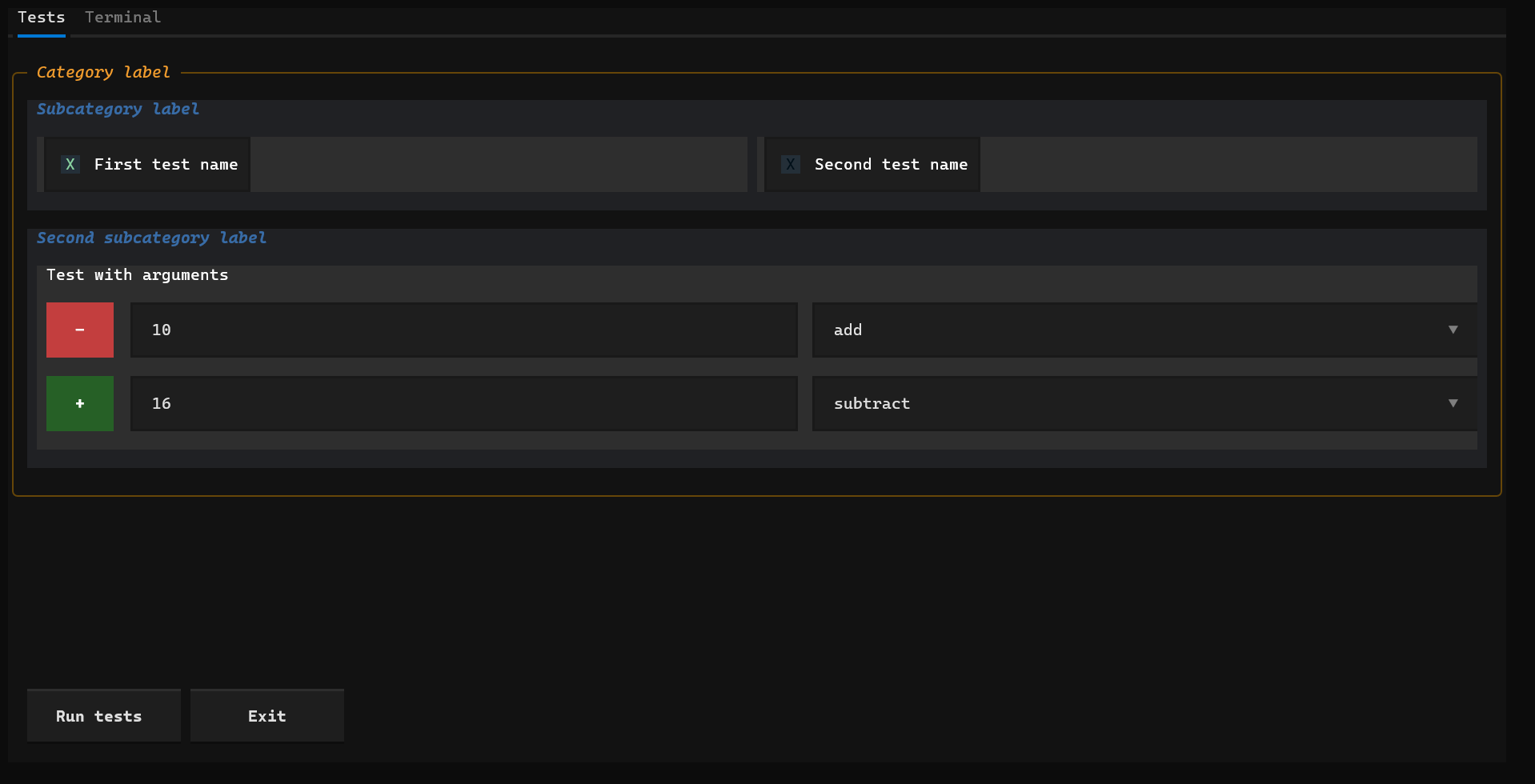
- Interactive test selection – check or uncheck which tests to run
- Color-coded test results –
- 🟢 Green → test passed
- 🔴 Red → test failed
- 🔵 Blue → test running
- Test parametrization – easily provide test arguments via text inputs or dropdown menus
- Integrated terminal output – see real pytest logs while tests run
- Persistent interface state – the layout and widget values are saved in local files, so you can easily share or restore your test setup later.
Instalation
Install from PyPI using:
pip install pytest-tui-runner
Usage
In the root folder of your project (where you have the tests/ directory), create a folder named pytest_tui_runner.
This folder will store everything related to the plugin — logs, configuration files, and widget states.
Once your configuration file is ready (see the Configuration section below), simply run:
pytest-tui run
The terminal interface will open.
You can then:
- Check or uncheck individual tests to include or exclude them
- Fill in argument fields for parametrized tests
- Add additional parameter sets using the green + button (each click creates a new row of arguments)
- Start the execution directly from the TUI
- Switch to the terminal view – you can copy text from it by holding Shift and dragging the mouse to select the desired output
Configuration
Inside the pytest_tui_runner folder, create a file named config.yaml.
This is the main configuration file defining how your tests are grouped and displayed.
Structure overview
Tests are organized into categories, each with a label.
Each category can contain one or more subcategories, which also have their own label.
Inside each subcategory, you define individual tests.
Every test can be referenced in two ways:
- Using
test_name→ must exactly match the real test function name.
This means that one checkbox in the TUI corresponds to one specific test function. - Using
markers→ a list of pytest markers (e.g.["setup", "login"]) that will be used to find all matching tests.
In this case, a single checkbox can represent multiple tests — all tests that contain the specified markers will be executed together.
You can also define arguments for parametrized tests.
Each argument must be described precisely using the following fields:
arg_name→ must exactly match the argument name used in the referenced test functionarg_type→ specifies how the value will be entered in the TUI and must be one of:"text_input"– user can type a custom text value manually"select"– user can choose from predefined options
- Additional fields depending on the type:
- for
"text_input"→ include aplaceholderfield to show a hint in the input box - for
"select"→ include anoptionsfield, which is a list of selectable values
- for
These definitions allow the TUI to dynamically generate interactive input fields that correspond to real test parameters.
Example configuration file
categories:
  - label: "Category label"
    subcategories:
      - label: "Subcategory label"
        tests:
          - label: "First test name"
            markers: ["test1"]
          - label: "Second test name"
            test_name: "test_2"
      - label: "Second subcategory label"
        tests:
          - label: "Test with arguments"
            test_name: "test_with_arguments"
            arguments:
              - arg_name: "x"
                arg_type: "text_input"
                placeholder: "Enter x"
              - arg_name: "action"
                arg_type: "select"
                options: ["add", "subtract", "multiply", "divide"]
Example Project Structure
my_project/
├── pytest_tui_runner/
│   └── config.yaml
├── tests/
│   ├── test_math.py
│   └── test_login.py
└── src/
    └── my_app/
🖼️ Screenshots
Here’s how the TUI looks in action:
🤝 Contributing
If you have ideas, feedback, or suggestions for improvements, I’d love to hear from you!
You can reach out directly via email or message me on LinkedIn:
- Email: 176jenda@gmail.com
- LinkedIn: Jan Málek
If you prefer, you can also open a discussion or issue on the GitHub Issues page.
License
This project is licensed under the [MIT License] - see the `LICENSE' file for more details..
Release history Release notifications | RSS feed


Download files
Download the file for your platform. If you're not sure which to choose, learn more about installing packages.
Source Distribution
Built Distribution
Filter files by name, interpreter, ABI, and platform.
If you're not sure about the file name format, learn more about wheel file names.
Copy a direct link to the current filters
File details
Details for the file pytest_tui_runner-1.0.4.tar.gz.
File metadata
- Download URL: pytest_tui_runner-1.0.4.tar.gz
- Upload date:
- Size: 31.4 kB
- Tags: Source
- Uploaded using Trusted Publishing? No
- Uploaded via: twine/6.2.0 CPython/3.12.2
File hashes
| Algorithm | Hash digest | |
|---|---|---|
| SHA256 |
26c8eea3dd461335a314ab4b59780e506dd1eab705165c17d720fde6e935653c
|
|
| MD5 |
dab334133985a39c11c2681d8e3245f0
|
|
| BLAKE2b-256 |
5f45b3170a7a140e43f6525bd21be40f26120228b45d9b3137ae0d049b22e227
|
File details
Details for the file pytest_tui_runner-1.0.4-py3-none-any.whl.
File metadata
- Download URL: pytest_tui_runner-1.0.4-py3-none-any.whl
- Upload date:
- Size: 36.4 kB
- Tags: Python 3
- Uploaded using Trusted Publishing? No
- Uploaded via: twine/6.2.0 CPython/3.12.2
File hashes
| Algorithm | Hash digest | |
|---|---|---|
| SHA256 |
28251a85151467fe2081c948dc1a70790172d1a920233dac6eba7aa7f3d09661
|
|
| MD5 |
42290a0108c61f6ceddf72700084f325
|
|
| BLAKE2b-256 |
d57b21d733dfcf55e0f624834d5637ef4912c429625993e15ca159cc72a1a11f
|






