
pytest-xspec



Executable specifications with pytest.
Link specifications to your existing pytest tests, organize your test suite your way, and see which specifications your test suite verifies. Detect missing tests and enforce verification in CI.
Usage
Install pytest-xspec into your pytest environment. The plugin is discovered
automatically. Python 3.10+ and pytest 8+ are supported.
pip install pytest-xspec
Declare specifications
Declare specification IDs under requirements in pyproject.toml.
[tool.xspec]
requirements = ["REQ-001", "REQ-002"]
Alternatively, use one ID per line in pytest.ini.
[pytest]
xspec =
    REQ-001
    REQ-002
Declare specifications in one of these files. Using both is an error, and other files do not supply specifications. IDs are opaque strings. Duplicates and marked IDs that have not been declared are rejected. No inventory, or an empty inventory, means zero specifications.
Mark tests
Associate tests with specifications, using one marker per specification.
import pytest


@pytest.mark.xspec("REQ-001")
@pytest.mark.xspec("REQ-002")
def test_shared_behavior():
    assert 1 + 1 == 2
Run pytest
Plain pytest checks specification configuration and markers without printing
a specification report. Add --xspec-report to see the report, or --xspec-strict
to also fail the run when a specification is unverified.
pytest --xspec-report             # Print the verification report
pytest --xspec-json=report.json   # Export statuses and individual test outcomes
pytest --xspec-strict             # Report and fail on unverified specifications
pytest -m xspec --xspec-strict    # Run only marked specification tests
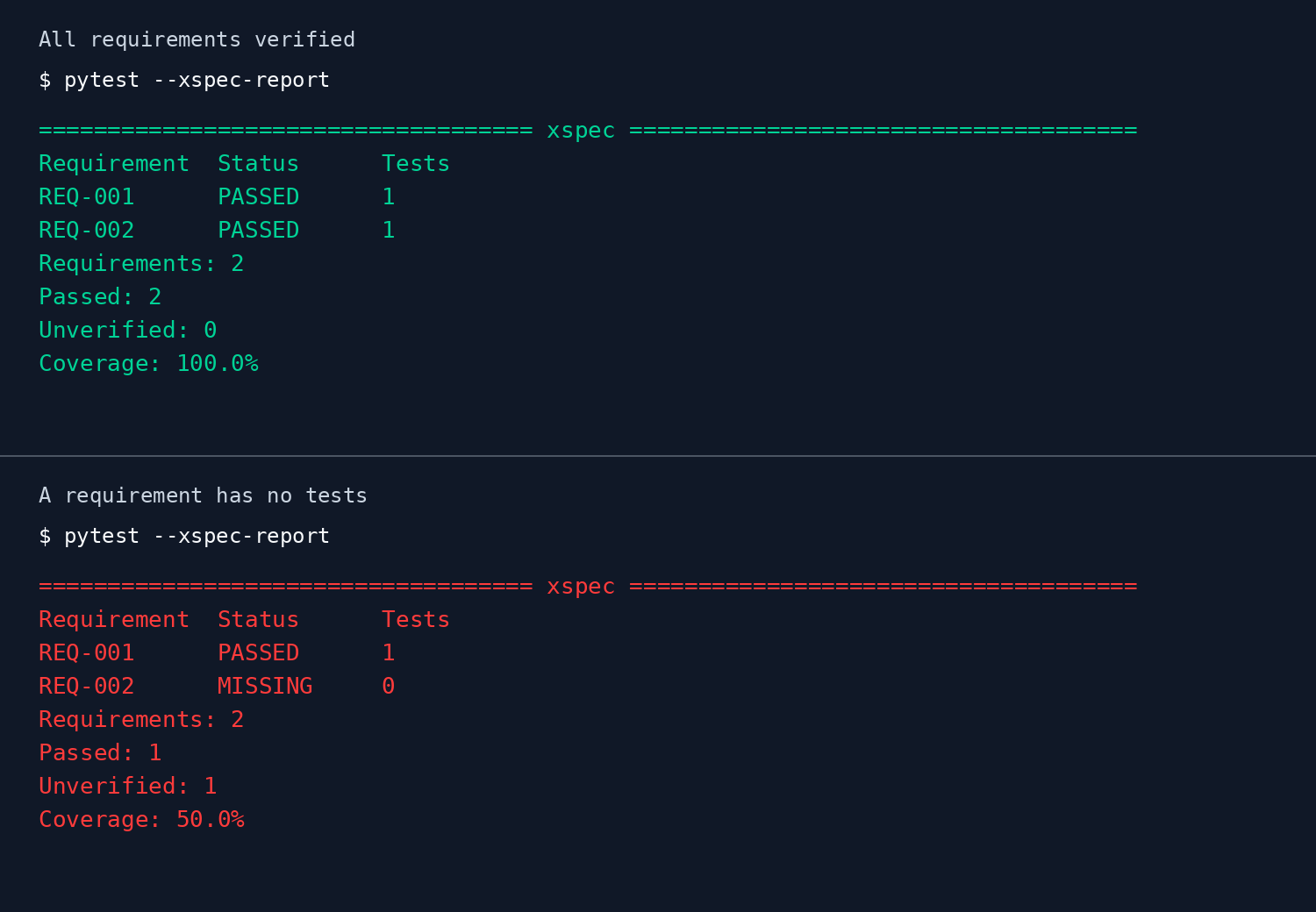
The report is green when all specifications are verified and red when verification fails. The first report shows the example above; the second shows a specification without tests.
Select specifications
Use --xspec-select=ID to run tests linked to one specification. Repeat the option
to select several specifications. A test linked to several selected IDs runs once.
pytest --xspec-select=REQ-001
pytest --xspec-select=REQ-001 --xspec-select=REQ-002
Each option takes one exact ID, including any spaces or commas. Quote IDs when the
shell requires it. Unmarked tests are excluded. Collection paths, -k and -m
further narrow the selection. An undeclared selected ID is a usage error.
Selecting only IDs without matching tests produces an empty selection.
Strict mode still evaluates every declared specification. Selecting one ID keeps
other specifications in the report and the coverage calculation. Excluded tests
remain DESELECTED, and tests shared with other specifications keep all their links.
With selection active, terminal reports and the JSON scope field show selected
IDs, collection paths, -k, -m and whether the run only discovers tests.
Discover tests without running them
Add --collect-only -q to list the selected test IDs, including parameterized cases.
pytest --xspec-select=REQ-001 --collect-only -q
Discovery runs neither fixtures nor test bodies. It still imports collected modules,
which need their normal dependencies. Reports mark discovered tests as SKIPPED,
so discovery does not verify their specifications. Strict mode fails when any
specification remains unverified. Without strict mode, an empty selection keeps
pytest's no-tests exit code, 5.
Read specification statuses
Reports label specifications as requirements.
A specification is verified when every test marked with its ID passes. One passing test is not enough if another test for the same specification fails or skips.
When those tests have different results, the report uses the first matching status in this table, reading from top to bottom.
| Status | Meaning |
|---|---|
ERROR |
A test's setup or cleanup failed. |
FAILED |
A test failed. |
XPASSED |
A test marked as an expected failure passed instead. |
XFAILED |
A test failed as expected. |
SKIPPED |
A test was skipped or never ran. |
DESELECTED |
A test was excluded by a filter such as -k or -m. |
PASSED |
Every test for the specification passed. |
For example, if one test passes and another skips, the specification is SKIPPED
and remains unverified. If one test fails and another skips, it is FAILED.
Missing and unfinished tests
Pytest first finds tests, then runs them. If it finds no marked tests for a
declared specification, that specification is MISSING. Tests that were found but
never ran are SKIPPED, including runs that only find tests or stop early.
If pytest encounters an error while finding tests, such as a broken import,
the verification check cannot succeed.
Tests without markers
Tests without a specification marker do not change specification statuses. They can still make pytest fail. In the duck example, the specification passes, but the unmarked cheese test fails the pytest run.
Check coverage
Coverage is the percentage of declared specifications that are verified. With no declared specifications and no errors while finding tests, the verification check succeeds and coverage is 0.0%.
Errors while finding tests make verification fail, even at 100% coverage. The report follows
pytest's color settings, so --color=no disables color.
For a complete report, let pytest find the whole test suite. With -k or -m,
the plugin still knows about the tests excluded by the filter and reports marked
ones as DESELECTED. If you run only one folder, it cannot see tests in other
folders.
Runnable examples
Start with the pizza, then try the other examples to see what makes a specification pass or remain unverified.
Run the commands below from the repository root. Dependencies are installed automatically.
| Example | With --xspec-strict |
Exit code |
|---|---|---|
| Quickstart - Two slices of pizza | PASSED, 100% coverage |
0 |
| Missing specification - A lost sock | MISSING, 50% coverage |
1 |
| Partial verification - Cat skips a meeting | SKIPPED, 0% coverage |
1 |
| Acceptance only - Duck versus cheese | PASSED with -m xspec |
0 |
Run an example
Run the Quickstart example, then replace quickstart with another example folder.
uv run --locked pytest examples/quickstart --xspec-strict
For acceptance_only, add -m xspec to run only the marked test.
Without that filter, the unmarked test makes pytest fail.
Select and discover example tests
Use the same example command with --xspec-select=REQ-001 to select the pizza test.
Add --collect-only -q to discover it without running it:
uv run --locked pytest examples/quickstart --xspec-select=REQ-001 --collect-only -q
For missing_requirement, repeat --xspec-select=REQ-002 to select both declared IDs.
Only the existing sock test runs. With --xspec-strict, the missing sock still
makes verification fail.
Inspect the JSON report
Export the example results to see the specification status and individual test outcomes.
uv run --locked pytest examples/quickstart --xspec-json=examples/quickstart/report.json
Open examples/quickstart/report.json after running the command.
Verify all examples
Check that every example behaves as described.
uv run --locked pytest examples/test_examples.py -n 0
All five checks should pass, including checks for the examples that deliberately fail. The examples are also verified in CI.
Contributing
See CONTRIBUTING.md for setup, tests and pull requests.
1 maintainer

Metadata
1 maintainer
Release files for pytest-xspec 0.6.0
For a detailed explanation of source distributions (sdists) and built distributions (wheels), please see the package formats documentation.
Source distribution (sdist)
| File | Size | Uploaded | Provenance | |
|---|---|---|---|---|
| pytest_xspec-0.6.0.tar.gz | 136.9 kB | With provenance | Details |
Built distribution (wheel)
| File | Interpreter | ABI | Platform | Reset |
|---|---|---|---|---|
| pytest_xspec-0.6.0-py3-none-any.whl | Python 3 | none | any | Details |
Total release size: 147.9 kB
Release files / pytest_xspec-0.6.0.tar.gz
| Download URL | pytest_xspec-0.6.0.tar.gz |
|---|---|
| Size | 136.9 kB |
| Tags | Source |
|
SHA-256 checksum How to use checksums |
4012fe08e62cf99d57f290244b84955c0fa29778122657de33e95e1b0abfa978
|
|
BLAKE2b-256 checksum How to use checksums |
ac04483776ffb5433bd80a6e976050b610d339671a1b0a128ed7d5133fb42bf9
|
| Upload date | |
|
Uploaded using Trusted Publishing? What is trusted publishing? |
Yes |
| Uploaded via |
twine/7.0.0 CPython/3.13.14
|
Provenance
Provenance describes where a file came from. On PyPI, provenance is shared via attestations, which provide a verifiable record of the build or publishing details. View details, limitations and caveats.


PyPI Publish Attestation
PyPI verified that this artifact, at this checksum, originated from the publisher listed below.
Signed by GitHub Actions, verified by PyPI on Oct 15, 2026.
Transparency logRelease files / pytest_xspec-0.6.0-py3-none-any.whl
| Download URL | pytest_xspec-0.6.0-py3-none-any.whl |
|---|---|
| Size | 11.0 kB |
| Tags | Python 3 |
|
SHA-256 checksum How to use checksums |
083eccbea11541bb122db5707a8abcda4d82e0c701db9cac7e0d511161ecc9f7
|
|
BLAKE2b-256 checksum How to use checksums |
233d55326110a14faf05561e5b0f2099ce1627d9a03147c8aabfa38853d19a51
|
| Upload date | |
|
Uploaded using Trusted Publishing? What is trusted publishing? |
Yes |
| Uploaded via |
twine/7.0.0 CPython/3.13.14
|
Provenance
Provenance describes where a file came from. On PyPI, provenance is shared via attestations, which provide a verifiable record of the build or publishing details. View details, limitations and caveats.
PyPI Publish Attestation
PyPI verified that this artifact, at this checksum, originated from the publisher listed below.
Signed by GitHub Actions, verified by PyPI on Oct 15, 2026.
Transparency logSecurity for pytest-xspec 0.6.0
Provenance
Provenance describes where a file came from. On PyPI, provenance is shared via attestations, which provide a verifiable record of the build or publishing details. View details, limitations and caveats.
Full provenance
All 2 files in this release have been uploaded with provenance metadata.
Attestation for pytest_xspec-0.6.0.tar.gz
PyPI Publish Attestation
PyPI verified that this artifact, at this checksum, originated from the publisher listed below.
Signed by GitHub Actions, verified by PyPI on Oct 15, 2026.
Transparency logA note on package security
PyPI is a repository for distributing packages, not a service for auditing them. While third-party security researchers and our staff do their best to detect and remove malicious packages, PyPI cannot guarantee the quality, security or suitability of any given package.
To learn more about protecting yourself from malicious actors, visit our package security documentation.














