
a pytest plugin that can run both python and robotframework tests while generating robot reports for them

Project description
pytest-robotframework
a pytest plugin that can run both python and robotframework tests while generating robot reports for them
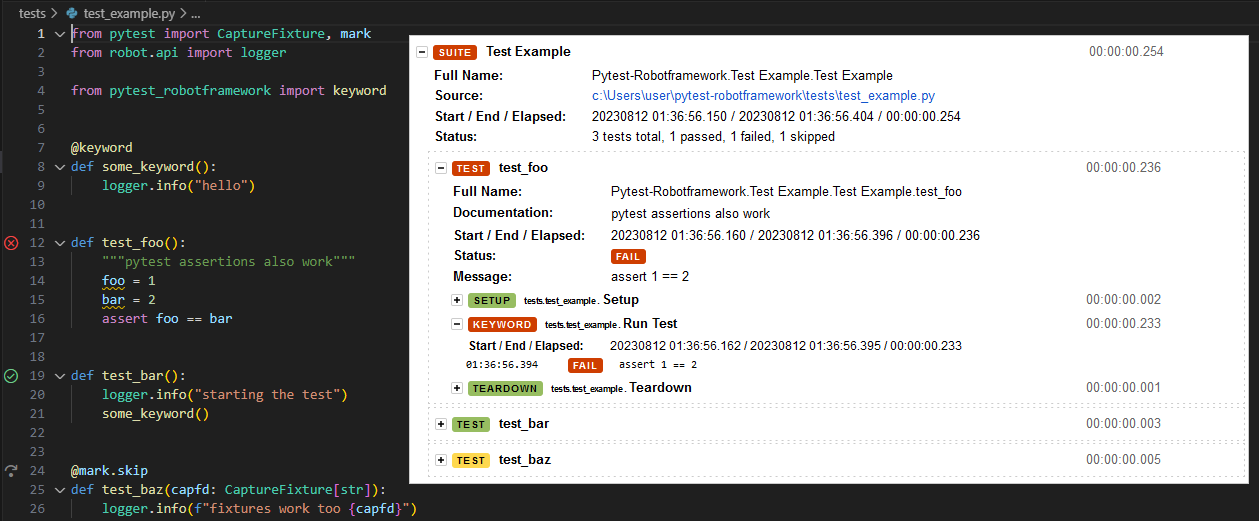
install
pytest should automatically find and activate the plugin once you install it.
poetry add pytest-robotframework --group=dev
features
write robot tests in python
# you can use both robot and pytest features
from robot.api import logger
from pytest import Cache

from pytest_robotframework import keyword

@keyword  # make this function show as a keyword in the robot log
def foo():
    ...

@mark.slow  # gets converted to robot tags
def test_foo(cache: Cache):
    foo()
run .robot tests
to allow for gradual adoption, the plugin also runs regular robot tests as well:
*** Settings ***
test setup  setup

*** Test Cases ***
bar
    [Tags]  asdf  key:value
    no operation

*** Keywords ***
setup
    log  ran setup
which is roughly equivalent to the following python code:
# conftest.py
from robot.api import logger
from pytest_robotframework import keyword

def pytest_runtet_setup():
    foo()

@keyword
def foo():
    logger.info("ran setup")
# test_foo.py
from pytest import mark

@mark.asdf
@mark.key("value")
def test_bar():
    ...
setup/teardown and other hooks
to define a function that runs for each test at setup or teardown, create a conftest.py with a pytest_runtest_setup and/or pytest_runtest_teardown function:
# ./tests/conftest.py
def pytest_runtest_setup():
    log_in()
# ./tests/test_suite.py
def test_something():
    """i am logged in now"""
these hooks appear in the log the same way that the a .robot file's Setup and Teardown options in *** Settings *** would:
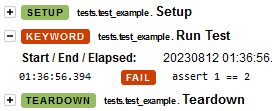
for more information, see writing hook functions. pretty much every pytest hook should work with this plugin but i haven't tested them all. please raise an issue if you find one that's broken.
tags/markers
pytest markers are converted to tags in the robot log:
from pytest import mark

@mark.slow
def test_blazingly_fast_sorting_algorithm():
    [1,2,3].sort()
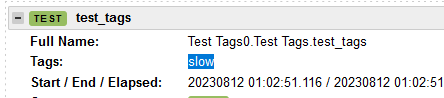
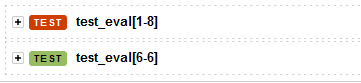
markers like skip, skipif and parameterize also work how you'd expect:
from pytest import mark

@mark.parametrize("test_input,expected", [(1, 8), (6, 6)])
def test_eval(test_input: int, expected: int):
    assert test_input == expected
listeners
you can define listeners in your conftest.py and decorate them with @listener to register them as global listeners:
# conftest.py
from pytest_robotframework import listener
from robot import model, result
from robot.api.interfaces import ListenerV3
from typing_extensions import override

@listener
class Listener(ListenerV3):
    @override
    def start_test(self, data: model.TestCase result: result.TestCase):
        ...
robot suite variables
to set suite-level robot variables, call the set_variables function at the top of the test suite:
from robot.libraries.BuiltIn import BuiltIn
from pytest_robotframework import set_variables

set_variables(
    {
        "foo": "bar",
        "baz": ["a", "b"],
    }
)

def test_variables():
    assert BuiltIn().get_variable_value("$foo") == "bar"
set_variables is equivalent to the *** Variables *** section in a .robot file. all variables are prefixed with $. @ and & are not required since $ variables can store lists and dicts anyway
config
since this is a pytest plugin, you should avoid using robot options that have pytest equivalents:
| instead of... | use... |
|---|---|
robot --include tag_name |
pytest -m tag_name |
robot --skip tag_name |
pytest -m "not tag_name" |
robot --test "test name" path/to/test.robot |
pytest path/to/test.robot::"Test Name" |
robot --listener Foo |
@listener decorator |
robot --dryrun |
pytest --collect-only (not exactly the same. you should use a type checker on your python tests as a replacement for robot dryrun) |
robot --exitonfailure |
pytest --maxfail=1 |
robot --rerunfailed |
pytest --lf |
if the robot option you want to use isn't mentioned here, check the pytest command line options and ini options for a complete list of pytest settings as there are probably many missing from this list.
specifying robot options directlty
you can specify robot CLI arguments directly with the --robotargs argument:
pytest --robotargs="-d results --listener foo.Foo"
or you could use the ROBOT_OPTIONS environment variable:
ROBOT_OPTIONS="-d results --listener foo.Foo"
however, arguments that have pytest equivalents should not be set with robot as they will probably cause the plugin to behave incorrectly.
Release history Release notifications | RSS feed


Download files
Download the file for your platform. If you're not sure which to choose, learn more about installing packages.
Source Distribution
Built Distribution
Filter files by name, interpreter, ABI, and platform.
If you're not sure about the file name format, learn more about wheel file names.
Copy a direct link to the current filters
File details
Details for the file pytest_robotframework-1.5.0.tar.gz.
File metadata
- Download URL: pytest_robotframework-1.5.0.tar.gz
- Upload date:
- Size: 17.3 kB
- Tags: Source
- Uploaded using Trusted Publishing? No
- Uploaded via: poetry/1.3.2 CPython/3.11.4 Linux/5.15.0-1041-azure
File hashes
| Algorithm | Hash digest | |
|---|---|---|
| SHA256 |
38210c9e72c9102b03cd4e440c57ce387e093f9c57d0d19cb2008421d99ab66e
|
|
| MD5 |
4fdecffb2246b88223ff472eb1fc31f8
|
|
| BLAKE2b-256 |
4079761c573bc302219439c5a81f9d4102215da48cdf1fa97c7b454b23e87d63
|
File details
Details for the file pytest_robotframework-1.5.0-py3-none-any.whl.
File metadata
- Download URL: pytest_robotframework-1.5.0-py3-none-any.whl
- Upload date:
- Size: 14.5 kB
- Tags: Python 3
- Uploaded using Trusted Publishing? No
- Uploaded via: poetry/1.3.2 CPython/3.11.4 Linux/5.15.0-1041-azure
File hashes
| Algorithm | Hash digest | |
|---|---|---|
| SHA256 |
8d5f9c5a31084cdcfa5a998afda615057a5afa98260b28c3d495eac93e743397
|
|
| MD5 |
f4cc82602e59075520a2666d947326b1
|
|
| BLAKE2b-256 |
924f4a848f184f0caf94081b6d068a5b3b6213bfda71a9ef64bc6e975d15b787
|






