
pythaiidcard
Python library for reading Thai national ID cards using smartcard readers.

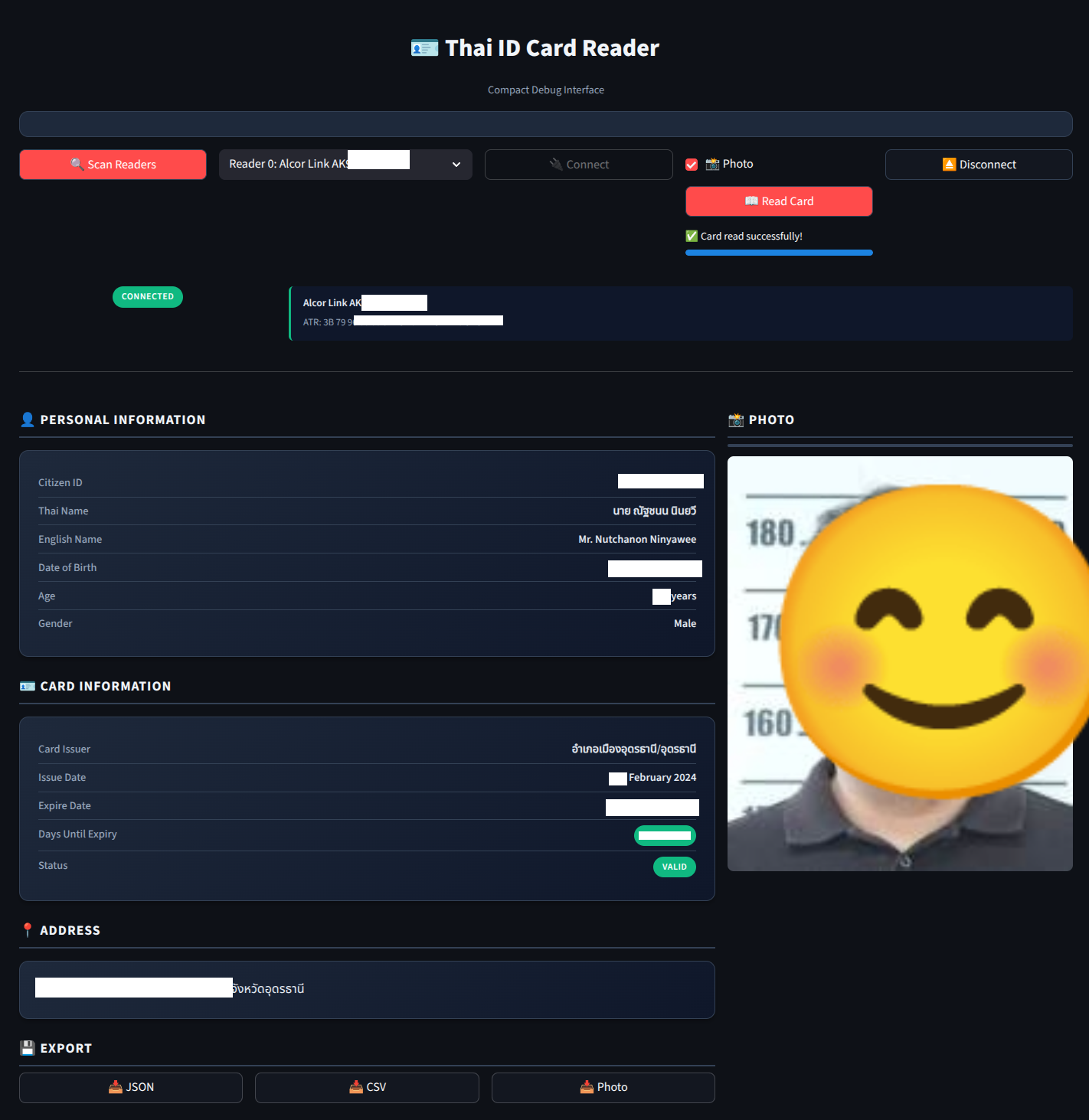
Table of Contents
- Features
- What's New in v0.3.0
- Quick Start
- Flutter Library Development
- Prerequisites
- Installation
- Usage
- Data Fields
- Dependencies
- Troubleshooting
- Project Structure
- Credits
- License
Features
- ✅ Full Card Data Extraction: Read all information from Thai ID cards
- 📸 Photo Support: Extract and save card photos (JPEG format)
- 🏥 NHSO Health Insurance: Read National Health Security Office data
- 🔖 Laser ID Support: Read laser-engraved ID from cards
- 🔒 Data Validation: Automatic CID checksum validation and date parsing
- 📅 Date Conversion: Buddhist Era to Gregorian calendar conversion
- 🏛️ Structured Data Models: Name and Address parsed into structured objects
- 🎨 Modern Web UI: Streamlit-based debug interfaces
- 🐍 Type-Safe: Full type hints and Pydantic models
- 🔍 Error Handling: Comprehensive exception handling and system checks
- 📦 Zero Config: Auto-detects readers and connects to cards
- 🚀 Fast: Efficient APDU command implementation
What's New in v0.3.0
Debug Interface Improvements
- 🎨 Consolidated Modern Interface: Merged debug interfaces into a single sidebar-based layout
- 📱 Better Organization: Expandable reader list with status indicators in sidebar
- ✨ Quick Copy Buttons: One-click copy for CID, names, and address fields
- 🌓 Dark Gradient Theme: Modern, production-ready appearance with card-based design
API Server Updates (v2.3.0)
- ⚡ Event-Driven Monitoring: New PCSCMonitor with real-time PC/SC state change detection
- 🔄 Auto-Read by Default: Reliable automatic card reading on insertion
- 🔧 Improved Reliability: Better handling of reader availability and connection states
- 🐛 Field Mapping Fixes: Corrected web app field names to match API model
Documentation
- 📚 Organized Structure: Moved documentation files to
notes/directory - 📝 Updated Guides: Comprehensive documentation for all interfaces
- 🧪 Test Coverage: Added event-driven monitoring tests
Quick Start
# 1. Install system dependencies
sudo apt-get install -y pcscd libpcsclite-dev python3-dev swig

# 2. Install Python dependencies
uv sync --group dev

# 3. Run the web interface
uv run streamlit run debug/app.py
Then open http://localhost:8501 in your browser, insert your Thai ID card, and click "Scan Readers" → "Connect" → "Read Card".
Flutter Library Development
We are actively working on a Flutter version of this library for cross-platform mobile support (iOS/Android). The development is in progress at playground/thai_idcard_reader_test/.
Key Features
- Package: Uses the
ccidFlutter package for smartcard reading - Platform Support: iOS (13.0+) and Android with USB OTG smartcard readers
- Architecture: Mirrors the Python implementation using APDU commands over PC/SC
- CI/CD: Automated iOS builds via GitHub Actions and Fastlane
Getting Started with Flutter Version
cd playground/thai_idcard_reader_test/

# Install dependencies
flutter pub get

# Run on Android device
flutter run

# For iOS builds, see the CI/CD workflow or use GitHub Actions
See the Flutter project README for detailed setup instructions, hardware requirements, and iOS cloud build configuration.
Note: Thai National ID cards do NOT support NFC - external USB OTG (Android) or MFi-certified (iOS) smartcard readers are required.
iOS Testing Limitation: The author currently lacks access to a Mac, making iOS testing challenging. However, the project includes GitHub Actions CI/CD for automated iOS builds. Community contributions and testing on iOS devices are highly appreciated!
Credits
This project is inspired by and based on:
- Thai National ID Card Reader Gist by bouroo
- lab-python3-th-idcard by pstudiodev1
Prerequisites
System Dependencies
This project requires the following system packages:
pcscd- PC/SC Smart Card Daemonlibpcsclite-dev- PC/SC development filespython3-dev- Python development headersswig- Interface compiler for Python bindings
Install them using:
sudo apt-get update
sudo apt-get install -y pcscd libpcsclite-dev python3-dev swig
Or if you have mise installed:
mise run install-deps
Installation
This project uses uv for Python package management.
# Install uv if you haven't already
curl -LsSf https://astral.sh/uv/install.sh | sh

# Install Python dependencies
uv sync
Or with mise:
mise run setup
Usage
Command Line
Connect your smartcard reader and insert a Thai ID card, then run:
uv run python thai-idcard.py
Or:
mise run run
The script will:
- Detect available smartcard readers
- Connect to the first reader automatically
- Read personal data from the Thai ID card including:
- Citizen ID
- Thai/English full name
- Date of birth
- Gender
- Card issuer
- Issue/Expiry dates
- Address
- Photo (saved as
{CID}.jpg)
Web Interface (Streamlit)
For a modern web-based interface with visual feedback:
# Modern interface with visual feedback
uv run streamlit run debug/app.py
Features:
- 🔍 Visual reader detection and selection
- 🔌 Connection status monitoring
- 📖 Interactive card reading with progress bars
- 📸 Photo preview and download
- 💾 Export data as JSON, CSV, or photo
- 🐛 Real-time debug logging (full interface)
See debug/README.md for detailed documentation.
Python Library
from pythaiidcard import ThaiIDCardReader

# Basic usage - auto-connect and read card
reader = ThaiIDCardReader()
with reader.card_session():
    card = reader.read_card(include_photo=True)

    print(f"Name: {card.english_fullname}")
    print(f"CID: {card.cid}")
    print(f"Age: {card.age}")
    print(f"Expires: {card.expire_date}")
    print(f"Valid: {not card.is_expired}")

    # Save photo
    if card.photo:
        card.save_photo()  # Saves as {cid}.jpg

# Advanced usage - manual control
from pythaiidcard.reader import ThaiIDCardReader

# List available readers
readers = ThaiIDCardReader.list_readers()
for reader_info in readers:
    print(f"Reader {reader_info.index}: {reader_info.name}")
    print(f"  ATR: {reader_info.atr}")
    print(f"  Connected: {reader_info.connected}")

# Connect to specific reader
reader = ThaiIDCardReader(reader_index=0)
reader.connect()

# Read without photo for faster operation
card = reader.read_card(include_photo=False)

# Read with progress callback
def on_photo_progress(current, total):
    print(f"Reading photo: {current}/{total}")

card = reader.read_card(
    include_photo=True,
    photo_progress_callback=on_photo_progress
)

reader.disconnect()

# Access card data - Structured models
# Names are parsed into structured Name objects
print(f"Thai First Name: {card.thai_name.first_name}")
print(f"Thai Last Name: {card.thai_name.last_name}")
print(f"English Prefix: {card.english_name.prefix}")  # "Mr.", "Mrs.", etc.
print(f"English Full Name: {card.english_name.full_name}")

# Address is parsed into structured Address object
print(f"House Number: {card.address_info.house_no}")
print(f"Moo: {card.address_info.moo}")
print(f"Soi: {card.address_info.soi}")
print(f"Street: {card.address_info.street}")
print(f"Subdistrict: {card.address_info.subdistrict}")
print(f"District: {card.address_info.district}")
print(f"Province: {card.address_info.province}")
print(f"Full Address: {card.address_info.address}")

# Backward compatibility - original string properties still work
print(f"Thai Name: {card.thai_fullname}")  # Returns full name string
print(f"English Name: {card.english_fullname}")  # Returns full name string
print(f"Address: {card.address}")  # Returns full address string

# Other computed properties
print(f"Gender: {card.gender_text}")  # "Male" or "Female"
print(f"Issue Date: {card.issue_date}")
print(f"Days until expiry: {card.days_until_expiry}")

# Export as JSON
import json
card_json = card.model_dump_json(indent=2)
print(card_json)

# Read NHSO (National Health Security Office) data
nhso_data = reader.read_nhso_data()
print(f"Main Hospital: {nhso_data.main_hospital_name}")
print(f"Insurance Type: {nhso_data.main_inscl}")
print(f"Expiry Date: {nhso_data.expire_date}")
print(f"Is Expired: {nhso_data.is_expired}")

# Read Laser ID (laser-engraved ID on card)
laser_id = reader.read_laser_id()
print(f"Laser ID: {laser_id}")
Data Fields
The library extracts and parses card data into structured models:
ThaiIDCard Model
| Field | Type | Description |
|---|---|---|
cid |
str |
13-digit citizen identification number (validated with checksum) |
thai_name |
Name |
Structured Thai name (prefix, first_name, middle_name, last_name) |
english_name |
Name |
Structured English name (prefix, first_name, middle_name, last_name) |
date_of_birth |
date |
Birth date (Buddhist Era → Gregorian converted) |
gender |
str |
Gender code ("1"=Male, "2"=Female) |
card_issuer |
str |
Issuing organization |
issue_date |
date |
Card issue date |
expire_date |
date |
Card expiration date |
address_info |
Address |
Structured address (house_no, moo, soi, street, subdistrict, district, province) |
photo |
bytes |
JPEG photo data (optional) |
Name Model
Automatically parses names from Thai ID card format (prefix#firstname#middlename#lastname):
| Field | Type | Description |
|---|---|---|
prefix |
str |
Name prefix (e.g., "นาย", "นาง", "Mr.", "Mrs.") |
first_name |
str |
First name |
middle_name |
str |
Middle name (may be empty) |
last_name |
str |
Last name |
full_name |
str |
Computed full name with proper spacing |
Address Model
Automatically parses Thai address format with proper component separation:
| Field | Type | Description |
|---|---|---|
house_no |
str |
House number (บ้านเลขที่) |
moo |
str |
Village/Moo number (หมู่ที่) |
soi |
str |
Soi/Lane (ซอย) |
street |
str |
Street/Road (ถนน) |
subdistrict |
str |
Subdistrict/Tambon (ตำบล) or แขวง (Bangkok) |
district |
str |
District/Amphoe (อำเภอ) or เขต (Bangkok) |
province |
str |
Province (จังหวัด) |
address |
str |
Computed full address with Thai prefixes |
Computed Properties
| Property | Type | Description |
|---|---|---|
age |
int |
Current age calculated from date of birth |
gender_text |
str |
Gender as text ("Male" or "Female") |
is_expired |
bool |
Whether the card has expired |
days_until_expiry |
int |
Days remaining until card expires |
thai_fullname |
str |
Full Thai name (backward compatibility) |
english_fullname |
str |
Full English name (backward compatibility) |
address |
str |
Full address string (backward compatibility) |
NHSOData Model
National Health Security Office health insurance data:
| Field | Type | Description |
|---|---|---|
main_inscl |
str |
Main insurance classification code |
sub_inscl |
str |
Sub insurance classification code |
main_hospital_name |
str |
Main registered hospital name |
sub_hospital_name |
str |
Sub hospital name |
paid_type |
str |
Payment type code |
issue_date |
date |
NHSO registration issue date |
expire_date |
date |
NHSO registration expiry date |
update_date |
date |
Last update date |
change_hospital_amount |
str |
Number of hospital changes allowed |
Computed Properties:
is_expired(bool): Whether the NHSO registration has expireddays_until_expiry(int): Days remaining until NHSO registration expires
Laser ID
Thai ID cards also contain a laser-engraved ID that can be read separately:
laser_id = reader.read_laser_id() # Returns string
This is a unique identifier laser-engraved on the physical card.
Dependencies
Python Packages
- pyscard (>=2.3.0) - Python smartcard library for PC/SC interface
- Pillow (>=11.3.0) - Python imaging library for photo handling
- pydantic (>=2.0) - Data validation and settings management
- python-dateutil (>=2.8.2) - Date parsing utilities
Development Dependencies
- streamlit (>=1.28.0) - Web interface framework (optional)
- ruff (>=0.8.4) - Linting and formatting
Troubleshooting
SystemDependencyError: Missing required system dependencies
The library will automatically check for required system dependencies on Linux systems with apt package manager. If dependencies are missing, you'll see a helpful error message with installation instructions.
Example error:
SystemDependencyError: Missing required system dependencies:

  ✗ PC/SC Smart Card Daemon (pcscd)
  ✗ PC/SC Lite development library (libpcsclite-dev)

To install missing dependencies, run:

  sudo apt-get update && sudo apt-get install -y pcscd libpcsclite-dev python3-dev swig
To skip the dependency check (if you know dependencies are installed via other means):
from pythaiidcard import ThaiIDCardReader

reader = ThaiIDCardReader(skip_system_check=True)
"No such file or directory: winscard.h"
Install the system dependencies listed above, particularly libpcsclite-dev.
"No readers available"
- Ensure your smartcard reader is connected
- Check that the
pcscdservice is running:sudo systemctl status pcscd - Start it if needed:
sudo systemctl start pcscd
Permission denied
Add your user to the scard group:
sudo usermod -a -G scard $USER
Then log out and log back in.
Project Structure
pythaiidcard/
├── pythaiidcard/              # Main library package
│   ├── __init__.py       # Package initialization
│   ├── reader.py         # ThaiIDCardReader implementation
│   ├── models.py         # Pydantic data models
│   ├── constants.py      # APDU commands and response codes
│   ├── exceptions.py     # Custom exceptions
│   ├── utils.py          # Utility functions
│   └── system_check.py   # System dependency checking
├── debug/                # Debug interface
│   ├── app.py           # Modern compact interface
│   └── README.md        # Debug interface documentation
├── thai-idcard.py       # Legacy CLI script
├── pyproject.toml       # Project configuration
└── README.md            # This file
Key Components
- ThaiIDCardReader: Main class for reading Thai ID cards
- ThaiIDCard: Pydantic model with validated card data
- Name: Structured name model (prefix, first_name, middle_name, last_name)
- Address: Structured address model (house_no, moo, soi, street, subdistrict, district, province)
- NHSOData: Health insurance data from National Health Security Office
- CardReaderInfo: Information about available card readers
- System Check: Automatic validation of system dependencies
- Debug Interfaces: Streamlit-based web UIs for testing and debugging
License
See LICENSE file for details.
1 maintainer

Metadata
1 maintainer
Release files for pythaiidcard 0.3.0
For a detailed explanation of source distributions (sdists) and built distributions (wheels), please see the package formats documentation.
Source distribution (sdist)
| File | Size | Uploaded | Provenance | |
|---|---|---|---|---|
| pythaiidcard-0.3.0.tar.gz | 2.9 MB | Without provenance | Details |
Built distribution (wheel)
| File | Interpreter | ABI | Platform | Reset |
|---|---|---|---|---|
| pythaiidcard-0.3.0-py3-none-any.whl | Python 3 | none | any | Details |
Total release size: 3.0 MB
Release files / pythaiidcard-0.3.0.tar.gz
| Download URL | pythaiidcard-0.3.0.tar.gz |
|---|---|
| Size | 2.9 MB |
| Tags | Source |
|
SHA-256 checksum How to use checksums |
9d7816613665f10053d6280c04bed02e2f7ba8daac3ef167d07bad3bd05cf30a
|
|
BLAKE2b-256 checksum How to use checksums |
4d2a97093b66df365db6abbdb0a62c76ead00dd58839af0d85514d8e06d390f2
|
| Upload date | |
|
Uploaded using Trusted Publishing? What is trusted publishing? |
No |
| Uploaded via |
uv/0.9.5
|
Release files / pythaiidcard-0.3.0-py3-none-any.whl
| Download URL | pythaiidcard-0.3.0-py3-none-any.whl |
|---|---|
| Size | 26.2 kB |
| Tags | Python 3 |
|
SHA-256 checksum How to use checksums |
9aad43bd3e4c9745e3bc69338a6b51de49c20cc493d7d3e23951be02888b5987
|
|
BLAKE2b-256 checksum How to use checksums |
83513fb4571c92aee7f1aaa9fe9e4e13025623912715eac3245248b32fc1a08f
|
| Upload date | |
|
Uploaded using Trusted Publishing? What is trusted publishing? |
No |
| Uploaded via |
uv/0.9.5
|
Security for pythaiidcard 0.3.0
Provenance
Provenance describes where a file came from. On PyPI, provenance is shared via attestations, which provide a verifiable record of the build or publishing details. View details, limitations and caveats.
No provenance found
None of the files in this release were uploaded with provenance metadata.
A note on package security
PyPI is a repository for distributing packages, not a service for auditing them. While third-party security researchers and our staff do their best to detect and remove malicious packages, PyPI cannot guarantee the quality, security or suitability of any given package.
To learn more about protecting yourself from malicious actors, visit our package security documentation.














