
PyThermoAI




🚀 Introduction
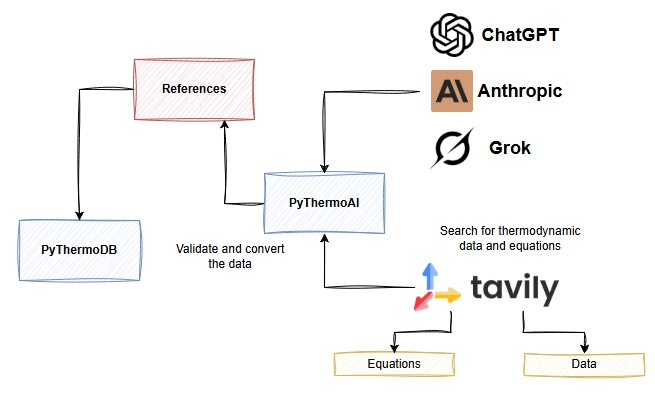
PyThermoAI is an intelligent Python package that revolutionizes thermodynamic data acquisition and processing by leveraging advanced AI agents and web search capabilities. This powerful tool seamlessly integrates thermodynamic data retrieval, equation solving, and database management into a unified platform.
Built with LangGraph for creating sophisticated multi-agent workflows, PyThermoAI employs intelligent agents that can reason, plan, and execute complex thermodynamic tasks. The system utilizes Tavily as its primary web search engine, enabling agents to efficiently discover and retrieve thermodynamic data from authoritative online sources.
Key Features
- 🤖 AI-Powered Data Agents: Intelligent agents that automatically search and retrieve thermodynamic properties from authoritative sources (NIST, DIPPR, peer-reviewed literature)
- 💾 Database Integration: Direct connection with PyThermoDB for data storage and management, with automatic conversion of retrieved thermodynamic data into the valid PyThermoDB format
Architecture Overview
PyThermoAI consists of several interconnected components:
- Data Agent: Searches and validates thermodynamic properties
- Equations Agent: Solves complex thermodynamic equations
- MCP Manager: Handles Model Context Protocol integrations allows using multiple MCP servers for enhanced functionality
📦 Installation
Install PyThermoAI using pip:
pip install pythermoai
Requirements
- Python 3.13+
- API keys for LLM providers (OpenAI, Anthropic, Google, etc.)
- Tavily API key for enhanced web search capabilities
🛠️ Quick Start
1. Launch the Web Interface
from pythermoai import thermo_chat

# mcp source configuration
mcp_source = {
    "tavily-remote": {
        "command": "npx",
        "args": [
            "-y",
            "mcp-remote",
            f"https://mcp.tavily.com/mcp/?tavilyApiKey={os.getenv('TAVILY_API_KEY')}"
        ],
        "transport": "stdio",
        "env": {}
    }
}

# Launch with OpenAI GPT-4
thermo_chat(
    model_provider="openai",
    model_name="gpt-4o-mini",
    mcp_source=mcp_source,
)
2. Create an AI Agent
import asyncio
from pythermoai.agents import create_agent
from pythermoai.memory import generate_thread

async def main():
    # Create a thermodynamic data agent
    agent = await create_agent(
        model_provider="openai",
        model_name="gpt-4o-mini",
        agent_name="data-agent",
        agent_prompt="You are a thermodynamic data expert...",
        mcp_source=mcp_source
    )

    # Generate conversation thread
    config = generate_thread()

    # Query for thermodynamic properties
    result = await agent.ainvoke({
        "messages": ["Find critical properties for methane"]
    }, config=config)

    print(result)

asyncio.run(main())
3. Create a FastAPI Service
from pythermoai.api import create_api
import uvicorn

# Create API with integrated agents
app = create_api(
    model_provider="openai",
    model_name="gpt-4o-mini",
    mcp_source=mcp_source
)

# Run the server
uvicorn.run(app, host="127.0.0.1", port=8000)
📋 Examples
Retrieve Thermodynamic Properties
# Request critical properties for multiple compounds
query = """
Find the following properties for methane, ethane, and propane:
- Critical Temperature (K)
- Critical Pressure (MPa)
- Critical Volume (m³/mol)
- Molecular Weight (g/mol)
"""

# The agent will automatically search, validate, and format the data
# Output will be structured in YAML format for easy integration
Convert Data to PyThermoDB Format
query = """
These are thermodynamic data for Methane

Experimental data for CH4 (Methane)
22 02 02 11 45
Other names
Biogas; Fire damp; Marsh gas; Methane; Methyl hydride; R 50;
INChI	INChIKey	SMILES	IUPAC name
InChI=1S/CH4/h1H4	VNWKTOKETHGBQD-UHFFFAOYSA-N	C	Methane
State	Conformation
1A1	TD
Enthalpy of formation (Hfg), Entropy, Integrated heat capacity (0 K to 298.15 K) (HH), Heat Capacity (Cp)
Property	Value	Uncertainty	units	Reference	Comment
Hfg(298.15K) enthalpy of formation	-74.60	0.30	kJ mol-1	Gurvich
Hfg(0K) enthalpy of formation	-66.63	0.30	kJ mol-1	Gurvich
Entropy (298.15K) entropy	186.37	 	J K-1 mol-1	Gurvich
Integrated Heat Capacity (0 to 298.15K) integrated heat capacity	10.02	 	kJ mol-1	Gurvich
Heat Capacity (298.15K) heat capacity	35.69	 	J K-1 mol-1	Gurvich

Give me the yaml formatted data for PyThermoDB
"""

# Automated retrieval and validation from multiple sources
🔧 Advanced Configuration
MCP Server Integration
# Configure multiple MCP servers for enhanced functionality
mcp_source = {
    "tavily-remote": {
        "command": "npx",
        "args": [
            "-y",
            "mcp-remote",
            f"https://mcp.tavily.com/mcp/?tavilyApiKey={os.getenv('TAVILY_API_KEY')}"
        ],
        "transport": "stdio",
        "env": {}
    },
    "custom-mcp": {
        "command": "path/to/custom/mcp-server",
        "args": ["--option", "value"],
        "transport": "stdio",
        "env": {}
    }
}
Custom Agent Prompts
from pythermoai.agents import DATA_AGENT_PROMPT, EQUATIONS_AGENT_PROMPT

# Customize agent behavior with specialized prompts
custom_prompt = """
You are a specialized petrochemical data expert.
Focus on hydrocarbon properties and refinery applications.
Always include uncertainty estimates and data sources.
"""
📚 API Reference
Core Functions
thermo_chat(): Launch the complete web applicationcreate_agent(): Create specialized AI agentscreate_api(): Generate FastAPI applicationgenerate_thread(): Create conversation memory threads
Supported Models
- OpenAI: GPT-4, GPT-4o, GPT-4o-mini
- Anthropic: Claude 3.5 Sonnet
- Google: Gemini Pro
- X.AI: Grok models
🤝 Contributing
Contributions are welcome! Please feel free to submit a Pull Request to improve the project.
📝 License
This project is licensed under the Apache License 2.0. You are free to use, modify, and distribute this software in your own applications or projects, provided that you comply with the terms of the Apache License. This includes providing proper attribution, including a copy of the license, and indicating any changes made to the original code. For more details, please refer to the LICENSE file.
❓ FAQ
For any questions, contact me on LinkedIn.
👨💻 Authors
⭐ Star this repository if you find it useful for your chemical engineering projects!
🐛 Report issues or 💡 suggest new features in the Issues section.
1 maintainer

Metadata
1 maintainer
Release files for pythermoai 0.1.2
For a detailed explanation of source distributions (sdists) and built distributions (wheels), please see the package formats documentation.
Source distribution (sdist)
| File | Size | Uploaded | |
|---|---|---|---|
| pythermoai-0.1.2.tar.gz | 239.0 kB | Details |
Built distribution (wheel)
| File | Interpreter | ABI | Platform | Reset |
|---|---|---|---|---|
| pythermoai-0.1.2-py3-none-any.whl | Python 3 | none | any | Details |
Total release size: 484.4 kB
Release files / pythermoai-0.1.2.tar.gz
| Download URL | pythermoai-0.1.2.tar.gz |
|---|---|
| Size | 239.0 kB |
| Tags | Source |
|
SHA-256 checksum How to use checksums |
38c94ec8ea380a082ad02acfca3e1d8da94af8a26504ce47111a319b2de64de4
|
|
BLAKE2b-256 checksum How to use checksums |
8d07e38532003b3d2bd4f717ea458b4eab7fca5976d90fa5fead2b068184f02e
|
| Upload date | |
|
Uploaded using Trusted Publishing? What is trusted publishing? |
No |
| Uploaded via |
uv/0.7.8
|
Release files / pythermoai-0.1.2-py3-none-any.whl
| Download URL | pythermoai-0.1.2-py3-none-any.whl |
|---|---|
| Size | 245.3 kB |
| Tags | Python 3 |
|
SHA-256 checksum How to use checksums |
04c16374783f873262b2ca7e045334616461509e87ac010f03d338024a95ebab
|
|
BLAKE2b-256 checksum How to use checksums |
c5caf6241942967d05d4ec777a27e7dbfb938655426aa58c6318c540945eb02d
|
| Upload date | |
|
Uploaded using Trusted Publishing? What is trusted publishing? |
No |
| Uploaded via |
uv/0.7.8
|














