
Pythinker — an ultra-lightweight personal AI agent framework with built-in chat channels, memory, MCP, and an OpenAI-compatible API.
Verified details
These details have been verified by PyPIProject links
GitHub Statistics
Maintainers

Project description
🐍 Pythinker




🐍 Pythinker is an open-source, ultra-lightweight personal-AI-agent framework. It keeps the core agent loop small and readable while still supporting chat channels, long-term memory, MCP, and practical deployment paths — so you can go from local setup to a long-running personal agent with minimal overhead.
Powered by a small, multiplexing agent loop: one Python process listens to Slack, Telegram, Discord, WhatsApp, Matrix, MS Teams, email, a WebSocket WebUI, and an OpenAI-compatible HTTP API — all backed by a single session-scoped memory layer.
💡 Key Features
- Ultra-lightweight — a small readable core. Stable long-running behavior without orchestration sprawl.
- Channel-agnostic — Slack, Telegram, Discord, WhatsApp, Matrix, MS Teams, email, WebSocket, plus an OpenAI-compatible HTTP API.
- Full-screen TUI —
pythinker tui(aliaschat) opens aprompt_toolkitchat with live streaming, slash-command pickers (/model,/provider,/sessions,/theme,/help,/status), fuzzy search, themable chrome (default + monochrome), and Ctrl+C cancellation of in-flight turns. - Provider-rich — 25+ LLM providers (Anthropic, OpenAI, Azure OpenAI, OpenAI Codex, GitHub Copilot, Qwen/DashScope, MiniMax, VolcEngine, Moonshot, DeepSeek, StepFun, and more) behind a single interface.
- Provider hot-reload — edits to model / provider / API key in
~/.pythinker/config.jsonland at the next turn boundary. No restart of the SDK or gateway. Same-signature snapshots short-circuit; broken configs are logged and swallowed so an in-flight session can't crash on a typo. - Headless browser tool (opt-in) — drives Playwright-managed Chromium for JavaScript-rendered pages, click/form flows, screenshots, and DOM snapshots.
mode="auto"launches a packaged headless Chromium without Docker;mode="cdp"connects to an external service for hardened deployments. First-use Chromium binary installs lazily, with idle eviction, per-context page caps, SSRF route handling, and turn-boundary hot reload of browser config. - Governed-execution runtime (off by default) — opt-in
RuntimeConfigwires aPolicyService(allow-lists from agent manifests, per-turn budgets, recursion depth), aToolEgressGatewaychokepoint, anAgentRegistrydirectory loader,RequestContext+BudgetCountersplumbing, and a pluggableTelemetrySink(loguru / JSONL / composite). When the loader isNoneand policy is off, the runtime is bit-for-bit identical to the legacy path. - Autonomous subagent tracking — spawned subagents are first-class task records with durable output under
.pythinker/task-results/. Use/tasks,/task-output <task_id>, and/task-stop <task_id>to inspect or stop background work from chat. - Memory that learns — a two-phase "Dream" process consolidates long-term memory into
MEMORY.md/SOUL.md/USER.md, auto-versioned with pure-Python git. - Skills & MCP — bundled skills (GitHub, cron, weather, tmux, summarize, skill-creator, …) plus first-class Model Context Protocol tool access.
- Research-grade PDF reports — opt-in
make_pdftool renders structured Markdown to a styled PDF via ReportLab (pip install 'pythinker-ai[reports]'). - Sandboxed shell — every command is wrapped in a bubblewrap sandbox on Linux; file tools enforce workspace boundaries.
- Hackable — the Python package is ~58k LOC with zero monolithic orchestration layer. Read it, fork it, extend it.
📦 Install
Pythinker requires Python 3.11 or newer. Check your version with
python3 --version. If yours is older, follow the per-OS steps below first.
1. Install Python 3.11+ (skip if you already have it)
macOS
# Recommended — Homebrew (https://brew.sh)
brew install python@3.13

# Or download an installer from python.org:
#   https://www.python.org/downloads/macos/
# After install, verify:
python3 --version    # should print 3.11 or newer
Linux
# Debian / Ubuntu
sudo apt update && sudo apt install -y python3.13 python3.13-venv python3-pip

# Fedora / RHEL / Rocky
sudo dnf install -y python3.13 python3-pip

# Arch
sudo pacman -S python python-pip

# Verify
python3 --version    # should print 3.11 or newer
If your distro's repos don't ship 3.11+, install pyenv or use the uv flow below — uv will fetch a managed Python automatically.
Windows
# Recommended — winget (built into Windows 10/11)
winget install Python.Python.3.13

# Or download an installer from python.org:
#   https://www.python.org/downloads/windows/
# At the bottom of the installer, tick "Add python.exe to PATH" before clicking Install.

# Verify (open a new PowerShell):
python --version    # should print 3.11 or newer
If python isn't found, restart your shell (or sign out / back in) so the new PATH takes effect.
2. Install Pythinker
uv tool install pythinker-ai
This installs Pythinker into an isolated environment and puts pythinker on your PATH. uv handles Python, PATH, and upgrades for you — and will fetch a managed Python 3.11+ if your system doesn't have one.
Don't have uv?
# macOS / Linux / WSL:
curl -LsSf https://astral.sh/uv/install.sh | sh

# Windows (PowerShell):
powershell -c "irm https://astral.sh/uv/install.ps1 | iex"
Restart your shell so the new PATH is picked up, then re-run uv tool install pythinker-ai.
Prefer pipx, plain pip, or source?
# pipx (equivalent to uv tool install, slower):
pipx install pythinker-ai

# Plain pip (last resort — you may need to add ~/.local/bin to PATH):
pip install --user pythinker-ai

# From source (contributors only):
git clone git@github.com:mohamed-elkholy95/Pythinker-ai.git
cd Pythinker-ai && uv sync --all-extras
If pythinker isn't found after install, run pythinker doctor (via python -m pythinker doctor if needed) for diagnostics.
3. Optional extras
Pythinker ships with the Python browser automation library needed by the
browser tool. Optional extras are for add-on channels and heavier document
features:
uv tool install 'pythinker-ai[reports]'   # Markdown → PDF reports (research/report deliverables)
uv tool install 'pythinker-ai[matrix]'    # Matrix channel (E2E messaging)
uv tool install 'pythinker-ai[discord]'   # Discord channel
uv tool install 'pythinker-ai[msteams]'   # Microsoft Teams channel
uv tool install 'pythinker-ai[pdf]'       # Read PDF files (PyMuPDF)
uv tool install 'pythinker-ai[api]'       # OpenAI-compatible HTTP server
# Combine: uv tool install 'pythinker-ai[reports,discord,api]'
The historical pythinker-ai[browser] extra is still accepted as a
compatibility alias, but it no longer adds packages. Enable the browser tool in
config with tools.web.browser.enable=true; the managed Chromium binary is
installed lazily on first browser use when allowed, or explicitly with
python -m playwright install chromium.
4. Install / pin a specific version
pythinker-ai follows SemVer — major-version
upgrades are not auto-installed. To pin or to opt into a major bump,
use the explicit pin form for your install method:
| Goal | Command |
|---|---|
Pin exactly 2.0.0 (uv tool — recommended) |
uv tool install --reinstall "pythinker-ai==2.0.0" |
Pin exactly 2.0.0 (pipx) |
pipx install --force "pythinker-ai==2.0.0" |
Pin exactly 2.0.0 (plain pip) |
python -m pip install --force-reinstall "pythinker-ai==2.0.0" |
| Stay at the latest stable release | pythinker upgrade |
| From inside pythinker, target a specific version | pythinker update --target 2.0.0 -y |
pip install -U pythinker-ai==2.0.0 works too, but it's semantically
noisy: the exact pin controls the version, not -U. pythinker upgrade will refuse to cross a major version (e.g. 1.x → 2.x)
without an explicit pythinker update --target opt-in.
🚀 Quick Start
pythinker onboard                           # write a config at ~/.pythinker/config.json
pythinker provider login openai-codex       # OAuth sign-in (the default provider)
pythinker agent                             # interactive CLI chat
pythinker tui                               # full-screen interactive chat (alias: chat)
pythinker onboard ships a config preconfigured for OpenAI Codex via ChatGPT OAuth (no API key needed). To use a different provider/model, edit ~/.pythinker/config.json — see Configuration for the full catalog of 25+ providers.
- Want different LLM providers, web search, MCP, security settings, or more config options? See Configuration.
- Want to run Pythinker in chat apps like Telegram, Discord, Slack, WhatsApp, or Matrix? See Chat Apps.
- Want Docker or Linux service deployment? See Deployment.
- Want governed-execution (policy allow-lists, budgets, telemetry) for hardened deployments? See Architecture §5.X —
pythinker/runtime/. The layer is opt-in viaruntime.policyEnabledinconfig.json.
🧠 Agent Runtime Controls
Pythinker can launch subagents for background coding, research, and maintenance work. The runtime now tracks those subagents as autonomous tasks instead of relying on chat text alone.
| Command | What it does |
|---|---|
/tasks |
List active and recent autonomous tasks for the current session |
/task-output <task_id> |
Show the latest bounded output tail for a task |
/task-stop <task_id> |
Cancel a running subagent by id |
Task output is written to .pythinker/task-results/, so large results do not flood the conversation and recovered output can still be inspected after a process restart. In-memory records are session-scoped; restart-recovered orphan output is workspace-wide by design for Pythinker's single-user/local deployment model.
🖥️ TUI
pythinker tui (alias pythinker chat) opens a full-screen prompt_toolkit interface for interactive sessions — a step up from pythinker agent's line-by-line REPL.
pythinker tui                               # opens with the default theme
pythinker tui --theme monochrome            # high-contrast / accessibility-friendly
pythinker tui --workspace ~/work/agent      # override per-session workspace
pythinker tui --logs ~/.pythinker/tui.log   # mirror loguru output to a file
Layout. A persistent chat pane (streamed assistant tokens render live with markdown swap-in once the turn ends), a status bar showing session/model/provider/iteration count, a hint footer for the current keymap, and a multiline editor with slash-command autocomplete.
Slash commands. Open in-app overlays for everything you'd normally configure on the CLI:
| Command | Opens |
|---|---|
/help |
Built-in cheat sheet |
/status |
Live snapshot — session key, model, provider, message count, recent activity |
/sessions |
Fuzzy-pick from past sessions and resume |
/model |
Fuzzy-pick a model from the active provider |
/provider |
Switch LLM provider |
/theme |
Swap between default and monochrome themes (persisted to cli.tui.theme) |
/mcp |
Show MCP status — configured servers, connected servers, registered tools; /mcp reconnect reloads MCP config and reconnects |
/clear |
Clear the chat pane (/clear --hard also wipes session memory) |
/exit |
Quit |
Pickers support fuzzy search — start typing to filter, ↑/↓ to navigate, Enter to commit, Esc to dismiss.
Keymap.
| Key | Action |
|---|---|
Enter |
Submit message |
Ctrl+J |
Newline inside the editor |
Ctrl+C |
Cancel the in-flight turn (or quit when idle) |
Esc |
Close the active overlay / picker |
↑ / ↓ |
Move cursor in pickers; PageUp / PageDown for 5-step jumps |
Theming. Two themes ship by default. Set cli.tui.theme in ~/.pythinker/config.json or pass --theme. Both themes provide separate prompt_toolkit chrome styles and Rich content styles so the chat panel and the surrounding UI stay visually consistent.
🧪 WebUI (Development)
[!NOTE] The WebUI development workflow currently requires a source checkout and is not yet shipped together with the official packaged release. See the WebUI README for full WebUI development docs and build steps.
1. Enable the WebSocket channel in ~/.pythinker/config.json
{ "channels": { "websocket": { "enabled": true } } }
2. Start the gateway
pythinker gateway
3. Start the WebUI dev server
cd webui
bun install
bun run dev
🏗️ Architecture
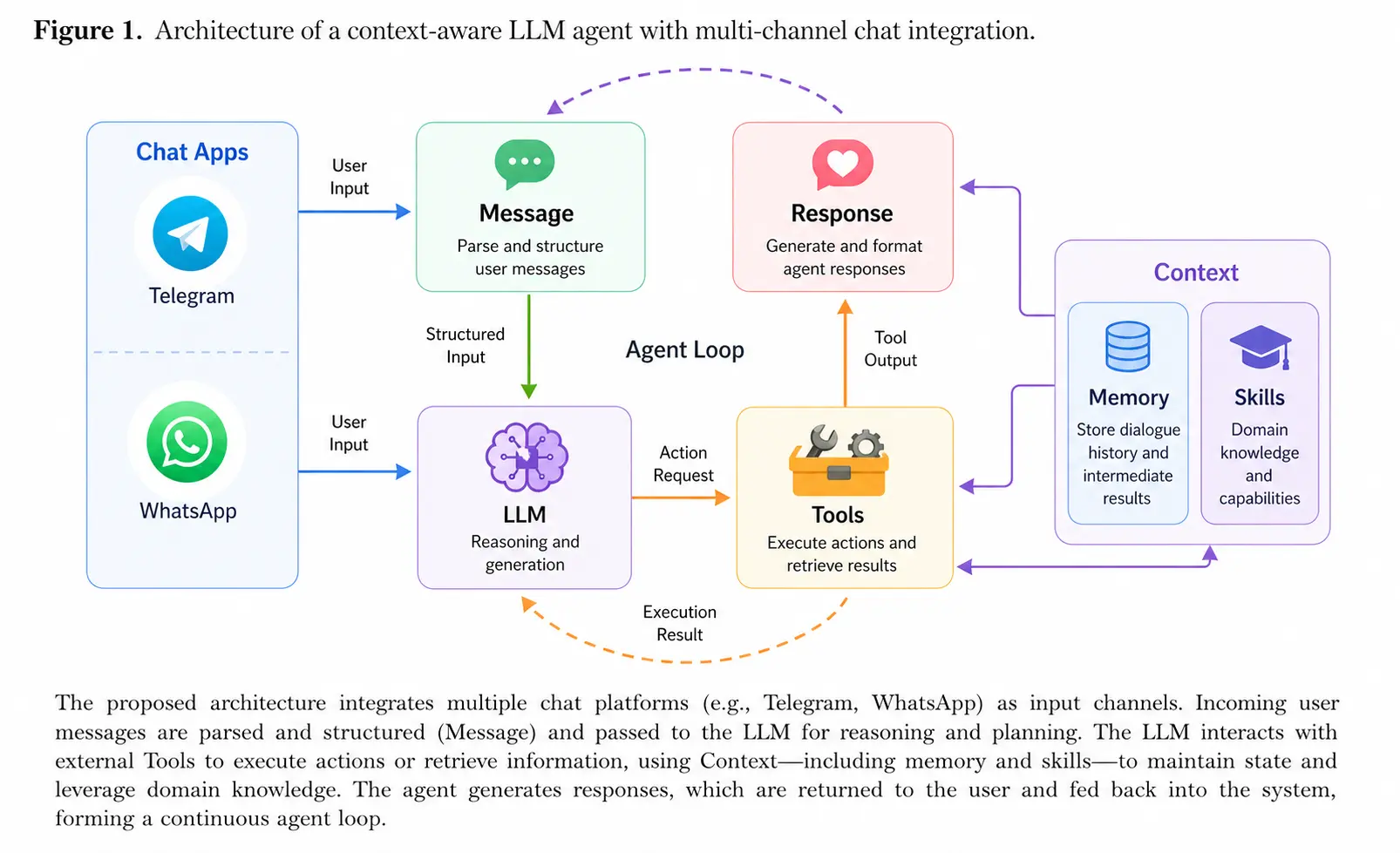
🐍 Pythinker stays lightweight by centering everything around a small agent loop: messages come in from chat apps, the LLM decides when tools are needed, and memory or skills are pulled in only as context instead of becoming a heavy orchestration layer. That keeps the core path readable and easy to extend, while still letting you add channels, tools, memory, and deployment options without turning the system into a monolith.
See docs/ARCHITECTURE.md for a forensic walkthrough of the runtime.
✨ Features
📈 24/7 Real-Time Market Analysis |
🚀 Full-Stack Software Engineer |
📅 Smart Daily Routine Manager |
📚 Personal Knowledge Assistant |
|---|---|---|---|
| Discovery • Insights • Trends | Develop • Deploy • Scale | Schedule • Automate • Organize | Learn • Memory • Reasoning |
📚 Docs
Browse the repo docs for the current GitHub development version.
- Talk to Pythinker from familiar chat apps: Chat Apps
- Configure providers, web search, MCP, and runtime behavior: Configuration
- Integrate Pythinker with local tools and automations: OpenAI-Compatible API · Python SDK
- Run Pythinker with Docker or as a Linux service: Deployment
- Deeper dives: Architecture · Memory · Multiple Instances · Channel Plugin Guide
🤝 Contribute & Roadmap
PRs welcome! The codebase is intentionally small and readable. 🤗
Branching Strategy
| Branch | Purpose |
|---|---|
main |
Stable releases — bug fixes and minor improvements |
dev |
Experimental features — new features and breaking changes |
Unsure which branch to target? See CONTRIBUTING.md for details.
Roadmap — Pick an item and open a PR!
- Multi-modal — See and hear (images, voice, video)
- Long-term memory — Never forget important context
- Better reasoning — Multi-step planning and reflection
- More integrations — Calendar and more
- Self-improvement — Learn from feedback and mistakes
🔐 Security
Found a vulnerability? Please do not open a public issue. Follow the private disclosure process in SECURITY.md.
📄 License
Pythinker is released under the MIT License. Third-party components redistributed with the project are listed in THIRD_PARTY_NOTICES.md.
Thanks for visiting ✨ Pythinker!
Project details
Verified details
These details have been verified by PyPIProject links
GitHub Statistics
Maintainers
Release history Release notifications | RSS feed


Download files
Download the file for your platform. If you're not sure which to choose, learn more about installing packages.
Source Distribution
Built Distribution
Filter files by name, interpreter, ABI, and platform.
If you're not sure about the file name format, learn more about wheel file names.
Copy a direct link to the current filters
File details
Details for the file pythinker_ai-2.2.0.tar.gz.
File metadata
- Download URL: pythinker_ai-2.2.0.tar.gz
- Upload date:
- Size: 563.6 kB
- Tags: Source
- Uploaded using Trusted Publishing? Yes
- Uploaded via: twine/6.1.0 CPython/3.13.12
File hashes
| Algorithm | Hash digest | |
|---|---|---|
| SHA256 |
b2a088479497b88f75500790be8e8186806b67e344cde99cb9c488a71b226755
|
|
| MD5 |
9ac13eea7b3be646ab4a5f9c283a0733
|
|
| BLAKE2b-256 |
b8440b23bd5a58e1053846cff2eabeefd92d88bb89a170a5fe160dfac08739de
|
Provenance
The following attestation bundles were made for pythinker_ai-2.2.0.tar.gz:
Publisher:
publish.yml on mohamed-elkholy95/Pythinker-ai
-
Statement:
-
Statement type:
https://in-toto.io/Statement/v1 -
Predicate type:
https://docs.pypi.org/attestations/publish/v1 -
Subject name:
pythinker_ai-2.2.0.tar.gz -
Subject digest:
b2a088479497b88f75500790be8e8186806b67e344cde99cb9c488a71b226755 - Sigstore transparency entry: 1452260530
- Sigstore integration time:
-
Permalink:
mohamed-elkholy95/Pythinker-ai@92d2971103cc2d908d823eb927b8161d5d364697 -
Branch / Tag:
refs/tags/v2.2.0 - Owner: https://github.com/mohamed-elkholy95
-
Access:
public
-
Token Issuer:
https://token.actions.githubusercontent.com -
Runner Environment:
github-hosted -
Publication workflow:
publish.yml@92d2971103cc2d908d823eb927b8161d5d364697 -
Trigger Event:
release
-
Statement type:
File details
Details for the file pythinker_ai-2.2.0-py3-none-any.whl.
File metadata
- Download URL: pythinker_ai-2.2.0-py3-none-any.whl
- Upload date:
- Size: 669.7 kB
- Tags: Python 3
- Uploaded using Trusted Publishing? Yes
- Uploaded via: twine/6.1.0 CPython/3.13.12
File hashes
| Algorithm | Hash digest | |
|---|---|---|
| SHA256 |
4da62bf59ce371c4e19579d584da24514555183d4d95012e26e7f969a6466e4b
|
|
| MD5 |
48fb9f71ba1a39644c97625343b5a0a7
|
|
| BLAKE2b-256 |
fe5efaa3f056c6772277a243455d9db4a7931678d084d3f29b07207bc6c3754b
|
Provenance
The following attestation bundles were made for pythinker_ai-2.2.0-py3-none-any.whl:
Publisher:
publish.yml on mohamed-elkholy95/Pythinker-ai
-
Statement:
-
Statement type:
https://in-toto.io/Statement/v1 -
Predicate type:
https://docs.pypi.org/attestations/publish/v1 -
Subject name:
pythinker_ai-2.2.0-py3-none-any.whl -
Subject digest:
4da62bf59ce371c4e19579d584da24514555183d4d95012e26e7f969a6466e4b - Sigstore transparency entry: 1452260647
- Sigstore integration time:
-
Permalink:
mohamed-elkholy95/Pythinker-ai@92d2971103cc2d908d823eb927b8161d5d364697 -
Branch / Tag:
refs/tags/v2.2.0 - Owner: https://github.com/mohamed-elkholy95
-
Access:
public
-
Token Issuer:
https://token.actions.githubusercontent.com -
Runner Environment:
github-hosted -
Publication workflow:
publish.yml@92d2971103cc2d908d823eb927b8161d5d364697 -
Trigger Event:
release
-
Statement type:






