
python-ags4
[[TOC]]
Introduction
python-ags4 is a library of functions that
- imports/reads AGS4 files to a collection of Pandas DataFrames.
- data can be analyzed, manipulated, and updated using Pandas
- and then exported/written back to an AGS4 file
Release available at pypi.org/project/python-ags4/
This project is maintained by the AGS Data Format Working Group
Note This repo was forked from github.com/asitha-sena/python-ags4 which is now archived and read-only
HEAD is gitlab.com/ags-data-format-wg/ags-python-library
Documentation
Juypter Notebook
We have created an example Juypter Notebook which imports an AGS file, plots boreholes on a map and creates a Striplog.
Installation
pip install python-ags4
Note Installation requires Python 3.7 or later.
Code Examples
First import the module.
from python_ags4 import AGS4
Import data from an AGS4 file:
# Load from a file
tables, headings = AGS4.AGS4_to_dataframe('path/to/file.ags')

# Or use our sample data
from python_ags4.data import load_test_data
tables, headings = load_test_data()
- tables is a dictionary of Pandas DataFrames. Each DataFrame contains the data from a GROUP in the AGS4 file.
- headings is a dictionary of lists. Each list has the header names of the corresponding GROUP
Important: If the above code throws an exception or returns an empty dictionary, it very likely that the input file is not a valid AGS4 file. In such a case, the AGS4.check_file() function can be used to validate the file and see whether anything needs to be fixed before trying again. Most users will find it easier perform this step using the command line interface as it will provide a formatted error report that is much easier to read than the python dictionary created by directly calling the function.
All data are imported as text so they cannot be analyzed or plotted immediately. You can use the following code to convert all the numerical data in a DataFrame from text to numeric.
LOCA = AGS4.convert_to_numeric(tables['LOCA'])
The AGS4.convert_to_numeric() function automatically converts all columns in the input DataFrame with the a numeric TYPE to a float. (Note: The UNIT and TYPE rows are removed during this operation as they are non-numeric.)
Export data back to an AGS4 file:
AGS4.dataframe_to_AGS4(tables, headings, 'output.ags')
A DataFrame with numeric columns may not get exported with the correct precision so they should be converted back to formatted text. The AGS4.convert_to_text() function will do this automatically if an AGS4 dictionary file is provided with the necessary UNIT and TYPE information. Numeric fields in the DataFrame that are not described in the dictionary file will be skipped with a warning.
LOCA_txt = AGS4.convert_to_text(LOCA, 'DICT.ags')
Tables converted to numeric using the AGS4.convert_to_numeric() function should always be converted back to text before exporting to an AGS4 file. (Note: The UNIT and TYPE rows will be added back in addition to formatting the numeric columns.)
Command Line Interface
A cli tool was added in version 0.2.0. It should be available from the terminal (or on the Anaconda Powershell prompt in Windows) after running python pip install python-ags4>=0.2.0
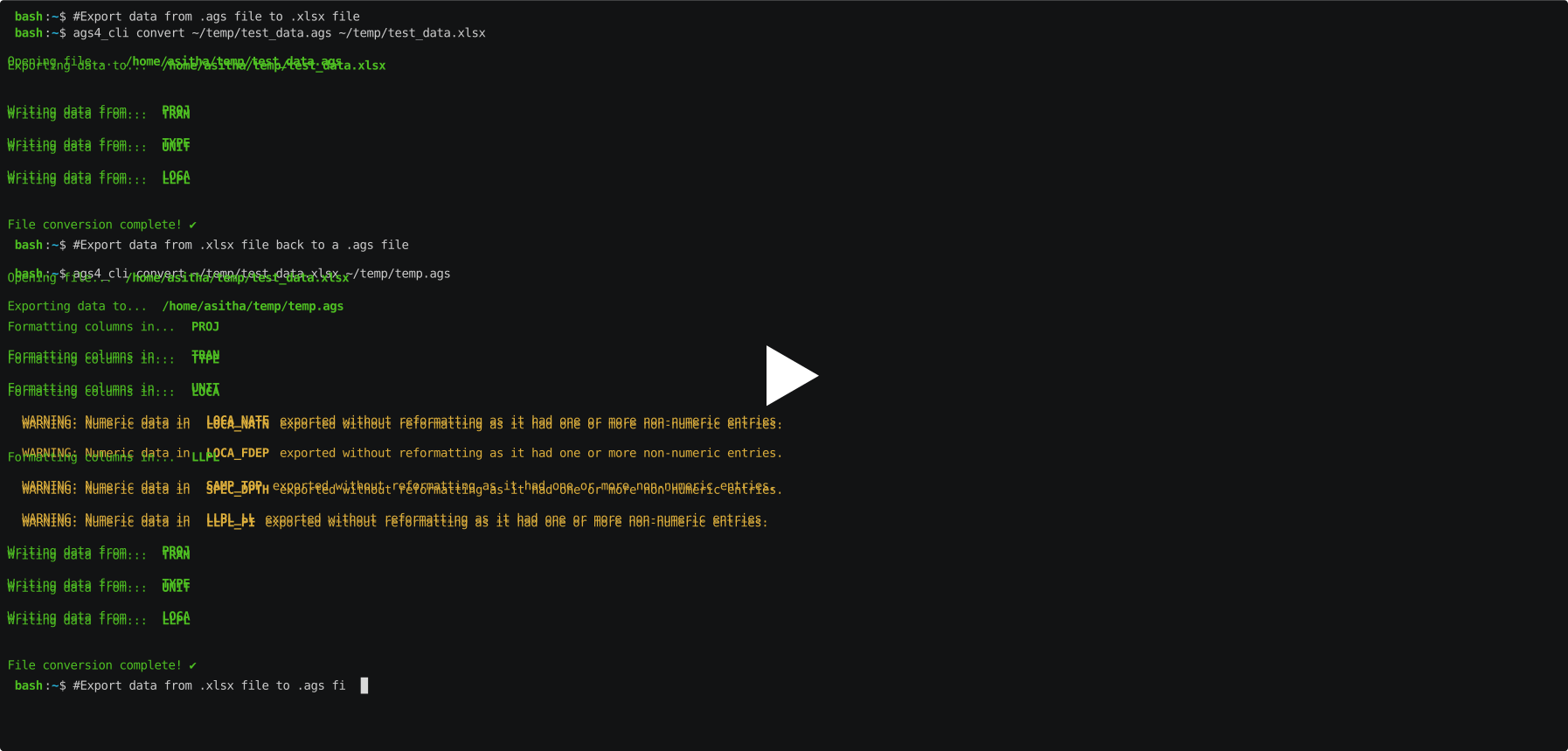
It does not yet have the full functionality of the library, but it does provide a quick and easy way to convert .ags files to Excel spreadsheets (.xlsx) and back. The data can be easily edited in a spreadsheet and then converted back a .ags file. The TYPE values for numeric columns can be changed in the spreadsheet and the data will be automatically reformatted correctly when converted back to .ags, as long as all values in a column are numbers. Any supposedly numeric columns with text entries will be skipped with a warning message.
(Note: All data is imported to the spreadsheet as text entries so any column that should be reformatted should be explicitly converted to numbers in Excel.)
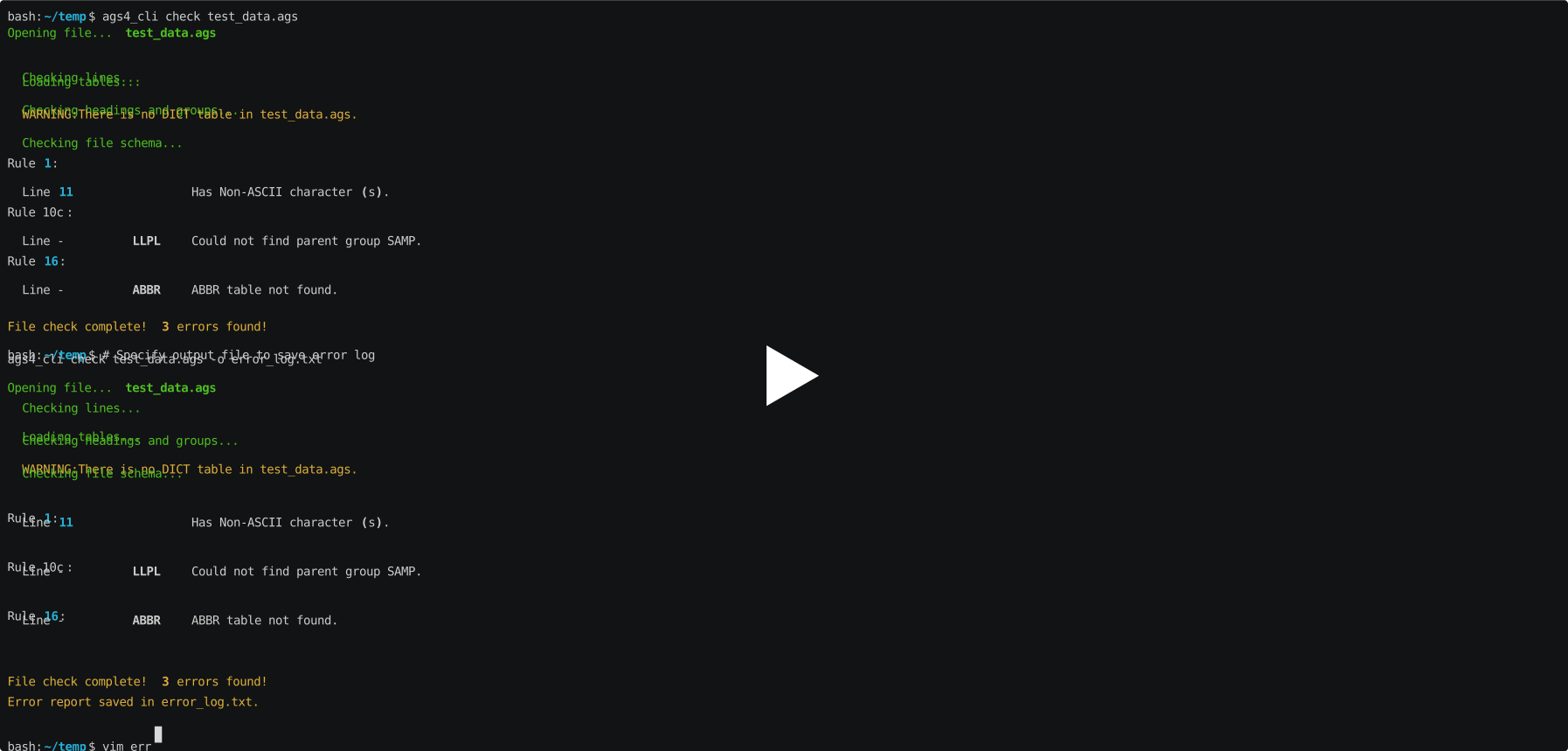
A checking tool is available as of version 0.3.0 and it can be used to make sure that the file conforms to the AGS4 rules. The tool has been tested in both bash and Powershell.
Graphical User Interface using pandasgui
The output from python-ags4 can be directly used with pandasgui to view and edit AGS4 files using an interactive graphical user interface. It also provides funtionality to plot and visualize the data.
from pandasgui import show
from python_ags4.data import load_test_data

tables, headings = load_test_data()
gui = show(**tables)

Any edits made in the GUI can be saved and exported back to an AGS4 file as follows:
updated_tables = gui.get_dataframes()

AGS4.dataframe_to_AGS4(updated_tables, headings, 'output.ags')
Development
Please refer to the Wiki page for details about the development environment and how to get involved in the project.
Implementations
This library has been used to create
- Windows Desktop Application - https://gitlab.com/ags-data-format-wg/ags-checker-desktop-app
- Web application and API (pyagsapi) - https://github.com/BritishGeologicalSurvey/pyagsapi
- Deployed as https://agsapi.bgs.ac.uk/
- Excel Add On - https://gitlab.com/RogerChandler/ags-validator-excel-add-in
2 maintainers


Release files for python-ags4 0.4.1
For a detailed explanation of source distributions (sdists) and built distributions (wheels), please see the package formats documentation.
Source distribution (sdist)
| File | Size | Uploaded | |
|---|---|---|---|
| python-AGS4-0.4.1.tar.gz | 232.3 kB | Details |
Built distribution (wheel)
| File | Interpreter | ABI | Platform | Reset |
|---|---|---|---|---|
| python_AGS4-0.4.1-py3-none-any.whl | Python 3 | none | any | Details |
Total release size: 472.3 kB
Release files / python-AGS4-0.4.1.tar.gz
| Download URL | python-AGS4-0.4.1.tar.gz |
|---|---|
| Size | 232.3 kB |
| Tags | Source |
|
SHA-256 checksum How to use checksums |
29fcd06205235437efd25e344e5df427e0e7d10a1b5d09e19f7993fafc15dedc
|
|
BLAKE2b-256 checksum How to use checksums |
31e4b8044f110eddb164c352ea4aed1ade50ed94c796746dc6f13137fc027688
|
| Upload date | |
|
Uploaded using Trusted Publishing? What is trusted publishing? |
No |
| Uploaded via |
poetry/1.1.14 CPython/3.9.13 Linux/5.15.0-46-generic
|
Release files / python_AGS4-0.4.1-py3-none-any.whl
| Download URL | python_AGS4-0.4.1-py3-none-any.whl |
|---|---|
| Size | 240.0 kB |
| Tags | Python 3 |
|
SHA-256 checksum How to use checksums |
a0b9920d65a168008deef090bbebbba475f45539ae847c6c2158a2fbf149a598
|
|
BLAKE2b-256 checksum How to use checksums |
ee4457a84cccbde29cc1c846673ae3514afe58827b2ec99a5fa4cefc244b2c1d
|
| Upload date | |
|
Uploaded using Trusted Publishing? What is trusted publishing? |
No |
| Uploaded via |
poetry/1.1.14 CPython/3.9.13 Linux/5.15.0-46-generic
|














