
python-agent-harness
A lightweight, hackable mini-OpenCode written in Python.
FSM-driven execution · OpenAI-compatible · built for daily use and easy customization


A terminal coding agent that reads your codebase, plans changes, edits files, runs commands, and verifies its work.
Inspired by gptel-agent-harness and opencode. It brings opencode's prompts and core behaviors — AGENTS.md discovery, plan/build modes, skills, sub-agents, todo tracking — into a lightweight Python implementation with only three runtime dependencies: rich, httpx, prompt_toolkit.
Works with any OpenAI-compatible API.
Demo
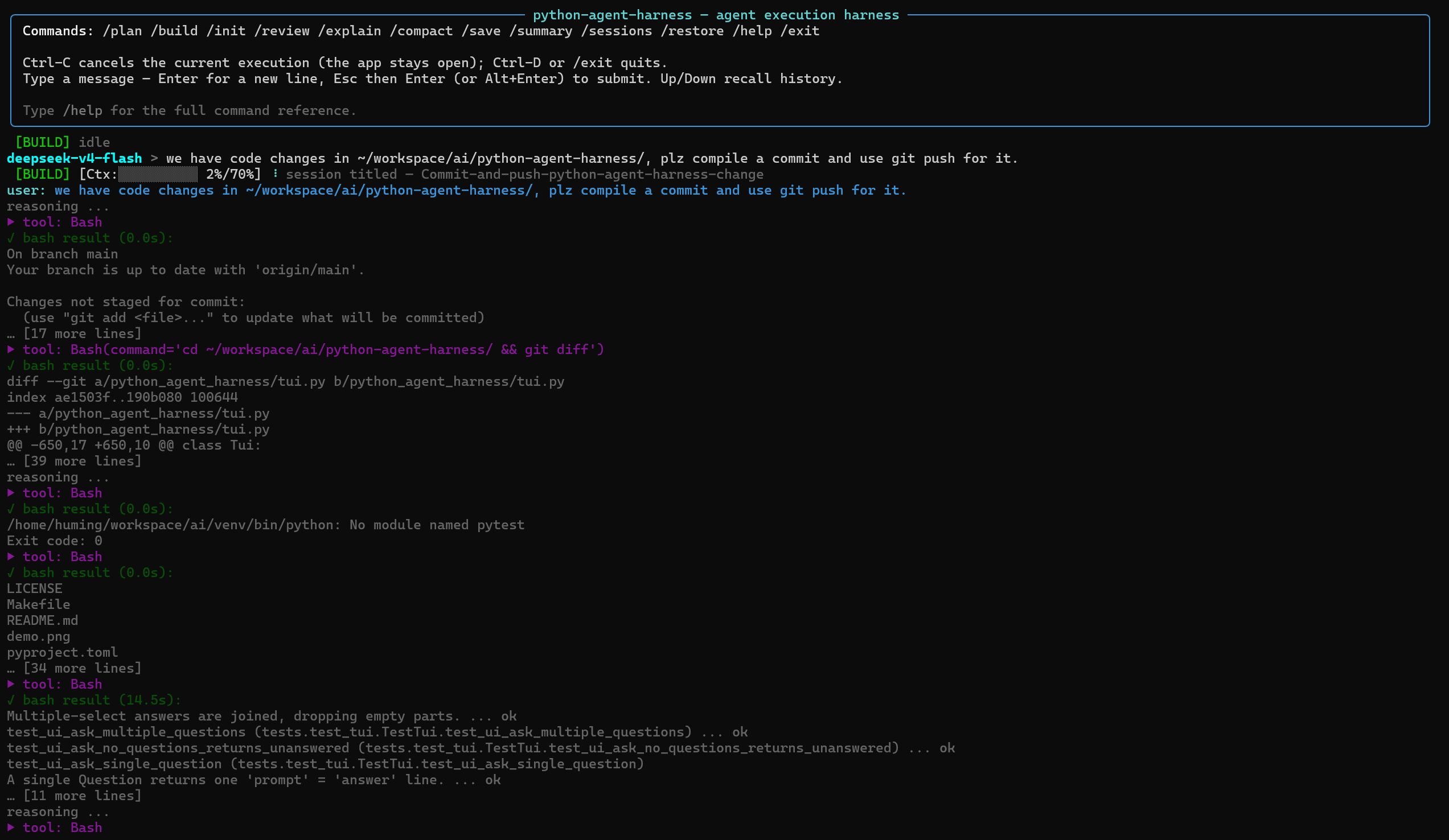
Quick start
pip install python-agent-harness          # or: pip install -e ".[dev]" from source
python-agent-harness config --init
python-agent-harness run
Optional extras: [mcp] for MCP server integration, [dev] for development tools.
Edit ~/.config/python-agent-harness/config.json and set your base_url, api_key, and model.
Features
- FSM-driven execution — explicit
WAIT/TOOL/TRET/SUPERVISE/DONE/ERRS/ABRTstates. Completion supervision nudges the model when it stops early; failed tool calls are sanitized. Transient API failures (429/5xx) retry with exponential backoff. Auth-expired codes (configurable viaAUTH_REFRESH_STATUS_CODESinconfig.py; defaults to[401, 502]) trigger automatic API key re-read from config/env. - Context management — CJK-aware token estimation, per-model context windows, automatic compaction at 70% usage.
- Image & text attachments — attach with
@path(e.g.@screenshot.png,@README.md): images (PNG/JPEG/GIF/WebP, up to 20 MB) become multimodalimage_urlparts; text files are inlined. Web URLs supported for images. - Coding tools —
Agent,TodoWrite,Glob,Grep,Read,Insert,Edit(incl. unified diffs),Write,Mkdir,Bash,Skill,Question,LSP,PlanExit. Read-only tool rounds (Read,Glob,Grep,Skill,LSP) dispatch concurrently; async tools (Bash,Agent) can also run concurrently. Results always delivered in emitted order. - Plan / Build modes — plan mode is read-only except for the per-session plan file.
- Persistent sessions — auto-saved after every response to
~/.local/share/python-agent-harness/sessions/, with LLM-generated titles and/restore --latest//sessions. - Focused TUI — Rich-based with pinned status bar, Todos panel, inline diff rendering, and a
prompt_toolkiteditor with history and completion.Esc+Entersubmits,Ctrl-Dquits,Ctrl-Ccancels. - MCP support — optional via
[mcp]extra. MCP tools become ordinary agent tools (mcp__<server>__<tool>). Supportsstdio,streamable-http, andssetransports. - Slash commands — built-in
/init,/review,/explain, etc., plus custom commands fromprompts/commands/*.md. - Custom agents — switch the main agent's system prompt at runtime with
/agent. Agent files live inprompts/agents/*.mdand supportname:andexclude_tools:frontmatter. - Embeddable runtime boundaries —
headless --jsonfor one-shot CI/scripting;servefor hosting apps (resident process, bidirectional protocol: multi-turn memory, mid-run Q&A, protocol-level cancel).
Usage
TUI mode
python-agent-harness run [--project DIR]
Headless mode
python-agent-harness headless [prompt] [--project DIR] [--restore [SPEC]] [--model NAME] [--json]
Runs a single prompt without the TUI — for CI, scripting, and piping. The assistant's answer goes to stdout; tool/status events go to stderr. Interactive prompts are auto-answered (confirm → yes, ask → "Unanswered").
- Prompt is a positional argument; when omitted, read from stdin.
--restorecontinues a saved session. Bare--restoreuses the most recent; a SPEC may be a file path or title substring.--model NAMEselects a profile from themodelsconfig section, or a raw model name on the configured endpoint.--jsonemits JSON lines on stdout:start,delta,notify,log, and a finalresult(with structurederrors). Each line carriesprotocol(wire schema version) andseq(monotonic counter). Exit code 0 on success, 1 on error.
Serve mode
python-agent-harness serve [--project DIR] [--answer-timeout SECONDS] [--max-rounds N] [--timeout SECONDS]
A persistent, bidirectional runtime for hosting applications. Keeps the Controller/Session resident so the host can submit multiple prompts, answer mid-run questions, and cancel runs via protocol messages. See docs/serve-protocol.md for the full protocol specification.
Slash commands
| Command | Description |
|---|---|
/plan / /build |
Switch between read-only plan mode and build mode |
/init |
Create or update AGENTS.md |
/review |
Review uncommitted changes, commits, branches, or pull requests |
/explain [project] [target] |
Explain code |
/compact |
Compact the conversation |
/summary |
Append a conversation summary |
/save |
Save the current session |
/sessions |
List saved sessions |
/restore [path|title|--latest|latest] |
Restore a session (substring search) |
/clear |
Start a fresh conversation |
/model [name] |
Switch LLM profiles; default restores original |
/agent [name] |
Switch agent prompt; default restores built-in |
/help |
List available commands |
/exit |
Quit |
Custom commands from prompts/commands/*.md are also registered (TUI only).
Custom agents
Agent files are markdown (.md) in prompts/agents/. Each becomes a switchable profile via /agent. Optional YAML frontmatter:
name:— override the agent name (defaults to file stem)exclude_tools:— list of tool names to hide. Matches by exact name, glob (mcp__git__*), or__-delimited prefix (mcp__githidesmcp__git__list_reposbutWritedoes NOT hideTodoWrite).
Commands vs Agents: Commands (/review) are one-shot with a hardcoded kickoff and reset after run. Agents (/agent reviewer) persist until the next /agent, let the user type their own prompt, and stay active after Ctrl-C.
Configuration
All LLM settings live in ~/.config/python-agent-harness/config.json. Environment variables are optional.
{
  "llm": {
    "base_url": "https://api.openai.com/v1",
    "api_key": "sk-...",
    "model": "gpt-5-mini",
    "reasoning_effort": null,
    "stream": true,
    "supports_image_input": false
  },
  "models": {
    "deepseek": { "base_url": "https://api.deepseek.com/v1", "model": "deepseek-chat" },
    "qwen": { "base_url": "https://dashscope.aliyuncs.com/compatible-mode/v1", "model": "qwen3.5-coder" }
  },
  "context_windows": {
    "deepseek-v4": 1000000
  },
  "paths": {
    "context_path": null,
    "skill_path": null
  },
  "mcp": {
    "servers": {
      "example": {
        "transport": "stdio",
        "command": "npx",
        "args": ["-y", "@modelcontextprotocol/server-filesystem", "/tmp"],
        "env": [],
        "parallel": false,
        "timeout": null,
        "enabled": false
      }
    }
  }
}
Options
llm— main LLM config. Optional keys:temperature,max_tokens,timeout,reasoning_effort,stream,supports_image_input.run --no-streamoverridesstream.supports_image_input(defaultfalse) controls whether@pathimages are sent or stripped.models— named LLM profiles for/modelswitching. Partial settings; unset keys inherit fromllm.defaultrestores the main config.context_windows— per-model context-window overrides (tokens). Keys are model names or substrings; first match wins. OverridesCONTEXT_WINDOWSinconfig.py.subagent_llm— LLM config forAgenttool. Unset values inherit fromllm. Setprofileto reuse amodelsentry. Precedence: profile >subagent_llm>llm> env vars.default_agent— agent name to use at session start (must exist inprompts/agents/).null= built-in default.paths.context_path/paths.skill_path— locations for context files and skills. Default: project-localcontexts/andskills/.lsp.servers— per-extension LSP server overrides for theLSPtool. Keys are extensions (.py,.cpp); each hascommand(argv) and optionallanguage_id. Layers on top ofDEFAULT_SERVERSinlsp/manager.py.mcp.servers— MCP server config (requires[mcp]extra). Each supportstransport,command,args,env,url,headers,parallel,timeout,enabled.headless/serve— optional budget limits:max_rounds(LLM rounds) andtimeout(wall-clock seconds).--max-rounds/--timeoutoverride per call;<= 0ornulldisables. Unset = unlimited.- Precedence — code defaults < config file <
OPENAI_*env vars. Sub-agents also supportOPENAI_SUBAGENT_*(_BASE_URL,_API_KEY,_MODEL). - Custom config —
--config PATHorPYTHON_AGENT_HARNESS_CONFIGenv var. - LLM logging — request/response bodies logged as JSON to
/tmp/python-agent-harness-<date>-<id>.json. SetLLM_LOG_DIRto change. Path printed at startup.
Inspired by opencode
Most of opencode's prompts and core behaviors have been ported. The goal: retain its practical coding-agent workflow while keeping the implementation small and easy to customize.
| opencode | python-agent-harness |
|---|---|
default.txt (main agent) |
agent.md |
plan.txt / plan-mode.txt / build-switch.txt |
plan.md / plan-mode.md / build-switch.md |
task.txt (sub-agent) |
subagent.md + Agent tool |
todowrite.txt / question.txt / skill.txt |
TodoWrite / Question / Skill tools |
read.txt / write.txt / edit.txt / grep.txt / glob.txt |
Read / Write / Edit / Grep / Glob tools |
shell.txt |
Bash tool + agent.md Git/GitHub guidance |
plan-enter.txt / plan-exit.txt |
PlanExit tool |
initialize.txt / review.txt / explain |
initialize.md / review.md / commands/explain.md |
| compaction / summary / title | compact.md / summary.md / title.md |
AGENTS.md handling |
prompts.py (find_agents_md_files, load_context_files) |
Development
Requires Python ≥ 3.11. CI runs against 3.11, 3.12, and 3.13 on Linux and macOS.
make test                           # unit tests
venv/bin/pip install -e ".[dev]"    # development tools
venv/bin/ruff check .               # lint
venv/bin/ruff format --check .      # formatting (CI blocks on this)
venv/bin/pyright                    # type checking
venv/bin/python -m build            # build sdist + wheel
venv/bin/pip-audit                  # dependency audit
Related projects
- gptel-agent-harness — the Emacs-based implementation that inspired this project.
- opencode — the primary source of many prompts and coding-agent behaviors.
License
MIT
1 maintainer

Metadata
1 maintainer
Release files for python-agent-harness 1.5.6.3
For a detailed explanation of source distributions (sdists) and built distributions (wheels), please see the package formats documentation.
Source distribution (sdist)
| File | Size | Uploaded | Provenance | Actions |
|---|---|---|---|---|
| python_agent_harness-1.5.6.3.tar.gz | 252.7 kB | With provenance | Details for python_agent_harness-1.5.6.3.tar.gz |
Built distribution (wheel)
| File | Interpreter | ABI | Platform | Actions Reset |
|---|---|---|---|---|
| python_agent_harness-1.5.6.3-py3-none-any.whl | Python 3 | none | any | Details for python_agent_harness-1.5.6.3-py3-none-any.whl |
Total release size: 519.6 kB
Release files / python_agent_harness-1.5.6.3.tar.gz
| Download URL | python_agent_harness-1.5.6.3.tar.gz |
|---|---|
| Size | 252.7 kB |
| Tags | Source |
|
SHA-256 checksum How to use checksums |
7543615d02468ea5b4877889a938f9f6e045cea7652e22dc9f5d295aba37f80a
|
|
BLAKE2b-256 checksum How to use checksums |
487d7f9717e8acc2c9aaf3e5ace8ec1c5782197c443851343e5438bab06db64f
|
| Upload date | |
|
Uploaded using Trusted Publishing? What is trusted publishing? |
Yes |
| Uploaded via |
twine/7.0.0 CPython/3.13.14
|
Provenance
Provenance describes where a file came from. On PyPI, provenance is shared via attestations, which provide a verifiable record of the build or publishing details. View details, limitations and caveats.


PyPI Publish Attestation
PyPI verified that this artifact, at this checksum, originated from the publisher listed below.
Signed by GitHub Actions, verified by PyPI on Oct 19, 2026.
Transparency logRelease files / python_agent_harness-1.5.6.3-py3-none-any.whl
| Download URL | python_agent_harness-1.5.6.3-py3-none-any.whl |
|---|---|
| Size | 266.9 kB |
| Tags | Python 3 |
|
SHA-256 checksum How to use checksums |
fa58fffa6cb0307771bae6301fe7464722f8b3e3f627f3695a2c0ecc02fbc925
|
|
BLAKE2b-256 checksum How to use checksums |
131453f4202d7303720cd72708ea5b44cb0667205793b56e0b95a47aa03e7251
|
| Upload date | |
|
Uploaded using Trusted Publishing? What is trusted publishing? |
Yes |
| Uploaded via |
twine/7.0.0 CPython/3.13.14
|
Provenance
Provenance describes where a file came from. On PyPI, provenance is shared via attestations, which provide a verifiable record of the build or publishing details. View details, limitations and caveats.
PyPI Publish Attestation
PyPI verified that this artifact, at this checksum, originated from the publisher listed below.
Signed by GitHub Actions, verified by PyPI on Oct 19, 2026.
Transparency logSecurity for python-agent-harness 1.5.6.3
Provenance
Provenance describes where a file came from. On PyPI, provenance is shared via attestations, which provide a verifiable record of the build or publishing details. View details, limitations and caveats.
Full provenance
Both files in this release have been uploaded with provenance metadata.
Attestation for python_agent_harness-1.5.6.3.tar.gz
PyPI Publish Attestation
PyPI verified that this artifact, at this checksum, originated from the publisher listed below.
Signed by GitHub Actions, verified by PyPI on Oct 19, 2026.
Transparency logA note on package security
PyPI is a repository for distributing packages, not a service for auditing them. While third-party security researchers and our staff do their best to detect and remove malicious packages, PyPI cannot guarantee the quality, security or suitability of any given package.
To learn more about protecting yourself from malicious actors, visit our package security documentation.














