
A Python interface to AutomationShield's Arduino shields


Project description
python-automationshield
python-automationshield is a Python package that implements a Python interface to Automationshield's devices. Automationshield creates cheap and accessible tools for control engineering education in the form of Arduino shields. Much of the Arduino code used in this package is derived from the code in the Automationshield repository.
Currently, this package has Python implementations for the following shields:
In addition, this package contains simulator for the implemented shields which allow to run run experiments and test controllers without a physical device. A simulator is available for the following shields:
- AeroShield:
AeroShieldMimic
This project was built to allow TU Delft students learning control engineering to use Python in their assignments, since that is what they are thought in the curriculum. This package provides a flexible controller class that lets users conveniently implement a controller and test it on the hardware without having to reupload new firmware to the Arduino board.
This project was developed using Arduino Leonardo boards. The code may work on other devices as well, but it will likely need a few changes. You are welcome to submit a pull request to add functionality for additional Arduino boards!
Installation
python-automationshield requires Python >= 3.10 and can be installed with the following command:
$ pip install python-automationshield
Usage
Below is a very simple example with the AeroShield to get started. Read more in the documentation.
Install the firmware on an Arduino board
When first importing the module, AutomationShield will download the arduino-cli to the package directory. The arduino-cli is used to flash the correct firmware onto your Arduino board. The package should download the correct executable for your operating system and architecture, but it has only been tested on a 64-bit Windows system.
from automationshield import AeroShield
from automationshield.arduino import UNO  # import the FQBN for the UNO from the arduino module

aero_shield = AeroShield()
aero_shield.install_firmware(device=UNO)

#optionally check that the correct firmware is installed
with aero_shield:
    print(aero_shield.check_firmware)  # this will print the version number of the Arduino code if the firmware is correct and throw an exception otherwise.
Send commands to the AeroShield and read its state
from automationshield import AeroShield


with AeroShield() as aero_shield:
    for _ in range(100):
        aero_shield.write(flag=aero_shield.RUN, motor=50)
        out = aero_shield.read()
        print(f"Potentiomneter [%]: {out[0]}, Angle [°]: {out[1]}")
Use the ShieldController class to conveniently implement a controller
from automationshield import AeroShield, ShieldController


class MyController(ShieldController):
    def controller(self, t: float, dt: float, ref: float, pot: float, angle: float) -> float:
        """Set the motor value to the provided reference."""
        return ref


shield = AeroShield()
# create controller instance
my_controller = MyController(shield)
# run the controller on the Arduino.
hist = my_controller.run(freq=200, cycles=1000, ref=45)
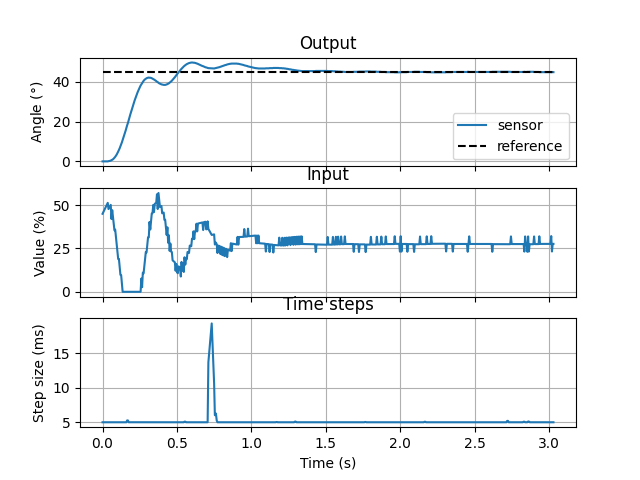
Plot the experiment data using the plotting.Plotter class
from automationshield.plotting import Plotter


fig, ax = Plotter(shield).plot(hist)
fig.show()
Below is an example of a figure plotting the result of a PID controller on the AeroShield with a constant reference at 45°.
Contributing
Interested in contributing? Check out the contributing guidelines. Please note that this project is released with a Code of Conduct. By contributing to this project, you agree to abide by its terms.
License
python-automationshield was created by Bert Van den Abbeele. It is licensed under the terms of the MIT license.
Credits
python-automationshield was created with cookiecutter and the py-pkgs-cookiecutter template.
Release history Release notifications | RSS feed


Download files
Download the file for your platform. If you're not sure which to choose, learn more about installing packages.
Source Distribution
Built Distribution
Filter files by name, interpreter, ABI, and platform.
If you're not sure about the file name format, learn more about wheel file names.
Copy a direct link to the current filters
File details
Details for the file python_automationshield-1.2.1.tar.gz.
File metadata
- Download URL: python_automationshield-1.2.1.tar.gz
- Upload date:
- Size: 84.7 kB
- Tags: Source
- Uploaded using Trusted Publishing? No
- Uploaded via: poetry/2.2.1 CPython/3.10.19 Linux/5.15.154+
File hashes
| Algorithm | Hash digest | |
|---|---|---|
| SHA256 |
89076415162e0e46cfbb2317dd40d0d97e4bf0d381667d8e3e8c1854ca519699
|
|
| MD5 |
c6c0b9d9daace0ecd20779942592b68b
|
|
| BLAKE2b-256 |
56b4f7a7934b5511bbbd1f761d3f9f47bc0058f03377199356f8ee005f10d3d0
|
File details
Details for the file python_automationshield-1.2.1-py3-none-any.whl.
File metadata
- Download URL: python_automationshield-1.2.1-py3-none-any.whl
- Upload date:
- Size: 109.0 kB
- Tags: Python 3
- Uploaded using Trusted Publishing? No
- Uploaded via: poetry/2.2.1 CPython/3.10.19 Linux/5.15.154+
File hashes
| Algorithm | Hash digest | |
|---|---|---|
| SHA256 |
a9a6f91ae67344447a8d6b253f052028e9a92f9a22d413f1a9449303c6e34b35
|
|
| MD5 |
3c1d31f58ad1d26debeb5fb764a9af5f
|
|
| BLAKE2b-256 |
01b29dff08c9aafe6fcb84716ac7f1476f70b16d7eebd688f89d6c83afd425ea
|






