
A python code analyzer that high jacks the current settrace function to analyze executed code.

Project description
Code Analyzer





What is this?
A python code analyzer that allows you to visually see how your code works after executing code. Alternatively, you can think of it as a python debugger that prints all the lines executed.
Why would you use this?
Let's say you don't want to use a python debugger and you want to see how your code runs line by line printed out. You can import this module and add a few lines of code to initialize the analyzer and run your code, and you will get a simple analysis of the code executed in your terminal or exported to a txt or html file.
It is not advised to use this analyzer in a big project as the output won't fit in your terminal; though, using an export method call to see the code in a file might be more useful/helpful.
Requirements:
python>=3.7
rich
colorama
pandas
Example:
from code_analyzer import CodeAnalyzer

code_analyzer = CodeAnalyzer()  # Initialize analyzer
code_analyzer.start()

# Comment that will be displayed on the next line
code_analyzer.record_comment_for_interpretable_next("Function definition here!")


def recursive(depth: int) -> int:
    # Comment that will be displayed on the previous line
    code_analyzer.record_comment_for_interpretable_previous({"__depth": depth})
    if depth <= 0:
        code_analyzer.record_comment_for_interpretable_next({"Final depth": depth})
        return depth

    return recursive(depth - 1)


code_analyzer.record_comment_for_interpretable_next("This is where the fun begins")
recursive(5)

code_analyzer.stop()
code_analyzer.print()

# code_analyzer.get_code_analyzer_printer().print_debug()
code_analyzer.get_code_analyzer_printer().export_to_txt()

# code_analyzer.get_code_analyzer_printer().print_rich()  # export_rich_to_html prints to console by default
code_analyzer.get_code_analyzer_printer().export_rich_to_html()

Or just look at the other examples in examples folder.
Output
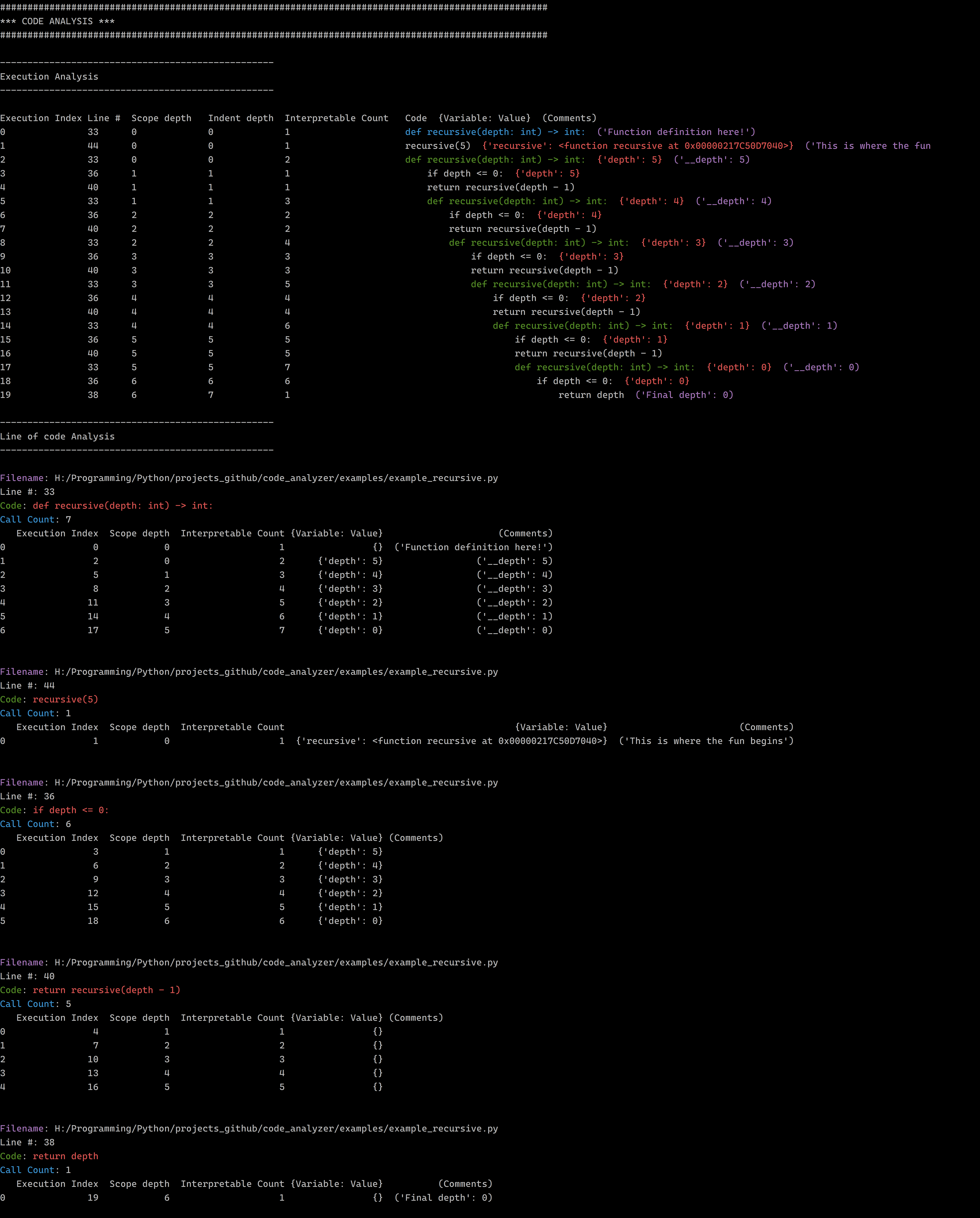
Rich output html
Notes
In the output of a print (Such as in the image above):
- Blue foreground code is a callable's definition.
- Green foreground code is a callable being executed.
- Red foreground text are {Variable: value} pairs found in between the
{}brackets that are new to the current interpretable relative to its scope. - Purple foreground text are (arguments) found in between the
()brackets passed to the method calls below:- .record_comment_for_interpretable_next(...)
- .record_comment_for_interpretable_previous(...)
In the output of a rich export (such as the .html files in the examples folder):
- Blue background code is a callable's definition.
- Green background code is a callable being executed.
- Orange foreground text are {Variable: value} pairs found in between the {} brackets that are new to the current interpretable relative to its scope.
- Red foreground text are (arguments) found in between the () brackets passed to the method calls below:
- .record_comment_for_interpretable_next(...)
- .record_comment_for_interpretable_previous(...)
IF YOU SEE CODE THAT DOESN'T SEEM TO BE CODE THAT YOU SHOULD BE ANALYZING WHEN USING TYPE HINTING, ADD THE IMPORT BELOW TO THE TOP OF THE FILE TO POSSIBLY REMOVE IT
from __future__ import annotations
Installation
pip install python-code-analyzer
pypi
TODO:
- Fancy visualizer
- Memory usage?
- Timing code?
- profiler (Time and calls amount)
- dis.show_code


Download files
Download the file for your platform. If you're not sure which to choose, learn more about installing packages.
Source Distribution
Built Distribution
Filter files by name, interpreter, ABI, and platform.
If you're not sure about the file name format, learn more about wheel file names.
Copy a direct link to the current filters
File details
Details for the file python_code_analyzer-1.0.14.tar.gz.
File metadata
- Download URL: python_code_analyzer-1.0.14.tar.gz
- Upload date:
- Size: 34.3 kB
- Tags: Source
- Uploaded using Trusted Publishing? No
- Uploaded via: twine/4.0.2 CPython/3.8.12
File hashes
| Algorithm | Hash digest | |
|---|---|---|
| SHA256 |
cbf5d40a0e96283be42ed5028e0127ce615a6a707faceb63ef9eb9590a3f0f33
|
|
| MD5 |
2d910f7aee2eb2a5ea828d3a941f9440
|
|
| BLAKE2b-256 |
37e10fe33b82c6da396ef3ef3f5d72519346b17a773443d4caee5719e54813b0
|
File details
Details for the file python_code_analyzer-1.0.14-py3-none-any.whl.
File metadata
- Download URL: python_code_analyzer-1.0.14-py3-none-any.whl
- Upload date:
- Size: 36.5 kB
- Tags: Python 3
- Uploaded using Trusted Publishing? No
- Uploaded via: twine/4.0.2 CPython/3.8.12
File hashes
| Algorithm | Hash digest | |
|---|---|---|
| SHA256 |
f98da92a3317396461117c54a1320fd637fc44b9a1ae5f890ed4d33c45ccaf6c
|
|
| MD5 |
be92e335a18b144937a218bc26ecbb94
|
|
| BLAKE2b-256 |
db2bd01fbdba718aaab85a064824166a3b2bfb04f31163b8c65fa78148de843f
|






