
A lightweight, cross-platform daemon manager that runs any command as a background process.

Project description
python-dmon


A lightweight, cross-platform daemon manager that runs any command — called a task — as a background process. It also supports logging and log rotation out of the box. No Docker or extra dependencies required.
Shipped as the CLI tool dmon.
It is a Python-based and more powerful successor to the handy-backend shell scripts.
Features
- 🖥️ Cross-platform: Works on Linux, macOS, and Windows.
- ⚡ Lightweight: Pure Python, no Docker or external dependencies needed.
- 🧩 Flexible tasks: Tasks can be configured in
pyproject.tomlordmon.yaml; or run ad-hoc commands directly. - 🪵 Logging & log rotation: Automatically manage log files to prevent uncontrolled growth.
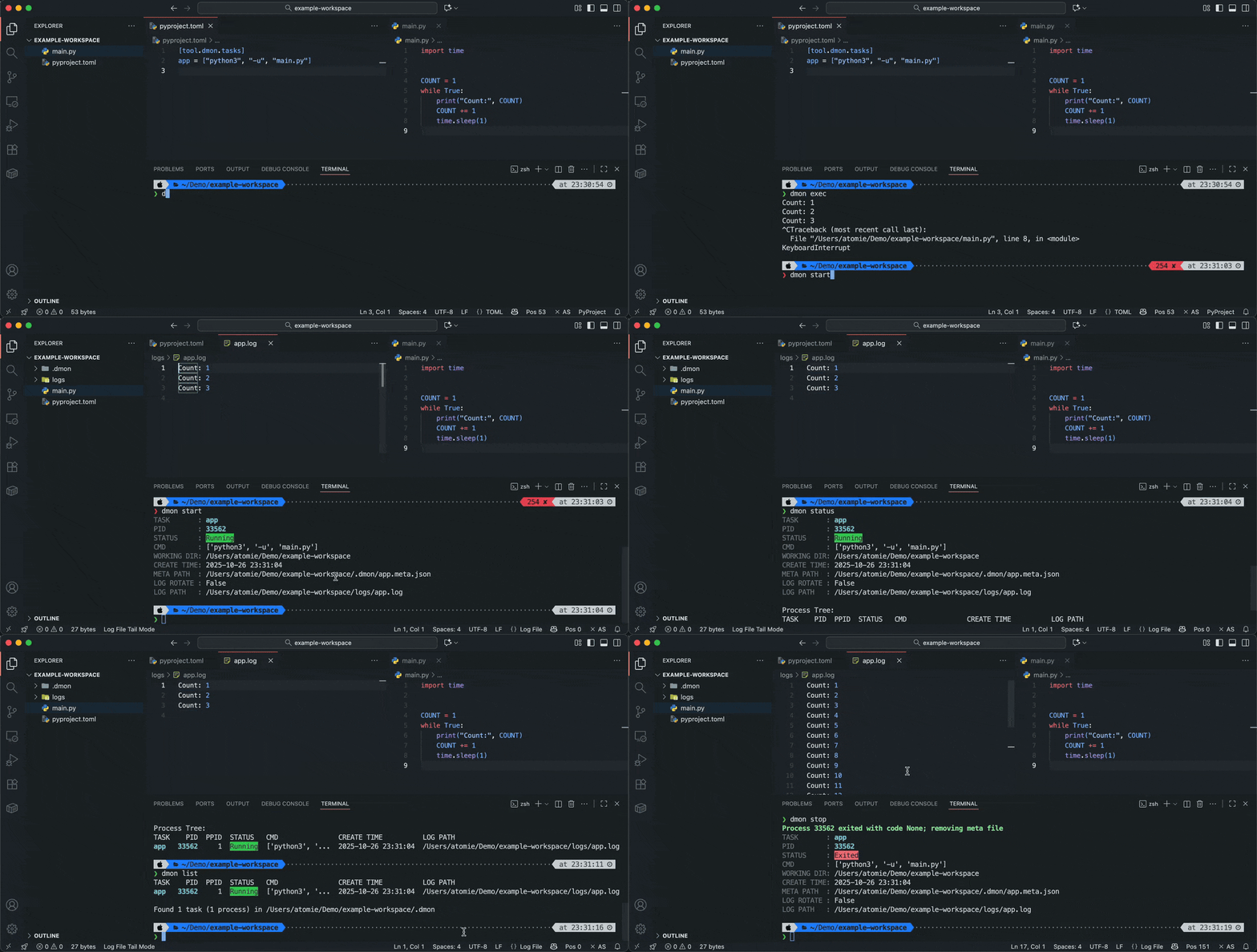
Installation
python-dmon is available on PyPI:
pip install python-dmon
We recommend installing into an isolated environment, e.g., with uv / pipx:
# Install globally with uv tool
uv tool install python-dmon

# Or with pipx
pipx install python-dmon

# Add as a dev dependency in your project
uv add --dev python-dmon
You can also invoke without installing:
# With uvx (uv tool run)
uvx python-dmon

# Or with pipx
pipx run python-dmon
To get the latest features, install from source:
pip install git+https://github.com/atomiechen/python-dmon.git
Getting Started
Prepare Configuration
Create a dmon.yaml file:
tasks:
  app: ["python", "-u", "server.py"]  # option 1: exec form
  # app: "python -u server.py"  # option 2: shell string
Or add to your pyproject.toml:
[tool.dmon.tasks]
app = ["python", "-u", "server.py"]  # option 1: exec form
# app = "python -u server.py"  # option 2: shell string
Commands can be a single string (run in shell), or list of strings (exec form). See Example Configuration for more configuration options.
Run tasks
Run a configured task by its name:
# Start a task
dmon start app

# Stop a running task
dmon stop app

# Check task status
dmon status app

# Execute a task in the foreground (useful for debugging)
dmon exec app
If you have defined default_task, or only one task is defined in the config file, you can omit the task name:
dmon start
dmon stop
dmon status
dmon exec
You can use --config to specify a custom config file or the directory containing it:
dmon start --config /path/to/dmon.yaml app  # YAML
dmon start --config /path/to/pyproject.toml app  # or TOML
dmon start --config /path/to/dir app  # dir with `dmon.y(a)ml` or `pyproject.toml`
And yes, you can use dmon to run in a nested manner:
tasks:
  app: ["python", "-u", "server.py"]
  nested: pwd && dmon exec app  # nest `dmon exec`
  subdir_task1:
    cwd: /path/to/dir
    cmd: ["dmon", "exec", "app"]  # run task defined in another folder
  subdir_task2: dmon exec app --config /path/to/dir/dmon.yaml  # like above
Run an ad-hoc command
# Run a command with arguments in the background
dmon run --name myserver python -u server.py

# Run a shell command in the background
dmon run --shell echo "Hello World"

# Run a shell script in the background
dmon run --cwd /path/to/script bash myscript.sh
[!NOTE] If no name is provided,
dmonautomatically assigns a fixed task namedefault_runto prevent duplicate runs.
List all running tasks
dmon list
Example Configuration
A task can be a string, list, or dictionary.
Here is a more complete example with default values:
tasks:
  your_task_name:
    # Command to run; can be a string (run in shell) or list of strings (exec form)
    cmd: ["python", "server.py"]  # required
    cwd: "/path/to/working/dir"  # (default: current dir)
    env:  # (default: inherit from parent process)
      PYTHONUNBUFFERED: "1"
    override_env: false  # override parent env and only use env defined here
    log_path: "logs/<task>.log" # path to log file
    log_rotate: false  # enable log rotation
    log_max_size: 5  # max log file size before rotation in MB
    rotate_log_path: "logs/<task>.rotate.log"  # path to rotation log
    rotate_log_max_size: 5  # max rotation log file size in MB
    meta_path: ".dmon/<task>.meta.json"  # path to meta file
default_task: your_task_name  # the default task name
In TOML, write like this:
[tool.dmon.tasks]
your_task_name = { cmd = [
  "python", "-u", "server.py"
], ... }
another_task = "cd subdir && ls && bash start.sh"

[tool.dmon]
default_task = "your_task_name"
Under the Hood
Each task is associated with a meta file (e.g. .dmon/<task>.meta.json) stored in the current working directory.
The file contains details such as the command, PID, log path, and more.
Do not modify or delete these files manually.
License
python-dmon © 2025 by Atomie CHEN is licensed under the MIT License.


Download files
Download the file for your platform. If you're not sure which to choose, learn more about installing packages.
Source Distribution
Built Distribution
Filter files by name, interpreter, ABI, and platform.
If you're not sure about the file name format, learn more about wheel file names.
Copy a direct link to the current filters
File details
Details for the file python_dmon-0.2.4.tar.gz.
File metadata
- Download URL: python_dmon-0.2.4.tar.gz
- Upload date:
- Size: 13.7 kB
- Tags: Source
- Uploaded using Trusted Publishing? No
- Uploaded via: twine/6.1.0 CPython/3.13.7
File hashes
| Algorithm | Hash digest | |
|---|---|---|
| SHA256 |
51eeb1961f5f36f7a0bd43adc19af8c643f3570cf2ec81a2a0dde27baf52744c
|
|
| MD5 |
09bc12c61ee1807dcf5f7472f1ee4946
|
|
| BLAKE2b-256 |
029993cde7d619e6fa69308fd4ac1af9251f8fb638dbba1533a37a402b764ec7
|
File details
Details for the file python_dmon-0.2.4-py3-none-any.whl.
File metadata
- Download URL: python_dmon-0.2.4-py3-none-any.whl
- Upload date:
- Size: 16.9 kB
- Tags: Python 3
- Uploaded using Trusted Publishing? No
- Uploaded via: twine/6.1.0 CPython/3.13.7
File hashes
| Algorithm | Hash digest | |
|---|---|---|
| SHA256 |
60ba3e6914dcdc4c69f81a0168ec6572f2fc8dae64ef024251bc0ab0c3cf6bda
|
|
| MD5 |
8754ed535f148c7431d21f2f9924c550
|
|
| BLAKE2b-256 |
384ca3e38516f34e82b043732c83bfda7373d65f1e57b5f4912006494cda2bdc
|






