
python-du
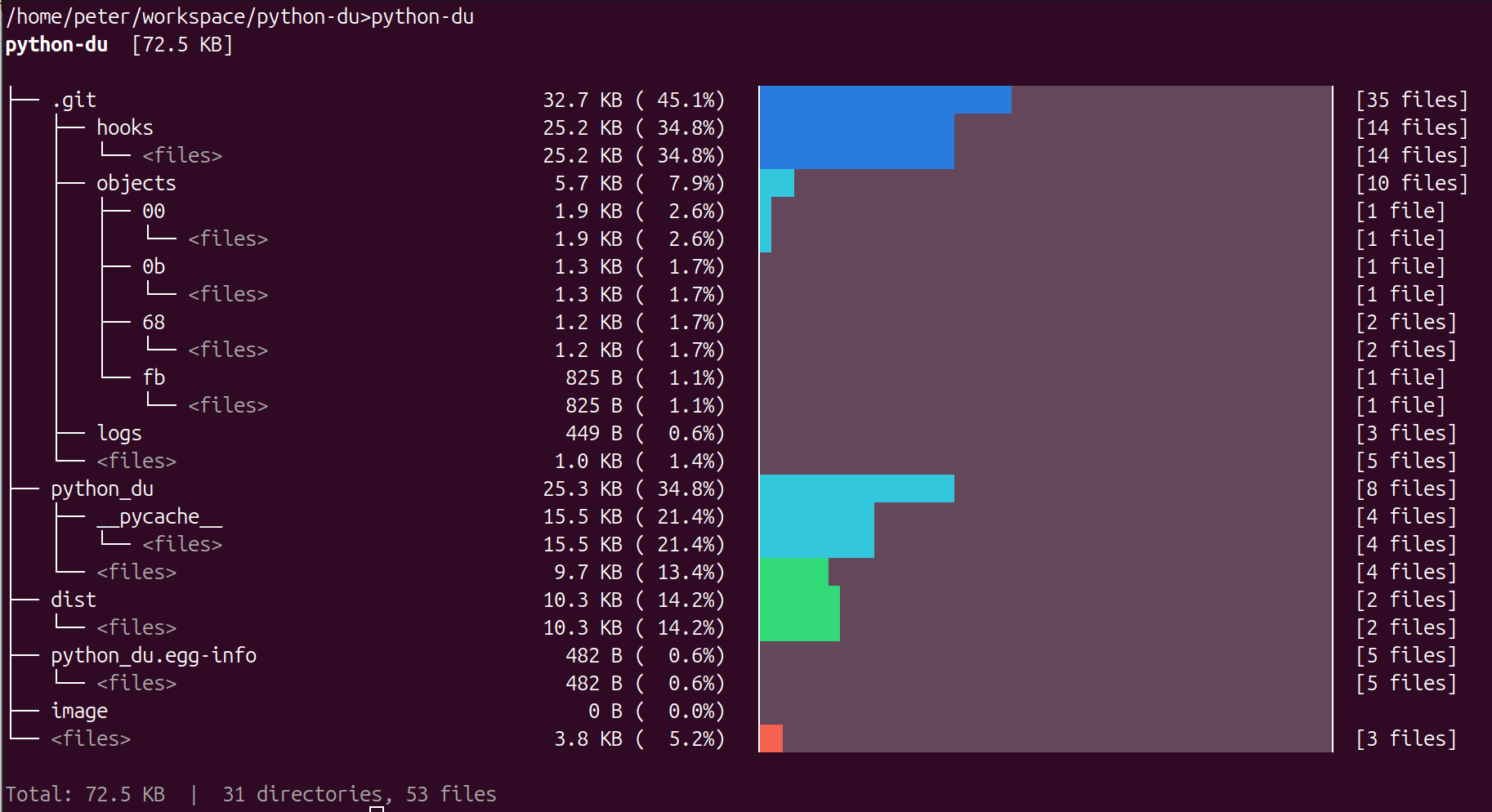
A disk usage analyzer that scans a directory and prints a visual tree map of folder sizes — right in your terminal.
Example
Installation
pip install -e .
pip uninstall python-du
Usage
python-du [path] [options]
If no path is given, the current directory is scanned.
Options
| Flag | Description |
|---|---|
-d, --max-depth N |
Maximum tree depth to display (default: 4) |
-m, --min-percent N |
Hide entries smaller than N% of total (default: 0.5) |
--no-color |
Disable colored output |
--sort-alpha |
Sort alphabetically instead of by size |
--scan-depth N |
Limit how deep the filesystem scan goes (default: unlimited) |
-L, --follow-symlinks |
Follow symbolic links |
Examples
Scan the current directory with defaults:
python-du
Scan /var/log showing only entries above 5%, two levels deep:
python-du /var/log -d 2 -m 5
Pipe to a file (automatically disables color):
python-du /home > usage-report.txt
Publishing to PyPI
pip install build twine
python -m build
twine upload dist/*
When prompted, use __token__ as the username and your PyPI API token as the password.
To skip the prompt, create a ~/.pypirc file:
[pypi]
username = __token__
password = pypi-YOUR-TOKEN-HERE
Note: Bump the
versioninpyproject.tomlbefore each upload — PyPI rejects duplicate version numbers.
Requirements
- Python >= 3.9
- No external dependencies
1 maintainer

Metadata
1 maintainer
Release files for python-du 0.1.2
For a detailed explanation of source distributions (sdists) and built distributions (wheels), please see the package formats documentation.
Source distribution (sdist)
| File | Size | Uploaded | Provenance | Actions |
|---|---|---|---|---|
| python_du-0.1.2.tar.gz | 5.3 kB | Without provenance | Details for python_du-0.1.2.tar.gz |
Built distribution (wheel)
| File | Interpreter | ABI | Platform | Actions Reset |
|---|---|---|---|---|
| python_du-0.1.2-py3-none-any.whl | Python 3 | none | any | Details for python_du-0.1.2-py3-none-any.whl |
Total release size: 11.7 kB
Release files / python_du-0.1.2.tar.gz
| Download URL | python_du-0.1.2.tar.gz |
|---|---|
| Size | 5.3 kB |
| Tags | Source |
|
SHA-256 checksum How to use checksums |
a74e7e584accc5941c4e0280465d27af63198c7763cf1d2519646e2deda9dda0
|
|
BLAKE2b-256 checksum How to use checksums |
e5d649abccaf877ad8eb0a04e7670fdca3bdbdfbb03294d2eeb395fc52823527
|
| Upload date | |
|
Uploaded using Trusted Publishing? What is trusted publishing? |
No |
| Uploaded via |
twine/6.2.0 CPython/3.11.1
|
Release files / python_du-0.1.2-py3-none-any.whl
| Download URL | python_du-0.1.2-py3-none-any.whl |
|---|---|
| Size | 6.4 kB |
| Tags | Python 3 |
|
SHA-256 checksum How to use checksums |
0344b3085e6a55bef2a337c580596de895015a69e6328343205d7abff07d7971
|
|
BLAKE2b-256 checksum How to use checksums |
8f2aa5b25c601c6504ca67390d46c6057e919c77841de4ae8b0836353e44b851
|
| Upload date | |
|
Uploaded using Trusted Publishing? What is trusted publishing? |
No |
| Uploaded via |
twine/6.2.0 CPython/3.11.1
|
Security for python-du 0.1.2
Provenance
Provenance describes where a file came from. On PyPI, provenance is shared via attestations, which provide a verifiable record of the build or publishing details. View details, limitations and caveats.
No provenance found
None of the files in this release were uploaded with provenance metadata.
A note on package security
PyPI is a repository for distributing packages, not a service for auditing them. While third-party security researchers and our staff do their best to detect and remove malicious packages, PyPI cannot guarantee the quality, security or suitability of any given package.
To learn more about protecting yourself from malicious actors, visit our package security documentation.














