
A beautiful, real-time log viewer with a web UI. Works with Django, Flask, and FastAPI.

Project description
python-log-viewer
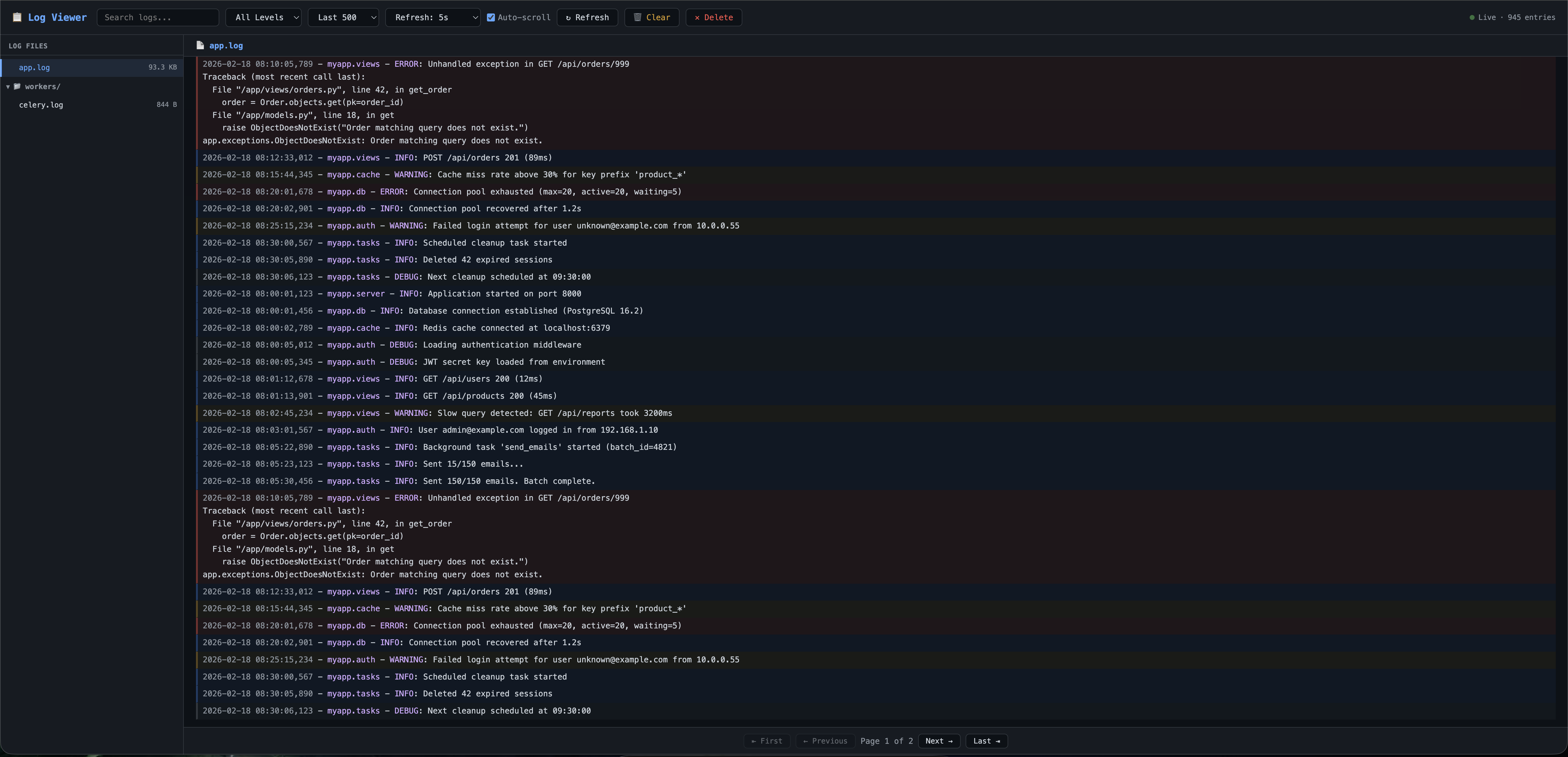
A beautiful, real-time log viewer with a dark-themed web UI. Browse, search, filter, clear, and delete log files — all from your browser.
Integrates seamlessly with Django, Flask, and FastAPI.
Preview
Support
If you like the package and find it helpful, you can Buy Me MO:MO.
Features
- 📁 File browser — sidebar with folder tree, file sizes
- 🔍 Search & filter — full-text search, log-level filtering (DEBUG / INFO / WARNING / ERROR)
- 🎨 Colour-coded — log levels highlighted with subtle background colours
- 🔄 Auto-refresh — configurable live-tail (5s, 10s, 30s, 1m, or manual)
- 📜 Line limits — last 500 / 1000 / 2500 / 5000 / all entries
- 🗑️ File actions — clear (truncate) or delete log files with confirmation modals
- 🔒 Basic Auth — optional HTTP Basic Authentication
- 📱 Responsive — works on mobile with a slide-out sidebar
Installation
pip install python-log-viewer
Framework extras
pip install python-log-viewer[django]    # Django integration
pip install python-log-viewer[flask]     # Flask integration
pip install python-log-viewer[fastapi]   # FastAPI integration
pip install python-log-viewer[all]       # All frameworks
Django Integration
1. Install
pip install python-log-viewer[django]
2. Add to INSTALLED_APPS
INSTALLED_APPS = [
    # ...
    "python_log_viewer.contrib.django",
]
3. Include URLs
# urls.py
from django.urls import path, include

urlpatterns = [
    # ...
    path("logs/", include("python_log_viewer.contrib.django.urls")),
]
4. Configure (optional)
Add any of these to your settings.py:
# Path to your log directory (default: BASE_DIR / "logs")
LOG_VIEWER_DIR = BASE_DIR / "logs"

# UI defaults
LOG_VIEWER_AUTO_REFRESH  = True    # enable auto-refresh
LOG_VIEWER_REFRESH_TIMER = 5000    # refresh interval in ms
LOG_VIEWER_AUTO_SCROLL   = True    # auto-scroll to bottom
LOG_VIEWER_COLORIZE      = True    # colour-coded log levels

# Authentication (optional — leave unset to disable)
LOG_VIEWER_USERNAME = "admin"
LOG_VIEWER_PASSWORD = "secret"

# Allow logged-in Django superusers to bypass Basic Auth (default: True)
LOG_VIEWER_SUPERUSER_ACCESS = True
Then visit http://localhost:8000/logs/ in your browser.
Flask Integration
1. Install
pip install python-log-viewer[flask]
2. Register the blueprint
from flask import Flask
from python_log_viewer.contrib.flask import create_log_viewer_blueprint

app = Flask(__name__)

app.register_blueprint(
    create_log_viewer_blueprint(
        log_dir="./logs",
        url_prefix="/logs",
        username="admin",      # optional
        password="secret",     # optional
    )
)

if __name__ == "__main__":
    app.run(debug=True)
Then visit http://localhost:5000/logs/ in your browser.
Blueprint parameters:
| Parameter | Default | Description |
|---|---|---|
log_dir |
"./logs" |
Path to log directory |
url_prefix |
"/logs" |
URL prefix |
username |
None |
Basic-Auth username |
password |
None |
Basic-Auth password |
auto_refresh |
True |
Enable auto-refresh |
refresh_timer |
5000 |
Refresh interval (ms) |
auto_scroll |
True |
Auto-scroll to bottom |
colorize |
True |
Colour-coded levels |
FastAPI Integration
1. Install
pip install python-log-viewer[fastapi]
2. Include the router
from fastapi import FastAPI
from python_log_viewer.contrib.fastapi import create_log_viewer_router

app = FastAPI()

app.include_router(
    create_log_viewer_router(
        log_dir="./logs",
        prefix="/logs",
        username="admin",      # optional
        password="secret",     # optional
    )
)
Then visit http://localhost:8000/logs/ in your browser.
Router parameters:
| Parameter | Default | Description |
|---|---|---|
log_dir |
"./logs" |
Path to log directory |
prefix |
"/logs" |
URL prefix |
username |
None |
Basic-Auth username |
password |
None |
Basic-Auth password |
auto_refresh |
True |
Enable auto-refresh |
refresh_timer |
5000 |
Refresh interval (ms) |
auto_scroll |
True |
Auto-scroll to bottom |
colorize |
True |
Colour-coded levels |
Using the Core API Directly
The core classes have zero dependencies and can be used in any Python application:
from python_log_viewer.core import LogDirectory, LogReader

# Point to your log directory
log_dir = LogDirectory("/var/log/myapp")

# List all files
for f in log_dir.list_files():
    print(f"{f.name}  {f.size} bytes  modified={f.modified}")

# Read and filter log entries
reader = LogReader(log_dir)
result = reader.read(
    file="app.log",
    lines=100,
    level="ERROR",
    search="database",
)
print(f"Total matching entries: {result['total']}")
for line in result["lines"]:
    print(line)

# File operations
log_dir.clear_file("app.log")    # truncate to 0 bytes
log_dir.delete_file("old.log")   # permanently remove
Environment Variables
Configuration can be set via environment variables (useful for Docker / CI):
| Variable | Description |
|---|---|
LOG_VIEWER_USERNAME |
Basic-Auth username |
LOG_VIEWER_PASSWORD |
Basic-Auth password |
Development
# Clone
git clone https://github.com/imsujan276/python-log-viewer.git
cd python-log-viewer

# Install in editable mode
pip install -e ".[all]"
License
MIT


Download files
Download the file for your platform. If you're not sure which to choose, learn more about installing packages.
Source Distribution
Built Distribution
Filter files by name, interpreter, ABI, and platform.
If you're not sure about the file name format, learn more about wheel file names.
Copy a direct link to the current filters
File details
Details for the file python_log_viewer-1.0.1.tar.gz.
File metadata
- Download URL: python_log_viewer-1.0.1.tar.gz
- Upload date:
- Size: 16.3 kB
- Tags: Source
- Uploaded using Trusted Publishing? No
- Uploaded via: twine/6.2.0 CPython/3.12.0
File hashes
| Algorithm | Hash digest | |
|---|---|---|
| SHA256 |
d0c7cb3376707d41908af76ea0cefa8acd3b544689076020118ef464d97d7521
|
|
| MD5 |
0db6966a18e953189099601658b5c8af
|
|
| BLAKE2b-256 |
7f5866e20d73f314abdd6e2ec65aa1cb61c0638b555a311a03789e731aff2a78
|
File details
Details for the file python_log_viewer-1.0.1-py3-none-any.whl.
File metadata
- Download URL: python_log_viewer-1.0.1-py3-none-any.whl
- Upload date:
- Size: 19.5 kB
- Tags: Python 3
- Uploaded using Trusted Publishing? No
- Uploaded via: twine/6.2.0 CPython/3.12.0
File hashes
| Algorithm | Hash digest | |
|---|---|---|
| SHA256 |
2d605419ff46f73fd5700bde56bf9d944930c99466dddac1e63a91415db5bfa4
|
|
| MD5 |
769e38c915a9f40d967e81f363dcc656
|
|
| BLAKE2b-256 |
ea209fcfa807058a24fc10db37ad164af99019052bd1ae9b0b6c32396b27d103
|






