
Direct Python log output to Discord

Project description



Python logging handler for Discord
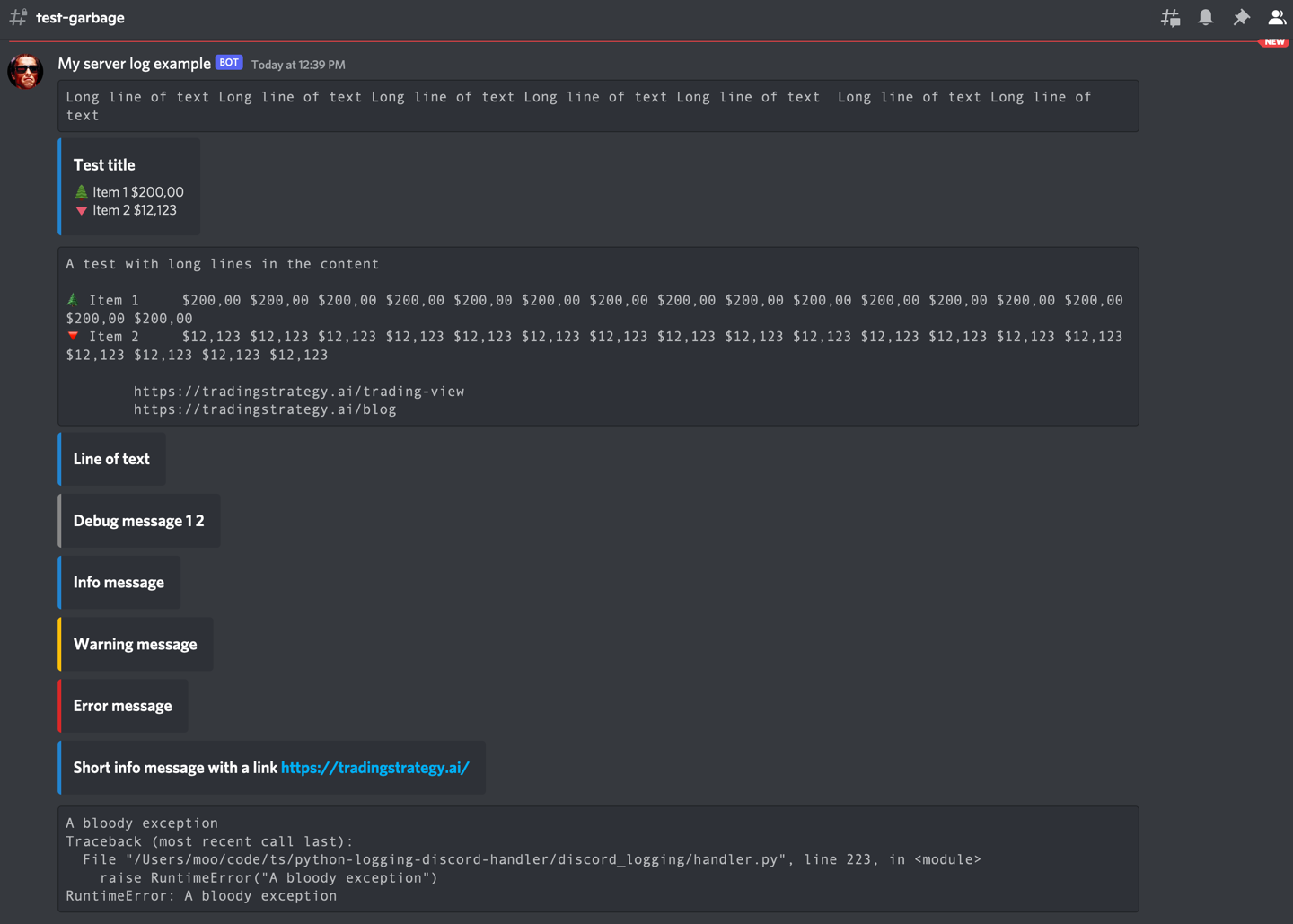
Redirect your Python log output to Discord using Python logging subsystem and Discord Webhook library.
Use cases
- Easily share logs with non-technical colleagues
- Get notified on server-side errors
- Follow your batch job processes easily
- Good for businesses and communities that have their messaging set up in Discord
Features
- Minimum or no changes to a Python application needed
- Optional color coding of messages using Discord embeds
- Optional emoticons on messages using Unicode
- Discord rate limiting friendly for burst of logs
- Documentation
- Special handling for long log messages like tracebacks to deal with Discord's 2000 character max message length
Requirements
- Python 3.8+
Installation
pip install python-logging-discord-handler
poetry add python-logging-discord-handler
Usage
This example logs both to Discord and standard output.
First you need to
import logging

from discord_logging.handler import DiscordHandler

# See instructions below how to get a Webhook URL
webhook_url = # ...
logger = logging.getLogger()

stream_format = logging.Formatter("%(asctime)s - %(name)s - %(levelname)s - %(message)s")
discord_format = logging.Formatter("%(message)s")

discord_handler = DiscordHandler(
    "Hello World Bot",
    webhook_url,
    avatar_url="https://i0.wp.com/www.theterminatorfans.com/wp-content/uploads/2012/09/the-terminator3.jpg?resize=900%2C450&ssl=1")

#discord_handler = DiscordHandler("Happy Bot", webhook_url, emojis={})
discord_handler.setFormatter(discord_format)
stream_handler = logging.StreamHandler()
stream_handler.setFormatter(stream_format)

# Add the handlers to the Logger
logger.addHandler(discord_handler)
logger.addHandler(stream_handler)
logger.setLevel(logging.DEBUG)

logger.info("This is an info message")
logger.debug("A debug message - usually not that interesting")
logger.error("Very nasty error messgae!")
Find more examples in the examples.py source code.
How to get Discord webhook URL
- Go to Edit channel (gear) in Discord
- Choose Integrations
- Choose View webhooks -> New
- Copy URL
Webhook URL security
It is recommend that you store the webhook URL outside your source code to avoid damage in hacks or similar security incidents.
In Linux/macOS shell you can do on the command line:
export DISCORD_TEST_WEBHOOK_URL=<your webhook URL here>
For long term configuration, you can create a file storing environment variables outside your source code tree, like in your home directory. Store the export commands there.
# Text editor for a secrets.env file in your home directory on Linux
nano ~/secrets.env
In your Linux shell session, you can then read this file and make environment variables effective using source command in your shell:
# Reads secrets.env and executes all commands there and makes them effective
# in the current shell session
source ~/secrets.env
Then you can read the environment variable in your Python code:
import os

webhook_url = os.environ["DISCORD_TEST_WEBHOOK_URL"]
Discord limitations
- Max 2000 characters per message. See API documentation how to work around this limitation with different options. By default the bottom most lines of the log message, like a traceback, are shown.
- Discord embeds, those that give you a logging level color bar on the left, have very hard time to deal with long lines. Embeds are disabled for long lines by default.
Log output formatting logic
The log message are converted to Discord embeds with the following logic
- Single line log messsages are converted to embed titles
- For multi line log messages, the first line is the embed title and the following lines are the embed description
- Long lines or long messages cannot be convert to embeds, instead they use Discord Markdown code formattiong to preserve the readability of the output
- A special
message_break_charcan be assigned to manually split long messages
Colours and emoticons
Logging messages can be decorated with colours and emoticons.
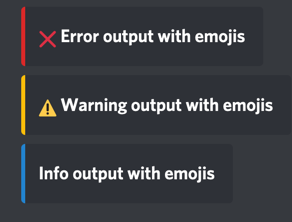
Here are the defaults:
#: The default log level colors as hexacimal, converted int
DEFAULT_COLOURS = {
    None: 2040357,  # Unknown log level
    logging.CRITICAL: 14362664,  # Red
    logging.ERROR: 14362664,  # Red
    logging.WARNING: 16497928,  # Yellow
    logging.INFO: 2196944,  # Blue
    logging.DEBUG: 8947848,  # Gray
}


#: The default log emojis as
DEFAULT_EMOJIS = {
    None: "",  # Unknown log level
    logging.CRITICAL: "🆘",
    logging.ERROR: "❌",
    logging.WARNING: "⚠️",
    logging.INFO: "",
    logging.DEBUG: "",
}
Emoticons are disabled by default as they often make the output a bit too colourful and harder to read.
Testing and development
Manual tests
Inspect how logging output looks in Discord.
- Checkout this Git repository
- Set up a dummy Discord channel
- Get its webhook URL
poetry install -E docs
export DISCORD_TEST_WEBHOOK_URL=...
python discord_logging/examples.py
This will dump some messages to your Discord.
Automated tests
Run:
pytest
History
Originally created for Trading Strategy to follow trading bot activity.
License
MIT


Download files
Download the file for your platform. If you're not sure which to choose, learn more about installing packages.
Source Distribution
Built Distribution
Filter files by name, interpreter, ABI, and platform.
If you're not sure about the file name format, learn more about wheel file names.
Copy a direct link to the current filters
File details
Details for the file python-logging-discord-handler-0.1.3.tar.gz.
File metadata
- Download URL: python-logging-discord-handler-0.1.3.tar.gz
- Upload date:
- Size: 9.5 kB
- Tags: Source
- Uploaded using Trusted Publishing? No
- Uploaded via: poetry/1.1.13 CPython/3.9.12 Darwin/21.3.0
File hashes
| Algorithm | Hash digest | |
|---|---|---|
| SHA256 |
51092f393656b07066f40fc61f8f200eff742fa920ed6c04e3711bff82cc6466
|
|
| MD5 |
9002635c171e3a7a94a7d77667780bf2
|
|
| BLAKE2b-256 |
30530109cbafb5e3af25f118e46e9fd88b32fc74bfd81c86a81fa1d0217006f0
|
File details
Details for the file python_logging_discord_handler-0.1.3-py3-none-any.whl.
File metadata
- Download URL: python_logging_discord_handler-0.1.3-py3-none-any.whl
- Upload date:
- Size: 9.5 kB
- Tags: Python 3
- Uploaded using Trusted Publishing? No
- Uploaded via: poetry/1.1.13 CPython/3.9.12 Darwin/21.3.0
File hashes
| Algorithm | Hash digest | |
|---|---|---|
| SHA256 |
9a93bc87e7585b53f431aa0fe2319a574b31288d30d73f38b7cce0b947f4fe59
|
|
| MD5 |
5af5ee25d54edc86af71ebf3dcf3de92
|
|
| BLAKE2b-256 |
3ff9de54169f25d0dc12446188a57673a438dc928dd2d90305139a0aa5fc1bdc
|






