
No project description provided

Project description
Python MCP Client: LLM-Powered Tool Orchestration Framework





A 100% open source Python framework for building, deploying, and orchestrating LLM-powered tools with Model Context Protocol (MCP). Create intelligent agents that can interact with databases, file systems, and web services through natural language processing. Free to use, modify, and distribute under the MIT license.
🚀 Key Features
- MCP Tool Orchestration: Build and connect powerful LLM tools using standardized messaging protocols
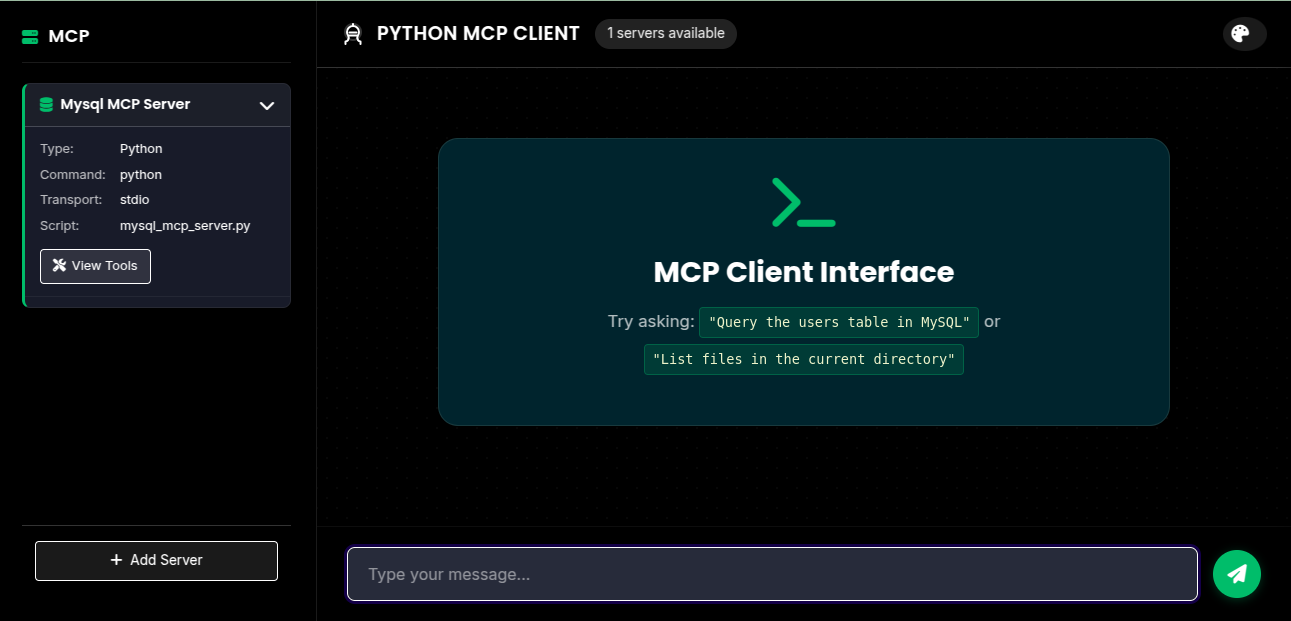
- Flask Web Interface: Interact with AI agents through an intuitive, user-friendly dashboard
- LangChain & LangGraph Integration: Create sophisticated AI workflows with industry-standard frameworks
- Multi-Server Support: Connect to multiple tool servers simultaneously from a single interface
- Dynamic Server Management: Add, configure, and update tool servers at runtime without restarts
🏗️ Architecture Overview
- Flask Web Application: Modern web interface serving as the command center for your AI tools
- MultiServerMCPClient: Advanced client that orchestrates connections to multiple tool servers
- LangChain React Agent: Intelligent decision-making system that chooses the right tools for each task
- MCP Servers: Specialized microservices that expose domain-specific tools through a standardized protocol
🔧 Getting Started with Python MCP
Installation Options
Option 1: Install from PyPI (Recommended)
The simplest way to install Python MCP Client is via pip:
pip install python-mcp-client
Option 2: Install from Source
If you want the latest development version or plan to contribute:
-
Clone the repository:
git clone https://github.com/kernelmax/python-mcp-client.git
cd python-mcp-client
-
Set up a virtual environment:
python -m venv .venv
source .venv/bin/activate  # On Windows, use: .venv\Scripts\activate
-
Install dependencies:
pip install -r requirements.txt
-
Set environment variables:
export OPENAI_API_KEY=your-api-key-here
Running Your AI Tool Platform
-
Start the Flask application:
python flask_app.py -
Open your browser and navigate to
http://localhost:5008
💡 Natural Language AI Tool Examples
Database Management with Natural Language
# Example natural language query
"Show me all users in the database that registered in the last month"

# How the AI agent processes your request
# 1. The LLM agent interprets the natural language query
# 2. It selects the appropriate database tool
# 3. It generates and executes optimized SQL: "SELECT * FROM users WHERE registration_date >= DATE_SUB(NOW(), INTERVAL 1 MONTH)"
# 4. Results are returned in a human-readable format
Database Creation Through Conversation
# Example natural language command
"Create a new database called customer_analytics"

# How the AI agent executes your request
# 1. The LLM agent processes your instructions
# 2. It selects the database creation tool
# 3. It executes the appropriate command with error handling
# 4. Confirmation is provided with next steps
Intelligent File Operations
# Example natural language request
"List all Python files in the current directory"

# How the AI assistant helps you
# 1. The LLM agent processes your request
# 2. It selects the file system tools
# 3. It intelligently filters results for Python files
# 4. Results are displayed in an organized format
🛠️ Available MCP Tool Servers
MySQL Database Assistant
A powerful AI database interface providing tools for:
- SQL query execution with natural language translation
- Automated table creation, insertion, and data manipulation
- Database management with intelligent suggestions
- Schema visualization and exploration
File System Navigator
An intelligent file system assistant with tools for:
- Context-aware file reading and analysis
- Smart file writing with formatting suggestions
- Automatic file creation with templates
- Directory organization and file discovery
🔮 Future Development Roadmap
- User Authentication: Secure access control with role-based permissions
- Database Engine Expansion: Support for PostgreSQL, MongoDB, and other databases
- Real-time Communication: WebSocket integration for live updates and responses
- Containerized Deployment: Docker compose setup for one-click deployment
- Comprehensive Testing: Extensive test suite for reliability and stability
- Session Persistence: Save and resume conversations with your AI tools
Planned MCP Server Integrations
We plan to expand our MCP server ecosystem with integrations for popular platforms:
- Google Workspace: Connect to Gmail, Google Docs, Google Drive, and Google Calendar
- Microsoft 365: Integrate with Outlook, OneDrive, and Microsoft Teams
- Slack: Send messages, manage channels, and automate workflows
- Salesforce: Query customer data, manage leads, and update records
- Jira: Create and manage issues, track projects, and generate reports
- GitHub: Manage repositories, issues, and pull requests
- Zoho: Connect to Zoho CRM, Zoho Books, and other Zoho applications
- Zendesk: Handle support tickets and customer inquiries
- HubSpot: Manage marketing campaigns and customer relationships
- Notion: Create and update pages, databases, and workspaces
💪 How to Contribute
We enthusiastically welcome contributors of all experience levels! Whether you're fixing a typo, improving documentation, or adding a major feature, your help makes this project better.
Contribute to the project on GitHub: https://github.com/kernelmax/python-mcp-client
Ways to Contribute
- Code contributions: Add new features or fix bugs
- Documentation: Improve explanations, add examples, or fix typos
- Bug reports: Help us identify issues
- Feature requests: Suggest new capabilities
- User experience: Provide feedback on usability
- Testing: Help ensure everything works properly
📜 License Information
This project is fully open source and available under the MIT License. This means you are free to:
- Use the code commercially
- Modify the code
- Distribute your modifications
- Use privately
- Sublicense
We believe in the power of open source to drive innovation and make AI tools accessible to everyone. By making this project open source, we encourage collaboration, transparency, and community-driven development.
📬 Contact & Support
For questions, feature requests, or support, please open an issue on GitHub or contact the maintainers directly.
Release history Release notifications | RSS feed


Download files
Download the file for your platform. If you're not sure which to choose, learn more about installing packages.
Source Distribution
Built Distribution
Filter files by name, interpreter, ABI, and platform.
If you're not sure about the file name format, learn more about wheel file names.
Copy a direct link to the current filters
File details
Details for the file python_mcp_client-0.1.2.tar.gz.
File metadata
- Download URL: python_mcp_client-0.1.2.tar.gz
- Upload date:
- Size: 5.6 kB
- Tags: Source
- Uploaded using Trusted Publishing? No
- Uploaded via: twine/6.1.0 CPython/3.8.10
File hashes
| Algorithm | Hash digest | |
|---|---|---|
| SHA256 |
d5232dfc7c4ca729c6967f209277cb95c1f98c6e00dad7282e619fe767734823
|
|
| MD5 |
6489bea772d1374e6204774a126f9785
|
|
| BLAKE2b-256 |
8e6c47739257e4b54d615191a465f606cd52a68589589a6d9edebc44337a51e3
|
File details
Details for the file python_mcp_client-0.1.2-py3-none-any.whl.
File metadata
- Download URL: python_mcp_client-0.1.2-py3-none-any.whl
- Upload date:
- Size: 4.4 kB
- Tags: Python 3
- Uploaded using Trusted Publishing? No
- Uploaded via: twine/6.1.0 CPython/3.8.10
File hashes
| Algorithm | Hash digest | |
|---|---|---|
| SHA256 |
db1934151e81ec3f08f6e677b38cee478b7aab027a104a9fd9acf45aef3be60f
|
|
| MD5 |
6037843e28a9c46062c37d32705222ce
|
|
| BLAKE2b-256 |
1bde95d323e7db417962447d9e9d2d48610931fea270a09f929ddf3308c5bdce
|






