
A Python package for interacting with OBS Studio.

Project description
py-obs
Table of Contents
Introduction
py-obs is a Python package that wraps the OBS WebSocket API functionality in order to provide easy programmatic access to OBS resources using Python. This package is designed to abstract as much configuration away so content creators can quickly and easily write scripts to automate tasks in OBS studio. Having dabbled in streaming myself, I was looking for a package like this with very clear documentation; this package was designed with my own experiences and desires in mind. This package will be open to contributions soon.
Getting Started
Installation
Getting started with py-obs is very simple. Make sure you have the package installed with
pip install py-obs
OBS Studio Setup
In OBS Studio select Tools > WebSocket Server Settings
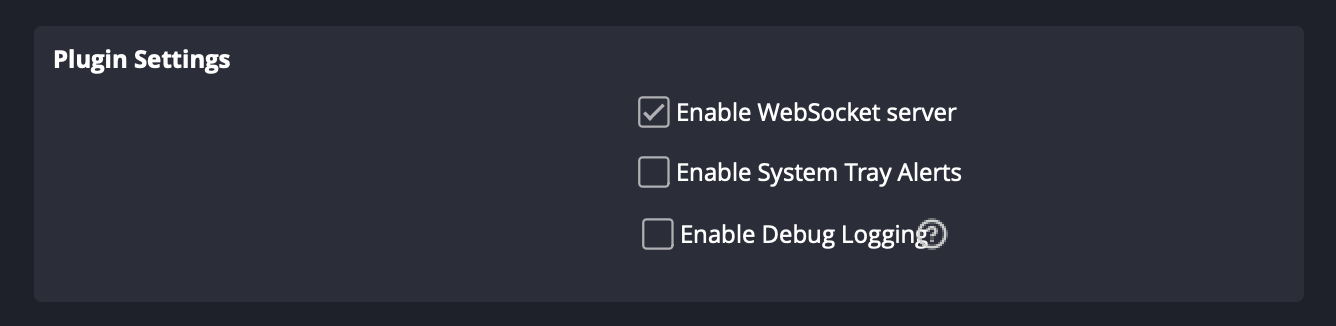
Under Plugin Settings make sure Enable WebSocket server is checked.
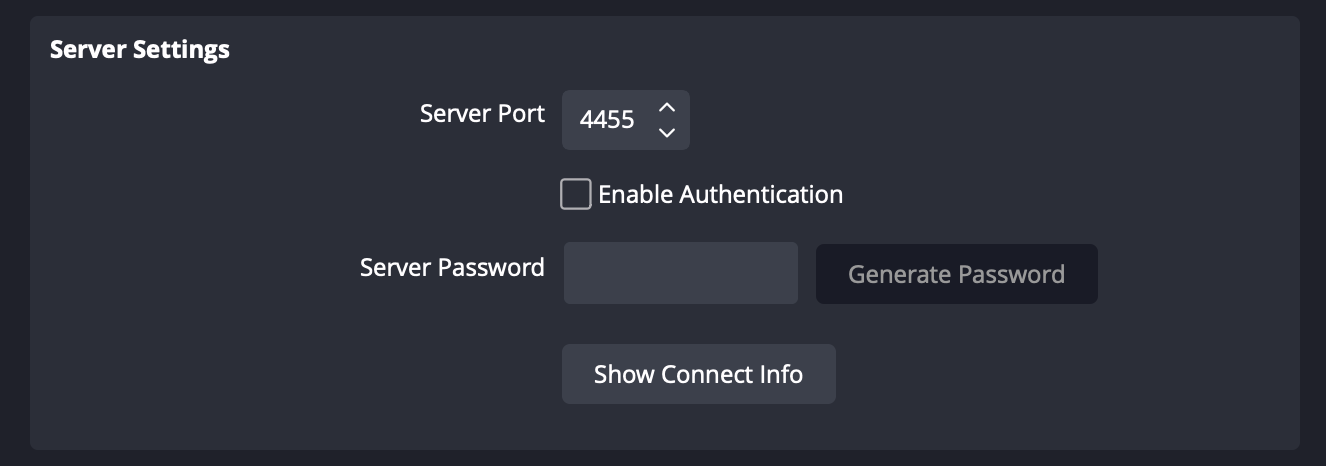
Under Server Settings select a Server Port (4455 is recommended). If you desire to set a password, check the Enable Authentication checkbox and set a strong Server Password. Keep all of this information, since it will be required to connect py-obs to your OBS WebSocket Server.
py-obs Setup
Now that your OBS WebSocket Server is setup, you can connect to it via py-obs.
from py_obs.clients import OBS

obs = OBS()
obs.connect()
OBS() takes three parameters: host (default is localhost), port (default if 4455), and password (default is None, meaning authentication is not enabled on the OBS WebSocket Server). Below is an example with a custom port and password.
from py_obs.clients import OBS

obs = OBS(port=8000, password="StrongPassword1234!")
obs.connect()
Documentation
OBS Clients
py-obs provides both synchronous and asynchronous clients.
Synchronous Client
The synchronous client is the default client. It is built on top of the asynchronous client. The synchronous client is ideal for simple use cases, like running individual commands.
To use the synchronous client import the OBS class from py_obs.clients
from py_obs.clients import OBS

obs = OBS()
obs.connect()

obs.scene("Main").source("Camera").set_rotation(90)
Asynchronous Client
The asynchronous client is the recommended client for more advanced use cases, like FastAPI integration.
To use the asynchronous client import the OBSAsync class from py_obs.clients
import asyncio
from py_obs.clients import OBSAsync

async def main():
    obs = OBSAsync()
    await obs.connect()

    await obs.scene("Main").source("Camera").set_rotation(90)

if __name__ == "__main__":
    asyncio.run(main())
Scenes
To set the current scene use
obs.set_scene(SCENE_NAME)
To create a new scene use
obs.create_scene(SCENE_NAME)
To delete a scene use
obs.delete_scene(SCENE_NAME)
Sources
Translation
To set the position of a source use
source.set_position(POSITION_X, POSITION_Y)
To translate a source from its current position use
source.translate(PIXELS_X, PIXELS_Y)
To translate in a specific direction use
source.translate_right(PIXELS_X)
source.translate_left(PIXELS_X)
source.translate_up(PIXELS_Y)
source.translate_down(PIXELS_Y)
Rotation
To set the specific orientation of a source use
source.set_rotation(ORIENTATION)
To rotate a source from its current orientation use
source.rotate(DEGREES)
To rotate a source in a specific direction use
source.rotate_clockwise(DEGREES)
source.rotate_counterclockwise(DEGREES)
Scale
To set the scale of a source use
source.set_scale(SCALE_X, SCALE_Y)
source.set_scale_X(SCALE_X)
source.set_scale_Y(SCALE_Y)
To scale a source from its current size use
source.scale(FACTOR_X, FACTOR_Y)
source.scale_X(FACTOR_X)
source.scale_Y(FACTOR_Y)
Crop
To crop a source use
source.crop(BOTTOM_PIXELS, LEFT_PIXELS, RIGHT_PIXELS, TOP_PIXELS)
To set crop from one specific direction use
source.crop_bottom(PIXELS)
source.crop_left(PIXELS)
source.crop_right(PIXELS)
source.crop_top(PIXELS)
Visibility
To hide a source use
source.hide()
To show a source use
source.show()
To toggle visibility on a source use
source.toggle_visibility()
Locking
To lock a source use
source.lock()
To unlock a source use
source.unlock()
To toggle locking on a source use
source.toggle_lock()
Example Code
Using py-obs is very easy. Make sure you have the package installed with
pip install py-obs
Below is some example code to demonstrate basic operations in py-obs.
Set the rotation of the Camera source in the Main scene to 90 degrees.
from py_obs.clients import OBS

obs = OBS()
obs.connect()

obs.scene("Main").source("Camera").set_rotation(90)
Alternatively you can format the same code in this format.
from py_obs.clients import OBS

obs = OBS()
obs.connect()

main = obs.scene("Main")
source = main.source("Camera")
source.set_rotation(90)


Download files
Download the file for your platform. If you're not sure which to choose, learn more about installing packages.
Source Distribution
Built Distribution
Filter files by name, interpreter, ABI, and platform.
If you're not sure about the file name format, learn more about wheel file names.
Copy a direct link to the current filters
File details
Details for the file python_obs-1.0.0.tar.gz.
File metadata
- Download URL: python_obs-1.0.0.tar.gz
- Upload date:
- Size: 9.6 kB
- Tags: Source
- Uploaded using Trusted Publishing? No
- Uploaded via: twine/6.2.0 CPython/3.9.13
File hashes
| Algorithm | Hash digest | |
|---|---|---|
| SHA256 |
66c5c69a4e927658f34cf2e7c0401a058ed10f46acf9223de33e3a0b856fcc8e
|
|
| MD5 |
67bdfb1ab0c53f4198fc47afc7d11b2d
|
|
| BLAKE2b-256 |
39abcad7cb112e8af257c6cd1d5128f5255f0385d2402c9c885ed2b1f7312369
|
File details
Details for the file python_obs-1.0.0-py3-none-any.whl.
File metadata
- Download URL: python_obs-1.0.0-py3-none-any.whl
- Upload date:
- Size: 8.8 kB
- Tags: Python 3
- Uploaded using Trusted Publishing? No
- Uploaded via: twine/6.2.0 CPython/3.9.13
File hashes
| Algorithm | Hash digest | |
|---|---|---|
| SHA256 |
f24f42b15c57c7292be7899917e75a8784887491f92560e7f5ed9b91ca1448ff
|
|
| MD5 |
a59ea8878a3e603f2b3ca65bbe1d2632
|
|
| BLAKE2b-256 |
f4fd5d401caf86209a52a587fb523a650e902df1d02d478b306b43cb4a86afbc
|






