
A simple, python-based process manager

Project description
pypm: A python-based process manager
💻 What is pypm?
pypm is a simple, python-based process manager. You can launch and monitor processes and their resources, automatically detect changes and log outputs. It keeps running after you close the console, which is very useful when dealing with remote sessions (for example, through ssh).
📥 How do I install it?
You can install pypm via pip with pip install python-pm
📖 How do I use it?
Basic use
To start a pypm instance, use the command python -m pypm init. For more info about this command, you can use python -m pypm init --help. This starts a server on your local machine which can be interacted with through the other commands.
The next thing you're going to want to do is add a process to be monitored. You can use python -m pypm add [name] [command]. An example would be python -m pypm add server "python -m http.server 80", which would launch an HTTP server.
To list all current processes, use python -m pypm list. To get the status of a specific process you can call python -m pypm status [name], which will display a table like the one below.

Killing processes is done using the kill instruction. All other options are listed on the help menu. Stopping the pypm instance will kill all running processes. There is a simple visual interface available with the command python -m pypm monit.
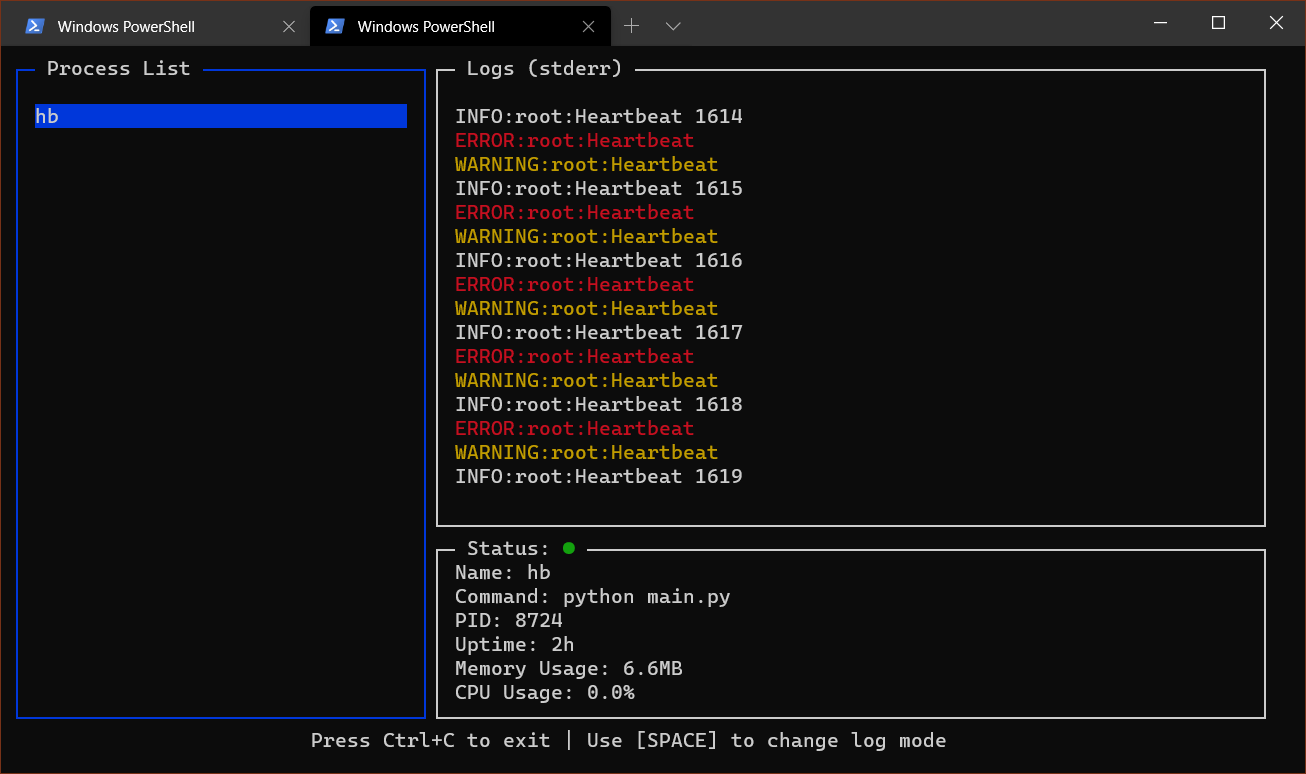
On Linux it might be useful to add alias pypm="python3 -m pypm" to your bash profile so the command syntax becomes simpler.


Download files
Download the file for your platform. If you're not sure which to choose, learn more about installing packages.
Source Distribution
Built Distribution
Filter files by name, interpreter, ABI, and platform.
If you're not sure about the file name format, learn more about wheel file names.
Copy a direct link to the current filters
File details
Details for the file python-pm-0.0.1.tar.gz.
File metadata
- Download URL: python-pm-0.0.1.tar.gz
- Upload date:
- Size: 13.8 kB
- Tags: Source
- Uploaded using Trusted Publishing? No
- Uploaded via: twine/3.1.1 pkginfo/1.5.0.1 requests/2.24.0 setuptools/41.2.0 requests-toolbelt/0.9.1 tqdm/4.46.0 CPython/3.8.2
File hashes
| Algorithm | Hash digest | |
|---|---|---|
| SHA256 |
9b9d1f7c174b5e686749fa72e2646216378c7989207975c34fed50805e837f08
|
|
| MD5 |
fdffd6a40da22f6012c701a90fa19ec1
|
|
| BLAKE2b-256 |
55fc49055fb4c49084756a9d363a63374cc44690cf09fb7756853d27004036ae
|
File details
Details for the file python_pm-0.0.1-py3-none-any.whl.
File metadata
- Download URL: python_pm-0.0.1-py3-none-any.whl
- Upload date:
- Size: 15.5 kB
- Tags: Python 3
- Uploaded using Trusted Publishing? No
- Uploaded via: twine/3.1.1 pkginfo/1.5.0.1 requests/2.24.0 setuptools/41.2.0 requests-toolbelt/0.9.1 tqdm/4.46.0 CPython/3.8.2
File hashes
| Algorithm | Hash digest | |
|---|---|---|
| SHA256 |
73e7622ac2c15fa43506b9c4c486393b460b0af1d74b664a444db3f68498da64
|
|
| MD5 |
080a013550fad6626d7f3d5da75d46cc
|
|
| BLAKE2b-256 |
680a3c1717f39d0c3101e6683e870fdd7dc8d17afac849ede3486c657fc7d54a
|






