
A Python utility for managing package versions with an interactive CLI interface

Project description
python-pvm
A Python utility for managing package versions with an interactive CLI interface. This tool helps you monitor, update, and backup your Python packages, whether they're project-specific or globally installed.
Quick Start for Beginners
Want to get started quickly? Here's what you need to know:
- Install the tool:
pip install python-pvm
- Run it:
python-pvm
- Common Tasks:
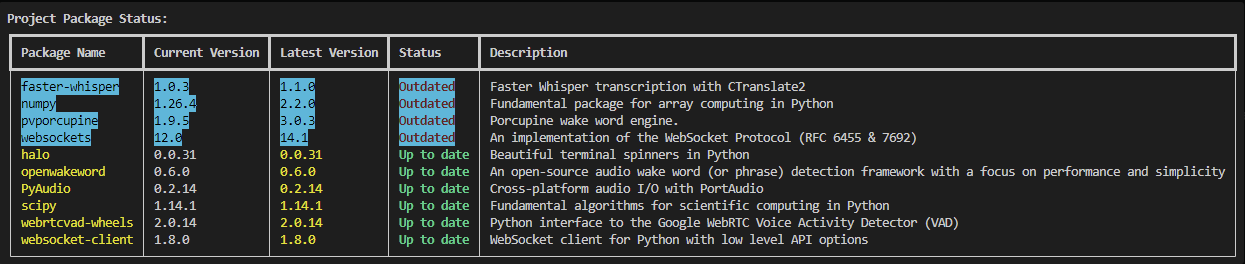
- Check for Updates: Look for packages highlighted in cyan - these need updates
- Update Packages: Choose "Update all packages" (don't worry, it creates automatic backups)
- Restore if Needed: Use "Restore from backup" if something goes wrong
That's it! Keep reading for more detailed information.
Features
- 📊 Interactive CLI with rich terminal formatting
- 🔍 Check both project-specific and global package versions
- 🔄 Detect and update outdated packages
- 💾 Backup and restore package versions
- 📈 Progress tracking with visual indicators
- 🎨 Color-coded status display
- ⚡ Parallel processing for package information retrieval
Requirements
- Python 3.12 or higher
- Required packages (automatically installed):
- rich
- inquirer
- packaging
Installation
From PyPI (Recommended)
pip install python-pvm
From Source
git clone https://github.com/workingwheel/python-package-version-manager.git
cd python-package-version-manager
pip install -e .
Usage
Run the tool using:
python-pvm
The interactive menu will guide you through the following options:
-
Choose scope:
- Project Libraries (checks packages in requirements.txt)
- Global Libraries (checks all installed packages)
-
Available actions:
- Update all packages
- Create backup only
- Restore from backup
- Exit
Features in Detail
Package Status Display
- Shows package name, current version, latest version, and description
- Color-coded status indicators:
- Green: Up to date
- Red: Outdated
- Cyan highlight: Outdated packages
- Sorted display with outdated packages shown first
Backup System
- Automatic backup creation before updates
- Manual backup creation option
- Restore from previous backups
- Backups stored in
package_backupsdirectory with timestamps
Progress Tracking
- Visual progress bars for updates and restores
- Time elapsed tracking
- Spinner animations for ongoing processes
Function Documentation
Main Functions
main() The entry point of the application. Handles the interactive menu and orchestrates the overall flow of the program.
check_project_packages(console, requirements_file) Analyzes packages listed in a requirements file.
- Parameters:
console: Rich console instance for outputrequirements_file: Path to requirements.txt
check_global_packages(console) Analyzes globally installed packages.
- Parameters:
console: Rich console instance for output
Utility Functions
get_package_descriptions_parallel(packages, max_workers=10) Fetches package descriptions concurrently for better performance.
- Parameters:
packages: List of package dictionariesmax_workers: Maximum number of concurrent workers (default: 10)
update_packages(outdated_packages, console, global_packages=True) Updates outdated packages with progress tracking.
- Parameters:
outdated_packages: List of packages to updateconsole: Rich console instanceglobal_packages: Boolean for global/local scope
create_backup(packages) Creates a timestamped backup of current package versions.
- Parameters:
packages: List of package information to backup
restore_packages(backup_file, console) Restores packages from a backup file.
- Parameters:
backup_file: Path to backup JSON fileconsole: Rich console instance
Examples
Error Handling
The script includes comprehensive error handling for:
- File operations
- Package management operations
- User interruptions
- JSON parsing
- Network-related issues
Best Practices
- Always create a backup before updating packages
- Review the status table before proceeding with updates
- Keep track of backup files for version control
- Use project-specific checking for isolated environments
Links
- PyPI Package: python-pvm
- GitHub Repository: python-package-version-manager
Contributing
Feel free to submit issues and enhancement requests!
License
This project is open source and available under the MIT License.
Release history Release notifications | RSS feed

Download files
Download the file for your platform. If you're not sure which to choose, learn more about installing packages.
Source Distribution
Built Distribution
Filter files by name, interpreter, ABI, and platform.
If you're not sure about the file name format, learn more about wheel file names.
Copy a direct link to the current filters
File details
Details for the file python_pvm-1.0.4.tar.gz.
File metadata
- Download URL: python_pvm-1.0.4.tar.gz
- Upload date:
- Size: 7.4 kB
- Tags: Source
- Uploaded using Trusted Publishing? No
- Uploaded via: twine/6.0.1 CPython/3.12.6
File hashes
| Algorithm | Hash digest | |
|---|---|---|
| SHA256 |
0c945326f01236836f0446c31f91e47281bb5c4d7b8c8d87a73af8d88a8c97d4
|
|
| MD5 |
c9690fea61e7ebee77aaf7e05f8e1e58
|
|
| BLAKE2b-256 |
0e70af6ab16ef037871ce39f03488513f3a023f1a9c5a5b9840aa40527cea44f
|
File details
Details for the file python_pvm-1.0.4-py3-none-any.whl.
File metadata
- Download URL: python_pvm-1.0.4-py3-none-any.whl
- Upload date:
- Size: 7.6 kB
- Tags: Python 3
- Uploaded using Trusted Publishing? No
- Uploaded via: twine/6.0.1 CPython/3.12.6
File hashes
| Algorithm | Hash digest | |
|---|---|---|
| SHA256 |
b015f9453d26840a87a26f2d03d419524833fb86118ba5616989026ae934e23f
|
|
| MD5 |
3695a84cfef3a09b15240ed532651f81
|
|
| BLAKE2b-256 |
2acd9ce01b5b958ff23f98f80bae8d836729c038e6ef11d0d8319639611e685d
|






