
Python Finite State Machines made easy.
Verified details
These details have been verified by PyPIProject links
GitHub Statistics
Maintainers

Project description
Python StateMachine






Expressive statecharts and FSMs for modern Python.

Welcome to python-statemachine, an intuitive and powerful state machine library designed for a great developer experience. Define flat state machines or full statecharts with compound states, parallel regions, and history — all with a clean, pythonic, declarative API that works in both sync and async Python codebases.
Quick start
>>> from statemachine import StateChart, State

>>> class TrafficLightMachine(StateChart):
...     "A traffic light machine"
...     green = State(initial=True)
...     yellow = State()
...     red = State()
...
...     cycle = (
...         green.to(yellow)
...         | yellow.to(red)
...         | red.to(green)
...     )
...
...     def before_cycle(self, event: str, source: State, target: State):
...         return f"Running {event} from {source.id} to {target.id}"
...
...     def on_enter_red(self):
...         print("Don't move.")
...
...     def on_exit_red(self):
...         print("Go ahead!")
Create an instance and send events:
>>> sm = TrafficLightMachine()
>>> sm.send("cycle")
'Running cycle from green to yellow'

>>> sm.send("cycle")
Don't move.
'Running cycle from yellow to red'

>>> sm.send("cycle")
Go ahead!
'Running cycle from red to green'
Check which states are active:
>>> sm.configuration
OrderedSet([State('Green', id='green', value='green', initial=True, final=False, parallel=False)])

>>> sm.green.is_active
True
Generate a diagram or get a text representation with f-strings:
>>> print(f"{sm:md}")
| State  | Event | Guard | Target |
| ------ | ----- | ----- | ------ |
| Green  | Cycle |       | Yellow |
| Yellow | Cycle |       | Red    |
| Red    | Cycle |       | Green  |
<BLANKLINE>
sm._graph().write_png("traffic_light.png")
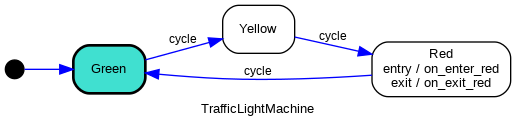
Parameters are injected into callbacks automatically — the library inspects the signature and provides only the arguments each callback needs:
>>> sm.send("cycle")
'Running cycle from green to yellow'
Guards and conditional transitions
Use cond= and unless= to add guards. When multiple transitions share the same
event, declaration order determines priority:
>>> from statemachine import StateChart, State

>>> class ApprovalWorkflow(StateChart):
...     pending = State(initial=True)
...     approved = State(final=True)
...     rejected = State(final=True)
...
...     review = (
...         pending.to(approved, cond="is_valid")
...         | pending.to(rejected)
...     )
...
...     def is_valid(self, score: int = 0):
...         return score >= 70

>>> sm = ApprovalWorkflow()
>>> sm.send("review", score=50)
>>> sm.rejected.is_active
True

>>> sm = ApprovalWorkflow()
>>> sm.send("review", score=85)
>>> sm.approved.is_active
True
The first transition whose guard passes wins. When score < 70, is_valid returns
False so the second transition (no guard — always matches) fires instead.
Compound states — hierarchy
Break complex behavior into hierarchical levels with State.Compound. Entering a
compound activates both the parent and its initial child. Exiting removes the
parent and all descendants:
>>> from statemachine import StateChart, State

>>> class DocumentWorkflow(StateChart):
...     class editing(State.Compound):
...         draft = State(initial=True)
...         review = State()
...         submit = draft.to(review)
...         revise = review.to(draft)
...
...     published = State(final=True)
...     approve = editing.to(published)

>>> sm = DocumentWorkflow()
>>> set(sm.configuration_values) == {"editing", "draft"}
True

>>> sm.send("submit")
>>> "review" in sm.configuration_values
True

>>> sm.send("approve")
>>> set(sm.configuration_values) == {"published"}
True
Parallel states — concurrency
State.Parallel activates all child regions simultaneously. Events in one
region don't affect others. A done.state event fires only when all
regions reach a final state:
>>> from statemachine import StateChart, State

>>> class DeployPipeline(StateChart):
...     class deploy(State.Parallel):
...         class build(State.Compound):
...             compiling = State(initial=True)
...             compiled = State(final=True)
...             finish_build = compiling.to(compiled)
...         class tests(State.Compound):
...             running = State(initial=True)
...             passed = State(final=True)
...             finish_tests = running.to(passed)
...     released = State(final=True)
...     done_state_deploy = deploy.to(released)

>>> sm = DeployPipeline()
>>> "compiling" in sm.configuration_values and "running" in sm.configuration_values
True

>>> sm.send("finish_build")
>>> "compiled" in sm.configuration_values and "running" in sm.configuration_values
True

>>> sm.send("finish_tests")
>>> set(sm.configuration_values) == {"released"}
True
History states
HistoryState() records which child was active when a compound is exited.
Re-entering via the history pseudo-state restores the previous child instead
of starting from the initial one:
>>> from statemachine import HistoryState, StateChart, State

>>> class EditorWithHistory(StateChart):
...     class editor(State.Compound):
...         source = State(initial=True)
...         visual = State()
...         h = HistoryState()
...         toggle = source.to(visual) | visual.to(source)
...     settings = State()
...     open_settings = editor.to(settings)
...     back = settings.to(editor.h)

>>> sm = EditorWithHistory()
>>> sm.send("toggle")
>>> "visual" in sm.configuration_values
True

>>> sm.send("open_settings")
>>> sm.send("back")
>>> "visual" in sm.configuration_values
True
Use HistoryState(type="deep") for deep history that remembers the exact leaf
state across nested compounds.
Eventless transitions
Transitions without an event trigger fire automatically. With a guard, they fire after any event processing when the condition is met:
>>> from statemachine import StateChart, State

>>> class AutoCounter(StateChart):
...     counting = State(initial=True)
...     done = State(final=True)
...
...     counting.to(done, cond="limit_reached")
...     increment = counting.to.itself(internal=True, on="do_increment")
...
...     count = 0
...
...     def do_increment(self):
...         self.count += 1
...     def limit_reached(self):
...         return self.count >= 3

>>> sm = AutoCounter()
>>> sm.send("increment")
>>> sm.send("increment")
>>> "counting" in sm.configuration_values
True

>>> sm.send("increment")
>>> "done" in sm.configuration_values
True
Error handling
When using StateChart, runtime exceptions in callbacks are caught and
turned into error.execution events. Define a transition for that event
to handle errors within the state machine itself:
>>> from statemachine import StateChart, State

>>> class ResilientService(StateChart):
...     running = State(initial=True)
...     failed = State(final=True)
...
...     process = running.to(running, on="do_work")
...     error_execution = running.to(failed)
...
...     def do_work(self):
...         raise RuntimeError("something broke")

>>> sm = ResilientService()
>>> sm.send("process")
>>> sm.failed.is_active
True
Async support
Async callbacks just work — same API, no changes needed. The engine detects async callbacks and switches to the async engine automatically:
>>> import asyncio
>>> from statemachine import StateChart, State

>>> class AsyncWorkflow(StateChart):
...     idle = State(initial=True)
...     done = State(final=True)
...
...     finish = idle.to(done)
...
...     async def on_finish(self):
...         return 42

>>> async def run():
...     sm = AsyncWorkflow()
...     result = await sm.finish()
...     print(f"Result: {result}")
...     print(sm.done.is_active)

>>> asyncio.run(run())
Result: 42
True
More features
There's a lot more to explore:
- DoneData on final states — pass structured data to
done.statehandlers - Delayed events — schedule events with
sm.send("event", delay=500) In(state)conditions — cross-region guards in parallel statesprepare_eventcallback — inject custom data into all callbacks- Observer pattern — register external listeners to watch events and state changes
- Django integration — auto-discover state machines in Django apps with
MachineMixin - Diagram generation — via f-strings (
f"{sm:mermaid}"), CLI, Sphinx directive, or Jupyter - Dictionary-based definitions — create state machines from data structures
- Internationalization — error messages in multiple languages
Full documentation: https://python-statemachine.readthedocs.io
Installing
pip install python-statemachine
To generate diagrams, install with the diagrams extra (requires
Graphviz):
pip install python-statemachine[diagrams]
Contributing
-
If you found this project helpful, please consider giving it a star on GitHub.
-
Contribute code: If you would like to contribute code, please submit a pull request. For more information on how to contribute, please see our contributing.md file.
-
Report bugs: If you find any bugs, please report them by opening an issue on our GitHub issue tracker.
-
Suggest features: If you have an idea for a new feature, or feel something is harder than it should be, please let us know by opening an issue on our GitHub issue tracker.
-
Documentation: Help improve documentation by submitting pull requests.
-
Promote the project: Help spread the word by sharing on social media, writing a blog post, or giving a talk about it. Tag me on Twitter @fgmacedo so I can share it too!
Project details
Verified details
These details have been verified by PyPIProject links
GitHub Statistics
Maintainers
Release history Release notifications | RSS feed


Download files
Download the file for your platform. If you're not sure which to choose, learn more about installing packages.
Source Distribution
Built Distribution
Filter files by name, interpreter, ABI, and platform.
If you're not sure about the file name format, learn more about wheel file names.
Copy a direct link to the current filters
File details
Details for the file python_statemachine-3.1.0.tar.gz.
File metadata
- Download URL: python_statemachine-3.1.0.tar.gz
- Upload date:
- Size: 706.3 kB
- Tags: Source
- Uploaded using Trusted Publishing? Yes
- Uploaded via: twine/6.1.0 CPython/3.13.12
File hashes
| Algorithm | Hash digest | |
|---|---|---|
| SHA256 |
d00f637172c7f000d1baed1fc4b217aad3daa8d71dc3848fa4e45b20f3bde38d
|
|
| MD5 |
c0469d9e44fccff20921fa8c6e82e155
|
|
| BLAKE2b-256 |
ca306d707ed1fc571c200fc40a0e571440d67f9212da5bc0a2f7437c10263da5
|
Provenance
The following attestation bundles were made for python_statemachine-3.1.0.tar.gz:
Publisher:
release.yml on fgmacedo/python-statemachine
-
Statement:
-
Statement type:
https://in-toto.io/Statement/v1 -
Predicate type:
https://docs.pypi.org/attestations/publish/v1 -
Subject name:
python_statemachine-3.1.0.tar.gz -
Subject digest:
d00f637172c7f000d1baed1fc4b217aad3daa8d71dc3848fa4e45b20f3bde38d - Sigstore transparency entry: 1548608070
- Sigstore integration time:
-
Permalink:
fgmacedo/python-statemachine@c6f6262ffca9f9b31f869e29dafdbda637d09f42 -
Branch / Tag:
refs/tags/v3.1.0 - Owner: https://github.com/fgmacedo
-
Access:
public
-
Token Issuer:
https://token.actions.githubusercontent.com -
Runner Environment:
github-hosted -
Publication workflow:
release.yml@c6f6262ffca9f9b31f869e29dafdbda637d09f42 -
Trigger Event:
push
-
Statement type:
File details
Details for the file python_statemachine-3.1.0-py3-none-any.whl.
File metadata
- Download URL: python_statemachine-3.1.0-py3-none-any.whl
- Upload date:
- Size: 125.8 kB
- Tags: Python 3
- Uploaded using Trusted Publishing? Yes
- Uploaded via: twine/6.1.0 CPython/3.13.12
File hashes
| Algorithm | Hash digest | |
|---|---|---|
| SHA256 |
78e6d80facc1441345bf1bd3600ec2fe10b5bd7e91406984a5df0698efc2e7f6
|
|
| MD5 |
43086edb29a5ac35f4b756879d33e54c
|
|
| BLAKE2b-256 |
e01b5c57c86770b227eb3309c9da891b190bdef57570866d3fde26711accdd1b
|
Provenance
The following attestation bundles were made for python_statemachine-3.1.0-py3-none-any.whl:
Publisher:
release.yml on fgmacedo/python-statemachine
-
Statement:
-
Statement type:
https://in-toto.io/Statement/v1 -
Predicate type:
https://docs.pypi.org/attestations/publish/v1 -
Subject name:
python_statemachine-3.1.0-py3-none-any.whl -
Subject digest:
78e6d80facc1441345bf1bd3600ec2fe10b5bd7e91406984a5df0698efc2e7f6 - Sigstore transparency entry: 1548608080
- Sigstore integration time:
-
Permalink:
fgmacedo/python-statemachine@c6f6262ffca9f9b31f869e29dafdbda637d09f42 -
Branch / Tag:
refs/tags/v3.1.0 - Owner: https://github.com/fgmacedo
-
Access:
public
-
Token Issuer:
https://token.actions.githubusercontent.com -
Runner Environment:
github-hosted -
Publication workflow:
release.yml@c6f6262ffca9f9b31f869e29dafdbda637d09f42 -
Trigger Event:
push
-
Statement type:






