
A small library to calculate the bearing of a VOR signal from a WAV file.

Project description
Python VOR Decoder
This repository contains a pure Python implementation of a VOR (VHF Omnidirectional Range) radio navigation signal decoder. The code is based on and adapted from the work of martinber, with additional comments, explanations, and minor modifications for clarity and usability.
Overview
[!NOTE] This library only decodes VOR signals from WAV files. It does not handle real-time signal processing or live VOR reception.
VOR is a type of radio navigation system for aircraft, allowing pilots to determine their position and bearing relative to a ground-based VOR station. This decoder processes a WAV file recording of a VOR signal and extracts the bearing information using digital signal processing techniques.
VOR technical details
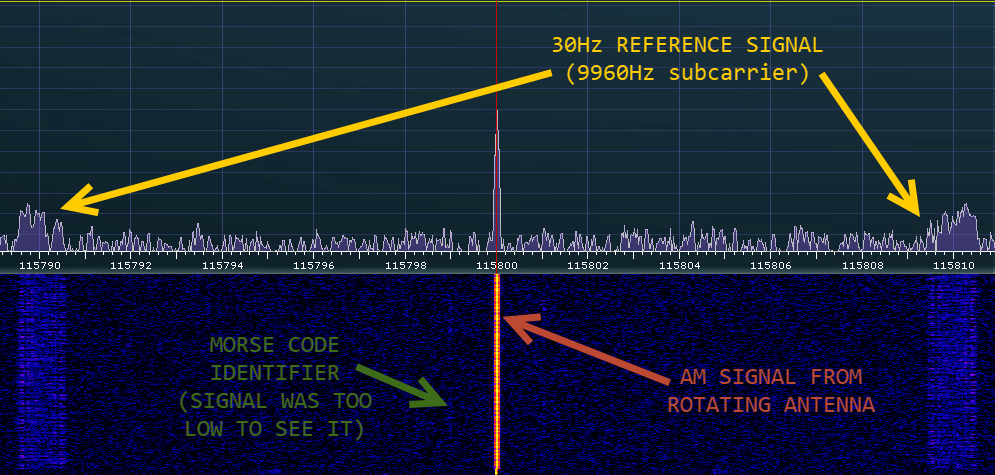
VOR systems operate in the VHF range (108.0-117.95 MHz with 50 kHz spacing), with the lower 4 MHz shared with ILS frequencies. The VOR signal encodes directional information through the phase relationship between two 30 Hz signals. In Conventional VORs (CVOR), a 30 Hz reference signal is FM-modulated on a 9,960 Hz subcarrier while a variable 30 Hz AM signal is created by a rotating antenna.
[!NOTE] This library only decodes VOR signals and not DVOR (Doppler VOR) signals. The decoding logic is designed specifically for Conventional VORs.
Doppler VORs (DVOR) use a fixed circular array of omnidirectional antennas, reversing the modulation roles: the reference is AM-modulated while the variable signal uses electronic switching to create FM through the Doppler effect.
Both types also transmit a station identifier in 7 WPM Morse code and often include an AM voice channel. Aircraft receivers determine bearing by measuring the phase difference between these reference and variable signals, with identical decoding regardless of VOR type.
This is exactly what this decoder does: it processes a recorded VOR signal, extracts the reference and variable components, demodulates them, and calculates the bearing based on their phase difference.
Features
- Pure Python implementation using:
- NumPy
- SciPy
- Matplotlib (only in the Jupyter Notebook)
- Signal processing pipeline including:
- Lowpass and bandpass FIR filtering
- Sample rate decimation
- FM subcarrier demodulation and phase extraction
- Cross-correlation for phase comparison
- Visualization of signals in both time and frequency domains at each processing step
- Calibration support for phase alignment
Processing details
The processing steps include:
- Loading audio file and displaying audio statistics (if debug logging is enabled)
- Filtering and decimating the reference and variable signals
- Demodulating the FM subcarrier
- Extracting and filtering the variable signal phase
- Comparing phases to compute the bearing
- Returning the calculated bearing in degrees
Testing
I tested the code using the signal from the VRN airport in Verona (115.800MHz), Italy. The code successfully decoded the VOR signal and displayed the correct bearing with a small approximation.
Test points
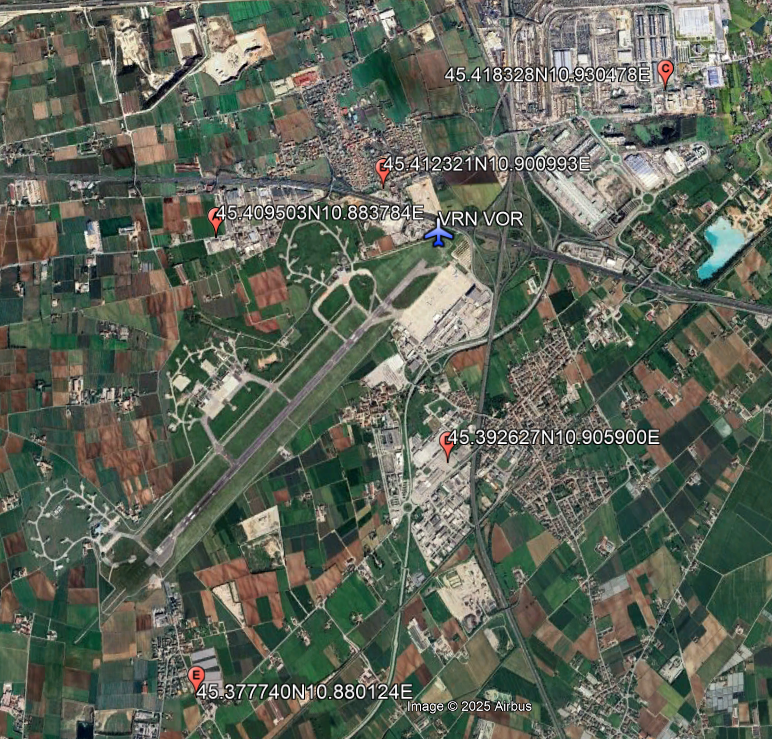
The following test points were used, with their respective bearings:
| Latitude | Longitude | Measured Bearing | Displayed Bearing |
|---|---|---|---|
| 45.377740N | 10.880124E | 211° | 210° |
| 45.392627N | 10.905900E | 181° | 182° |
| 45.409503N | 10.883784E | 275° | 275° |
| 45.412321N | 10.900993E | 322° | 320° |
| 45.418328N | 10.930478E | 58° | 58° |
Usage
WAV recording
Independent of the decoding method, you need to record a VOR signal in WAV format. This can be done using any audio recording software or hardware that supports VOR frequencies.
Record a VOR signal as a WAV file (mono or stereo). The recording should capture both the AM reference and FM variable signals.
- The receiver should be set to AM mode with a bandwidth of 22KHz and centered on the VOR frequency (e.g., 115.800MHz).
- Recording should be saved with a minimum sample rate of 48KHz (96KHz preferred)
- There is no need to record more than 1 second of audio, as the decoder processes the signal in chunks.
Option 1: Calculating using Jupyter Notebook
The Jupyter Notebook at VOR_Decoder.ipynb provides an interactive environment to process the recorded WAV file and extract the bearing.
It displays the decoding steps, including the original signal, filtered signals, and the final bearing result with visualizations.
- Set the
FILENAMEvariable in the notebook or script to point to your WAV file. - Run the notebook or script to process the signal and extract the bearing.
Option 2: Calculating using Python library
- Install the library using pip:
pip install python-vor - Import the
get_bearingfunction from the library:from python_vor import get_bearing - Call the function with the WAV file path and optional parameters:
from python_vor import get_bearing
file_path = "path/to/your/vor_signal.wav"
offset = 223  # Optional offset to add in the VOR calculation
bearing = get_bearing(file_path, offset=offset)
print(f"Bearing for file at {file_path} is: {bearing:.2f}°")
Enabling debug logs
To enable detailed logging, you can set the logging level in your script:
import logging
logger = logging.getLogger("python-vor")
logger.setLevel(logging.DEBUG)
This will print debug messages like:
DEBUG:python-vor:Loading WAV input from audio\45.409503N10.883784E-275Deg.wav
DEBUG:python-vor:Input is stereo, keeping only one channel
DEBUG:python-vor:Input sample rate: 96000
DEBUG:python-vor:Input samples: 312256
DEBUG:python-vor:Recording duration: 3.252666666666667 seconds
DEBUG:python-vor:Recording is longer than 1 second, cutting it to 96000 samples
DEBUG:python-vor:Input sample rate: 96000
DEBUG:python-vor:Input samples: 96000
DEBUG:python-vor:Recording duration: 1.0 seconds
DEBUG:python-vor:Applying lowpass filter to reference signal
DEBUG:python-vor:Calculating filter parameters
DEBUG:python-vor:Lowpass filtering with 699 taps
DEBUG:python-vor:New signal delay: 349
DEBUG:python-vor:Decimating reference signal to 6000Hz
DEBUG:python-vor:Decimating signal from 96000 to 6000 Hz
DEBUG:python-vor:Applying bandpass filter to FM signal
DEBUG:python-vor:Calculating filter parameters
DEBUG:python-vor:Bandpass filtering with 351 taps
DEBUG:python-vor:New signal delay: 175
DEBUG:python-vor:Centering FM signal on 0Hz
DEBUG:python-vor:Applying lowpass filter to FM signal
DEBUG:python-vor:Calculating filter parameters
DEBUG:python-vor:Lowpass filtering with 699 taps
DEBUG:python-vor:New signal delay: 524
DEBUG:python-vor:Decimating FM signal to 6000Hz
DEBUG:python-vor:Decimating signal from 96000 to 6000 Hz
DEBUG:python-vor:Calculating phase of FM signal
DEBUG:python-vor:Removing DC from variable signal
DEBUG:python-vor:Calculating filter parameters
DEBUG:python-vor:Bandpass filtering with 1453 taps
DEBUG:python-vor:New signal delay: 758
DEBUG:python-vor:Comparing phases of reference and variable signals
DEBUG:python-vor:Copying signals to avoid modifying the originals
DEBUG:python-vor:Removing delays from signals
DEBUG:python-vor:Correcting variable signal delay with angle offset
DEBUG:python-vor:Cutting variable signal to match reference signal length
DEBUG:python-vor:Calculating correlation between signals
DEBUG:python-vor:Normalizing signals for better visualization
DEBUG:python-vor:Calculated bearing: 275.4000000000001 degrees
DEBUG:python-vor:Calculated bearing: 275.4000000000001°
Dependencies
- numpy
- scipy
- matplotlib (only for the Jupyter Notebook visualization)
Install them via pip if needed:
pip install scipy==1.16.0
pip install numpy==2.3.1
Contributing
Please refer to the CONTRIBUTING.md file for guidelines on contributing to this project.
Attribution
Original code and algorithm by martinber.
This repository provides a cleaned-up and commented version for educational and practical use.
License
This project is licensed under the MIT License. See the LICENSE file for details.


Download files
Download the file for your platform. If you're not sure which to choose, learn more about installing packages.
Source Distribution
Built Distribution
Filter files by name, interpreter, ABI, and platform.
If you're not sure about the file name format, learn more about wheel file names.
Copy a direct link to the current filters
File details
Details for the file python_vor-0.0.5.tar.gz.
File metadata
- Download URL: python_vor-0.0.5.tar.gz
- Upload date:
- Size: 14.2 kB
- Tags: Source
- Uploaded using Trusted Publishing? Yes
- Uploaded via: twine/6.1.0 CPython/3.12.9
File hashes
| Algorithm | Hash digest | |
|---|---|---|
| SHA256 |
e555a49f10395c16e4225eb859ab3d5c3530b05ae6d0798a9fbd98bd7167ab10
|
|
| MD5 |
cc0f6b0c88d784b08732f820410549aa
|
|
| BLAKE2b-256 |
6051d2c7fa9c0886a4ff0aaa52889bc9cc6e3314a5985e5f71bb2c4b1953e2a6
|
Provenance
The following attestation bundles were made for python_vor-0.0.5.tar.gz:
Publisher:
publish.yml on iu2frl/PythonVOR
-
Statement:
-
Statement type:
https://in-toto.io/Statement/v1 -
Predicate type:
https://docs.pypi.org/attestations/publish/v1 -
Subject name:
python_vor-0.0.5.tar.gz -
Subject digest:
e555a49f10395c16e4225eb859ab3d5c3530b05ae6d0798a9fbd98bd7167ab10 - Sigstore transparency entry: 272085872
- Sigstore integration time:
-
Permalink:
iu2frl/PythonVOR@ee9728e23ff69d1c03082687bac64d206b1dd5d3 -
Branch / Tag:
refs/tags/0.0.5 - Owner: https://github.com/iu2frl
-
Access:
public
-
Token Issuer:
https://token.actions.githubusercontent.com -
Runner Environment:
github-hosted -
Publication workflow:
publish.yml@ee9728e23ff69d1c03082687bac64d206b1dd5d3 -
Trigger Event:
release
-
Statement type:
File details
Details for the file python_vor-0.0.5-py3-none-any.whl.
File metadata
- Download URL: python_vor-0.0.5-py3-none-any.whl
- Upload date:
- Size: 16.5 kB
- Tags: Python 3
- Uploaded using Trusted Publishing? Yes
- Uploaded via: twine/6.1.0 CPython/3.12.9
File hashes
| Algorithm | Hash digest | |
|---|---|---|
| SHA256 |
954bcdb8916a21720b1fd6511f3e864dca7c385725615a6639793cf13d92eadb
|
|
| MD5 |
fabec0f5f3d28bfac8b3d5cd9c1a9c09
|
|
| BLAKE2b-256 |
b9af07b6b8386001e74cfb8573add82c442dba0377099b97ab7758c0c8c11725
|
Provenance
The following attestation bundles were made for python_vor-0.0.5-py3-none-any.whl:
Publisher:
publish.yml on iu2frl/PythonVOR
-
Statement:
-
Statement type:
https://in-toto.io/Statement/v1 -
Predicate type:
https://docs.pypi.org/attestations/publish/v1 -
Subject name:
python_vor-0.0.5-py3-none-any.whl -
Subject digest:
954bcdb8916a21720b1fd6511f3e864dca7c385725615a6639793cf13d92eadb - Sigstore transparency entry: 272085882
- Sigstore integration time:
-
Permalink:
iu2frl/PythonVOR@ee9728e23ff69d1c03082687bac64d206b1dd5d3 -
Branch / Tag:
refs/tags/0.0.5 - Owner: https://github.com/iu2frl
-
Access:
public
-
Token Issuer:
https://token.actions.githubusercontent.com -
Runner Environment:
github-hosted -
Publication workflow:
publish.yml@ee9728e23ff69d1c03082687bac64d206b1dd5d3 -
Trigger Event:
release
-
Statement type:






