

python-zenity
python-zenity is a library for python wich inspired by Zenity. When you write scripts, you can use python-zenity to create simple dialogs that interact graphically with the user.
Requirements
Python 2.x (x>6)
PyGTK
Installation
Install using pip :
$ pip install python-zenityOr clone the repo :
$ git clone https://github.com/poulp/python-zenity.git
$ cd ./python-zenity
$ python setup.py install
Example
Simple dialog :
from pythonzenity import Calendar
result = Calendar(title="Awesome Calendar",text_info="Your birthday ?")
print result
This code show a calendar dialog :
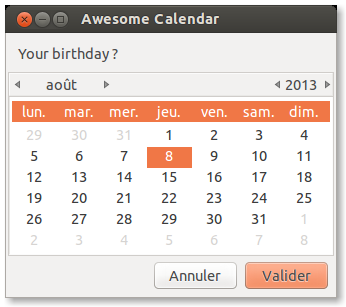
And display the result :
$ python test.py
$ (2013, 7, 8)
Usage
All the widgets have some common parameters :
Param |
Description |
Type |
|---|---|---|
title |
title of the window |
string |
width |
window width |
int |
height |
window height |
int |
timeout |
in millisecond |
int |
Example :
Message(title="Close in 5 seconds !", width=800, height=600, timeout=5000)Widgets
Message
Display a simple message
Param |
Description |
Type |
|---|---|---|
text |
text inside the window |
string |
Example :
Message(text="Message in the bottle")Error
Display a simple message as an error
Param |
Description |
Type |
|---|---|---|
text |
text inside the window |
string |
Example :
Error(text="Something wrong!")Warning
Display a simple message as an warning
Param |
Description |
Type |
|---|---|---|
text |
text inside the window |
string |
Example :
Warning(text="This operation will delete your computer from the universe")Question
Display a question, possible answer are yes/no. Return the answer as a boolean
Param |
Description |
Type |
|---|---|---|
text |
text inside the window |
string |
Example :
Question(text="Are you in love with me ?")Entry
Display a text input, return value as a string
Param |
Description |
Type |
|---|---|---|
text |
text inside the window |
string |
entry_text |
placeholder for the input |
string |
Example :
Entry(text="1 + 1 ?", entry_text="2")Password
Display a text input with hidden characters, return value as a string.
Param |
Description |
Type |
|---|---|---|
text |
text inside the window |
string |
entry_text |
placeholder for the input |
string |
Example :
Password(text="Need to be authenticated : ")Calendar
Param |
Description |
Type |
|---|---|---|
text_info |
text inside the window |
string |
day |
default day |
int |
month |
default month |
int |
File selection
Open a file selection window, return path of files selected.
Param |
Description |
Type |
|---|---|---|
multiple |
multilple file selection, return a list of files |
boolean |
directory |
only directory selection |
boolean |
save |
save mode |
boolean |
confirm_overwrite |
confirm when a file is overwritten |
boolean |
filename |
placeholder for the filename |
string |
Example :
FileSelection(multiple=True)Scale
Param |
Description |
Type |
|---|---|---|
text_info |
text inside the window |
string |
value |
current value |
int |
min |
minimum value |
int |
max |
maximum value |
int |
step |
incrementation value |
int |
draw_value |
hide/show cursor value |
boolean |
Example :
Scale(value=50, min=10, max=110, step=10)Color selection
Param |
Description |
Type |
|---|---|---|
show_palette |
hide/show the palette |
boolean |
Example :
ColorSelection(show_palette=True)1 maintainer

Metadata
1 maintainer
Release files for python-zenity 0.1.3
For a detailed explanation of source distributions (sdists) and built distributions (wheels), please see the package formats documentation.
Source distribution (sdist)
| File | Size | Uploaded | |
|---|---|---|---|
| python-zenity-0.1.3.tar.gz | 5.6 kB | Details |
Release files / python-zenity-0.1.3.tar.gz
| Download URL | python-zenity-0.1.3.tar.gz |
|---|---|
| Size | 5.6 kB |
| Tags | Source |
|
SHA-256 checksum How to use checksums |
6e529199af3d18fb891b41b244db6553585b913058dc788f3b9f1e9f026f119d
|
|
BLAKE2b-256 checksum How to use checksums |
fa915fb971f1e5088523f7dd8dcfcaedf3882c03ae4061df688245697c4131d5
|
| Upload date | |
|
Uploaded using Trusted Publishing? What is trusted publishing? |
No |














