
Here is the Kivy based app to run code from the Jupyter magic %there

Project description






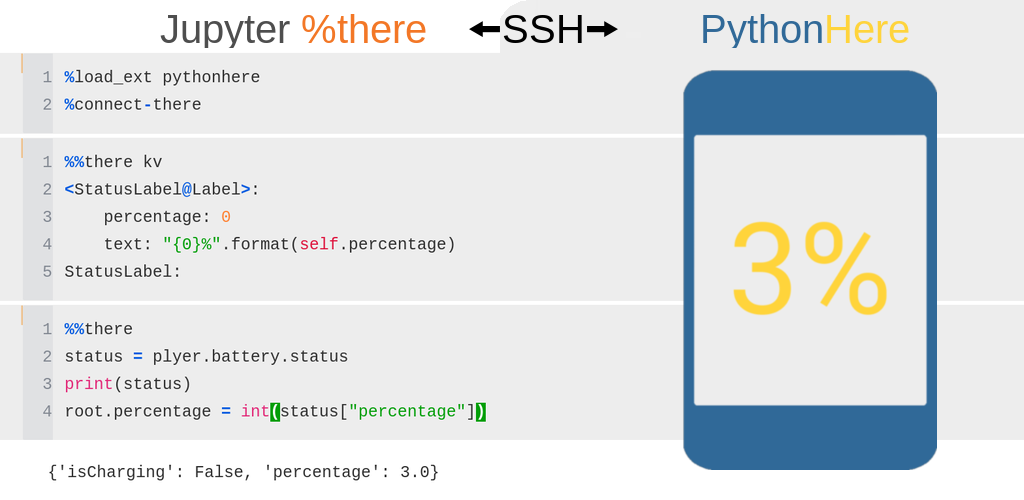
PythonHere lets you run Python code from a local Jupyter notebook inside a remote Kivy app.
PythonHere has two parts:
Here is the remote/server side. It runs a Python environment with a Kivy GUI, for example on Android, Raspberry Pi, or another machine.
%there is the local/client side. It is a Jupyter magic command for running code interactively in the remote PythonHere environment.
This makes PythonHere useful as a live Python/Kivy playground, and as a way to inspect or control a Python app running remotely.
Project documentation: https://herethere.me/pythonhere
Install the Android app
Install PythonHere with Obtainium to receive updates from GitHub Releases.
Ready-to-use PythonHere APKs are available from the GitHub Releases page.
For APK provenance and signing checks, see Android APK verification. For a list of Python packages included in the Android build, see buildozer.spec.
Start a local Jupyter environment with Docker
The Docker image is based on Jupyter Docker Stacks and includes PythonHere with usage examples.
Example command to start the Docker container:
docker run \
       --rm \
       -p 8888:8888 \
       --user root \
       -e CHOWN_EXTRA=/home/jovyan/work \
       -e CHOWN_EXTRA_OPTS='-R' \
       -v "$(pwd)/work":/home/jovyan/work \
       herethere/pythonhere:latest
The command exposes the Jupyter server on host port 8888. Jupyter logs are printed in the terminal and include a URL such as http://127.0.0.1:8888/?token=.... Open this URL in a browser to use the local Jupyter environment.
Files in /home/jovyan/work inside the container are stored in the local work directory.
Run a local Jupyter environment without Docker
Commands to run locally:
pip install pythonhere jupyter
jupyter notebook
Build Android app
To build with Buildozer, run in the source directory:
buildozer android debug
Release history Release notifications | RSS feed


Download files
Download the file for your platform. If you're not sure which to choose, learn more about installing packages.
Source Distribution
Built Distribution
Filter files by name, interpreter, ABI, and platform.
If you're not sure about the file name format, learn more about wheel file names.
Copy a direct link to the current filters
File details
Details for the file pythonhere-0.2.1.tar.gz.
File metadata
- Download URL: pythonhere-0.2.1.tar.gz
- Upload date:
- Size: 33.7 kB
- Tags: Source
- Uploaded using Trusted Publishing? No
- Uploaded via: twine/6.2.0 CPython/3.10.20
File hashes
| Algorithm | Hash digest | |
|---|---|---|
| SHA256 |
4713eb158539cc24fc2c5eb4837f1502190c12bc5795ec01e87a90c8a38dbb29
|
|
| MD5 |
5c21309917a85b81c963093227e64967
|
|
| BLAKE2b-256 |
2dbe8635e306ce792c9c6788c8e941b59b9b9f529bc3d94649588bdc06421a1f
|
File details
Details for the file pythonhere-0.2.1-py3-none-any.whl.
File metadata
- Download URL: pythonhere-0.2.1-py3-none-any.whl
- Upload date:
- Size: 32.0 kB
- Tags: Python 3
- Uploaded using Trusted Publishing? No
- Uploaded via: twine/6.2.0 CPython/3.10.20
File hashes
| Algorithm | Hash digest | |
|---|---|---|
| SHA256 |
bc4bc7dc411bd4bd88c2d1d8f137ee25fac281bd1bce82db6d2589a575021e90
|
|
| MD5 |
8ab94cd37d180199fc7b32bb8e06c5f9
|
|
| BLAKE2b-256 |
45aaaf49269b922703869715df028175e35e777d6fd76d8f017c254060c76a98
|






