
PyThra — a Flutter-like GUI framework in Python. a declarative Python UI framework for desktop apps with a webview renderer.

Project description
PyThra GUI Toolkit
A declarative Python gui toolkit for building beautiful, modern desktop applications using web technologies.
Inspired by the development patterns of Flutter, PyThra brings the power of a stateful, component-based UI model to Python developers.
Key Features • Getting Started • Example • Philosophy • Core Concepts • Contributing
🚀 Key Features
- Declarative UI: Describe your UI as a function of your application's state. When the state changes, PyThra intelligently updates only the necessary parts of the UI.
- Component-Based: Build your application by composing small, reusable
Widgets, just like in modern web frameworks. - Python-First: Write your entire application logic, state management, and UI structure in pure Python. No need to write HTML, CSS, or JavaScript by hand.
- Efficient Reconciliation: Features a sophisticated reconciliation algorithm that minimizes DOM manipulations, ensuring a smooth and responsive user experience.
- Rich Widget Library: Includes a set of pre-built, Material Design-inspired widgets like
Scaffold,AppBar,TextField,ListView,Dialog, and more. - Themed and Customizable: Widgets are styled using a shared, dynamic CSS system. Easily create and apply themes, including custom scrollbars powered by SimpleBar.js.
- Hot Reloading: The architecture is designed to support hot reloading for a rapid development cycle.
📦 Getting Started
Prerequisites
- Python 3.8+
- PySide6 (
pip install pyside6)
Installation
Currently, PyThra is under active development. To use it, you can install it using pip or clone the repository and install the dependencies.
# Install pythra and its prerequisites
pip install pythra

# Check pythra installation
pythra doctor

# create a pythra project
pyhtra create-project new-app
💡 Example Usage
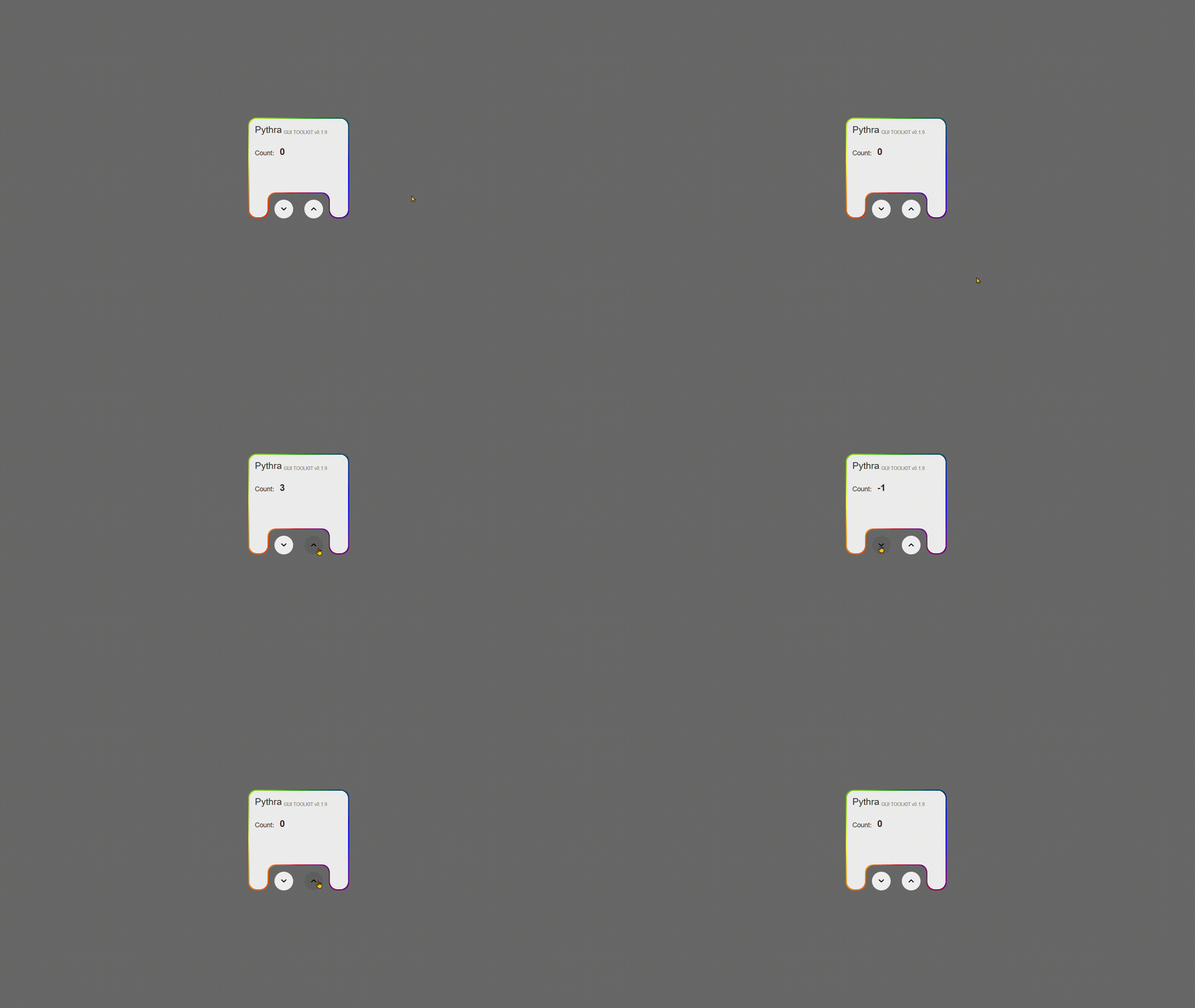
Building an application with PyThra is simple and intuitive. Here’s a classic "Counter App" example:
# lib/main.py
# import colors
from constants.colors import *
# Welcome to your new Pythra App!
from pythra import (
Framework,
StatefulWidget,
State,
Column,
Row,
Key,
Widget,
Container,
Text,
Alignment,
Colors,
Center,
ElevatedButton,
SizedBox,
MainAxisAlignment,
CrossAxisAlignment,
ClipPath,
EdgeInsets,
Icon,
IconButton,
Icons,
ButtonStyle,
TextStyle,
Stack,
Positioned,
ClipBehavior,
GradientTheme,
)
class HomePageState(State):
def __init__(self):
self.count = 0
def incrementCounter(self):
self.count += 1
print("self.count: ", self.count)
self.setState()
def decrementCounter(self):
self.count -= 1
print("self.count: ", self.count)
self.setState()
def build(self) -> Widget:
rotating_gradient_theme = GradientTheme(
gradientColors=["red", "yellow", "green", "blue", "red"],
rotationSpeed="4s", # <-- Set a rotation speed to enable rotation
)
return Container(
key=Key("home_page_Pythra_wrapper_container"),
height="100vh",
width="100vw",
color=app_black,
child=Center(
key=Key("home_page_Pythra_center"),
child=Stack(
key=Key("home_page_Pythra_center_Stack"),
clipBehavior=ClipBehavior.NONE,
children=[
ClipPath(
height="30vh",
width="30vh",
viewBox=[100, 100],
points=[
(0, 100),
(20, 100),
(20, 75),
(80, 75),
(80, 100),
(100, 100),
(100, 0),
(0, 0),
],
radius=8,
key=Key("home_page_Pythra_home_page_clip_path"),
child=Container(
key=Key("home_page_Pythra_home_page_container"),
height="30vh",
width="30vh",
gradient=rotating_gradient_theme,
padding=EdgeInsets.all(2),
child=ClipPath(
height="29.4vh",
width="29.4vh",
viewBox=[100, 100],
points=[
# _ |
(0, 100),
(18.5, 100),
(18.5, 74.8),
(81.5, 74.8),
(81.5, 100),
(100, 100),
(100, 0),
(0, 0),
],
radius=8,
key=Key(
"home_page_Pythra_home_page_clip_path_child"
),
child=Container(
key=Key(
"home_page_Pythra_home_page_column_cont"
),
color=app_white,
padding=EdgeInsets.all(12),
height="100%",
child=Column(
key=Key(
"home_page_Pythra_home_page_column"
),
children=[
Row(
crossAxisAlignment=CrossAxisAlignment.END,
key=Key(
"home_page_Pythra_counter_headerRow"
),
children=[
Text(
"Pythra",
key=Key("home_page_Pythra"),
style=TextStyle(
color=app_black,
fontSize=20,
),
),
SizedBox(
width=4,
key=Key("sixe_2_box"),
),
Text(
"GUI TOOLKIT v0.1.0",
key=Key(
"home_page_Pythra_ver"
),
style=TextStyle(
color=Colors.grey,
fontSize=10,
),
),
],
),
SizedBox(
height=24,
key=Key("sixe_box_head"),
),
Row(
crossAxisAlignment=CrossAxisAlignment.END,
key=Key(
"home_page_Pythra_counter_txtRow"
),
children=[
Text(
f"Count:",
key=Key(
"home_page_Pythra_counter_txt"
),
style=TextStyle(
color=app_black,
fontSize=14,
),
),
SizedBox(
width=12,
key=Key("sixe_box"),
),
Text(
f"{self.count}",
key=Key(
"home_page_Pythra_counter_txt_count"
),
style=TextStyle(
color=app_black,
fontSize=20,
fontWeight="bold",
),
),
],
),
],
),
),
),
),
),
Positioned(
height="30vh",
width="30vh",
top="24.4vh",
key=Key("home_page_Pythra_decrement_btn_Positioned"),
child=Container(
key=Key(
"home_page_Pythra_decrement_btn_Positioned_Container"
),
child=Row(
mainAxisAlignment=MainAxisAlignment.CENTER,
key=Key(
"home_page_Pythra_decrement_btn_Positioned_Container_Row"
),
children=[
IconButton(
key=Key("home_page_Pythra_decrement_btn"),
icon=Icon(
Icons.stat_minus_1_rounded,
key=Key("home_page_Pythra_dec_btn_txt"),
),
onPressed=self.decrementCounter,
),
SizedBox(
width=24,
key=Key("sixe_box_dec"),
),
IconButton(
key=Key("home_page_Pythra_increment_btn"),
icon=Icon(
Icons.stat_1_rounded,
key=Key("home_page_Pythra_btn_txt"),
),
onPressed=self.incrementCounter,
),
],
),
),
),
],
),
),
)
class HomePage(StatefulWidget):
def createState(self) -> HomePageState:
return HomePageState()
class MainState(State):
def __init__(self):
self.home_page = HomePage(key=Key("home_page"))
def build(self):
return self.home_page
class Main(StatefulWidget):
def createState(self) -> MainState:
return MainState()
if __name__ == "__main__":
# This allows running the app directly with `python lib/main.py`
# as well as with the CLI's `pythra run` command.
app = Framework.instance()
app.set_root(Main(key=Key("home_page_wrapper")))
app.run(title="My New Pythra App")
🪄 Demo
📜 Philosophy
PyThra is built on the idea that building desktop UIs should be as fluid and logical as building for the modern web.
- The UI is a reflection of the state. You don't manually show, hide, or update UI elements. You change the state, and the toolkit figures out the most efficient way to reflect those changes in the UI.
- Composition over inheritance. Complex UIs are built by nesting simple widgets. A
Buttonisn't a complex class; it's aContainerwith padding, aTextchild, and an event listener. - Developer Experience is paramount. Features like hot reloading, a declarative API, and a single language (Python) for everything are designed to make development faster and more enjoyable.
🔬 Core Concepts
- Widget: The base class for everything you see on the screen. Widgets are lightweight, immutable "blueprints" for UI elements.
- StatefulWidget & State: For UI that needs to change dynamically, you use a
StatefulWidget. Its mutable data is held in a separateStateobject. CallingsetState()on this object is what triggers a UI rebuild. build()method: The core of everyStateobject. It must return aWidgettree that describes the UI for the current state.- Reconciler: The engine of the toolkit. It compares the widget tree returned by
build()with the previous tree, generates a list of minimal changes (patches), and sends them to the web front-end to be applied to the DOM. - Key: A special object that gives a widget a stable identity across rebuilds. This is crucial for preserving state in lists and for maintaining focus on elements like
TextField.
🤝 Contributing
Contributions are welcome! Whether it's reporting a bug, proposing a new feature, or submitting a pull request, your help is appreciated.
Please feel free to open an issue to discuss any changes or ideas.
📄 License
This project is licensed under the MIT License - see the LICENSE file for details.
Release history Release notifications | RSS feed


Download files
Download the file for your platform. If you're not sure which to choose, learn more about installing packages.
Source Distribution
Built Distribution
Filter files by name, interpreter, ABI, and platform.
If you're not sure about the file name format, learn more about wheel file names.
Copy a direct link to the current filters
File details
Details for the file pythra-0.1.11.tar.gz.
File metadata
- Download URL: pythra-0.1.11.tar.gz
- Upload date:
- Size: 430.7 kB
- Tags: Source
- Uploaded using Trusted Publishing? No
- Uploaded via: twine/6.2.0 CPython/3.13.7
File hashes
| Algorithm | Hash digest | |
|---|---|---|
| SHA256 |
13b03b4a4814e9e1e1c3f39748fe4425b72049033cf4250b05c3d400ea5f109c
|
|
| MD5 |
fc2102669dfac3ae1fb9cf663121a8d6
|
|
| BLAKE2b-256 |
73884c5b29ba86101bfb8001509eb32173980ee4992aca41e45ea5d945b00e14
|
File details
Details for the file pythra-0.1.11-py3-none-any.whl.
File metadata
- Download URL: pythra-0.1.11-py3-none-any.whl
- Upload date:
- Size: 444.9 kB
- Tags: Python 3
- Uploaded using Trusted Publishing? No
- Uploaded via: twine/6.2.0 CPython/3.13.7
File hashes
| Algorithm | Hash digest | |
|---|---|---|
| SHA256 |
a97de71b8a592d0f7fa4c4815f9efb4c228299590236926fe18ebc507a185cea
|
|
| MD5 |
aaede35d3d7b7807dfe599ed337eaf8b
|
|
| BLAKE2b-256 |
0b03b141a9791c80ff514a65f8461ca5603cee18d2efe3850d3eaa6453751643
|






