
Extension for pytket providing access to cuStateVec functionality.

Project description

pytket-custatevec
GPU-accelerated statevector and shot-based simulation for pytket.





📚 Read the Full Documentation
🚀 Features • 📊 Benchmarks • 📦 Installation • ⚡ Quick Start • 💻 Development • 📄 Citing
pytket-custatevec is a high-performance extension for pytket that allows quantum circuits to be simulated on NVIDIA GPUs.
It acts as an open-source bridge to the NVIDIA cuQuantum SDK, utilizing cuStateVec to optimize memory usage and gate execution speed for large circuit simulations.
Features
- High Performance: Designed for rapid simulation of quantum circuits using parallel GPU architecture.
- Seamless Integration: Works as a standard
pytketBackend. - Optimized Memory: Manages GPU VRAM efficiently for complex simulations.
Benchmarks
These results are auto-generated by our CI pipeline. They compare pytket-custatevec (GPU) against standard CPU simulators (Aer, Qulacs) for a dense random circuit.
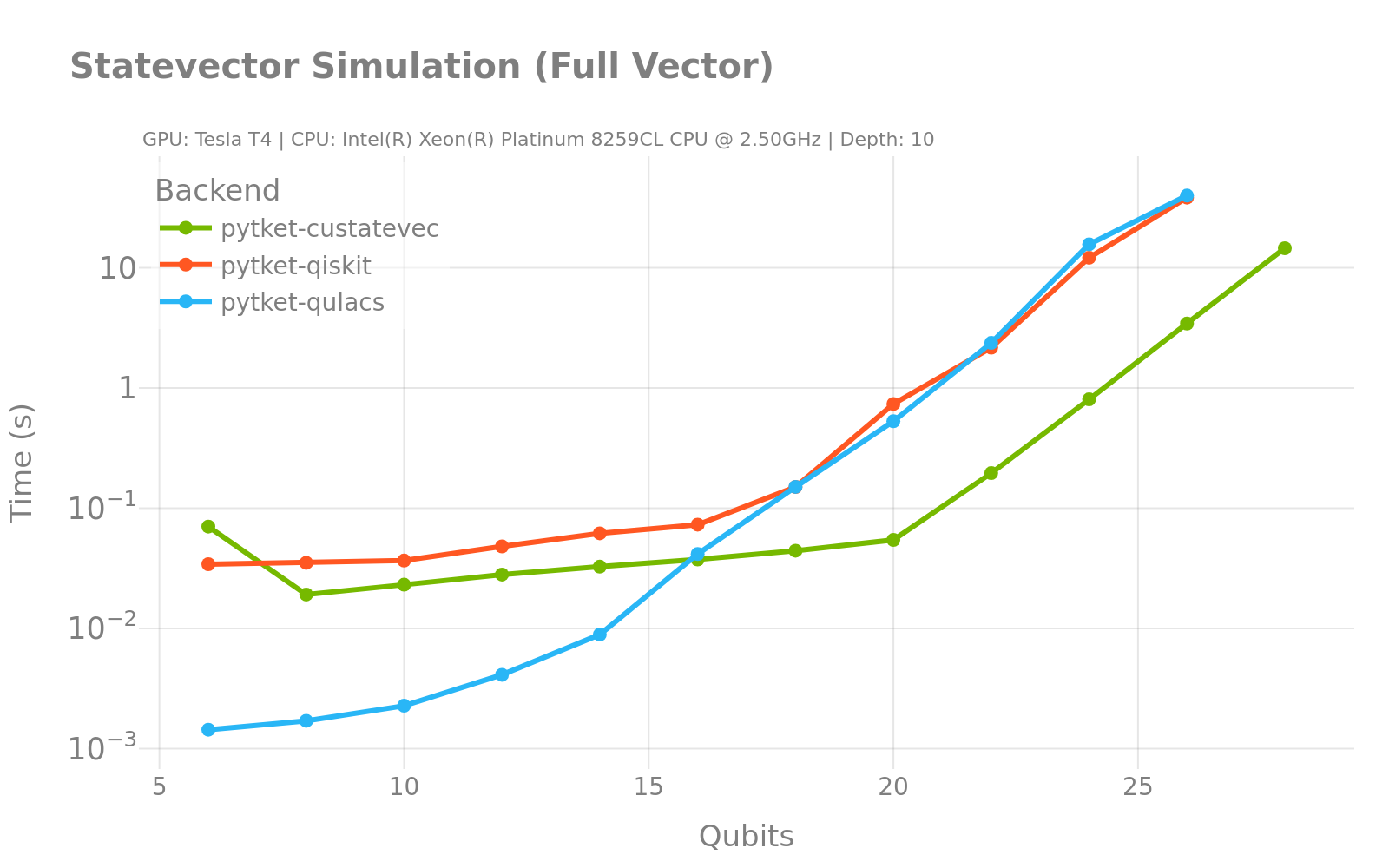
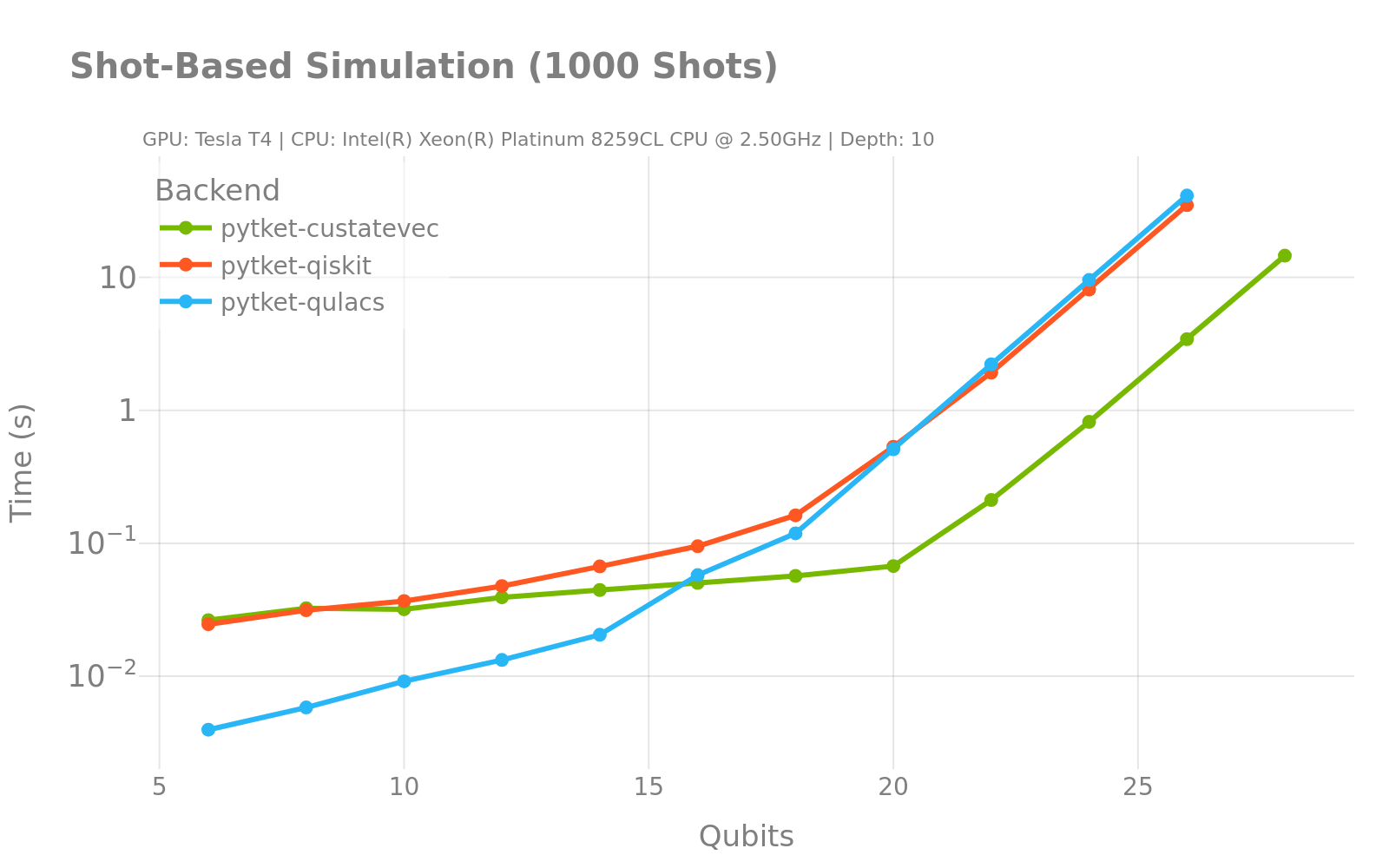
[!NOTE] The charts above are static snapshots. View the Interactive Benchmarks in our documentation to see hardware details and zoom into specific data points.
Installation
Prerequisites
- Python 3.10+
- Linux machine with NVIDIA GPU (Compute Capability 7.0+)
- NVIDIA Drivers installed
Option A: Conda (Recommended) We recommend Conda to reliably handle system-level CUDA libraries.
conda install -c conda-forge cuquantum-python
pip install pytket-custatevec
Option B: Pip You can install everything via pip, which pulls the necessary binary wheels automatically.
pip install pytket-custatevec
Quick Start
from pytket import Circuit
from pytket.extensions.custatevec import CuStateVecStateBackend

# 1. Define a circuit
circ = Circuit(2).H(0).CX(0, 1)

# 2. Initialize the GPU backend
backend = CuStateVecStateBackend()
compiled_circ = backend.get_compiled_circuit(circ)

# 3. Run on GPU
statevector = backend.run_circuit(compiled_circ).get_state()
print(statevector)
Development
Setup
To install the extension in editable mode for development:
pip install -e ".[dev,docs,test]"
Code Style
We use pre-commit to maintain code quality. Before committing, run:
pre-commit run
This handles formatting (ruff), type checking (mypy), and linting.
Testing
To run the test suite (requires a GPU environment):
pytest tests/
Citing
If you use pytket-custatevec in your research, please cite it as follows:
@software{pytket_custatevec,
  author = {{The pytket-custatevec Developers}},
  title = {pytket-custatevec: GPU-accelerated pytket simulation},
  url = {https://github.com/quantinuum/pytket-custatevec},
  year = {2025}
}
Release history Release notifications | RSS feed


Download files
Download the file for your platform. If you're not sure which to choose, learn more about installing packages.
Source Distribution
Built Distribution
Filter files by name, interpreter, ABI, and platform.
If you're not sure about the file name format, learn more about wheel file names.
Copy a direct link to the current filters
File details
Details for the file pytket_custatevec-0.1.1.tar.gz.
File metadata
- Download URL: pytket_custatevec-0.1.1.tar.gz
- Upload date:
- Size: 35.3 kB
- Tags: Source
- Uploaded using Trusted Publishing? No
- Uploaded via: twine/6.1.0 CPython/3.13.12
File hashes
| Algorithm | Hash digest | |
|---|---|---|
| SHA256 |
8be29b3a7b588c897ec792d83bd23714e98230788db789be6551aacf583ff5dd
|
|
| MD5 |
22accf74102a5b403e5b644d734cbb9f
|
|
| BLAKE2b-256 |
2e8eceada6a7f3f2918ea7eb889ab92f5c93d0102a7efd72803d503fa0f66d8d
|
File details
Details for the file pytket_custatevec-0.1.1-py3-none-any.whl.
File metadata
- Download URL: pytket_custatevec-0.1.1-py3-none-any.whl
- Upload date:
- Size: 41.8 kB
- Tags: Python 3
- Uploaded using Trusted Publishing? No
- Uploaded via: twine/6.1.0 CPython/3.13.12
File hashes
| Algorithm | Hash digest | |
|---|---|---|
| SHA256 |
0ff04c712192c9823f4e8448d4fc07a2e3a5c27c7fc9769972a42116473dbb43
|
|
| MD5 |
adaa89952acd713bf49e9f78d8b5717e
|
|
| BLAKE2b-256 |
d071173ed7046303c2d7b06d62a08362207354d85a312af5bbfdb96e91be6e61
|






