
pytktable





A spreadsheet-like table widget for tkinter, wrapping the Tcl/Tk Tktable extension.
⚠️ Important: pytktable is only the Python wrapper. The table widget itself is Tktable, an extension for Tcl/Tk written in C, which
pip install pytktabledoes not install. Install it with pytktable, prebuilt for Linux, macOS and Windows, withpip install "pytktable[binary]", or install it yourself following the installation instructions for your OS. Then runpython -m tktableto check that it works.
The wrapper was originally written by Guilherme Polo.
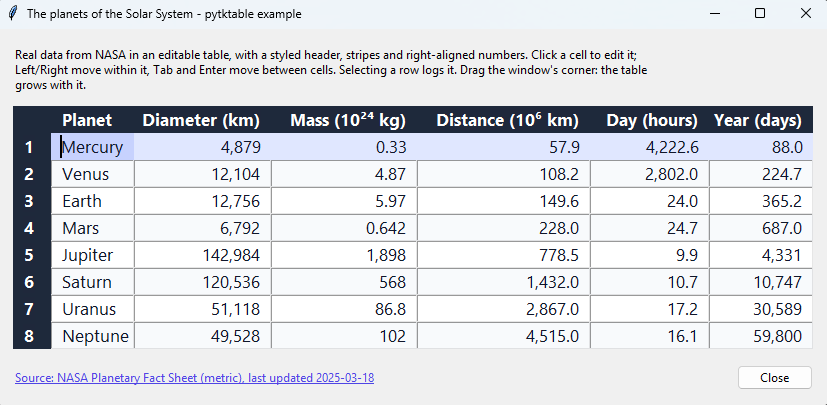
The example above shows the planets of the Solar System, from NASA's Planetary Fact Sheet (screenshot taken on Windows 11).
Features
- Spreadsheet-like tables with title rows and columns, editable cells, and keyboard navigation.
- Cell values kept in an
ArrayVar(a Tcl array), or computed on demand by a callback. - Styling with tags: colors, fonts, alignment and relief, for single cells, rows or columns.
- Merged cells (spans), embedded widgets, and resizable rows and columns.
- Cells that flash when their value changes, with a color of your choice.
- Selection of cells, rows or columns; inserting and deleting rows and columns.
- Callbacks when the active cell changes, to compute cell values, to validate edits, and to format the selection when it is copied.
- Works on Linux, macOS and Windows, with Python 3.11 or later and Tcl/Tk 8.6 or 9.0, once Tcl/Tk (usually bundled with Python) and the Tktable extension are installed.
python -m tktablechecks that Tktable can be found and loaded.
Installation
With Tktable, prebuilt for Linux, macOS and Windows (pytktable-binaries):
pip install "pytktable[binary]"
Without Tktable, if you install it yourself (see Installation):
pip install pytktable
It is imported as tktable (from tktable import Table). Run python -m tktable to check that
Tktable can be found and loaded.
Documentation
https://nbro.github.io/tktable/: usage, API reference, development and releasing.
License
Copyright (c) 2008, Guilherme Polo
Copyright (c) 2016-2026, nbro
See the changelog for what changed in this fork.
1 maintainer

Metadata
1 maintainer
Release files for pytktable 0.3.0
For a detailed explanation of source distributions (sdists) and built distributions (wheels), please see the package formats documentation.
Source distribution (sdist)
| File | Size | Uploaded | Provenance | Actions |
|---|---|---|---|---|
| pytktable-0.3.0.tar.gz | 15.3 kB | With provenance | Details for pytktable-0.3.0.tar.gz |
Built distribution (wheel)
| File | Interpreter | ABI | Platform | Actions Reset |
|---|---|---|---|---|
| pytktable-0.3.0-py3-none-any.whl | Python 3 | none | any | Details for pytktable-0.3.0-py3-none-any.whl |
Total release size: 30.0 kB
Release files / pytktable-0.3.0.tar.gz
| Download URL | pytktable-0.3.0.tar.gz |
|---|---|
| Size | 15.3 kB |
| Tags | Source |
|
SHA-256 checksum How to use checksums |
06adb0a99e21939d3aa1720ebeeeddc9e0787dbb08a4f388efc68ed8d8265f08
|
|
BLAKE2b-256 checksum How to use checksums |
135a4c123d7ccdeb3f33ce2ec18b91de2b37f10511bb88591289e35d3dca9f87
|
| Upload date | |
|
Uploaded using Trusted Publishing? What is trusted publishing? |
Yes |
| Uploaded via |
twine/7.0.0 CPython/3.13.16
|
Provenance
Provenance describes where a file came from. On PyPI, provenance is shared via attestations, which provide a verifiable record of the build or publishing details. View details, limitations and caveats.


PyPI Publish Attestation
PyPI verified that this artifact, at this checksum, originated from the publisher listed below.
Signed by GitHub Actions, verified by PyPI on Nov 4, 2026.
Transparency logRelease files / pytktable-0.3.0-py3-none-any.whl
| Download URL | pytktable-0.3.0-py3-none-any.whl |
|---|---|
| Size | 14.7 kB |
| Tags | Python 3 |
|
SHA-256 checksum How to use checksums |
2c01f16fd865b92e997be27a5b397e63881ea25a3714e8199a7efb076d71affe
|
|
BLAKE2b-256 checksum How to use checksums |
c769cd365357bf40d0da7758d599eb4ad1dfcbbc99931f3c48e6463e34b4d8a2
|
| Upload date | |
|
Uploaded using Trusted Publishing? What is trusted publishing? |
Yes |
| Uploaded via |
twine/7.0.0 CPython/3.13.16
|
Provenance
Provenance describes where a file came from. On PyPI, provenance is shared via attestations, which provide a verifiable record of the build or publishing details. View details, limitations and caveats.
PyPI Publish Attestation
PyPI verified that this artifact, at this checksum, originated from the publisher listed below.
Signed by GitHub Actions, verified by PyPI on Nov 4, 2026.
Transparency logSecurity for pytktable 0.3.0
Provenance
Provenance describes where a file came from. On PyPI, provenance is shared via attestations, which provide a verifiable record of the build or publishing details. View details, limitations and caveats.
Full provenance
All 2 files in this release have been uploaded with provenance metadata.
Attestation for pytktable-0.3.0.tar.gz
PyPI Publish Attestation
PyPI verified that this artifact, at this checksum, originated from the publisher listed below.
Signed by GitHub Actions, verified by PyPI on Nov 4, 2026.
Transparency logA note on package security
PyPI is a repository for distributing packages, not a service for auditing them. While third-party security researchers and our staff do their best to detect and remove malicious packages, PyPI cannot guarantee the quality, security or suitability of any given package.
To learn more about protecting yourself from malicious actors, visit our package security documentation.














