
An easy text-menu creation interface

Project description
pytnu
An easy interface to create text-menus with
About The Project
pytnu is a lightweight, easy to use menu creation interface that allows you to create easy text-based menus. It supports nested menus and allows the user to easily build a user interface;
Getting Started
This is an example of how you may give instructions on setting up your project locally. To get a local copy up and running follow these simple example steps.
Prerequisites
This package uses no prerequisites and no external packages are necessary.
Installation
- Install the package using pip
pip install pytnu
Usage
-
Import pytnu
-
Create a dictionary with your options and descriptions
options = {name: (description, functionName)}Name is the keyword the user inputs to call the option Description is the text that tells the user what the option does functionName is the name of the function to be called, without the parenthesis. -
Create a Menu object using
Menu(options) -
To start the menu, use
Menu.start()
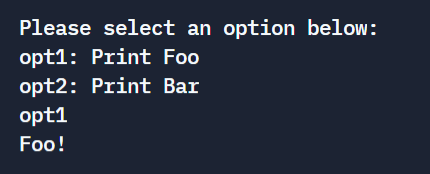
To re-create the menu seen above:
options = {"opt1": ("Prints Foo", printFoo), "opt2": ("Prints Bar", printBar)}
menu = Menu(options)
menu.start()
Methods
Menu.addOption(name, description, funcName)
Adds an option to the available options of a menu class
Menu.delOption(name)
Deletes an option based on the given name
Release history Release notifications | RSS feed


Download files
Download the file for your platform. If you're not sure which to choose, learn more about installing packages.
Source Distribution
File details
Details for the file pytnu-1.0.1.tar.gz.
File metadata
- Download URL: pytnu-1.0.1.tar.gz
- Upload date:
- Size: 2.8 kB
- Tags: Source
- Uploaded using Trusted Publishing? No
- Uploaded via: twine/4.0.0 CPython/3.10.4
File hashes
| Algorithm | Hash digest | |
|---|---|---|
| SHA256 |
4d949269f2829ed371c92b6c726ff53401415e237ebc4b52598ad8fdd077ad33
|
|
| MD5 |
2964b90fdc7f9593670dc71566c37eb1
|
|
| BLAKE2b-256 |
5829e3f49c01d38f06ddce2d58296b7e4b210f56411f997ddbad762e8f5c5ea3
|






