
A simple Python tools package by Ibrahim Akhlaq

Project description

Pytpro
pytpro is a lightweight Python package by Ibrahim Akhlaq that provides powerful utility functions for math, randomness, and HTML rendering. It's clean, minimal, and built to feel like magic.
API REFERENCE
🚀 Features
➕ Math Functions:
add(a, b):
The add() function takes two numbers a and b and returns their sum.
subtract(a, b):
The subtract() function takes two numbers a and b and returns their difference a-b.
multiply(a, b):
The multiply() function takes two numbers a and b and returns their product.
divide(a, b):
The divide() function takes two numbers a and b and returns their quotient a/b.
modulus(a, b):
The modulus() function takes two numbers a and b and returns the remainder of a/b.
floordivision(a, b):
The floordivision() function takes two numbers a and b and returns the largest integer less than or equal to a/b.
square(a)/cube(a):
These functions return the square or cube (respectively) of a number a.
squareroot(a)/cuberoot(a):
These functions return the square root or cube root (respectively) of a number a.
absolutevalue(a):
The absolutevalue() function returns the absolute value of a number a.
roundoff(a):
The roundoff() function rounds a number a to the nearest integer.
exponent(a, b)/power(a, b)
These functions return a raised to the power of b.They are the same functions but they have different names for convenience.
🔢 Random Number Generators
randint(start=0, end=100):
The randint() function generates a random integer between start and end (inclusive). The default value is 0 to 100.
randfloat():
This function (randfloat()) generates a random floating-point number between 0 and 1. It requires no parameters or arguments, and if you want to generate a random float in a specific range, you can use the randomfloatpositive(start, end) or randomfloatnegative(start, end) functions. Inputting an argument or parameter could result in errors.
randomintpositive(start, end, step=1):
The function randomintpositive() generates a random integer between start and end (inclusive) with a step size of step.
The return value of this function will always be a positive value, whether the input is positive or negative.
randomintnegative(start, end, step=1):
The function randomintnegative() generates a random integer between start and end (inclusive) with a step size of step.
The only difference between this function and the randomintpositive() function is that the generated integer will return a negative value, whether the input is positive or negative.
randomfloatpositive(start, end):
The function randomfloatpositive() generates a random floating-point number between start and end (inclusive). Just like the randomintpositive() function, the return value of this function will always be a positive value, whether the input is positive or negative.
randomfloatnegative(start, end):
The function randomfloatnegative() generates a random floating-point number between start and end (inclusive). Just like the randomintnegative() function, the return value of this function will always be a negative value, whether the input is positive or negative.
randomfloat(start, end):
The function randomfloat() generates a random floating-point number between start and end (inclusive).
📐 Trigonometry & Logs
(1) sine(x)
(2) cosine(x)
(3) tangent(x)
(4) arctangent(x)
(5) log_base_2(x)
(6) log_base_10(x)
(7) natural_log(x)
The functions above return the sine, cosine, tangent, arctangent, log base 2, log base 10, and natural logarithm of a number x respectively.
📏 Constants
`pi()`, `e()`, `goldenratio()`, `tau()`
`speedoflight()`, `planckconstant()`, `gravitationalconstant()`
`electronmass()`, `protonmass()`, `neutronmass()`
`electronvolt()`, `joule()`, `kilojoule()`, `megajoule()`, `gigajoule()`, `terajoule()`, `petajoule()`, `exajoule()`
The functions above return the value of their respective constants. Note that the functions have no parameters or arguments. If any parameter or argument is provided, it could result in errors that are extremely hard to diagnose.
HTML RENDERING
write(text)
You can use the write() function to render text.
Example
import pytpro as py
py.write("Hello World!")
Output
<p>Hello World!</p>
-
Hello World!
title(text)
You can use the title() function to render a title as HTML text.
Example
import pytpro as py
py.title("Hello World!")
Output
<h1>Hello World!</h1>
-
Hello World!
header(text)
You can use the header() function to render a header as HTML text.
Example
import pytpro as py
py.header("Hello World!")
Output
<h2>Hello World!</h2>
-
Hello World!
subheader(text)
You can use the subheader() function to render a subheader as HTML text.
Example
import pytpro as py
py.subheader("Hello World!")
Output
<h3>Hello World!</h3>
-
Hello World!
caption(text)
You can use the caption() function to render a caption as HTML text.
Example
import pytpro as py
py.caption("Hello World!")
Output
<p style='font-size: 0.9em; color: gray;'>Hello World!</p>
-
Hello World!
htmlcssjs(html_fragment)
You can use the htmlcssjs() function to render raw HTML, CSS, and Javascript code.
Example
import pytpro as py
py.htmlcssjs("""
<style>
button {
    background-color: red;
    color: white;
}
</style>
<button onclick='click()'>Hello World!</button>
<p id="output"></p>
<script>
  const output = document.getElementById('output');
  function click() {
    output.innerHTML = 'Hello World!';
  }
</script>
""")
Output
<style>
button {
    background-color: red;
    color: white;
}
</style>
<button onclick='click()'>Hello World!</button>
<p id="output"></p>
<script>
  const output = document.getElementById('output');
  function click() {
    output.innerHTML = 'Hello World!';
  }
</script>
- <style>
button { background-color: red; color: white; } </style> Hello World!
{javascript is not supported in PYPI}
Alert Boxes
alertbox_red(text)
alertbox_green(text)
alertbox_blue(text)
alertbox_yellow(text)
alertbox_purple(text)
alertbox_orange(text)
alertbox_pink(text)
alertbox_cyan(text)
alertbox_lime(text)
alertbox_brown(text)
alertbox_gray(text)
alertbox_black(text)
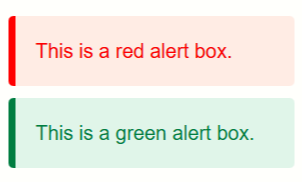
You can use the alertbox_*() functions to display alert boxes. Each function takes a text argument, which is the message to be displayed in the alert box. The alert boxes have different colors and styles, making them visually distinct from each other.
Example
import pytpro as py
py.alertbox_red("Hello World!")
Output
    <div style='
        padding: 16px;
        margin: 10px 0;
        background-color: #fdecea;
        color: #b00020;
        border-left: 6px solid #b00020;
        border-radius: 4px;
        font-family: sans-serif;
    '>
        Hello World!
    </div>
Toast Notifications (auto-fade)
toast(text)– white defaulttoast_red(text)toast_green(text)toast_blue(text)toast_black(text)toast_pink(text)
You can use the toast() function to display a toast notification with a default color of white. The function takes a text argument, which is the message to be displayed in the toast notification. The toast notification will automatically fade out after a few seconds.
Disclaimer: This feature is experimental and may not work as expected in all cases. It is not recommended to use this yet, as it is still being developed and may have bugs or issues. Fixes will be applied in future updates.
Markdown Preview
markdown(text)
You can use the markdown() function to display markdown text.
Example:
import pytpro as py
py.markdown("""
# Hello World!
This is a paragraph with **bold**, *italic*, and `inline code`.
""")
<h1> Hello World!</h1>
<p>This is a paragraph with <strong>bold</strong>, <em>italic</em>, and <code>inline code</code>.</p>
-
Hello World!
This is a paragraph with bold, italic, and
inline code.
For more information about Markdown formatting and its syntax, see the Markdown documentation, cheat sheet, basic syntax, or extended syntax.
Pytpro
🖥️ Example Usage
import pytpro

pytpro.add(2, 3)
pytpro.square(6)
pytpro.pi()
pytpro.htmlcssjs("<h1>Hello!</h1><p>This is raw HTML.</p>")
🖥️ Instructions to install:
To install locally from your project directory, open PowerShell or terminal and run:
pip install pytpro
 _______  ___    ___ ________  _______    _________    ________
|   ___  \\  \  /  /|__    __||   ___  \ |   ___   | /  ______  \
|  |___|  |\  \/  /    |  |   |  |___|  ||  |___|  ||  /      \  |
|   _____/  \    /     |  |   |   _____/ |    ____/ |  |      |  |
|  |         \  /      |  |   |  |       |    \___  |  |      |  |
|  |         |  |      |  |   |  |       |  |\__  \_|  \______/  |
|__|         |__|      |__|   |__|       |__|   \____\ ________ /
version:0.3.0
Release history Release notifications | RSS feed


Download files
Download the file for your platform. If you're not sure which to choose, learn more about installing packages.
Source Distribution
Built Distribution
Filter files by name, interpreter, ABI, and platform.
If you're not sure about the file name format, learn more about wheel file names.
Copy a direct link to the current filters
File details
Details for the file pytpro-0.2.4.tar.gz.
File metadata
- Download URL: pytpro-0.2.4.tar.gz
- Upload date:
- Size: 13.4 kB
- Tags: Source
- Uploaded using Trusted Publishing? No
- Uploaded via: twine/6.1.0 CPython/3.13.5
File hashes
| Algorithm | Hash digest | |
|---|---|---|
| SHA256 |
8a747dac5693d8f25ca56c5230a69efffcc64c408760038b9ae44e58ee413276
|
|
| MD5 |
9906f813491625e9d95c724bc490b904
|
|
| BLAKE2b-256 |
433f3cb94ae66ce091da3809cc4d6ec6224c695b39d415cf5b14127590e9f1bc
|
File details
Details for the file pytpro-0.2.4-py3-none-any.whl.
File metadata
- Download URL: pytpro-0.2.4-py3-none-any.whl
- Upload date:
- Size: 11.3 kB
- Tags: Python 3
- Uploaded using Trusted Publishing? No
- Uploaded via: twine/6.1.0 CPython/3.13.5
File hashes
| Algorithm | Hash digest | |
|---|---|---|
| SHA256 |
f94ac7e78a21d416b7459de8b950a7610c7c8d15f60486732f87c0e0868d5452
|
|
| MD5 |
4b419f3314b1c07541eff5a33faaac50
|
|
| BLAKE2b-256 |
1a696d9ebd9757eff0b72e44ae9972235a019682ed8646f1255afc6504efd605
|






