
pyTRLCConverter




pyTRLCConverter is a command-line tool to convert TRLC (Treat Requirements Like Code) files to different output formats. Since the definition of TRLC types is project-specific, the built-in converters can be extended in an object-oriented manner.
Currently out of the box supported formats:
- Markdown
- docx
- reStructuredText
- ReqIF
- dump
Find the requirements, test cases, coverage and etc. on the github pages.
Table of Contents
- Overview
- Installation
- Usage
- Examples
- Compile into an executable
- Publish to PyPI
- SW Documentation
- Tools
- Used Libraries
- Issues, Ideas And Bugs
- License
- Contribution
Overview
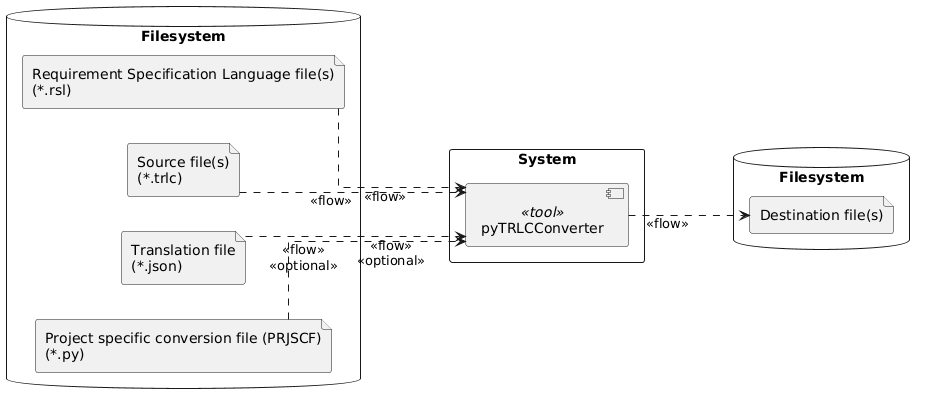
Find the requirements, test cases, coverage and etc. deployed on github pages.
Installation
Follow these steps to setup an editable pyTRLCConverter workspace using a virtual python environment.
Clone this Project
git clone https://github.com/NewTec-GmbH/pyTRLCConverter.git
cd pyTRLCConverter
Setup a virtual Python Environment
python -m venv .venv
.venv\Scripts\activate.ps1 # <- Windows Power Shell version
Note:
- For Windows CMD shell, use
.venv\Scripts\activate.batto activate the virtual environment. - For Linux/Macos, use
source .venv/bin/activateto activate the virtual environment.
Tool Installation
The developers might like to install it in editable mode together with additional needed
development tools like pytest.
pip install -e .
pip install -r requirements-dev.txt
The users of the tool install it as usual.
pip install .
Install from PyPI
End users can install the latest stable release directly from PyPI without cloning the repository:
pip install pyTRLCConverter
Usage
Conversion to Markdown format
The tool requires two kinds of TRLC input sources for the conversion. These are the requirements (*.trlc) files and the model (*.tls) files. These input files are specified using one or more --source or -s options followed by a file name or directory path. If a path is given, all files with a .trlc or .tls extension are read by the tool.
pyTRLCConverter --source trlc/model --source trlc/swe-req markdown
It will create a Markdown file with the same name as the requirements file (*.trlc) in the current directory, but with the Markdown extension (.md).
If the requirements are split into several files, a Markdown file will be created for each. To generate a single Markdown file the argument --single-document can be used, which will create an output.md file by default.
The converter supports additional arguments that are shown by adding the --help option after the markdown subcommand.
pyTRLCConverter markdown --help

usage: pyTRLCConverter markdown [-h] [-e EMPTY] [-n NAME] [-sd] [-tl TOP_LEVEL] [--render-plantuml]

options:
  -h, --help            show this help message and exit
  -e EMPTY, --empty EMPTY
                        Every attribute value which is empty will output the string (default = N/A).
  -n NAME, --name NAME  Name of the generated output file inside the output folder (default = output.md) in case a single document is generated.
  -sd, --single-document
                        Generate a single document instead of multiple files. The default is to generate multiple files.
  -tl TOP_LEVEL, --top-level TOP_LEVEL
                        Name of the top level heading, required in single document mode (default = Specification).
  --render-plantuml     Render plantuml fenced code blocks as SVG image references. Without this option plantuml blocks are passed through unchanged.
More examples are shown in the examples folder.
Conversion to docx format
Similar to the Markdown conversion, minimal required are the requirements (*.trlc) and the model (*.tls). Both can be added by file name or just the path where they are located.
pyTRLCConverter --source trlc/model --source trlc/swe-req docx
It will always create a single output.docx file in the current directory, regardless of how many TRLC source files are provided.
The converter supports additional arguments that are shown by adding the --help option after the docx subcommand.
pyTRLCConverter docx --help

usage: pyTRLCConverter docx [-h] [-t TEMPLATE] [-n NAME]

options:
  -h, --help            show this help message and exit
  -t TEMPLATE, --template TEMPLATE
                        Load the given docx file as a template to append to.
  -n NAME, --name NAME  Name of the generated output file inside the output folder (default = output.docx).
Conversion to reStructuredText format
The tool requires two kinds of TRLC input sources for the conversion. These are the requirements (*.trlc) files and the model (*.tls) files. These input files are specified using one or more --source or -s options followed by a file name or directory path. If a path is given, all files with a .trlc or .tls extension are read by the tool.
pyTRLCConverter --source trlc/model --source trlc/swe-req rst
If the requirements are split into several files (*.trlc), a reStructuredText file will be created for each. To generate a single reStructuredText file the argument --single-document can be used, which will create an output.rst file by default.
The converter supports additional arguments that are shown by adding the --help option after the reStructuredText subcommand.
pyTRLCConverter rst --help

usage: pyTRLCConverter rst [-h] [-e EMPTY] [-n NAME] [-sd] [-tl TOP_LEVEL]

options:
  -h, --help            show this help message and exit
  -e EMPTY, --empty EMPTY
                        Every attribute value which is empty will output the string (default = N/A).
  -n NAME, --name NAME  Name of the generated output file inside the output folder (default = output.rst) in case a single document is generated.
  -sd, --single-document
                        Generate a single document instead of multiple files. The default is to generate multiple files.
  -tl TOP_LEVEL, --top-level TOP_LEVEL
                        Name of the top level heading, required in single document mode (default = Specification).
More examples are shown in the examples folder.
Conversion to ReqIF format
The tool requires two kinds of TRLC input sources for the conversion. These are the requirements (*.trlc) files and the model (*.tls) files. These input files are specified using one or more --source or -s options followed by a file name or directory path. If a path is given, all files with a .trlc or .tls extension are read by the tool.
pyTRLCConverter --source trlc/model --source trlc/swe-req reqif
If the requirements are split into several files (*.trlc), a ReqIF file will be created for each. To generate a single ReqIF file the argument --single-document can be used, which will create an output.reqif file by default.
The converter supports additional arguments that are shown by adding the --help option after the ReqIF subcommand.
pyTRLCConverter reqif --help

usage: pyTRLCConverter reqif [-h] [-e EMPTY] [-n NAME] [-sd] [-tl TOP_LEVEL] [--reqifz] [--id-store ID_STORE]

options:
  -h, --help            show this help message and exit
  -e EMPTY, --empty EMPTY
                        Every attribute value which is empty will output the string (default = ).
  -n NAME, --name NAME  Name of the generated output file inside the output folder (default = output.reqif) in case a single document is generated.
  -sd, --single-document
                        Generate a single document instead of multiple files. The default is to generate multiple files.
  -tl TOP_LEVEL, --top-level TOP_LEVEL
                        Name of the top level heading, required in single document mode (default = Specification).
  --reqifz              Archive the ReqIF output as a ZIP file with the .reqifz extension. The default is to write plain .reqif files.
  --id-store ID_STORE   Path to a JSON file used to keep the identifiers of ReqIF Identifiable elements immutable across consecutive exports. On the initial conversion the file is created with the generated identifiers; on subsequent conversions the stored identifiers are reused and new elements are added.
Immutable identifiers:
The ReqIF standard requires the identifier of every Identifiable element to stay immutable across consecutive exports and imports. By default each conversion generates fresh identifiers. To keep them stable, pass --id-store <file.json>:
- On the initial conversion the JSON file does not exist yet; the generated identifiers (for
SPEC-OBJECT,SPEC-HIERARCHY,SPEC-RELATIONand the ReqIF header) are stored in it, keyed by a stable logical key. - On subsequent conversions the file is loaded and the stored identifiers are reused for already known elements. New elements receive new identifiers which are written back to the file.
Markdown-formatted requirement attributes configured via --renderCfg are automatically converted to ReqIF-compatible XHTML content.
Conversion rules:
Types and spec-objects:
- Each distinct TRLC record type is mapped to one
SPEC-OBJECT-TYPE. The type's attributes are reflected asATTRIBUTE-DEFINITION-*entries on the type. - TRLC
sectionheadings are mapped to a dedicatedSPEC-OBJECT-TYPEnamedSectionand produce a containerSPEC-OBJECTin the hierarchy. - Every TRLC record object produces one
SPEC-OBJECTof the matchingSPEC-OBJECT-TYPE.
Attribute mapping by field type:
| TRLC field type | ReqIF datatype | ReqIF attribute value |
|---|---|---|
| String / Integer / Boolean / Decimal | DATATYPE-DEFINITION-XHTML |
ATTRIBUTE-VALUE-XHTML — plain text is HTML-escaped and wrapped in <p> tags |
| String with Markdown render config | DATATYPE-DEFINITION-XHTML |
ATTRIBUTE-VALUE-XHTML — Markdown is converted to XHTML via marko |
| Enumeration | DATATYPE-DEFINITION-ENUMERATION |
ATTRIBUTE-VALUE-ENUMERATION — enum value keys start at 0 and follow the literal declaration order in the RSL model |
| Record reference / array of references | — | Converted to SPEC-RELATION entries (see below) |
Optional field with null value |
— | Attribute is omitted from the SPEC-OBJECT |
Record name:
- The TRLC record name is mapped to an explicit
ATTRIBUTE-VALUE-STRINGattribute namedReqIF.ForeignIDon the owningSPEC-OBJECT-TYPE.
Record references:
- TRLC record reference fields (single or array) are converted to
SPEC-RELATION-TYPEandSPEC-RELATIONentries. - The relation type name is the TRLC attribute name, for example
derived. - The reference field is not emitted as a regular object attribute.
- This preserves traceability links in a form that can be imported by DOORS Next.
- The source and target records must be part of the same generated ReqIF document. Use
--single-documentwhen references span multiple TRLC files.
Dump TRLC item list to console
Mainly for development all TRLC items can be dumped to the console.
pyTRLCConverter --source trlc/model --source trlc/swe-req dump
Apply attribute name translation
The built-in converters display the requirements and their attributes in a table. The first column always contains the attribute name, and the second column contains the attribute value. Since the attribute names must comply with the TRLC standard, they are not always human-readable.
Therefore a translation JSON file can be used to translate the attribute names. Use the --translation argument to specify the translation file.
Translation file example:
{
    "SwRequirement": {
        "desc": "Description"
    }
}
See the example for more information.
Requirement description in Markdown
When requirements include lists or need bold/italic emphasis, TRLC currently supports plain text only. pyTRLCConverter lets you write requirement descriptions in Markdown and converts them to the chosen target format (e.g., reStructuredText). To enable this, you must explicitly specify in a JSON configuration which attribute contains Markdown-formatted content.
Two Markdown specifications are supported:
Supported by the formats:
| Format | CommonMark | GitHub Flavored | XHTML | Inline PlantUML |
|---|---|---|---|---|
| docx | X | X | - | Embedded PNG |
| dump | Output as string literal | Output as string literal | - | - |
| markdown | X | X | - | SVG (opt-in, see below) |
| reStructuredText | X | X | - | SVG via .. image:: |
| reqif | X | X | X | SVG via <object> element |
The reqif format additionally supports "xhtml" as a format specifier in the render configuration. When set, the attribute value is treated as already-valid XHTML and is embedded in the ReqIF output without any conversion. This allows requirement authors to write raw XHTML markup directly in their TRLC string attributes.
For the markdown format, inline PlantUML rendering is opt-in: pass --render-plantuml to the markdown subcommand to replace ```plantuml blocks with SVG image references. Without this flag, PlantUML blocks are passed through unchanged — useful when the Markdown is consumed by a renderer that supports PlantUML natively (e.g. GitLab, some Sphinx extensions).
Configuration example:
{
    "renderCfg": [{
        "package": ".*",
        "type": "Info",
        "attribute": "description",
        "format": "md"
    }]
}
The package, type and attribute fields support regex, which makes it easier to set the format for several types. Always the first match wins.
Use the --renderCfg <RENDER-CFG-FILE> program argument to specify the configuration file.
Show tool version
Show the installed tool version.
pyTRLCConverter --version
PlantUML
With the PlantUML extension the tool supports automatic diagram generation from PlantUML files.
Activate the support by setting the PLANTUML environment variable to either the path to a local plantuml.jar file or the URL of a PlantUML server.
| Environment Variable | Description | Default |
|---|---|---|
PLANTUML |
Path to plantuml.jar or URL of PlantUML server. |
- |
PLANTUML_VERIFY_SSL |
Set to false to disable SSL certificate verification for PlantUML server requests. Useful for internal servers with self-signed or corporate CA certificates. |
true |
Examples
Check out the all the Examples.
Compile into an executable
It is possible to create an executable file that contains the tool and all its dependencies. "PyInstaller" is used for this. Just run the following command on the root of the folder:
pyinstaller --noconfirm --onefile --console --name "pyTRLCConverter" --add-data "./pyproject.toml;." "./src/pyTRLCConverter/__main__.py"
Publish to PyPI
Releasing a new version to PyPI is automated via the deploy.yml GitHub Actions workflow. Creating and publishing a GitHub release triggers the following steps automatically:
- Build the source distribution and wheel with
python -m build. - Upload the artifacts to PyPI using OIDC trusted publishing (no API token required).
One-time setup: Before the first automated release, configure a Trusted Publisher on PyPI (no API token needed). Go to the
pyTRLCConverterproject on PyPI → Manage → Publishing → Add a new publisher, and set OwnerNewTec-GmbH, RepositorypyTRLCConverter, Workflowdeploy.yml.
To trigger a release:
- Create and push a version tag, then publish a GitHub release for that tag.
- The
publish-pypijob indeploy.ymlruns automatically and uploads the distribution to PyPI.
To test the build locally before releasing:
python -m pip install build twine
python -m build
twine check dist/*.whl dist/*.tar.gz
SW Documentation
More information on the deployment and architecture can be found in the documentation
Tools
Tools used for development or automation, see Tools.
Used Libraries
Used 3rd party libraries which are not part of the standard Python package:
| Library | Description | License |
|---|---|---|
| Marko | A markdown parser with high extensibility. | MIT |
| ReqIF | ReqIF is a Python library for working with ReqIF format. | Apache-2.0 |
| PlantUML | Generate UML diagrams. | GPL-3.0 |
| python-docx | Creation of Microsoft Word 2007+ (.docx) files. | MIT |
| requests | HTTP processing | Apache-2.0 |
| sphinx | Using Sphinx for documentation deployment. | BSD |
| toml | Parsing TOML | MIT |
| trlc | Treat Requirements Like Code | GPL-3.0 |
See also requirements.txt.
Issues, Ideas And Bugs
If you have further ideas or you found some bugs, great! Create an issue or if you are able and willing to fix it by yourself, clone the repository and create a pull request.
License
The whole source code is published under GPL-3.0. Consider the different licenses of the used third party libraries too!
Contribution
Unless you explicitly state otherwise, any contribution intentionally submitted for inclusion in the work by you, shall be licensed as above, without any additional terms or conditions.
1 maintainer

Download files
Download the file for your platform. If you're not sure which to choose, learn more about installing packages.
Source Distribution
Built Distribution
Filter files by name, interpreter, ABI, and platform.
If you're not sure about the file name format, learn more about wheel file names.
Copy a direct link to the current filters
File details
Details for the file pytrlcconverter-2.2.0.tar.gz.
File metadata
- Download URL: pytrlcconverter-2.2.0.tar.gz
- Upload date:
- Size: 2.3 MB
- Tags: Source
- Uploaded using Trusted Publishing? Yes
- Uploaded via:
twine/6.1.0 CPython/3.13.12
File hashes
| Algorithm | Hash digest | |
|---|---|---|
| SHA256 |
4eb6ef4f5539f8cfaa1f9c3e7de5bd75c2976e62ecdb4bfcb1d641c1945cd79f
|
|
| MD5 |
a2605a91f6d0117f94188dbcacba6222
|
|
| BLAKE2b-256 |
89882cd99b8a8c78ab1d4ff6946707fcf956b8001862e029836ca99628e36b91
|
Provenance
The following attestation bundles were made for pytrlcconverter-2.2.0.tar.gz:
Publisher:
deploy.yml on NewTec-GmbH/pyTRLCConverter
-
Statement:
-
Statement type:
https://in-toto.io/Statement/v1 -
Predicate type:
https://docs.pypi.org/attestations/publish/v1 -
Subject name:
pytrlcconverter-2.2.0.tar.gz -
Subject digest:
4eb6ef4f5539f8cfaa1f9c3e7de5bd75c2976e62ecdb4bfcb1d641c1945cd79f - Sigstore transparency entry: 1825144028
- Sigstore integration time:
-
Permalink:
NewTec-GmbH/pyTRLCConverter@06e6dcead22671bf7e5e1aeb352abb7416de9e1f -
Branch / Tag:
refs/tags/v2.2.0 - Owner: https://github.com/NewTec-GmbH
-
Access:
public
-
Token Issuer:
https://token.actions.githubusercontent.com -
Runner Environment:
github-hosted -
Publication workflow:
deploy.yml@06e6dcead22671bf7e5e1aeb352abb7416de9e1f -
Trigger Event:
release
-
Statement type:
File details
Details for the file pytrlcconverter-2.2.0-py3-none-any.whl.
File metadata
- Download URL: pytrlcconverter-2.2.0-py3-none-any.whl
- Upload date:
- Size: 98.2 kB
- Tags: Python 3
- Uploaded using Trusted Publishing? Yes
- Uploaded via:
twine/6.1.0 CPython/3.13.12
File hashes
| Algorithm | Hash digest | |
|---|---|---|
| SHA256 |
08798e3295a4b3d2d64a287b1c8e94b4d99182576e7c1381ffc67352a3fc2cc7
|
|
| MD5 |
af97769c887f97f6634d0f6902029966
|
|
| BLAKE2b-256 |
4fba8aa178bc13b6b9ba94a72184010d72e2ebea77d4a34e67d6d1332fe4966a
|
Provenance
The following attestation bundles were made for pytrlcconverter-2.2.0-py3-none-any.whl:
Publisher:
deploy.yml on NewTec-GmbH/pyTRLCConverter
-
Statement:
-
Statement type:
https://in-toto.io/Statement/v1 -
Predicate type:
https://docs.pypi.org/attestations/publish/v1 -
Subject name:
pytrlcconverter-2.2.0-py3-none-any.whl -
Subject digest:
08798e3295a4b3d2d64a287b1c8e94b4d99182576e7c1381ffc67352a3fc2cc7 - Sigstore transparency entry: 1825144057
- Sigstore integration time:
-
Permalink:
NewTec-GmbH/pyTRLCConverter@06e6dcead22671bf7e5e1aeb352abb7416de9e1f -
Branch / Tag:
refs/tags/v2.2.0 - Owner: https://github.com/NewTec-GmbH
-
Access:
public
-
Token Issuer:
https://token.actions.githubusercontent.com -
Runner Environment:
github-hosted -
Publication workflow:
deploy.yml@06e6dcead22671bf7e5e1aeb352abb7416de9e1f -
Trigger Event:
release
-
Statement type:














