
pyTxTchat
Python Terminal Text Chat
- using Apache Kafka
using
- ping
$ pip install pytxtchat

$ txtping
pong
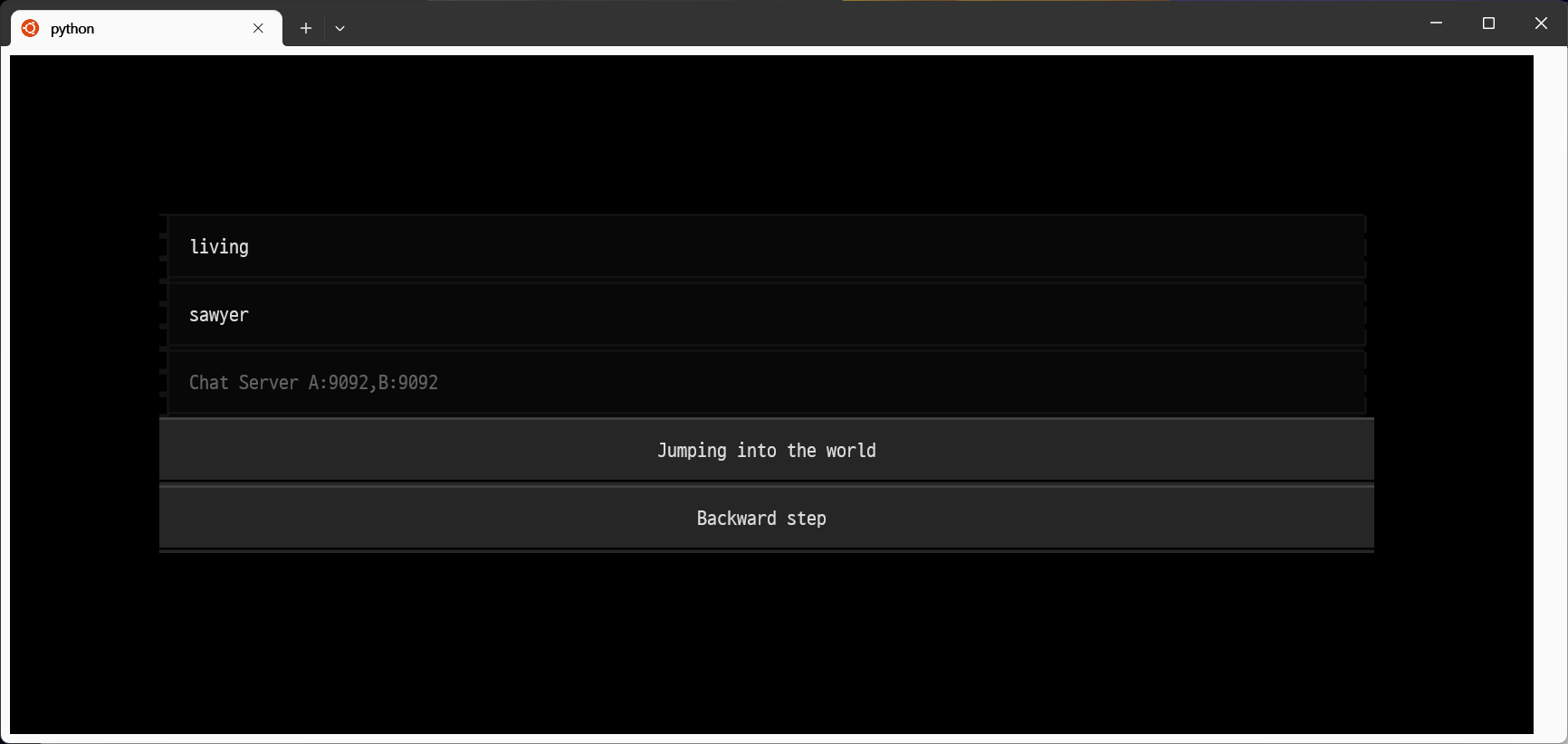
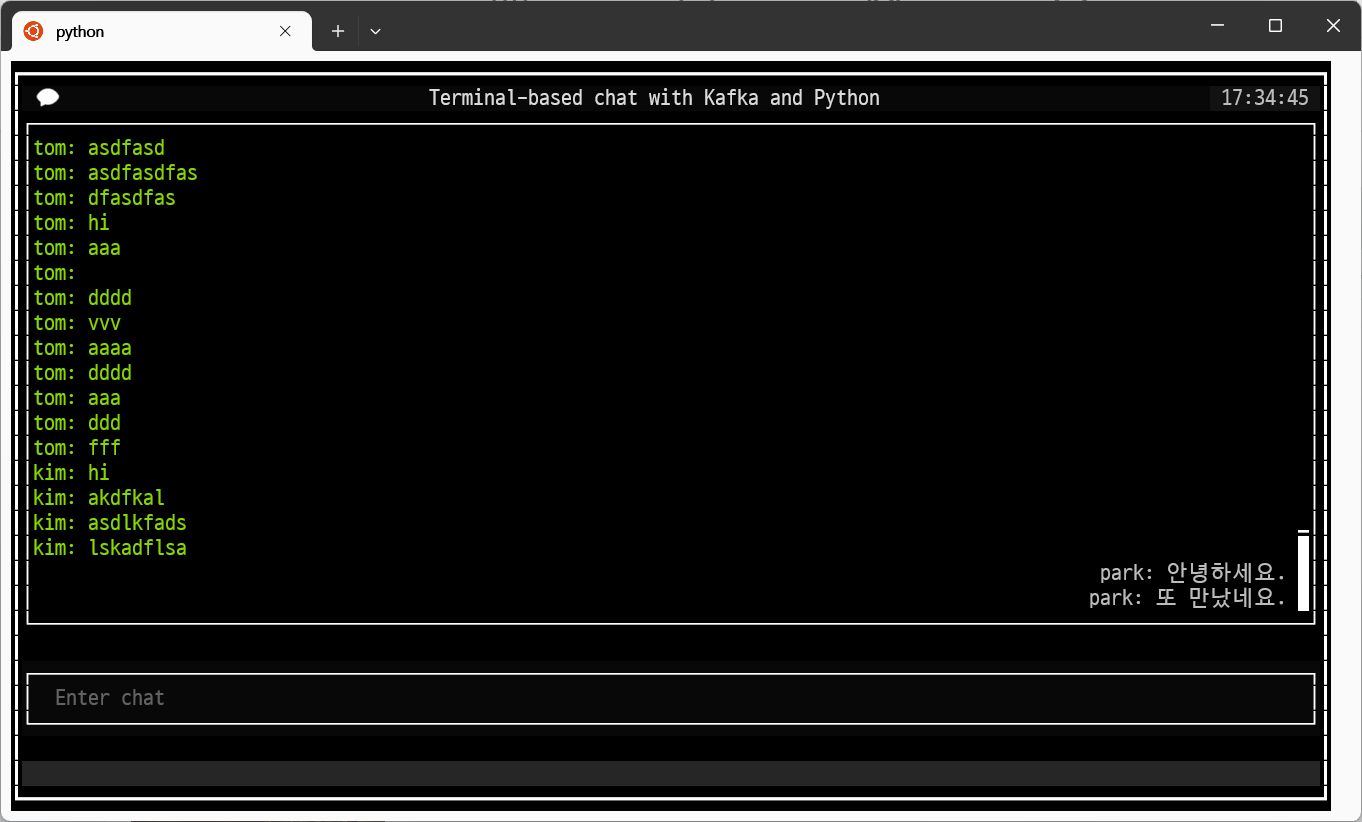
- chat
$ txtchat
- run cat bot
$ txtbot living <KAFKA-URL>:9092
- search_movie
$ txtsmovie 창동 --column directorNm tablefmt github
|      | movieNm   |   openDt | nationAlt   | genreAlt   | typeNm   | directorNm   |           |   movieCd |   year |
|------|-----------|----------|-------------|------------|----------|--------------|--------------------|-----------|--------|
|  449 | 버닝      | 20180517 | 한국        | 미스터리   | 장편     | 이창동       | 파인하우스필름(주) |  20173202 |   2018 |
| 6259 | 버닝      | 20180517 | 한국        | 미스터리   | 장편     | 이창동       | 나우필름(주)       |  20173202 |   2018 |

$ txtsmovie --help
NAME
    txtsmovie - 영화 검색 함수

SYNOPSIS
    txtsmovie WORD <flags>

DESCRIPTION
    영화 검색 함수

POSITIONAL ARGUMENTS
    WORD
        Type: str
        검색할 단어

FLAGS
    -c, --column=COLUMN
        Default: 'movieNm'
        검색할 컬럼 (기본값: 'movieNm') nationAlt, genreAlt, typeNm, directorNm, companyNm
    -i, --isprint=ISPRINT
        Default: 'True'
        검색 결과를 출력할지 여부 (기본값: 'True')
    -t, --tablefmt=TABLEFMT
        Default: 'github'
        출력 형식 (기본값: 'github') plain, simple, grid, pipe, pretty, tsv ... https://pypi.org/project/tabulate/

NOTES
    You can also use flags syntax for POSITIONAL ARGUMENTS


$ txtgmovie --star=True --column=directorNm
강정훈      [ 90]  ****************************
강현성      [ 87]  ***************************
나가에 타카미  [ 90]  ****************************
나기라 겐조   [ 63]  ********************
버드맨 텟페이  [132]  ****************************************
윤준세      [ 71]  **********************
조태호      [ 70]  **********************
테이 쟈가    [ 65]  ********************
토미죠 타로   [ 82]  *************************
한동호      [ 65]  ********************

$ txtgmovie --column=companyNm --limit=5
(주)샤이커뮤니케이션즈  [132]  ███████▏
(주)소나무픽쳐스     [192]  ██████████▎
(주)영화사가을      [746]  ████████████████████████████████████████
(주)케이알씨지      [230]  ████████████▍
스마일컨텐츠        [192]  ██████████▎

$ txtgmovie --star=True --column=genreAlt
공포(호러)              [ 311]  ******
다큐멘터리               [ 504]  **********
드라마                 [1520]  ****************************
멜로/로맨스              [2214]  ****************************************
멜로/로맨스,드라마          [1568]  *****************************
성인물(에로)             [1922]  ***********************************
성인물(에로),드라마,멜로/로맨스  [ 326]  ******
성인물(에로),멜로/로맨스      [ 374]  *******
애니메이션               [ 451]  *********
액션                  [ 351]  *******

$ txtgmovie --help
 Usage: txtgmovie [OPTIONS]

 특정 컬럼을 기준으로 그룹화하여 데이터 개수를 세고 시각화하는 함수
 Args:   column (str, optional): 그룹화할 컬럼 명 (기본값: 'year').   star (str, optional): 그래프 축 라벨에 별 문자 사용 여부 (기본값: "False").
 'True'이면 사용, 'False'이면 사용하지 않음.   limit (int, optional): 상위 N개 그룹만 표시할지 여부 (기본값: 10).
 Returns:   None

╭─ Options ──────────────────────────────────────────────────────────────╮
│ --column        TEXT  [default: year]                                  │
│ --star          TEXT  [default: False]                                 │
│ --limit         TEXT  [default: 10]                                    │
│ --help                Show this message and exit.                      │
╰────────────────────────────────────────────────────────────────────────╯
if you're a developer
$ git clone ... & cd ...

$ pdm venv create
$ source .venv/bin/activate
$ pdm install

$ pytest --cov
================ test session starts =================
platform linux -- Python 3.11.9, pytest-8.3.2, pluggy-1.5.0
configfile: pyproject.toml
plugins: cov-5.0.0

---------- coverage: platform linux, python 3.11.9-final-0 -----------
Name                      Stmts   Miss  Cover
---------------------------------------------
src/pytchat/__init__.py       0      0   100%
src/pytchat/com.py            2      0   100%
tests/__init__.py             0      0   100%
tests/test_com.py             4      0   100%
---------------------------------------------
TOTAL                         6      0   100%


================= 1 passed in 0.05s ==================
Ref
1 maintainer

Metadata
1 maintainer
Release files for pytxtchat 0.5.0
For a detailed explanation of source distributions (sdists) and built distributions (wheels), please see the package formats documentation.
Source distribution (sdist)
| File | Size | Uploaded | |
|---|---|---|---|
| pytxtchat-0.5.0.tar.gz | 681.1 kB | Details |
Built distribution (wheel)
| File | Interpreter | ABI | Platform | Reset |
|---|---|---|---|---|
| pytxtchat-0.5.0-py3-none-any.whl | Python 3 | none | any | Details |
Total release size: 1.4 MB
Release files / pytxtchat-0.5.0.tar.gz
| Download URL | pytxtchat-0.5.0.tar.gz |
|---|---|
| Size | 681.1 kB |
| Tags | Source |
|
SHA-256 checksum How to use checksums |
8a284a69b581ef30438b8664d3b4cd52dfd36dda6d0a24b7e268d9a0c18742fb
|
|
BLAKE2b-256 checksum How to use checksums |
33dab0d3f1de8ffb83b44fec177592340f6a39ee08136c15b44124511515f83b
|
| Upload date | |
|
Uploaded using Trusted Publishing? What is trusted publishing? |
No |
| Uploaded via |
pdm/2.18.1 CPython/3.12.4 Linux/5.15.153.1-microsoft-standard-WSL2
|
Release files / pytxtchat-0.5.0-py3-none-any.whl
| Download URL | pytxtchat-0.5.0-py3-none-any.whl |
|---|---|
| Size | 680.6 kB |
| Tags | Python 3 |
|
SHA-256 checksum How to use checksums |
f94d58813747f2cb88a3394c4c86c3b30476fb80b440455d63ce08b77595047f
|
|
BLAKE2b-256 checksum How to use checksums |
652f0eddb2d27fee8e47fb06e6493e63e0b8b9acf0ecff7f3e1fd0253635354d
|
| Upload date | |
|
Uploaded using Trusted Publishing? What is trusted publishing? |
No |
| Uploaded via |
pdm/2.18.1 CPython/3.12.4 Linux/5.15.153.1-microsoft-standard-WSL2
|














